
Introducción
This manual provides detailed instructions for the setup, operation, and maintenance of your A4tech Bloody Light Strike B314 Gaming Keyboard. Please read this manual thoroughly before using the product to ensure optimal performance and longevity.
Características principales
- Bloody 4 Light Strike Mechanical Switches: Experience ultra-fast response times of 0.2ms with infrared optic switches, providing a competitive edge in gaming.
- Mayor durabilidad: Designed for intensive use, featuring A,S,D,W silicon keys with a convex shape for improved control and longevity.
- Neon Glare System LED Backlighting: Customize your gaming environment with vibrant LED backlighting, making keys easy to locate in low-light conditions.
- 9 teclas programables: Personalize your gaming experience by assigning custom functions to 9 individually programmable keys.
- Double Secure Water-Resistance: The keyboard is electronically sealed with a water drain hole, protecting it from accidental spills and extending its lifespan.
Contenido del paquete
Verifique que todos los artículos estén presentes en el paquete:
- Bloody Light Strike B314 Gaming Keyboard
- Manual de usuario (este documento)

Image: The retail packaging for the Bloody Light Strike B314 Gaming Keyboard, showing the keyboard with LED backlighting and key features highlighted.
Guía de configuración
- Conectar el teclado: Conecte el conector USB del teclado a un puerto USB disponible en su computadora.
- Instalación del controlador: The keyboard is typically plug-and-play. Your operating system should automatically detect and install the necessary drivers. If prompted, follow the on-screen instructions.
- Instalación de software (opcional): For advanced customization, including programming keys and managing backlighting, download and install the official Bloody software from the A4tech websitio.
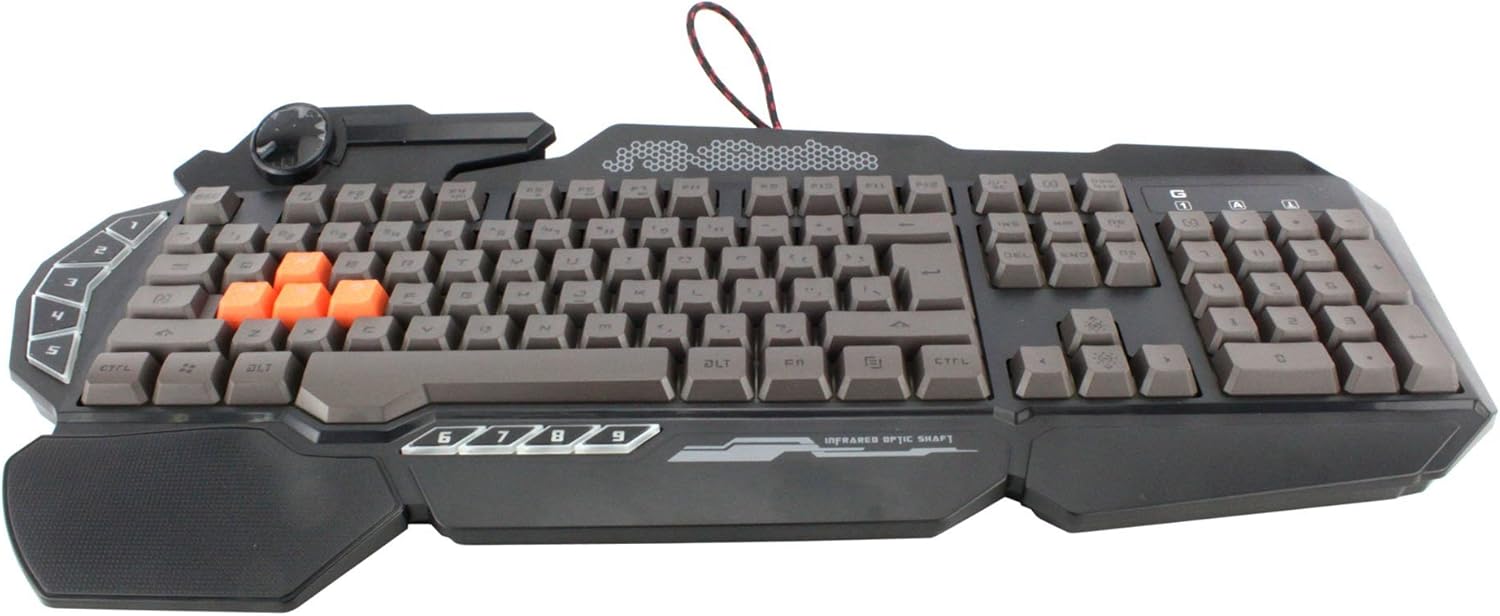
Imagen: Una vista de arriba hacia abajo view of the Bloody Light Strike B314 Gaming Keyboard, showcasing the full QWERTY layout with orange WASD keys and dedicated macro keys on the left.
Instrucciones de funcionamiento
Uso básico
The Bloody B314 functions as a standard QWERTY keyboard for everyday typing and gaming. Its infrared mechanical switches provide a fast and responsive typing experience.
Teclas programables
The keyboard features 9 programmable keys, typically located on the left side. To customize these keys:
- Install the official Bloody software from the A4tech websitio.
- Launch the software and navigate to the key customization section.
- Select the desired programmable key (e.g., G1-G9 or similar).
- Assign macros, key functions, or multimedia controls as needed.
- Salva a tu profile para aplicar los cambios.
LED Backlighting Control
The Neon Glare System LED backlighting can be adjusted using function key combinations:
- Fn+F12: Cycle through different backlighting modes (e.g., static, breathing, off).
- Fn + Flecha arriba/abajo: Ajusta el brillo de la retroiluminación.
- Fn + Flecha izquierda/derecha: Adjust backlight speed or direction (if applicable to the mode).
Modo de juego
Activate Game Mode to disable the Windows key and prevent accidental interruptions during gameplay.
- Fn+F8: Activar / desactivar el modo de juego.

Imagen: Un ángulo view of the Bloody Light Strike B314 Gaming Keyboard, highlighting the ergonomic wrist rest and the distinct orange WASD keys.
Mantenimiento
Limpieza
- Desconecte el teclado de su computadora antes de limpiarlo.
- Utilice un paño suave y seco.amp cloth to wipe the surface of the keyboard. Avoid harsh chemicals or abrasive materials.
- Para eliminar el polvo y los residuos entre las teclas, utilice aire comprimido.
- The water-resistant design helps protect against spills, but it is still recommended to clean up liquids promptly.
Almacenamiento
Guarde el teclado en un lugar fresco y seco, alejado de la luz solar directa y de temperaturas extremas cuando no lo utilice durante períodos prolongados.
Solución de problemas
Teclado no responde
- Asegúrese de que el cable USB esté conectado de forma segura tanto al teclado como a la computadora.
- Intente conectar el teclado a un puerto USB diferente.
- Reinicie su computadora.
- Compruebe si el teclado se reconoce en el Administrador de dispositivos de su computadora (Windows) o en la Información del sistema (macOS).
La retroiluminación no funciona
- Ensure the backlighting is not turned off using the Fn + F12 combination.
- Adjust brightness using Fn + Up Arrow.
- Si se utilizan programas personalizadosfiles, ensure the backlighting settings are correctly configured in the Bloody software.
Programmable Keys Not Working
- Verify that the Bloody software is installed and running.
- Ensure your custom profiles are loaded and active within the software.
- Check for any software updates for the Bloody keyboard utility.
Presupuesto
| Característica | Detalle |
|---|---|
| Marca | A4tech |
| Número de modelo | A4TKLA45173 |
| Tecnología de conectividad | Infrarrojo |
| Descripción del teclado | Mecánico |
| Tipo de interruptor | Mechanical (Light Strike Optic) |
| Característica especial | Backlit, Programmable Keys, Water Resistant |
| Color | Negro |
| Soporte de color de retroiluminación de teclado | RGB (Neon Glare System) |
| Número de llaves | 104 |
| Botones programables | 9 |
| Nivel de resistencia al agua | Resistente al agua |
| Peso del artículo | 2.9 libras |
Garantía y soporte
For warranty information and technical support, please refer to the official A4tech webSitio web o contacte directamente con el servicio de atención al cliente. Conserve su recibo de compra como comprobante para reclamaciones de garantía.
Official A4tech Websitio: www.a4tech.com