
OttLite A59G5B-FFP
Mesa OttLite LED FlexNeck Lamp con puerto de carga USB (modelo A59G5B-FFP) Manual de instrucciones
1. Introducción
This manual provides essential information for the safe and efficient operation of your OttLite LED FlexNeck Table LampLea atentamente estas instrucciones antes de usar y consérvelas para futuras consultas.
The OttLite LED FlexNeck Table Lamp is designed to provide natural daylight illumination, featuring a flexible neck for adjustable lighting, three brightness settings, and a convenient USB charging port.
2. Producto terminadoview y componentes
Familiarize yourself with the main components of your OttLite LED FlexNeck Table Lamp:
- Cabezal de luz LED: Emits natural daylight LEDs.
- Cuello flexible: Allows for precise positioning of the light.
- Control táctil: Located on the base for power and brightness adjustments.
- Puerto de carga USB: Integrated into the base for charging compatible devices.
- Base estable: Provides support for the lamp.

Image 2.1: Labeled diagram of the OttLite LED FlexNeck Table Lamp Componentes.
3. Configuración
Follow these steps to set up your lamp:
- Deshacer: Retire con cuidado todos los componentes del embalaje.
- Colocación: Coloque la lamp base on a stable, flat surface. Ensure the base diameter of 4.75 inches (11.6 cm) is fully supported.
- Conecte la electricidad: Insert the included A/C adapter into the power port on the lamp base, then plug the adapter into a standard 120-volt electrical outlet.
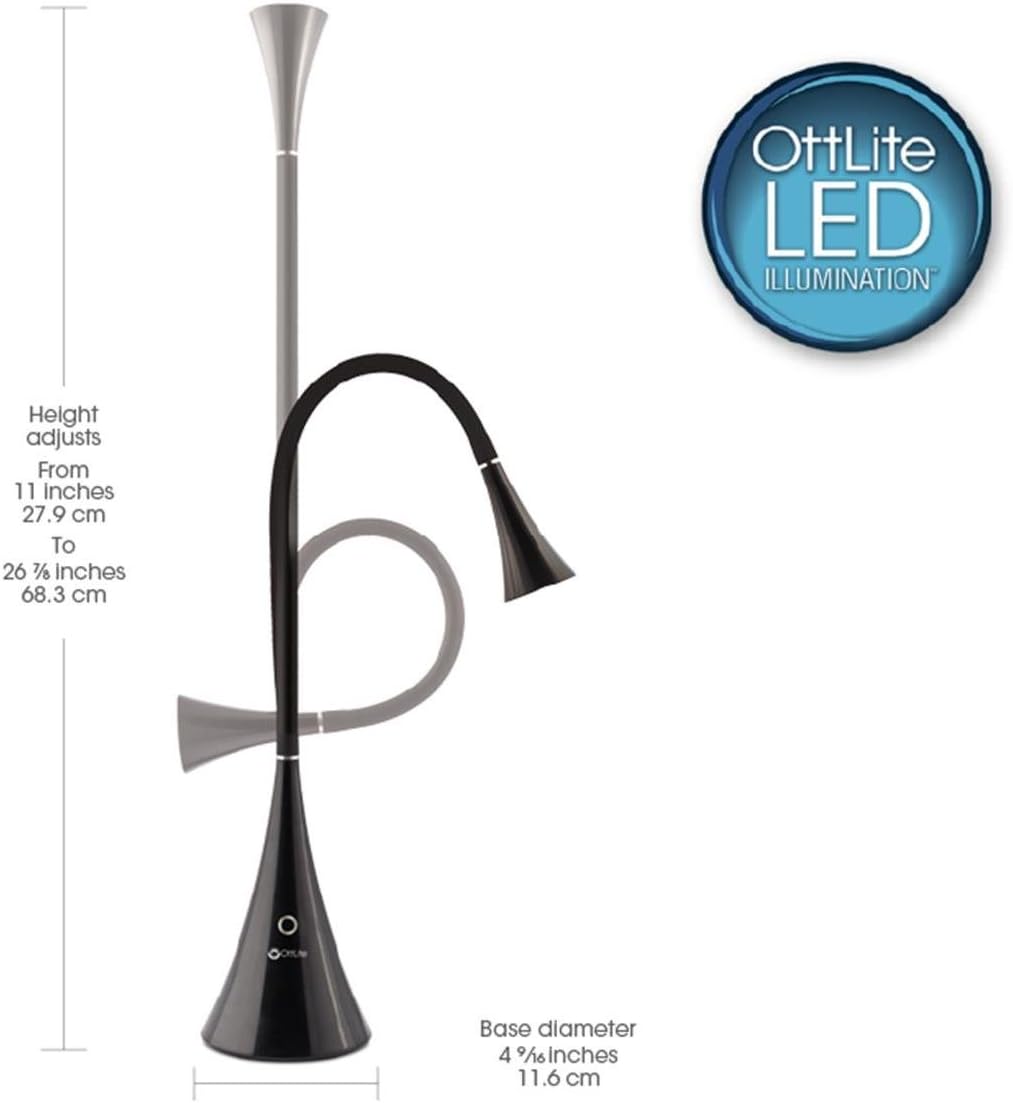
Imagen 3.1: Lamp dimensions and height adjustment range.
4. Instrucciones de funcionamiento
4.1 Control de encendido y brillo
El lamp features a touch-sensitive control button on its base:
- Encendido/apagado: Lightly touch the control button to turn the lamp encendido o apagado.
- Configuración de brillo: El lamp has three brightness levels. Each subsequent touch of the control button will cycle through the brightness settings (Low, Medium, High) before turning off.
4.2 Ajuste flexible del cuello
The flexible neck allows you to direct the light precisely where needed. Gently bend and position the neck to achieve your desired lighting angle and height. The lamp's height can adjust from 11 inches (27.9 cm) to 26.8 inches (68.3 cm).
4.3 puertos de carga USB
A USB charging port is located on the lamp's base. Connect your mobile device's USB charging cable to this port to charge your device. The USB port provides 5V, 2.1A output.

Image 4.1: Detail of the touch-sensitive control and flexible neck.
5. Mantenimiento
Para garantizar la longevidad y el rendimiento óptimo de su lamp:
- Limpieza: Desconecte el lamp de la fuente de alimentación antes de limpiarlo. Utilice un paño suave y seco para limpiarlo.amp. Evite limpiadores abrasivos o disolventes.
- LED: The integrated LEDs are designed for long life (up to 40,000 hours) and are not user-replaceable.
- Almacenamiento: Si almacena el lamp, ensure it is clean and dry. Store in a cool, dry place away from direct sunlight.
6. Solución de problemas
If you encounter issues with your OttLite LED FlexNeck Table Lamp, consulte las siguientes soluciones comunes:
| Problema | Posible causa | Solución |
|---|---|---|
| Lamp no se enciende. | Sin conexión de energía. | Ensure the A/C adapter is securely plugged into both the lamp y una toma de corriente que funcione. Pruebe la toma con otro dispositivo. |
| El puerto USB no carga dispositivos. | Dispositivo no compatible o problema con el cable. | Verify your device is compatible with 5V, 2.1A USB charging. Try a different USB cable. Ensure the lamp Está encendido. |
| Lamp parpadea o la luz es inconsistente. | Conexión suelta o fluctuación de potencia. | Verifique todas las conexiones de alimentación. Intente enchufar elamp a una salida diferente. |
| Lamp La base se siente inestable. | Superficie irregular o colocación incorrecta. | Asegúrese de que lamp is placed on a completely flat and stable surface. Avoid extending the flexible neck too far horizontally without proper counter-balance. |
Si el problema persiste después de intentar estas soluciones, comuníquese con el servicio de atención al cliente.
7. Especificaciones
| Característica | Detalle |
|---|---|
| Número de modelo | A59G5B-FFP |
| Marca | OttLite |
| Lamp Tipo | Escritorio Lamp |
| Tipo de fuente de luz | CONDUJO |
| Salida de luz máxima | 300 lúmenes |
| Ajustes de brillo | 3 (Touch-controlled) |
| Flexible Neck Height Adjustment | 11 a 26.8 pulgadas (27.9 cm a 68.3 cm) |
| Diámetro de la base | 4.75 pulgadas (11.6 cm) |
| Salida del puerto de carga USB | 5 V, 2.1 A |
| Fuente de poder | Eléctrico con cable |
| Quétage | 10 vatios |
| Volumentage | 120 voltios |
| Dimensiones del producto (Pr. x An. x Al.) | 10" de profundidad x 4.63" de ancho x 16.25" de alto |
| Peso del artículo | 2.94 libras |
| Material base | Goma |
| Proceso de dar un título | Listado por UL |
| Código Postal | 761712010991 |
8. Información de garantía
OttLite provides a warranty for its products. Warranty coverage for OttLite lamps and accessories (excluding batteries) is for 2 years from the date of purchase. OttLite bulbs are covered for 1 year from the date of purchase. This warranty does not cover damages resulting from the use of the product for any purpose other than its intended use. Additionally, warranty coverage excludes OttLite items purchased "as is" or from unauthorized retailers.
9. Información de soporte
For further assistance, product inquiries, or warranty claims, please visit the official OttLite website or contact their customer support directly. Refer to the product packaging or the OttLite webSitio para obtener la información de contacto más actualizada.
Ask a question about this manual
Ask about setup, troubleshooting, compatibility, parts, safety, or missing instructions. Manuals+ will review the question and use this page’s manual context to help answer it.