
1. Introducción
This manual provides detailed instructions for the operation and maintenance of your Supersonic SC-1495BT Bluetooth AM/FM Boombox. Please read this manual thoroughly before using the device to ensure proper function and to maximize your listening experience.
2. Información de seguridad
- No exponga la unidad a la lluvia ni a la humedad para evitar incendios o descargas eléctricas.
- No obstruya las aberturas de ventilación. Asegúrese de que haya suficiente espacio alrededor de la unidad para una correcta circulación del aire.
- Evite colocar la unidad cerca de fuentes de calor como radiadores, rejillas de calefacción, estufas u otros aparatos (incluidos ampificadores) que producen calor.
- Utilice únicamente accesorios especificados por el fabricante.
- Desenchufe este aparato durante tormentas eléctricas o cuando no lo utilice durante períodos prolongados.
- Refiera todo el servicio a personal de servicio calificado. Se requiere servicio cuando el aparato ha sido dañado de alguna manera.
3. Contenido del paquete
Al desembalar, asegúrese de que estén presentes todos los elementos enumerados a continuación:
- Supersonic SC-1495BT Bluetooth AM/FM Boombox
- Cable de alimentación de CA
4. Características del producto
The Supersonic SC-1495BT Boombox offers a variety of features for versatile audio playback:
- Bluetooth Version 3.0 for wireless music streaming
- Built-in USB input for media playback
- Built-in SD card and Micro SD card slot for media playback
- 3.5 mm Line-in (AUX) jack for external audio devices
- Four-band radio: AM, FM, SW1, SW2
- Integrated rechargeable battery for portable use
- Pantalla LCD clara
- Fast forward and rewind functions for media playback
- 360-degree rod antenna for enhanced radio reception
- Control de volumen giratorio
- Toma de auriculares para escuchar en privado
- AC/DC operation for flexible power options
5. Controles y conexiones
Familiarize yourself with the various controls and connection ports on your boombox.
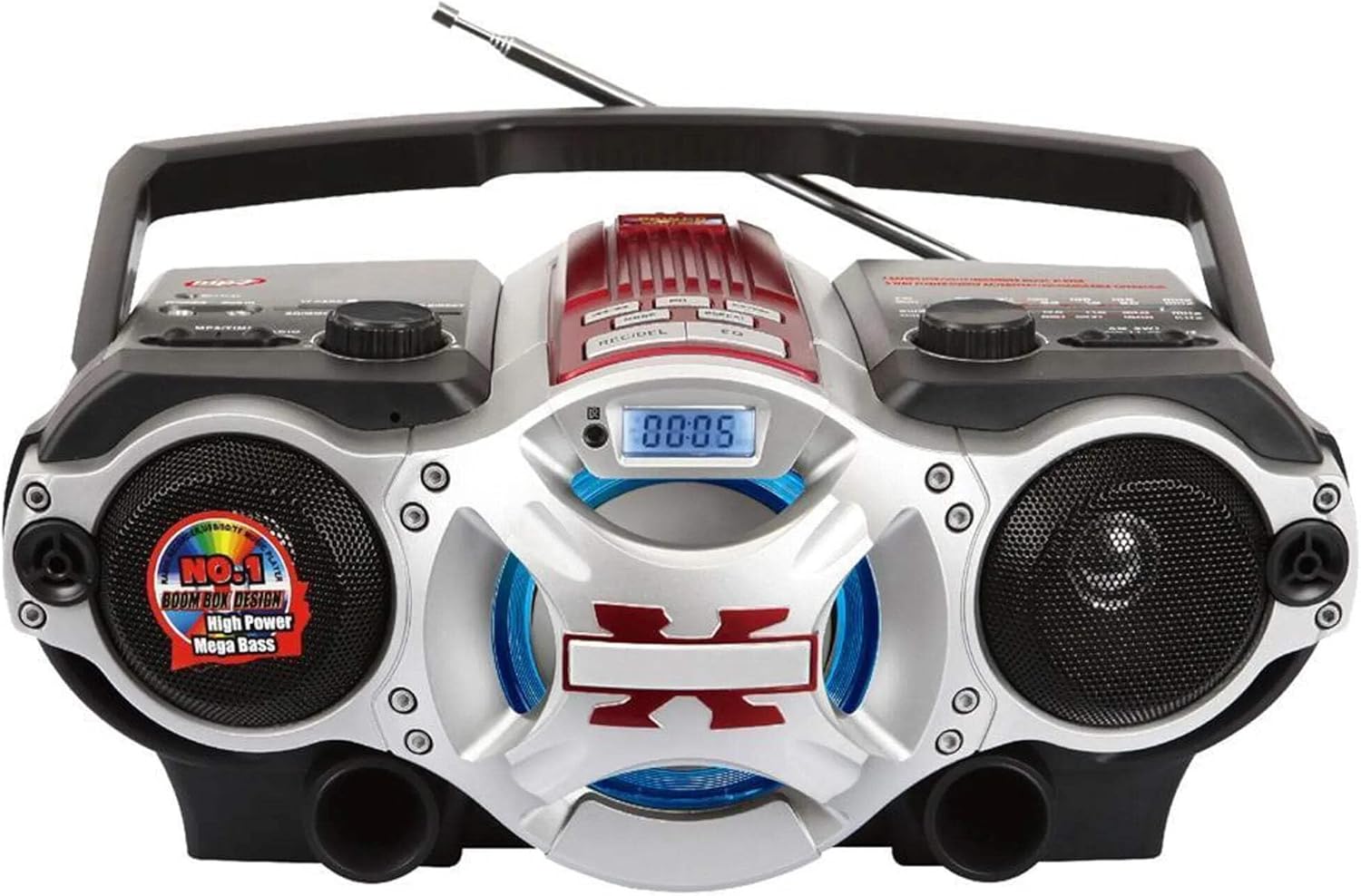
Figura 1: Frente view of the Supersonic SC-1495BT Boombox, showing the speakers, central display, and main control area.

Figura 2: Left side controls, including USB input, SD/Micro SD card slot, AUX IN, PHONES jack, BT/MP3/RADIO mode switch, and Rotary Volume control.

Figura 3: Right side controls, featuring the AM/FM/SW1/SW2 band selector, TUNING knob, and playback control buttons (Play/Pause, Skip, Mode, Clock, EQ).
6. Configuración
6.1 Conexión de alimentación
- Alimentación CA: Connect the included AC power cord to the AC input on the back of the boombox and then plug it into a standard wall outlet. The internal rechargeable battery will begin charging.
- Alimentación CC (batería): The boombox has a built-in rechargeable battery. Ensure it is charged before portable use. The unit can also operate on DC power from the internal battery when not connected to AC.
6.2 Ajuste de la antena
Extend the 360-degree rod antenna for optimal radio reception, especially for FM and SW bands. Adjust its position for the clearest signal.
7. Instrucciones de funcionamiento
7.1 Encendido/apagado y selección de modo
- To power on the unit, slide the BT/MP3/RADIO switch to the desired mode (BT, MP3, or RADIO).
- Para apagar, deslice el interruptor a la posición APAGADO.
7.2 Funcionamiento de Bluetooth
- Deslice el interruptor de modo a BT (Bluetooth). The LCD display will indicate Bluetooth mode, and the unit will enter pairing mode.
- En su dispositivo con Bluetooth (teléfono inteligente, tableta, etc.), habilite Bluetooth y busque los dispositivos disponibles.
- Select "SC-1495BT" from the list of devices. Once paired, the unit will emit a confirmation sound.
- You can now play audio from your device through the boombox. Use your device or the boombox's playback controls (Play/Pause, Skip) to manage music.
7.3 Radio Operation (AM/FM/SW1/SW2)
- Deslice el interruptor de modo a RADIO.
- Seleccione la banda deseada (AM, FM, SW1 o SW2) utilizando el interruptor selector de banda.
- Extend and adjust the rod antenna for optimal reception.
- Girar el SINTONIZACIÓN knob to scan for radio stations. The frequency will be displayed on the LCD.
7.4 Reproducción de tarjeta USB/SD
- Deslice el interruptor de modo a MP3.
- Insert a USB flash drive into the USB input or an SD/Micro SD card into the corresponding slot. Ensure the card is inserted correctly.
- The unit will automatically detect and begin playing MP3 audio files del medio insertado.
- Use the playback control buttons (Play/Pause, Skip, Fast Forward, Rewind) to navigate tracks.
7.5 Entrada auxiliar (AUX)
- Deslice el interruptor de modo a MP3.
- Conecte un dispositivo de audio externo (por ejemplo, reproductor MP3, teléfono inteligente) al AUX IN conector mediante un cable de audio de 3.5 mm (no incluido).
- Play audio from your external device. The sound will be routed through the boombox speakers. Control playback from your external device.
7.6 Control de volumen
Girar el VOLUMEN perilla en sentido horario para aumentar el volumen y en sentido antihorario para disminuirlo.
7.7 Toma de auriculares
For private listening, plug standard 3.5mm earphones (not included) into the TELÉFONOS jack. The main speakers will be muted.
8. Mantenimiento
- Limpieza: Utilice un paño suave y seco para limpiar el exterior de la unidad. No utilice limpiadores abrasivos ni disolventes.
- Almacenamiento: Cuando no utilice el boombox durante períodos prolongados, guarde el boombox en un lugar fresco y seco, alejado de la luz solar directa y de temperaturas extremas.
- Cuidado de la batería: To prolong the life of the built-in rechargeable battery, avoid fully discharging it frequently. Charge the unit regularly, even if not in use.
9. Solución de problemas
Si tiene problemas con su boombox, consulte los siguientes problemas y soluciones comunes:
| Problema | Posible causa | Solución |
|---|---|---|
| Sin poder | AC cord not connected; Battery discharged; Power switch off | Ensure AC cord is securely plugged in; Charge the battery; Slide power switch to ON/BT/MP3/RADIO. |
| Sin sonido | Volume too low; Mute activated (if applicable); Incorrect mode selected; Earphones connected | Increase volume; Ensure correct mode (BT, MP3, RADIO) is selected; Disconnect earphones. |
| Bluetooth no emparejado | Boombox not in pairing mode; Device Bluetooth off; Too far from boombox | Ensure boombox is in BT mode; Enable Bluetooth on your device; Move device closer (within 30 feet/10 meters); Try re-pairing. |
| Mala recepción de radio | Antenna not extended/adjusted; Weak signal area | Fully extend and adjust the rod antenna; Try moving the unit to a different location. |
| La tarjeta USB/SD no se reproduce | Incorrecto file formato; Tarjeta/unidad no insertada correctamente; Dañado files | Asegurar files are MP3 format; Re-insert card/drive; Try a different USB drive or SD card. |
10. Especificaciones
- Modelo: SC-1495BT
- Marca: Supersónico
- Conectividad: Bluetooth (Ver. 3.0), USB, SD/Micro SD, 3.5mm AUX
- Bandas de radio: AM, FM, SW1, SW2
- Formatos de audio compatibles: MP3
- Fuente de energía: AC 110-220V, Built-in Rechargeable Battery
- Oradores: 2 (Estéreo)
- Dimensiones (L x An x Al): 15 x 10 x 12 pulgadas
- Peso: 4.3 libras
- Fabricante: Compañía de ventas Capitol
- Código postal: 639131814950
11. Garantía
This product comes with a 1-year limited warranty. Please retain your proof of purchase for warranty claims. For specific warranty terms and conditions, refer to the documentation included with your purchase or contact Supersonic customer support.
12. Soporte
For further assistance, technical support, or inquiries regarding your Supersonic SC-1495BT Boombox, please visit the official Supersonic websitio o contacte con su departamento de atención al cliente. La información de contacto normalmente se encuentra en la ficha del fabricante. websitio o embalaje del producto.