
1. Introducción
This manual provides detailed instructions for the setup, operation, and maintenance of your Enover TS18 7-Day Programmable Digital Timer. This device is designed to automate the control of electrical appliances by setting specific ON/OFF times throughout the week, offering convenience and energy management.
2. Características del producto
- Horario flexible: Program up to 10 distinct ON/OFF cycles within a 7-day period. Each program repeats weekly.
- Gestión de la energía: Automatically controls lamps, holiday lights, humidifiers, and other electrical devices. Includes a feature to protect devices from overcharge.
- Función de seguridad: Features a random ON/OFF option to vary lighting times, simulating occupancy when away from home.
- Interfaz fácil de usar: Equipped with a large LCD display for clear visibility and a manual override switch for immediate control adjustments.
- Copia de seguridad de la batería: An integrated battery retains programmed settings during power outages, eliminando la necesidad de reprogramación.

Image: Enover TS18 Digital Timer highlighting key features for easy home automation.
3. Contenido del paquete
El paquete incluye los siguientes artículos:
- 1 x Enover Digital Timer Switch (Model TS18)
- 1 x Manual de usuario

Image: Contents of the Enover TS18 Digital Timer package, including the timer and manual.
4. Producto terminadoview
The Enover TS18 Digital Timer features a clear LCD display and intuitive buttons for easy programming. It plugs directly into a standard electrical outlet.

Imagen: Frente view of the Enover TS18 Digital Timer, displaying the time and control buttons.
Funciones de los botones:
- SEMANA: Sets the day(s) for programs.
- HORA: Ajusta la hora para la configuración de tiempo y programa.
- MINUTO: Ajusta los minutos para la configuración de tiempo y programa.
- RES/RCL: Resets or recalls settings.
- RELOJ: Enters or exits clock setting mode.
- MINUTERO: Cycles through program settings (P1 ON, P1 OFF, P2 ON, etc.).
- ENCENDIDO/AUTOMÁTICO/APAGADO: Selecciona el modo de funcionamiento (Siempre encendido, Automático, Siempre apagado).
- ALEATORIO: Activa o desactiva la función ON/OFF aleatorio.
- REINICIAR: Small button (requires a pointed object) to clear all settings and reset the device.
Video: A brief demonstration of the Enover Digital Timer's basic functions and display.
5. Configuración
5.1 Cargo inicial
Before first use, plug the timer into an electrical outlet for approximately 5-10 minutes to charge the internal battery. This ensures the display is active and settings can be retained.
5.2 Configuración de la hora y el día actuales
- Mantenga pulsado el RELOJ botón.
- Mientras sostenía RELOJ, presione el SEMANA button repeatedly to set the current day of the week.
- Mientras sostenía RELOJ, presione el HORA button repeatedly to set the current hour (AM/PM will display).
- Mientras sostenía RELOJ, presione el MINUTO Botón repetidamente para configurar el minuto actual.
- Liberar el RELOJ para guardar la configuración
6. Instrucciones de funcionamiento
6.1 Programación de ciclos de encendido y apagado
El temporizador permite hasta 10 programas de encendido y apagado. Siga estos pasos para configurar un programa:
- Presione el MINUTERO Presione el botón una vez. La pantalla mostrará "1 ON".
- Prensa SEMANA to select the day(s) for this program (e.g., MO, TU, WE, TH, FR, SA, SU, MO TU WE TH FR, SA SU, MO TU WE TH FR SA SU, etc.).
- Prensa HORA para establecer la hora de encendido deseada.
- Prensa MINUTO para establecer el minuto de encendido deseado.
- Presione el MINUTERO Presione el botón de nuevo. La pantalla mostrará "1 OFF".
- Repeat steps 2-4 to set the desired OFF time for Program 1. Ensure the correct day(s) are selected for the OFF time.
- Continuar presionando MINUTERO to cycle through and set additional programs (2 ON, 2 OFF, up to 10 ON, 10 OFF).
- Después de configurar todos los programas deseados, presione el botón RELOJ Botón para volver a la visualización de la hora actual.
- Asegúrese de que el temporizador esté en AUTO mode for programs to execute. Press ENCENDIDO/AUTO/APAGADO ir en bicicleta a AUTO.
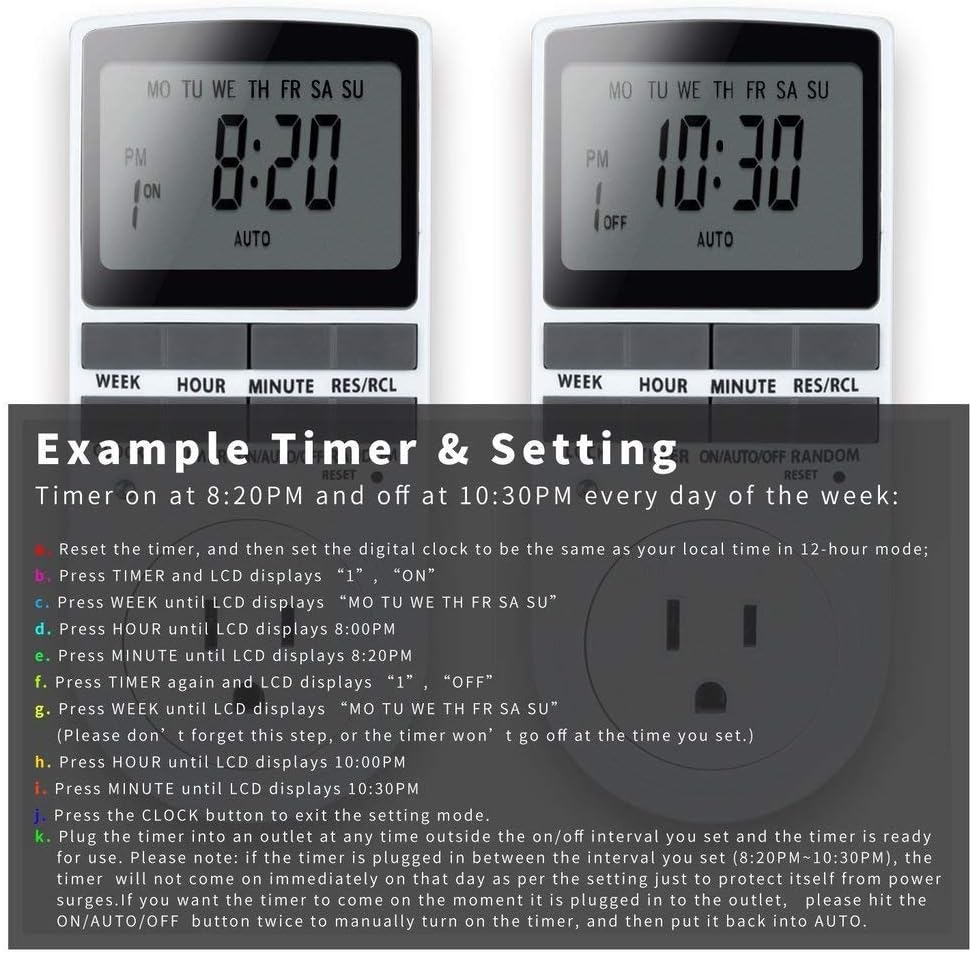
Image: Visual guide for setting an example timer program (ON at 8:20 PM, OFF at 10:30 PM daily).
6.2 Random Function (Anti-theft)
To activate the random ON/OFF feature:
- Presione el ALEATORIO button. The word "RANDOM" will appear on the display.
- In random mode, the timer will turn ON and OFF at varying times within a set period, typically around the programmed ON/OFF times, to simulate occupancy.
- Para desactivar, presione el botón ALEATORIO botón de nuevo.

Image: The anti-theft random feature of the Enover TS18 Digital Timer, designed to deter intruders.
6.3 Anulación manual
To manually switch the timer's output without affecting programmed settings:
- Presione el ENCENDIDO/AUTO/APAGADO botón para recorrer los modos: ON (siempre activo), AUTO (sigue programas), APAGADO (siempre apagado).
- Select the desired temporary mode. The timer will revert to AUTO mode at the next programmed ON/OFF event.
Video: A detailed demonstration of setting programs and using the manual override function on the Enover Digital Timer.
7. Aplicaciones
The Enover TS18 Digital Timer can be used to automate various household devices, enhancing convenience and energy efficiency.
- Coffee Makers: Program your coffee maker to start brewing before you wake up.
- Aquarium Lights/Pumps: Automate the lighting and filtration cycles for your aquarium.
- Indoor Grow Lights: Maintain consistent light schedules for plants.
- Decoraciones navideñas: Set festive lights to turn on and off automatically.
- Fans/Humidifiers: Control environmental devices to operate only when needed.

Imagen: Examples of automating daily routines with the Enover TS18 Digital Timer, such as a coffee maker and aquarium.
8. Especificaciones
| Número de modelo | TS18 |
| Marca | Enover |
| Color | Blanco |
| Material | Plástico |
| Número de configuraciones | 10 (programas de encendido y apagado) |
| Volumentage | 120 voltios |
| Quétage | 1800 vatios |
| Ampcapacidad de erage | 15 Amps |
| Método de instalación | Enchufar |
| Tipo de montaje | Montaje enchufable |
| Formato de enchufe | B - Estilo estadounidense con enchufe de tierra |
| Características especiales | 3-wire grounded plug and 3-prong grounded outlet |
| Uso | Uso en interiores únicamente |
| Peso del artículo | 6.4 onzas |
| Dimensiones del paquete | 5.67 x 3.31 x 2.6 pulgadas |
| Tipo de celda de la batería | Baterías de níquel-metal hidruro (NiMH) |
| Duración de la batería | 100 days (backup) |
9. Solución de problemas
- El temporizador no se enciende ni se apaga según lo programado:
- Asegúrese de que el temporizador esté en AUTO modo.
- Verifique que la hora y el día actuales estén configurados correctamente.
- Check that the ON and OFF times for the specific program are correctly entered and assigned to the desired days.
- Confirm the appliance connected to the timer is switched ON.
- La pantalla está en blanco o tenue:
- Plug the timer into an active electrical outlet for 5-10 minutes to charge the internal battery.
- Se perdieron todas las configuraciones después de un corte de energíatage:
- The internal battery may not be sufficiently charged. Ensure the timer is regularly plugged in to maintain battery charge.
- To clear all settings:
- Use a pointed object (like a pen tip) to press the REINICIAR button. This will clear all programs and reset the clock. You will need to re-enter all settings.
10. Garantía y soporte
For warranty information or technical support, please refer to the contact details provided on the product packaging or the official Enover websitio. Guarde su recibo de compra para reclamos de garantía.