
1. Introducción y másview
The DSC HS2LCD PowerSeries Neo Full Message LCD Keypad is an essential component of your DSC PowerSeries Neo security alarm system. This hardwired keypad provides a clear, full-message liquid crystal display (LCD) for easy system status viewing, event logging, and user interaction. It allows for arming and disarming the system, bypassing zones, and performing various user functions.
This keypad is designed for compatibility with DSC PowerSeries Neo control panels, including models HS2016, HS2032, HS2064, and HS21218. For detailed system programming and advanced features, refer to the installer manual for your specific PowerSeries Neo control panel.
2. Información de seguridad
- Instalación profesional recomendada: Installation of this keypad and integration with a security system should be performed by a qualified security professional. Improper installation can lead to system malfunction or compromise security.
- Seguridad eléctrica: Ensure all power to the alarm control panel is disconnected before performing any wiring or installation procedures. Work with low voltage cableado solamente.
- Condiciones ambientales: Install the keypad in a dry indoor location, away from direct sunlight, extreme temperatures, and high humidity.
- Daño: Do not attempt to open or service the keypad yourself. Refer all servicing to qualified personnel.
3. Contenido del paquete
Verifique que su paquete contenga los siguientes elementos:
- DSC HS2LCD PowerSeries Neo Full Message LCD Keypad
- Installation Guide / Quick Start Guide (may be included with the main control panel)

Figure 1: DSC HS2LCD Keypad as received, with protective film.
This image shows the DSC HS2LCD keypad, still partially in its original packaging. The keypad is white with a green protective film covering the LCD screen area. The DSC logo is visible on the packaging and faintly on the keypad itself.
4. Configuración e instalación
The HS2LCD keypad is designed for professional hardwired installation. The following steps provide a general overview; always refer to the detailed installation instructions provided with your DSC PowerSeries Neo control panel for specific wiring diagrams and mounting procedures.
4.1. Montaje del teclado
- Seleccione una ubicación interior adecuada, generalmente cerca de un punto de entrada/salida, que sea fácilmente accesible y visible.
- Abra con cuidado la carcasa del teclado para acceder a los orificios de montaje.
- Secure the keypad to the wall using appropriate screws and anchors (not included), ensuring it is level and firmly attached.
4.2. Conexiones de cableado
The HS2LCD keypad connects to the PowerSeries Neo control panel via a 4-wire Keybus connection. Ensure power to the control panel is OFF before making any connections.
- Connect the Red terminal on the keypad to the Red (Aux+) terminal on the control panel.
- Connect the Black terminal on the keypad to the Black (Aux-) terminal on the control panel.
- Connect the Yellow terminal on the keypad to the Yellow (Keybus Data) terminal on the control panel.
- Connect the Green terminal on the keypad to the Green (Keybus Data) terminal on the control panel.
Nota: Proper polarity and secure connections are crucial for reliable operation. Consult your control panel's installation manual for specific terminal locations and wiring best practices.
4.3. Encendido inicial
Once all wiring is complete and verified, restore power to the control panel. The keypad should power on and display initial system messages. The installer will then configure the keypad's address and integrate it into the system.
5. Instrucciones de funcionamiento
5.1. Disposición y pantalla del teclado
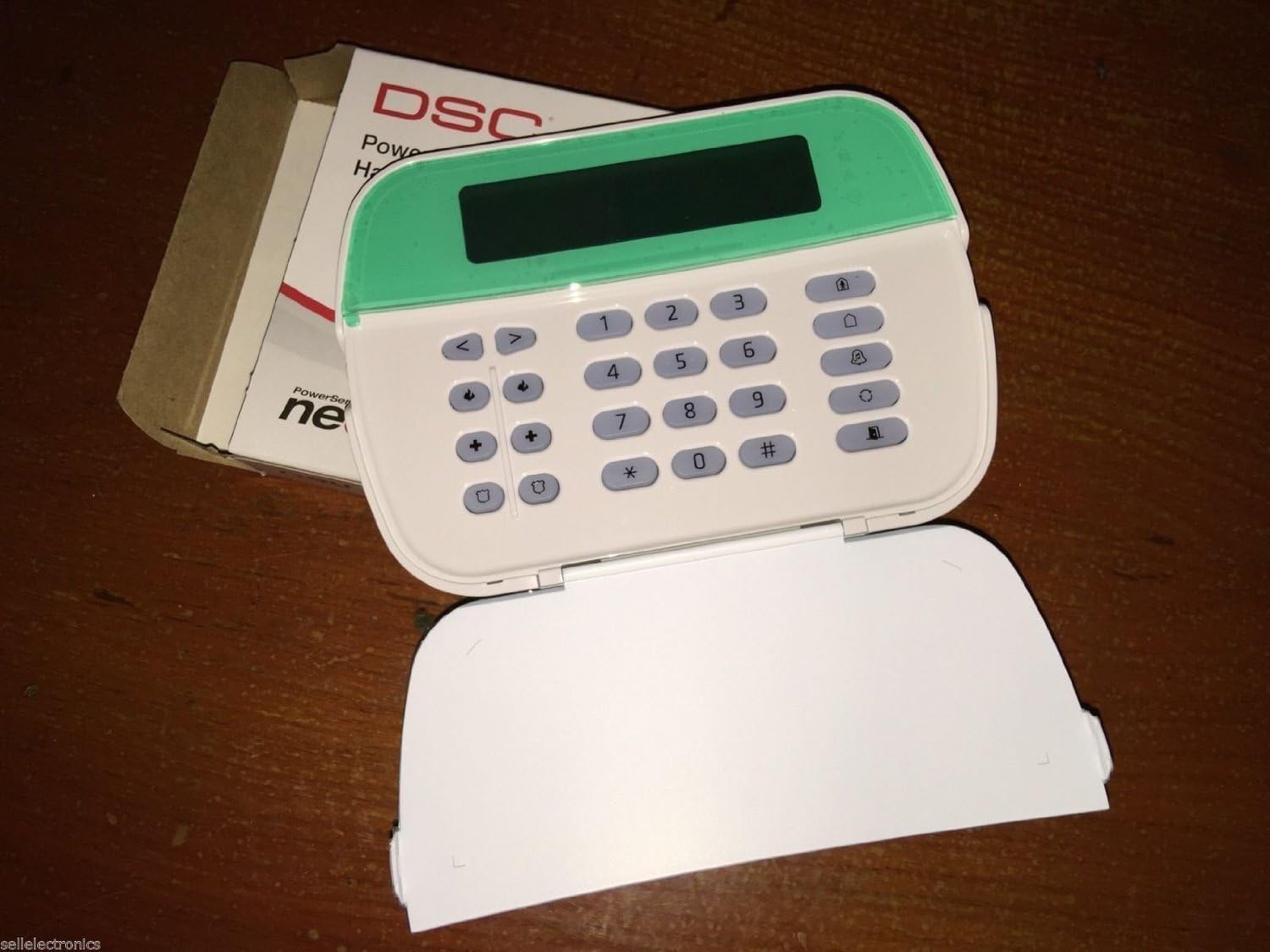
Figure 2: DSC HS2LCD Keypad with cover open.
This image displays the DSC HS2LCD keypad with its front cover flipped down, exposing the full alphanumeric keypad. The LCD screen is visible at the top, above the numbered keys (0-9), asterisk (*), and pound (#) keys, along with various function buttons.
The HS2LCD features a full-message LCD display that provides clear text prompts and system status. Below the display, you will find a standard numeric keypad (0-9, *, #) and dedicated function buttons for common operations.
5.2. Basic System Operations
All operations require a valid 4-digit or 6-digit user code.
- Arming Away: To arm the system when all occupants are leaving, enter your Codigo de usuario. The system will provide an exit delay.
- Arming Stay: To arm the system while occupants remain inside (bypassing interior zones), press the Permanecer button, then enter your Codigo de usuario.
- Encantador: To disarm the system, enter your Codigo de usuario. This will silence any alarms and restore the system to a disarmed state.
- Zonas de derivación: To temporarily remove a zone from the system's protection (e.g., a window left open), press the Derivación button, enter your Codigo de usuario, then enter the 2-digit zone number(s) to bypass. Press # Para salir.
- ViewEstado del sistema ing: The LCD will display system status messages (e.g., "System Ready to Arm", "Not Ready", "Alarm Memory"). Use the arrow keys to scroll through messages if available.
- Alarmas de pánico: Dedicated panic buttons (often labeled F, A, P or with symbols) can be pressed and held for 2 seconds to activate immediate alarms (Fire, Auxiliary, Panic). Consult your installer for specific button assignments.
5.3. Cambio de códigos de usuario
To change a user code (if enabled by your installer):
- Prensa [*] [5].
- Ingresa tu Código de usuario maestro.
- Enter the 2-digit Número de usuario (e.g., 01 for User 1).
- Entrar en el Nuevo código de usuario (4 or 6 digits).
- Prensa # para salir de la programación.
Nota: Not all user codes have permission to change other codes. Consult your installer for user code management. For advanced programming, refer to the DSC PowerSeries Neo Installer Manual.
6. Mantenimiento
- Limpieza: To clean the keypad, gently wipe the surface with a soft, dry cloth. For stubborn marks, slightly dampen the cloth with water. Do not use abrasive cleaners, solvents, or spray liquids directly onto the keypad.
- Controles periódicos: Periodically check the keypad for any physical damage or loose connections. Ensure the display is clear and all buttons respond correctly.
- Prueba del sistema: Follow your security provider's recommendations for regular system testing to ensure all components, including the keypad, are functioning correctly.
7. Solución de problemas
If you experience issues with your HS2LCD keypad, consider the following common problems and solutions. For complex issues or system-wide faults, contact your professional security installer.
| Problema | Posible causa | Solución |
|---|---|---|
| La pantalla del teclado está en blanco o no responde. | No power to the keypad or control panel; loose wiring connection. | Check power to the control panel. Verify all 4 Keybus wires are securely connected at both the keypad and the control panel. Contact installer if issue persists. |
| Keypad beeps continuously or displays an error message. | System trouble condition (e.g., low battery, communication error, zone fault). | Presione el [*] botón para view trouble conditions on the LCD. Address the specific trouble (e.g., close open doors/windows). If it's a system fault, contact your installer. |
| Los botones no responden. | Keypad frozen; physical damage. | Try disarming the system if it's armed. If unresponsive, a power cycle of the main control panel (by an installer) may be required. If physically damaged, replacement may be necessary. |
| El sistema no se arma. | Zones are open; system not ready. | Check the keypad display for "Not Ready" messages. Close all protected doors and windows. Bypass any zones you wish to leave open. |
Importante: The DSC HS2LCD keypad is a component of a larger security system. Many issues may originate from the main control panel or other connected devices. Always consult your security system's comprehensive manual or contact your professional installer for advanced diagnostics and repairs.
8. Especificaciones
| Marca | DSC |
| Número de modelo | HS2LCD (Part Number), 4331024609 (Item Model Number) |
| Código Postal | 702188341806 |
| Color | Blanco |
| Fuente de poder | Corded Electric (via control panel) |
| Paneles de control compatibles | HS2016, HS2032, HS2064, HS21218 (DSC PowerSeries Neo) |
| Tecnología de conectividad | Wired (Keybus) |
| Tipo de instalación | Profesional cableado |
| Método de control | Tocar (botones) |
| Dimensiones del artículo (largo x ancho x alto) | 9.8 x 7.3 x 2.2 pulgadas (24.9 x 18.5 x 5.6 cm) |
| Peso del artículo | 1.1 libras (0.5 kg) |
9. Garantía y soporte
Warranty information for the DSC HS2LCD keypad is typically provided by the manufacturer, DSC, and may be included with your main PowerSeries Neo control panel or available on the official DSC website. Warranty terms and conditions can vary.
For technical support, service, or warranty claims, please contact your professional security system installer or the authorized DSC distributor from whom the product was purchased. They are best equipped to provide assistance specific to your installed system.
You can also visit the official DSC website for product documentation, FAQs, and contact information for customer support.