
Introducción
This manual provides instructions for the proper setup, operation, maintenance, and troubleshooting of your Excalibur Deluxe Virtual Casino 5-in-1 Video Game. Please read this manual thoroughly before using the device to ensure optimal performance and longevity.
The Excalibur Deluxe Virtual Casino is a handheld electronic gaming device featuring five classic casino games: Poker, Blackjack, Slots, Craps, and Roulette. It is designed for portable entertainment.
Configuración
1. Instalación de la batería
The Excalibur Deluxe Virtual Casino requires 3 AAA batteries (not included) for operation.
- Localice la tapa del compartimiento de la batería en la parte posterior del dispositivo.
- Deslice la tapa para abrirla en la dirección indicada por la flecha.
- Inserte 3 pilas AAA, asegurándose de la polaridad correcta (+ y -) como está marcado dentro del compartimento.
- Vuelva a colocar la tapa del compartimiento de la batería, asegurándose de que encaje firmemente en su lugar.
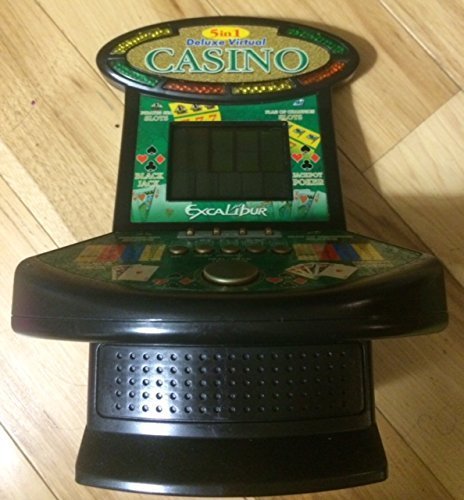
Figura 1: Excalibur Deluxe Virtual Casino handheld device. This image shows the front of the device, featuring the LED display and control buttons, which include a directional pad and action buttons.
2. Encendido inicial
Después de instalar las baterías, presione el botón FUERZA button, usually located on the top or front of the device, to turn it on. The screen should illuminate, displaying the main menu or game selection screen.
Instrucciones de funcionamiento
Controles sobreview
- Pad direccional (D-Pad): Used for navigating menus and making selections within games.
- SELECT/MENU Button: Typically used to confirm selections or access in-game menus.
- ACTION Buttons (A, B, C, etc.): Used for specific game actions, such as dealing cards, spinning reels, or placing bets. Refer to individual game instructions for specific button functions.
- SOUND/VOLUME Button: Adjusts the device's sound level or mutes audio.
- Botón de encendido: Enciende o apaga el dispositivo.
Selección de juegos
Desde el menú principal, utilice el Mando direccional to highlight your desired game (Poker, Blackjack, Slots, Craps, or Roulette). Press the SELECCIONAR button to confirm your choice and start the game.
Basic Gameplay (General)
- Placing Bets: Utilice el Mando direccional to select bet amounts or areas on the table (for Craps/Roulette). Confirm with an ACCIÓN botón.
- Game Actions: Follow on-screen prompts. For example, in Poker/Blackjack, use ACCIÓN buttons to "Hit," "Stand," "Deal," or "Fold." In Slots, press an ACCIÓN button to "Spin."
- Viewing Rules: Some games may have an option to view rules within their respective menus. Access this via the MENÚ Botón si está disponible.
Mantenimiento
Limpieza
To clean the device, gently wipe the exterior with a soft, dry cloth. Do not use abrasive cleaners, solvents, or immerse the device in water. For the screen, use a soft, lint-free cloth specifically designed for electronics displays.
Cuidado y almacenamiento de la batería
- Retire las baterías si el dispositivo no se utilizará durante un período prolongado para evitar fugas.
- Guarde el dispositivo en un lugar fresco y seco, alejado de la luz solar directa y de temperaturas extremas.
- No mezcle baterías viejas y nuevas, o diferentes tipos de baterías.
Solución de problemas
| Problema | Posible causa | Solución |
|---|---|---|
| El dispositivo no se enciende. | Baterías muertas o instaladas incorrectamente. | Compruebe la polaridad de las pilas. Reemplácelas con pilas AAA nuevas. |
| La pantalla está en blanco o parpadea. | Baterías bajas o una falla temporal del software. | Reemplace las baterías. Apague y vuelva a encender el dispositivo. |
| Los botones no responden. | Low batteries or a software issue. | Replace batteries. Turn the device off and on again. Ensure buttons are not stuck. |
| No hay sonido. | El volumen está silenciado o configurado demasiado bajo. | Presione el SOUND/VOLUME Botón para ajustar el volumen o activar el silencio. |
Presupuesto
- Modelo: B01GGZSPTA
- Marca: Excalibur
- Tipo de pantalla: CONDUJO
- Factor de forma: Portátil
- Fuente de energía: Pilas 3 x AAA (no incluidas)
- Juegos incluidos: Poker, Blackjack, Slots, Craps, Roulette
Garantía y soporte
Excalibur products are designed for quality and reliability. For information regarding warranty coverage, please refer to the warranty card included with your purchase or visit the official Excalibur websitio.
For technical support or customer service inquiries, please contact Excalibur customer support through their official channels. Contact details are typically available on the product packaging or the manufacturer's websitio.