
Introducción
Thank you for choosing the Divoom Onbeat 500 Portable Wireless Bluetooth Speaker. This device is designed to deliver powerful sound with convenient wireless connectivity. This manual will guide you through the setup, operation, and maintenance of your speaker to ensure optimal performance and longevity.
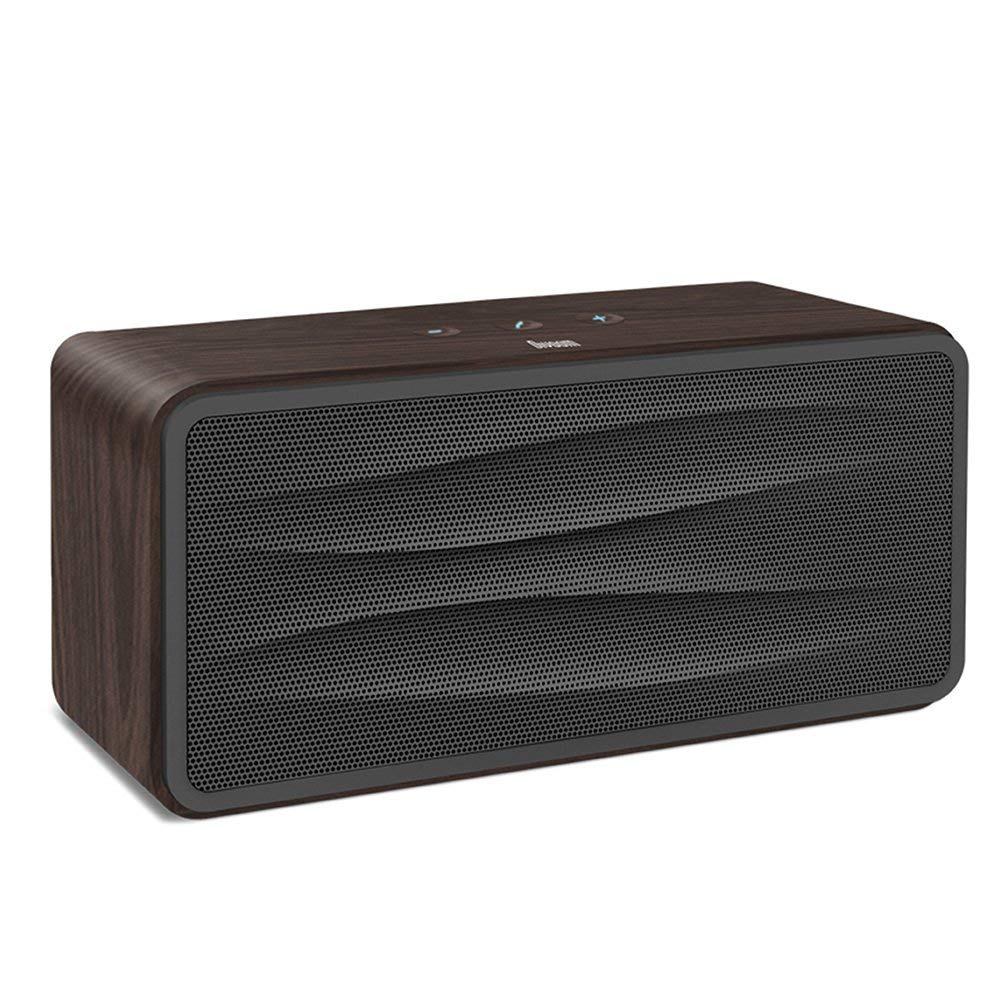
Figura 1: Frente view of the Divoom Onbeat 500 speaker. This image displays the speaker's main grille and overall design.
Contenido del paquete
Por favor revise el paquete para ver los siguientes artículos:
- Divoom Onbeat 500 Speaker
- Cable de carga micro USB
- Cable auxiliar
- Manual de usuario (este documento)
- Tarjeta de garantía
Características del producto
The Divoom Onbeat 500 speaker offers a range of features for an enhanced audio experience:
- Sonido potente: 2.1 channel design with a proprietary passive bass radiator for rich audio.
- Tecnología NFC: Tap-to-pair functionality for quick and easy Bluetooth connection.
- Conectividad Bluetooth: Wirelessly play and control music from up to 33 feet (10 meters) away.
- Altavoz incorporado: Allows you to make and take calls directly from the speaker.
- Batería de larga duración: Integrated 5000mAh battery provides extended playback time.
- Entrada auxiliar: Para conexión por cable a dispositivos sin Bluetooth.
Configuración
1. Carga del altavoz
Before initial use, fully charge your Divoom Onbeat 500 speaker. Use the provided Micro USB charging cable to connect the speaker to a USB power source (e.g., computer USB port, USB wall adapter). The charging indicator light will illuminate during charging and turn off or change color when fully charged. A full charge typically provides 8-10 hours of playback.
2. Encendido / apagado
- Para encender: Press and hold the Power button for a few seconds until you hear an audible prompt or see the indicator light illuminate.
- Para apagar: Mantenga presionado el botón de encendido nuevamente durante unos segundos hasta que el altavoz se apague.
3. Emparejamiento Bluetooth
The Onbeat 500 offers two methods for wireless connection:
NFC (Near Field Communication) Pairing:
If your device supports NFC, you can pair quickly:
- Asegúrese de que NFC esté habilitado en su teléfono inteligente o tableta.
- With the Onbeat 500 powered on, gently tap your NFC-enabled device against the NFC area on the speaker.
- Confirm the pairing request on your device. The speaker will indicate a successful connection.
Emparejamiento Bluetooth estándar:
For devices without NFC or for manual pairing:
- Power on the Divoom Onbeat 500 speaker. It will automatically enter Bluetooth pairing mode if no device is connected, or you may need to press a dedicated Bluetooth button (refer to speaker controls).
- On your audio device (smartphone, tablet, computer), go to the Bluetooth settings and enable Bluetooth.
- Buscar available devices. You should see "Divoom Onbeat 500" in the list.
- Select "Divoom Onbeat 500" to connect. The speaker will confirm the connection with an audible prompt.
4. Conexión auxiliar
To connect a device using the auxiliary cable:
- Connect one end of the provided auxiliary cable to the AUX-in port on the Divoom Onbeat 500.
- Conecte el otro extremo del cable auxiliar al conector de auriculares o a la salida de audio de su dispositivo.
- The speaker will automatically switch to AUX mode, or you may need to select it manually (refer to speaker controls).

Figura 2: Lado view of the Divoom Onbeat 500, illustrating the location of the charging port, AUX input, and control buttons.
Operar el altavoz
1. Reproducción de música
Once connected via Bluetooth or AUX, you can control music playback from your connected device. The speaker may also have integrated controls for volume adjustment, play/pause, and track skipping. Refer to the speaker's physical buttons for these functions.
2. Funcionalidad del altavoz
When connected to a smartphone via Bluetooth, the Divoom Onbeat 500 can be used as a speakerphone:
- Responder una llamada: Press the Call button (often indicated by a phone icon) on the speaker.
- Terminar una llamada: Presione el botón Llamar nuevamente.
- Rechazar una llamada: Mantenga presionado el botón de llamada.

Figura 3: Trasero view of the Divoom Onbeat 500, highlighting the passive bass radiator for enhanced low-frequency sound.
Mantenimiento
1. Limpieza
Para mantener la apariencia y funcionalidad de su altavoz:
- Limpie el exterior con un paño suave, seco y sin pelusa.
- Do not use abrasive cleaners, alcohol, benzene, or other chemical solvents, as these may damage the finish.
- Evite que entre humedad en las aberturas.
2. Cuidado de la batería
To prolong the life of the built-in lithium-ion battery:
- Evite descargar completamente la batería con frecuencia.
- Guarde el altavoz en un lugar fresco y seco cuando no lo utilice durante períodos prolongados.
- Charge the speaker at least once every three months if stored for a long time to prevent deep discharge.
Solución de problemas
If you encounter issues with your Divoom Onbeat 500, please refer to the following common solutions:
| Problema | Posible solución |
|---|---|
| El altavoz no se enciende | Ensure the battery is charged. Connect the speaker to a power source using the Micro USB cable and try again. |
| No hay sonido del altavoz | Check the volume level on both the speaker and your connected device. Ensure the speaker is correctly paired via Bluetooth or connected via AUX. Try re-pairing the Bluetooth device. |
| El emparejamiento de Bluetooth falla | Ensure the speaker is in pairing mode. Turn off and on Bluetooth on your device. Move your device closer to the speaker. Clear previous Bluetooth connections on your device and try again. |
| Mala calidad de sonido | Ensure the speaker and connected device are within range (for Bluetooth). Check for interference from other wireless devices. Try a different audio source or cable. |
Presupuesto
Detailed technical specifications for the Divoom Onbeat 500 speaker:
- Nombre del modelo: Divoom Onbeat 500
- Tipo de altavoz: Altavoz de la computadora
- Tecnología de conectividad: Bluetooth
- Tecnología de comunicación inalámbrica: Bluetooth
- Método de control: Tocar
- Fuente de energía: Funciona con pilas
- Batería: 1 batería de iones de litio (5000 mAh)
- audio wattage: 20 vatios
- Potencia máxima de salida del altavoz: 100 vatios
- Configuración del canal de sonido envolvente: 2.1
- Dispositivos compatibles: Android, Windows, iPhone (iOS)
- Tipo de conector: USB (para cargar)
- Dimensiones del producto: 22.5 x 7.49 x 10.49 cm (largo x ancho x alto)
- Peso del artículo: 1.55 kilogramos
- Color: Carbón
- Características especiales: NFC, Built-in Speakerphone, Passive Bass Radiator
Garantía y soporte
Your Divoom Onbeat 500 speaker comes with a limited warranty. Please refer to the included Warranty Card for detailed terms and conditions, including warranty period and coverage.
For technical support, service inquiries, or further assistance, please visit the official Divoom website or contact their customer service department using the information provided on your Warranty Card or product packaging. Please have your model number (Onbeat 500) and purchase details ready when contacting support.