
1. Introducción
The Zmodo Outdoor Security Camera Wireless (2 Pack) provides a comprehensive monitoring solution for your home or business. This system features 1080p Full HD video, night vision, and motion detection capabilities. Designed for both indoor and outdoor use, it offers remote viewing via the Zmodo app and is compatible with Amazon Alexa and Google Assistant for voice control.
Las características principales incluyen:
- Fácil configuración: Connect cameras within minutes using the Zmodo app.
- True 1080p HD Live Video: Día y noche viewing up to 65ft in the dark.
- Funciona con Alexa: Controla tu cámara con comandos de voz.
- Smartz Eaze Cloud Recording: Receive video clips upon motion detection (14-day free trial included).
- Wall-mount Design: Flexible installation for optimal viewángulos de ing.
2. ¿Qué hay en la caja?
The Zmodo Outdoor Security Camera Wireless (2 Pack) package includes the following items:
- 2 x Zmodo Outdoor Cameras

3. Configuración
Setting up your Zmodo Outdoor Security Camera is a straightforward process. Follow these steps for quick installation and configuration.
3.1 Instalación física
- Elija una ubicación: Seleccione una ubicación adecuada para su cámara, asegurándose de que tenga un espacio libre view of the area you wish to monitor and is within range of your Wi-Fi network. The camera is designed for wall mounting.
- Monte la cámara: Utilice el soporte de montaje y los tornillos proporcionados para fijar firmemente la cámara a una pared o superficie deseada.
- Conecte la electricidad: Plug the camera's power adapter into a nearby electrical outlet.
- Conecte la antena Wi-Fi: Screw the Wi-Fi antenna into the designated port on the back of the camera.


3.2 Configuración de la aplicación
- Download the Zmodo App: Download the free Zmodo app from your smartphone's app store (iOS or Android).
- Crear una cuenta: Open the app and follow the on-screen instructions to create a new Zmodo account or log in if you already have one.
- Agregar dispositivo: In the app, select the option to add a new device. Follow the prompts to connect your camera to your Wi-Fi network. This typically involves scanning a QR code on the camera or following guided steps.
- Ponle nombre a tu cámara: Assign a descriptive name to your camera (e.g., "Front Door Camera," "Backyard Camera") for easy identification.
3.3 Vídeos de configuración
For visual guidance on the setup process, refer to the following videos:
4. Instrucciones de funcionamiento
Once your Zmodo camera is set up, you can begin monitoring your property and utilizing its smart features.
4.1 en vivo View y reproducción
- Acceso a la transmisión en vivo: Open the Zmodo app on your smartphone or tablet. Select the desired camera from your device list to view its live 1080p Full HD video feed.
- Visión nocturna: The camera automatically switches to night vision mode in low-light conditions, providing clear black and white video up to 65 feet.
- Almacenamiento en la nube: With the optional Smartz Eaze cloud recording plan, motion-triggered video clips are saved to the cloud. You can review, save, and share footage at any time. A 14-day free trial is available.


4.2 Detección de movimiento y alertas
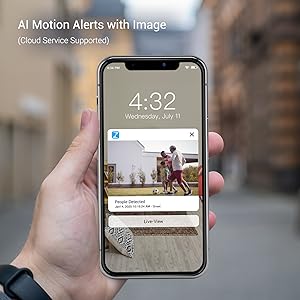
- Recibir alertas: The camera sends intelligent mobile alerts to your smartphone when motion is detected.
- Detección de movimiento por IA: Advanced AI helps detect and identify humans, pets, and vehicles accurately, reducing false alerts.
4.3 Integración con Alexa
The Zmodo camera is compatible with Amazon Alexa, allowing for convenient voice control.
- Comandos de voz: Use commands like "Alexa, show me the front door" to view a live stream from your camera on compatible Alexa devices such as Echo Show or Fire TV.
- Actualizar firmware: Ensure your Zmodo product is updated to the latest device version for optimal interaction with Amazon Alexa.

4.4 Alexa Integration Video
Watch this video for detailed instructions on how to integrate your Zmodo camera with Amazon Alexa and Fire TV:
5. Mantenimiento
To ensure optimal performance and longevity of your Zmodo Outdoor Security Camera, follow these maintenance guidelines:
- Limpieza regular: Limpie periódicamente la lente de la cámara con un paño suave.amp cloth to remove dust, dirt, or smudges that may affect image clarity. Avoid abrasive cleaners.
- Comprobar conexiones: Ensure all cables (power, antenna) are securely connected and free from damage.
- Actualizaciones de firmware: Regularly check for and install firmware updates through the Zmodo app to benefit from new features, improvements, and security enhancements.
- Protección contra la intemperie: Si bien la cámara es resistente al agua según norma IP65, asegúrese de instalarla en un lugar que minimice la exposición directa a condiciones climáticas extremas, si es posible, para prolongar su vida útil.

6. Solución de problemas
If you encounter issues with your Zmodo camera, refer to the following common problems and solutions:
| Problema | Posible solución |
|---|---|
| Cámara fuera de línea/No se puede conectar a Wi-Fi | Ensure the camera is powered on. Check your Wi-Fi signal strength at the camera's location. Restart your router and the camera. Re-add the camera through the Zmodo app. |
| Mala calidad de video | Clean the camera lens. Ensure adequate lighting for day vision. Check Wi-Fi signal strength; a weak signal can degrade video quality. |
| Alertas de movimiento no recibidas | Verify motion detection is enabled in the app settings. Check app notification settings on your phone. Ensure the camera has a clear view del área de detección. |
| Alexa integration not working | Ensure the Zmodo skill is enabled in the Alexa app and your Zmodo account is linked. Verify your Alexa device (Echo Show/Fire TV) is connected to the same network. Update camera firmware. |
7. Especificaciones
Detailed technical specifications for the Zmodo Outdoor Security Camera (Model ZM-W0002-2):
| Característica | Detalle |
|---|---|
| Marca | Zmodo |
| Nombre del modelo | ZM-W0002-2 |
| Tecnología de conectividad | Cloud, Wi-Fi, 2.4GHz |
| Características especiales | HD Resolution, Motion Sensor, Night Vision |
| Uso en interiores y exteriores | Interior, exterior |
| Dispositivos compatibles | Alexa, Asistente de Google |
| Tipo de montaje | Montaje en pared |
| Color | Blanco |
| Factor de forma | Bala |
| Clasificación de impermeabilidad | IP65 |
| Resolución del sensor fotográfico | 1080 píxeles |
| Resolución de captura de video | 1080p |
| Velocidad de cuadros | 25 fps |
| Viewángulo de ing | 90 grados |
| Zoom óptico | 4 x |
| Rango de visión nocturna | 65 pies |
| Fuente de poder | Eléctrico con cable |
| Volumentage | 12 voltios |
| Quétage | 5 vatios |
| Dimensiones del artículo | 2.2 x 2.1 x 3.4 pulgadas |
8. Garantía y soporte
Garantía: The Zmodo Outdoor Security Camera comes with a 3-year manufacturer's warranty.
Atención al cliente: For technical assistance, troubleshooting, or warranty claims, please visit the official Zmodo website or contact their customer support team. Refer to the Zmodo app or packaging for the most up-to-date contact information.