
Introducción
This manual provides essential instructions for the installation, operation, and maintenance of your LiftMaster 41A5273-1 Security Multi-Function Wall Control Panel. Please read this manual thoroughly before attempting to install or operate the device to ensure proper function and safety.
Producto terminadoview
The LiftMaster 41A5273-1 is a multi-function wall control panel designed for use with LiftMaster garage door openers operating at 390MHz. It provides convenient control over your garage door and its integrated lighting system.
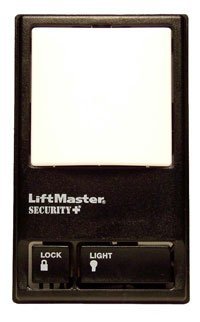
Image showing the LiftMaster 41A5273-1 Security Multi-Function Wall Control Panel, typically mounted on a wall, featuring buttons for garage door operation, light control, and a lock function.
Características principales:
- 390 MHz compatibility with LiftMaster garage door openers.
- Multi-function control for garage door operation.
- Integrated light control features.
- Lock feature for enhanced security.
Configuración e instalación
Proper installation is crucial for the safe and reliable operation of your wall control panel. It is recommended to consult the full installation guide provided with your garage door opener or seek professional assistance if you are unsure about any steps.
Pasos generales de instalación:
- Seguridad ante todo: Disconnect power to the garage door opener before beginning installation.
- Ubicación de montaje: Choose a convenient location within sight of the garage door, at least 5 feet (1.5 meters) above the floor to keep it out of reach of small children.
- Alambrado: Connect the wall control panel to the garage door opener's terminal block using low-voltage wire. Ensure correct polarity if specified by your opener's manual.
- Montaje seguro: Mount the panel securely to the wall using the provided screws.
- Restaurar energía: Vuelva a conectar la energía al abridor de la puerta del garaje.
- Pruebas: Test the wall control panel's functions (door operation, light control, lock feature) to ensure it is working correctly.
Note: This panel is designed for 390MHz LiftMaster garage door openers. Compatibility with other frequencies or brands is not guaranteed.
Instrucciones de funcionamiento
Once installed, the LiftMaster 41A5273-1 wall control panel provides intuitive control over your garage door system.
Funciones:
- Funcionamiento de la puerta del garaje: Press the main button to open or close the garage door. Pressing it again during operation will stop the door.
- Control de luz: The light button allows you to turn the garage door opener's light on or off independently of the door operation. The light will also activate automatically when the door is operated.
- Función de bloqueo: The lock button disables all remote controls and wireless keypads, preventing unauthorized access. The garage door can still be operated using the wall control panel. To deactivate the lock feature, press the lock button again.
Mantenimiento
The LiftMaster 41A5273-1 wall control panel requires minimal maintenance to ensure long-term performance.
- Limpieza: Periodically wipe the surface of the control panel with a soft, dry cloth. Avoid using abrasive cleaners or solvents.
- Inspección: Occasionally check the wiring connections to ensure they are secure.
- Condiciones ambientales: Ensure the panel is not exposed to excessive moisture or extreme temperatures, which can affect its electronic components.
Solución de problemas
If you encounter issues with your wall control panel, try the following troubleshooting steps:
- El panel no responde:
- Check if the garage door opener has power.
- Inspect the wiring connections at both the wall control panel and the garage door opener for loose or damaged wires.
- Ensure the "Lock" feature is not activated.
- Remote Controls Not Working:
- Verify that the "Lock" feature on the wall control panel is not engaged.
- Check the batteries in your remote controls.
- Reprogram your remote controls if necessary, following the instructions for your specific garage door opener model.
- La luz no funciona:
- Check the light bulb in the garage door opener.
- Ensure the light button on the wall control panel is pressed.
Si los problemas persisten después de intentar estos pasos, comuníquese con el servicio de atención al cliente de LiftMaster o con un técnico de puertas de garaje calificado.
Presupuesto
| Número de modelo: | 41A5273-1 |
| Marca: | Maestro elevador |
| Fabricante: | El grupo Chamberlain |
| Frecuencia: | 390 MHz |
| Color: | Negro |
| Estilo: | Moderno |
| Cantidad de artículos del paquete: | 1 |
| Pilas necesarias: | No |
| Fecha de primera disponibilidad: | 19 de agosto de 2016 |
Garantía y soporte
Specific warranty details for the LiftMaster 41A5273-1 Security Multi-Function Wall Control Panel are not provided in this document. For warranty information, technical support, or to purchase replacement parts, please visit the official LiftMaster websitio o comuníquese directamente con su servicio de atención al cliente.
A menudo puede encontrar recursos de soporte, preguntas frecuentes e información de contacto en el sitio web del fabricante. websitio: www.liftmaster.com