
1. Producto terminadoview
The Tenergy 11W Dimmable LED Desk Lamp (Model FY-0001) is designed to provide versatile lighting for various tasks, featuring adjustable brightness, multiple color temperatures, and a convenient USB charging port. Its sleek design and flexible arm make it suitable for home and office environments.

Image: The Tenergy 11W LED Desk Lamp, mostrarasing its modern design and adjustable features.
2. ¿Qué hay en la caja?
- Tenergy 11W Dimmable LED Desk Lamp
- Cable de carga USB
- Adaptador de corriente
- Manual de usuario (este documento)

Image: The Tenergy 11W LED Desk Lamp and its included accessories laid out on a surface.
3. Configuración
- Retire con cuidado todos los componentes del embalaje.
- Coloque la lamp base sobre una superficie estable y plana.
- Conecte el adaptador de corriente al lamp's power input port, typically located at the rear of the base.
- Plug the power adapter into a standard electrical outlet. The lamp's indicator light should illuminate, indicating it is ready for use.
4. Instrucciones de funcionamiento
4.1 Encendido y apagado
Para girar la lamp on or off, gently touch the Encendido/apagado button located on the touch control panel on the lampbase de
4.2 Ajuste del brillo
El lamp offers 5 levels of brightness. Use the + y - buttons on the touch control panel to increase or decrease the light intensity.
4.3 Changing Light Modes (Color Temperature)
El lamp features 4 distinct light modes, each with a different color temperature, optimized for various activities:
- Modo de lectura: Provides a bright, neutral white light ideal for reading.
- Modo de estudio: Offers a cooler, more focused light to enhance concentration.
- Modo relax: Emits a warm, soft light for a comfortable and calming atmosphere.
- Modo de sueño: Delivers a very warm, dim light suitable for winding down before sleep.
To switch between these modes, repeatedly touch the corresponding icon on the control panel.

Image: Visual representation of the four adjustable light color temperatures available on the lamp.
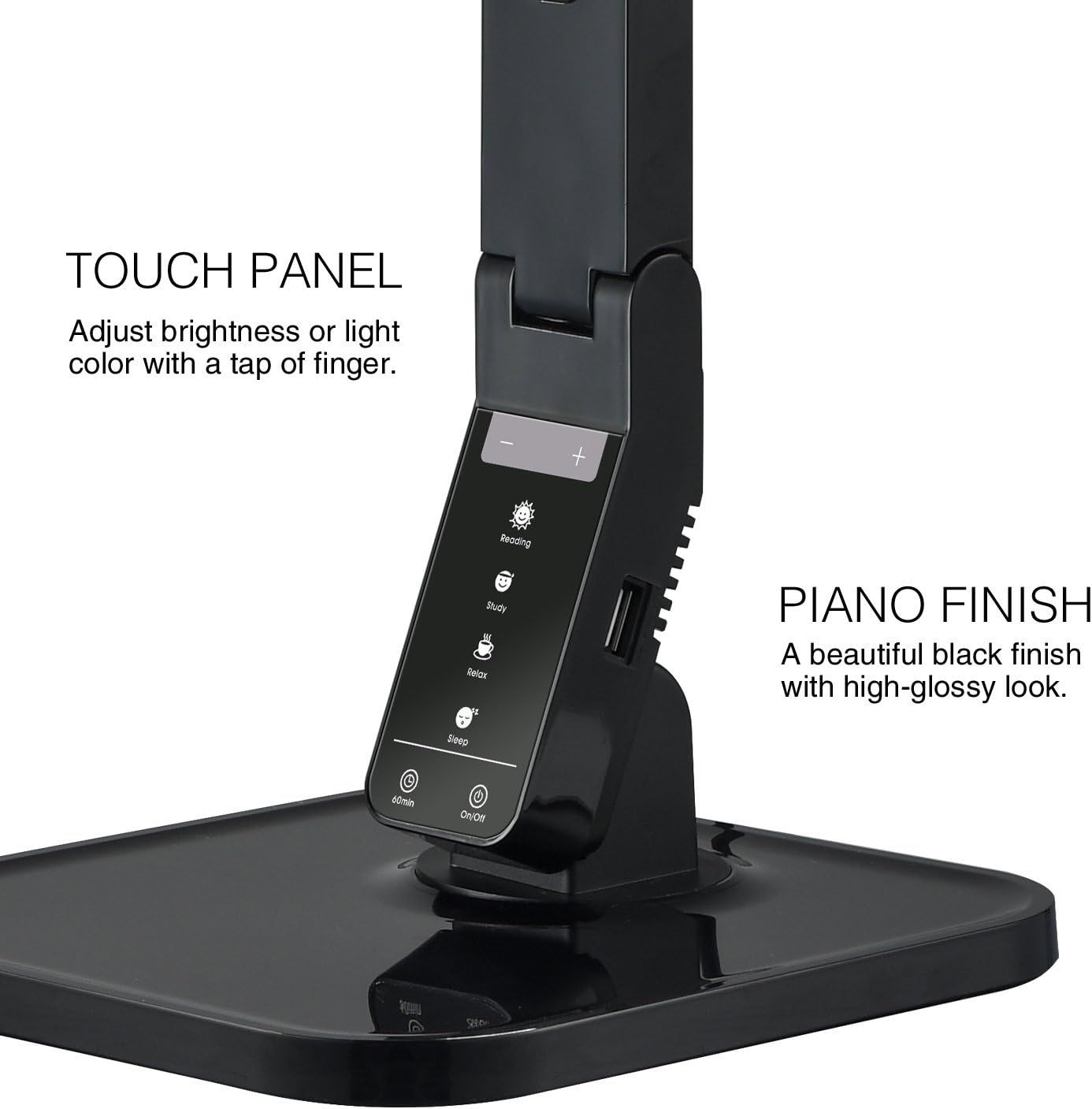
Image: The touch control panel with various light mode and brightness adjustment icons.
4.4 Uso del puerto de carga USB
A USB charging port is integrated into the lamp's base, allowing you to charge compatible devices such as smartphones or tablets. Simply connect your device's USB charging cable to the port.

Image: A smartphone being charged via the integrated USB port on the lampbase de
4.5 Ajuste de la Lamp Brazo
El lamp features an adjustable arm that allows you to direct the light precisely where needed. The arm can be folded, extended, and swiveled to achieve optimal positioning.

Image: Illustrations demonstrating the flexibility and adjustability of the lampel brazo de
4.6 Función de temporizador
El lamp includes a 60-minute timer function. To activate, press the 60 minutos button on the control panel. The lamp se apagará automáticamente después de 60 minutos.
4.7 Vídeo oficial del producto
Video: An official product video from Tenergy Corporation demonstrating the features and benefits of the 11W LED Desk Lamp, including its adjustable lighting, USB charging, and sleek design.
5. Mantenimiento
- Limpieza: Para limpiar el lamp, especially its glossy finish, use a soft, dry microfiber cloth. Avoid abrasive cleaners or harsh chemicals that may damage the surface.
- Almacenamiento: Cuando no se utilice durante períodos prolongados, guarde el producto en un lugar fresco y seco.amp En un lugar fresco y seco.
6. Solución de problemas
- Lamp no se enciende: Asegúrese de que el adaptador de corriente esté enchufado de forma segura en ambos lados.amp and a working electrical outlet. Check if the outlet is receiving power.
- El puerto USB no carga: Verifique el lamp is powered on and the USB cable is properly connected to both the lamp and your device. Ensure your device is compatible with USB charging.
- Luz parpadeante: If the light flickers, try unplugging the lamp for a few minutes and then plugging it back in. If the issue persists, contact customer support.
7. Especificaciones
| Número de modelo | Año fiscal 0001 |
| Marca | Tenería |
| Quétage | 11 vatios |
| Tipo de fuente de luz | CONDUJO |
| Niveles de brillo | 5 |
| Light Colors / Modes | 4 (Reading, Study, Relax, Sleep) |
| Método de control | Tocar |
| Tecnología de conectividad | USB |
| Fuente de poder | Eléctrico con cable |
| Dimensiones del producto | 7" de profundidad x 6.75" de ancho x 16.7" de alto |
| Tipo de material | Plástico |
| Tipo de acabado | Lustroso |
8. Garantía y soporte
For warranty information or technical support, please visit the official Tenergy webSitio web o contacte con el departamento de atención al cliente. Conserve el recibo de compra para cualquier reclamación de garantía.
Tenergy Store: https://www.amazon.com/stores/Tenergy/page/5AE2FFA8-E197-4708-9169-C4D8CB488E9E