
1. Introducción
Thank you for choosing the UGREEN Micro USB Fast Charging Nylon Cable. This cable is designed to provide efficient charging and high-speed data synchronization for a wide range of Micro USB-enabled devices. Its durable nylon braided construction and advanced technology ensure reliable performance and extended lifespan.

Image 1.1: UGREEN Micro USB Fast Charging Nylon Cable.
2. Configuración
The UGREEN Micro USB cable is designed for simple plug-and-play functionality. No special software or drivers are required for basic operation.
2.1 Identifying the Connectors
- Conector USB-A: This is the standard rectangular connector that plugs into a power adapter, computer USB port, or power bank.
- Conector micro USB: This is the smaller, trapezoidal connector that plugs into your Micro USB-enabled device.

Image 2.1: The cable features a Micro USB connector, ensuring compatibility with devices specifically designed for this port type. It is not compatible with USB-C or Lightning ports.
2.2 Conexión del cable
- Insert the USB-A connector into a compatible USB power source (e.g., wall charger, computer, power bank).
- Insert the Micro USB connector into the charging/data port of your device. Ensure the connector is inserted correctly to avoid damage.

Imagen 2.2: Primer plano view of the gold-plated Micro USB connector, designed for secure and corrosion-resistant connection.
3. Instrucciones de funcionamiento
3.1 carga rápida
This UGREEN Micro USB cable supports fast charging technologies, including Quick Charge (QC) 2.0 and 3.0, and Samsung Adaptive Fast Charging (AFC). When connected to a compatible fast charger and device, it can deliver up to 18W (12V/1.5A, 9V/2A, 5V/2.4A) of power, significantly reducing charging times compared to standard cables.
- Ensure your device and power adapter both support fast charging for optimal results.
- The cable will automatically adjust to the maximum charging speed supported by your connected devices.

Image 3.1: Illustration of 18W fast charging capability, showing faster charging compared to original cables.
3.2 Sincronización de datos
The cable supports data transfer speeds of up to 480 Mbps (USB 2.0 standard), allowing for quick synchronization of photos, music, documents, and other files between your device and a computer.
- Connect the USB-A end to your computer's USB port and the Micro USB end to your device.
- Es posible que su dispositivo le solicite que seleccione un modo de conexión (por ejemplo, "File Transfer," "MTP," "PTP"). Choose the appropriate mode for data transfer.
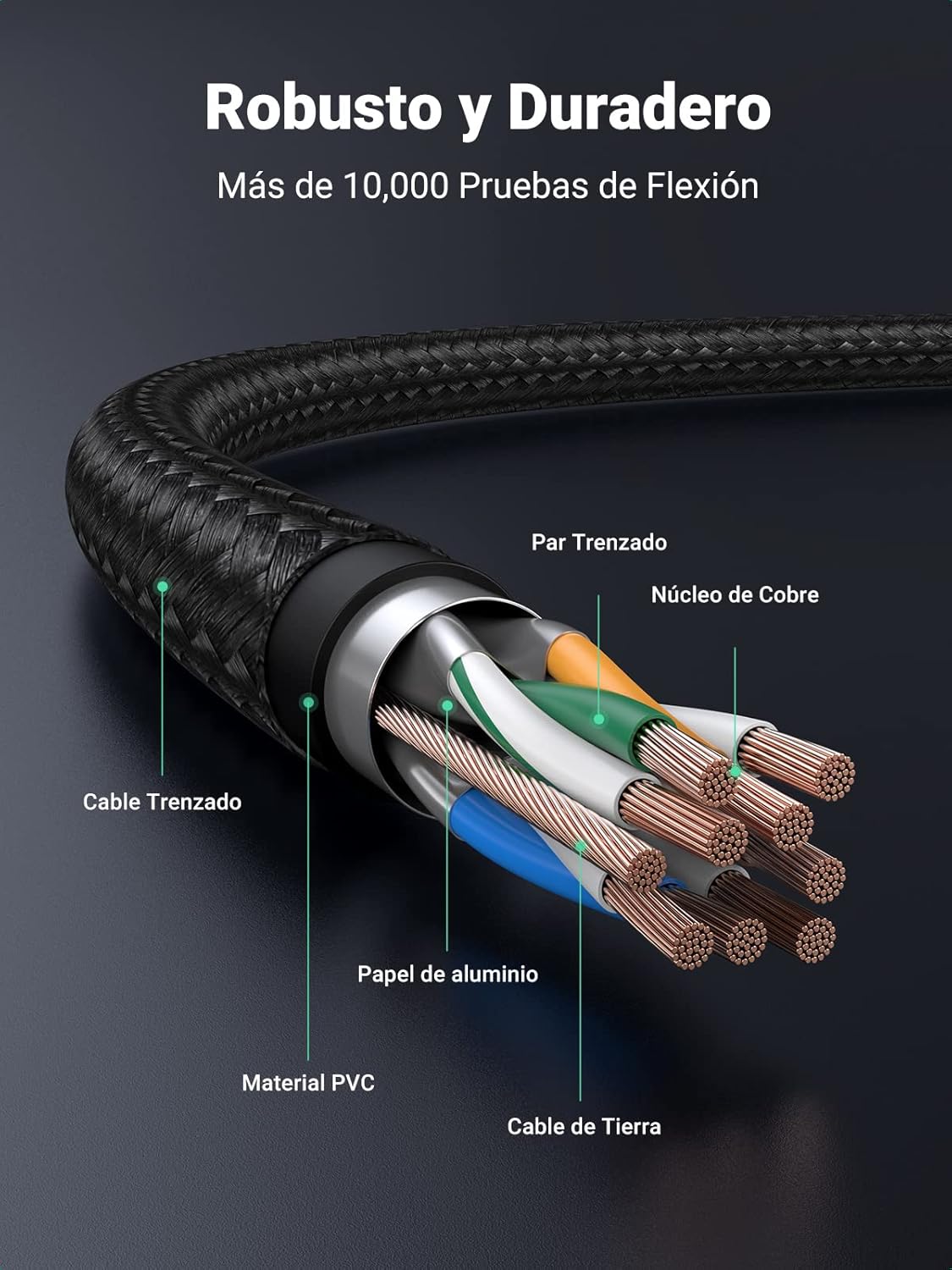
Image 3.2: Visual representation of fast data synchronization, indicating 1GB transfer in approximately 25 seconds at 480 Mbps.
4. Mantenimiento
Proper care and maintenance will extend the life of your UGREEN Micro USB cable.
- Evite doblarse: Do not excessively bend or crimp the cable, especially near the connectors. The nylon braiding provides durability, but extreme stress can still cause internal damage.
- Conectores Limpios: Periodically inspect the connectors for dust or debris. Use a soft, dry cloth or a small brush to gently clean them if necessary.
- Conservar adecuadamente: When not in use, coil the cable loosely and store it in a clean, dry place away from direct sunlight or extreme temperatures.
- Tratar con cuidado: Al desconectarlo de un dispositivo o fuente de alimentación, tire siempre del cabezal del conector, no del cable en sí.

Image 4.1: Diagram illustrating the robust construction of the cable, including braided nylon, aluminum foil shielding, PVC material, copper core, and reinforced joints for enhanced durability.
5. Solución de problemas
If you encounter issues with your UGREEN Micro USB cable, try the following troubleshooting steps:
- El dispositivo no se carga:
- Asegúrese de que ambos extremos del cable estén bien conectados.
- Pruebe con un adaptador de corriente o un puerto USB diferente.
- Test the cable with another Micro USB device to rule out a device-specific issue.
- Compruebe si el puerto de carga de su dispositivo está limpio y libre de residuos.
- Carga lenta:
- Verify that your power adapter supports fast charging (e.g., QC 2.0/3.0, AFC).
- Ensure your device also supports fast charging.
- Evite utilizar el dispositivo de forma intensa mientras se carga, ya que esto puede ralentizar el proceso.
- Problemas de transferencia de datos:
- Confirme que su dispositivo esté configurado en "File Modo "Transferencia" o "MTP" cuando se conecta a una computadora.
- Intente conectarse a un puerto USB diferente en su computadora.
- Reinicie tanto el dispositivo como la computadora.
- Conexión intermitente:
- Verifique si hay daños visibles en el cable o los conectores.
- Ensure the connectors are fully inserted and not loose.
- Evite ejercer tensión sobre el cable mientras lo utiliza.
6. Especificaciones
| Número de modelo | 30649 |
| Tipo de conector | Micro USB (Male to Female) |
| Tipo de cable | USB 2.0 |
| Velocidad de transferencia de datos | Hasta 480 Mbps |
| Corriente maxima | 2.4 Amperes |
| Máxima potencia | 18 vatios |
| Vol máximotage | 20 voltios |
| Material exterior | Nailon trenzado |
| Dimensions (0.5m variant) | 14.5 x 8 x 0.2 cm; 20 g |
| Certificaciones | ANSI, CE, RoHS, USB-IF |
6.1 Compatibilidad universal
This cable is compatible with a wide range of Micro USB devices, including but not limited to:
- Teléfonos inteligentes: Samsung Galaxy S7/S6/S5/S4/S3, Note 5/4/3/2, J-series, A-series (older models); Xiaomi Redmi Note series, Redmi series, Mi A2 Lite; Huawei P-series Lite, Y-series, Mate series (older models); Honor series; Sony Xperia series; HTC Desire/One/Butterfly; Wiko Lenny/Rainbow/U Feel/Fever/Sunny/Highway/Tommy; Motorola Moto G/E series; LG Q/K series; Nokia C/Lumia series.
- Tabletas: Samsung Galaxy Tab A/E/S2/3/4.
- Otros dispositivos: PS4/Xbox One controllers, MP3 players, digital cameras, power banks, Bluetooth speakers, and other Micro USB-enabled peripherals.

Image 6.1: Visual guide to the universal compatibility of the UGREEN Micro USB cable with various mobile phones, tablets, and other devices.
7. Garantía y soporte
UGREEN products are designed for reliability and performance. For warranty information, technical support, or any inquiries regarding your product, please refer to the official UGREEN websitio o comuníquese directamente con su servicio de atención al cliente.
Conserve su comprobante de compra para reclamos de garantía.