
Casio HR-200RCE-W-EC
Manual del usuario de la calculadora de escritorio con impresora Casio HR-200RCE-W-EC
Model: HR-200RCE-W-EC
Introducción
The Casio HR-200RCE-W-EC is a versatile and portable printing desktop calculator designed for efficient numerical operations. It features a large 12-digit LC display and offers functions such as tax calculations, cost-sell-margin analysis, and currency conversions. This manual provides essential information for setting up, operating, maintaining, and troubleshooting your calculator to ensure optimal performance.
Configuración
Desembalaje
Retire con cuidado todos los componentes del embalaje. La caja debe contener:
- Casio HR-200RCE-W-EC Printing Desktop Calculator
- 4 pilas AA
- Small paper roll for initial use
Note: The power adapter (AD-A60024) is not included and must be purchased separately if mains power is desired.
Instalación de fuente de alimentación
Your calculator can be powered by batteries or an optional AC adapter.
- Instalación de la batería: Open the battery compartment cover on the underside of the calculator. Insert the four (4) AA batteries, ensuring correct polarity (+/-). Close the cover securely.
- Adaptador de CA (opcional): If using the AD-A60024 AC adapter, plug it into the DC IN jack on the side of the calculator and then into a standard electrical outlet.
Instalación del rollo de papel
The calculator uses 58mm wide paper rolls for printing. Follow these steps to install a new roll:
- Open the paper roll cover at the top rear of the calculator.
- Coloque el nuevo rollo de papel en el compartimiento, asegurándose de que el papel se alimente desde la parte inferior del rollo.
- Introduzca el borde delantero del papel en la ranura de la impresora hasta que sobresalga por la parte superior.
- Cierre la tapa del rollo de papel.

Image: The Casio HR-200RCE-W-EC calculator showing the paper roll installed and a printed receipt.
Instrucciones de funcionamiento
This section covers the basic and advanced functions of your Casio HR-200RCE-W-EC calculator.
Cálculos básicos
Perform standard arithmetic operations using the numeric keypad and function keys:
- Suma (+): Ingrese el primer número, presione +, ingrese el segundo número, presione =.
- Resta (-): Ingrese el primer número, presione -, ingrese el segundo número, presione =.
- Multiplicación (x): Ingrese el primer número, presione x, ingrese el segundo número, presione =.
- Division (•): Ingrese el primer número, presione •, ingrese el segundo número, presione =.
- Claro (C): Borra el último número ingresado.
- Todo despejado (AC): Borra todas las entradas y reinicia la calculadora.
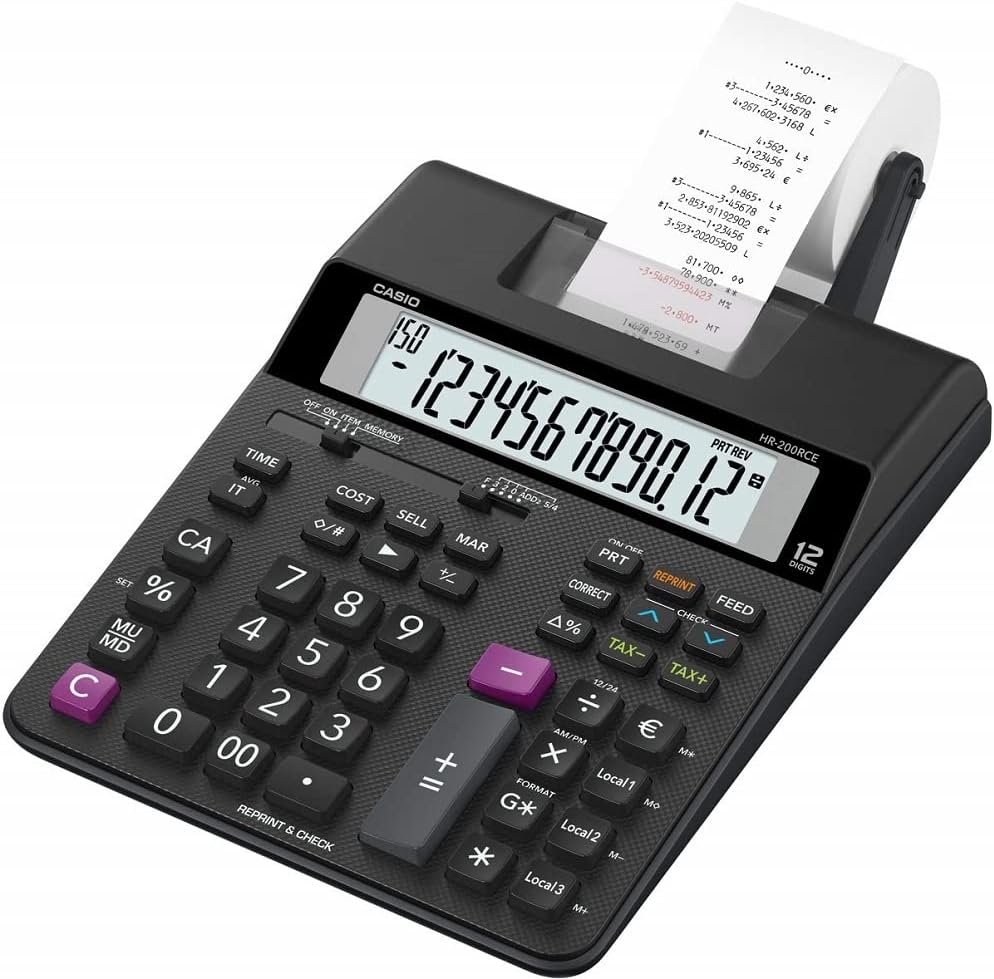
Imagen: En ángulo view of the Casio HR-200RCE-W-EC calculator, highlighting the full keyboard layout.
Funciones especiales
The HR-200RCE-W-EC includes several advanced functions for business and financial calculations:
- Tax Calculations (TAX+, TAX-): Use these keys to add or subtract a pre-set tax rate. Refer to the full manual for setting the tax rate.
- Cost, Sell, Margin (COST, SELL, MAR): Estas claves permiten un cálculo rápido del costo, precio de venta o margen de ganancia cuando se conocen dos de los tres valores.
- Currency Conversions (Local 1, Local 2, Local 3): Configure up to three local currency exchange rates for quick conversions.
- 2-Color Print (IR-40T): The calculator supports two-color printing (black and red) for clear differentiation of positive and negative values on the paper roll.
- Check & Correct (CHECK, CORRECT): Esta característica le permite volverview and correct previous entries on the printout.

Imagen: Primer plano view of the 'CHECK' and 'CORRECT' buttons on the Casio HR-200RCE-W-EC calculator.
Mantenimiento
Proper maintenance ensures the longevity and reliable operation of your calculator.
Limpieza
- Limpie el exterior de la calculadora con un paño suave y seco.
- Para suciedad difícil, ligeramente dampEnjuague el paño con agua y un detergente suave y séquelo inmediatamente.
- No utilice limpiadores abrasivos, solventes ni aerosoles directamente sobre la calculadora.
Ink Roller Replacement (IR-40T)
When printouts become faint or incomplete, it's time to replace the ink roller.
- Asegúrese de que la calculadora esté apagada.
- Abra la cubierta de la impresora.
- Carefully remove the old ink roller.
- Insert a new Casio IR-40T ink roller, ensuring it clicks into place.
- Cierre la cubierta de la impresora.
Reemplazo del rollo de papel
Replace the paper roll when it runs out, following the instructions in the "Paper Roll Installation" section under Setup.
Solución de problemas
If you encounter issues with your calculator, refer to the table below for common problems and their solutions.
| Problema | Posible causa | Solución |
|---|---|---|
| No hay pantalla o la pantalla es tenue | Baterías bajas o agotadas; adaptador de CA no conectado o defectuoso. | Replace batteries; Check AC adapter connection or try new adapter. |
| No printing or faint printing | Paper roll empty or incorrectly installed; Ink roller dry or incorrectly installed. | Install new paper roll correctly; Replace ink roller (IR-40T). |
| Resultados de cálculo incorrectos | Incorrect data entry; Incorrect mode setting. | Re-enter calculation carefully; Check mode settings (e.g., decimal selector). |
| Calculator freezes or becomes unresponsive | Error temporal del sistema. | Remove batteries for a few minutes, then reinsert. If using AC adapter, unplug and replug. |
Presupuesto
| Característica | Detalle |
|---|---|
| Modelo | HR-200RCE-W-EC |
| Mostrar | 12-Digits LC-Display |
| Velocidad de impresión | 2.0 Lines/Sec |
| impresión color | 2-Colour Print (Black/Red) |
| Rodillo de tinta | IR-40T |
| Tamaño del papel | 58 mm (Outer Roll “Roll 57mm”) |
| Fuente de poder | Batteries (4 x AA Included) or Optional AC Adapter (AD-A60024) |
| Composición de las celdas de la batería | Alcalino |
| Dimensiones (L x An x Al) | 31.3 x 19.5 x 6.5 cm |
| Peso | 670 gramos |
| Tipo de material | Plástico |
| Características especiales | Simple algebraic logic, Two-tone print, Tax calculations, Cost Sell Margin, Currency Conversions |
Garantía y soporte
Garantía del fabricante
The Casio HR-200RCE-W-EC Printing Desktop Calculator comes with a Garantía del fabricante de 2 años A partir de la fecha de compra. Esta garantía cubre defectos de materiales y mano de obra en condiciones normales de uso. Conserve su comprobante de compra para reclamaciones de garantía.
Atención al cliente
For further assistance, technical support, or warranty inquiries, please visit the official Casio website or contact their customer service department. Refer to your product packaging or the Casio website for the most current contact information in your region.
Ask a question about this manual
Ask about setup, troubleshooting, compatibility, parts, safety, or missing instructions. Manuals+ will review the question and use this page’s manual context to help answer it.