
SOMFY V250
Somfy V250 Video Intercom System User Manual
Modelo: V250
1. Introducción
Thank you for choosing the Somfy V250 Video Intercom System. This system allows you to communicate with visitors at your gate or door, view them on a 7-inch color display, and remotely control access. Additionally, the indoor monitor includes an integrated wireless control point for up to five Somfy RTS (Radio Technology Somfy) products, such as roller shutters, lighting, or garage doors.
Please read this manual carefully before installation and operation to ensure correct usage and to maximize the benefits of your V250 system.
2. Instrucciones de seguridad
- Asegúrese de que todas las conexiones eléctricas sean realizadas por un electricista calificado y cumplan con las regulaciones locales.
- Desconecte la alimentación antes de realizar cualquier trabajo de instalación, mantenimiento o reparación.
- Do not expose the outdoor station to direct water jets or immerse it in water.
- No abra el dispositivo casings. There are no user-serviceable parts inside.
- Mantenga el sistema alejado de campos electromagnéticos fuertes.
- Use only original Somfy accessories and spare parts.
- This product is designed for residential use. Do not modify the system for other applications.
3. Contenido del paquete
Verifique que todos los componentes estén presentes en el paquete:
- 1x Somfy V250 Indoor Monitor (7-inch color display)
- 1x Somfy V250 Outdoor Station (with camera and call button)
- Accesorios de montaje (tornillos, tacos)
- Adaptador de corriente para monitor de interior
- Manual de usuario
4. Componentes del sistemaview
4.1. Outdoor Station
The outdoor station is designed for external installation and includes:
- Cámara: Captures video of visitors. Features night vision with white LEDs for clear visibility in low light.
- Micrófono: Para comunicación de audio bidireccional.
- Vocero: For audio output to visitors.
- Botón de llamada: Inicia una llamada al monitor interior.
- Letrero: For displaying resident's name.
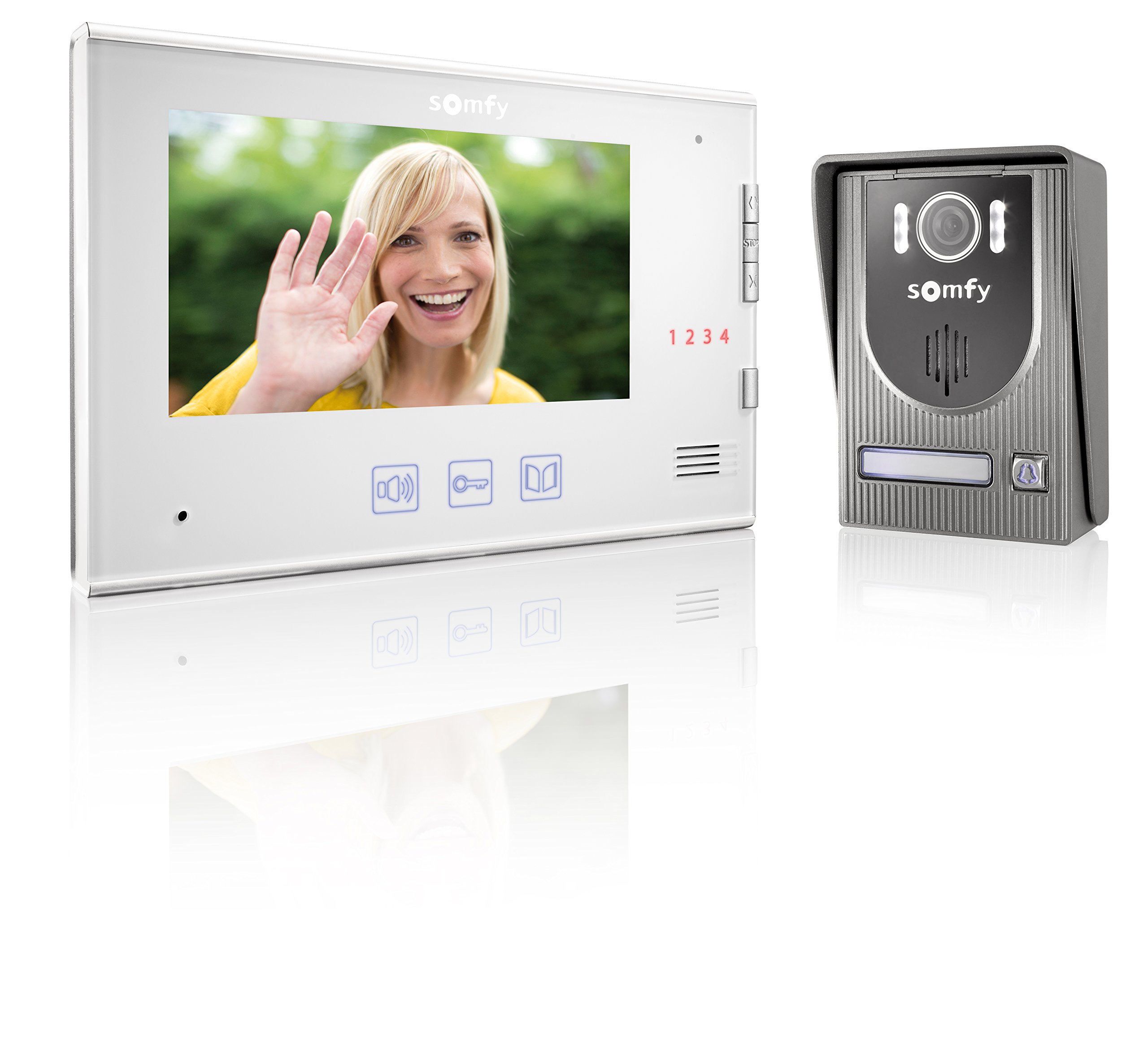
Image: Somfy V250 Outdoor Station with camera, LEDs, speaker, and call button.
4.2. Monitor de interior
The indoor monitor is the central control unit inside your home and features:
- Pantalla a color de 7 pulgadas: Shows live video from the outdoor station.
- Botones de control: For answering calls, opening gates/doors, and controlling RTS devices.
- Micrófono y altavoz: Para comunicación de audio bidireccional.
- RTS Control Point: Integrated module to manage up to 5 Somfy RTS products.

Image: Somfy V250 Indoor Monitor with 7-inch display and control buttons.
5. Instalación y configuración
The Somfy V250 system uses a simple 2-wire connection between the indoor monitor and the outdoor station.
5.1. Preparación del sitio
- Choose a suitable location for the outdoor station, typically near your gate or main entrance, at a height of approximately 1.5 to 1.6 meters from the ground. Avoid direct sunlight or strong backlighting if possible.
- Select a convenient indoor location for the monitor, away from direct heat sources or moisture.
- Ensure the maximum distance between the monitor and the outdoor station does not exceed 100 meters.
5.2. Montaje de la estación exterior
- Marque los puntos de perforación en la pared utilizando el soporte de montaje como plantilla.
- Taladre agujeros e inserte tacos de pared.
- Asegure el soporte de montaje a la pared.
- Connect the 2-wire cable from the indoor monitor to the designated terminals on the outdoor station. Ensure correct polarity if specified.
- Attach the outdoor station to the mounting bracket.
5.3. Montaje del monitor interior
- Mark the drilling points for the indoor monitor's mounting bracket.
- Taladre agujeros e inserte tacos de pared.
- Asegure el soporte de montaje a la pared.
- Connect the 2-wire cable from the outdoor station to the designated terminals on the indoor monitor.
- Conecte el adaptador de corriente al monitor interior y enchúfelo a una toma de corriente.
- Conecte el monitor interior a su soporte de montaje.
5.4. Initial Power-Up and RTS Pairing
- Once all connections are secure, power on the indoor monitor.
- The monitor should display the live feed from the outdoor station or a standby screen.
- To pair Somfy RTS products: Refer to the specific instructions for your RTS device. Generally, you will need to put the RTS device into programming mode and then activate the pairing function on the V250 indoor monitor (usually by pressing a dedicated RTS button or navigating through a menu).
- Test the RTS control functionality after pairing.
6. Operating the Somfy V250 Intercom
6.1. Recibir una llamada
When a visitor presses the call button on the outdoor station:
- The indoor monitor will ring and display the live video feed from the outdoor camera.
- Presione el Respuesta button (often represented by a phone icon) on the monitor to establish two-way audio communication.
- Para finalizar la llamada, presione la tecla Finalizar llamada button. The call will automatically end after a set duration if not answered or manually ended.

Image: A person pressing the call button on an outdoor intercom station.
6.2. Viewing Visitors (Monitoring)
Puedes hacerlo manualmente view the outdoor station's camera feed at any time without a call:
- Presione el Monitor button (often represented by an eye or camera icon) on the indoor monitor.
- The display will show the live video feed. You can initiate two-way communication if desired.
6.3. Opening Gate/Door
During a call or while monitoring, you can open an electric gate or door connected to the system:
- Presione el Descubrir or Puerta abierta button (often represented by a key or gate icon) on the indoor monitor.
- The connected gate or door will activate.
6.4. Controlling Somfy RTS Products
The V250 monitor allows control of up to 5 paired Somfy RTS devices:
- Use the dedicated RTS control buttons or navigate through the monitor's menu to select and operate your paired RTS devices (e.g., open/close roller shutters, turn lights on/off).
- Refer to the monitor's on-screen interface for specific RTS control options.

Image: A modern house equipped with Somfy roller shutters, illustrating RTS product integration.
7. Mantenimiento
- Limpieza: Utilice un paño suave y seco.amp cloth to clean the surfaces of the indoor monitor and outdoor station. Do not use abrasive cleaners, solvents, or chemical sprays.
- Estación al aire libre: Periodically check the camera lens and microphone/speaker grilles for dirt or obstructions and gently clean them.
- Alambrado: Asegúrese de que todas las conexiones del cableado permanezcan seguras y libres de daños.
- Actualizaciones de software: Check the Somfy website for any available firmware updates for your V250 system.
8. Solución de problemas
| Problema | Posible causa | Solución |
|---|---|---|
| No hay imagen en el monitor interior. | Problema de energía, cableado suelto, mal funcionamiento de la cámara. | Check power connection. Verify 2-wire connection between monitor and outdoor station. Restart the system. |
| No hay sonido durante la comunicación. | Volume too low, microphone/speaker obstruction, wiring issue. | Adjust volume on indoor monitor. Check for obstructions on outdoor station's speaker/mic. Verify wiring. |
| Gate/door not opening. | Incorrect wiring to gate/door opener, opener malfunction, system not receiving command. | Check wiring to the gate/door opener. Ensure the opener is functional independently. Consult an electrician. |
| RTS product not responding. | RTS product not paired, out of range, battery low (for battery-powered RTS devices). | Re-attempt RTS pairing. Ensure RTS product is within range of the monitor. Check battery if applicable. |
| Operación intermitente. | Conexiones sueltas, interferencias eléctricas. | Check all wiring connections. Ensure no strong electrical interference sources are nearby. |
9. Especificaciones técnicas
| Característica | Detalle |
|---|---|
| Modelo | Somfy V250 |
| Pantalla de monitor de interior | 7-inch (17.8 cm) Color Display |
| Cámara de estación exterior | Integrated with Night Vision (White LEDs) |
| Alambrado | 2-wire connection between monitor and outdoor station |
| Max. Distance (Monitor to Outdoor Station) | 100 metros |
| Control de estrategia en tiempo real | Integrated wireless control for up to 5 Somfy RTS products |
| Color | White (Indoor Monitor), Grey (Outdoor Station) |
| Material | Plástico |
| Peso del artículo | 1.16 kilogramos |
| Dimensiones del artículo (largo x ancho x alto) | 39 x 29 x 8.5 centímetros |
| Fabricante | SOMFY |
10. Garantía y soporte
Somfy products are designed for reliability and durability. For detailed warranty information, please refer to the warranty card included with your product or visit the official Somfy websitio.
If you encounter any issues that cannot be resolved using the troubleshooting guide, or if you require technical assistance, please contact Somfy customer support:
- Soporte en línea: Visita www.somfy.com for FAQs, product documentation, and support contact details.
- Servicio al cliente: Contact information for your region can be found on the Somfy websitio.
Please have your product model (V250) and purchase date ready when contacting support.
Ask a question about this manual
Ask about setup, troubleshooting, compatibility, parts, safety, or missing instructions. Manuals+ will review the question and use this page’s manual context to help answer it.