
Introducción
The Anderic RR3UNV is a versatile 3-device universal remote control designed to simplify the management of your entertainment systems. This remote can control up to three different devices, including TVs, DVD players, VCRs, cable boxes, satellite receivers, and audio systems. It features a learning function for expanded compatibility and glow-in-the-dark buttons for ease of use in low-light conditions. This manual provides detailed instructions for setup, operation, and maintenance of your RR3UNV remote control.
Configuración
1. Instalación de la batería
The Anderic RR3UNV remote requires two (2) AA batteries for operation. Ensure correct polarity when inserting the batteries.
- Abra la tapa del compartimiento de la batería ubicada en la parte posterior del control remoto.
- Inserte dos pilas AA nuevas, haciendo coincidir los terminales (+) y (-) como se indica dentro del compartimento.
- Cierre bien la tapa del compartimento de la batería.

Imagen: Trasera view of the Anderic RR3UNV remote control, showing the battery compartment cover at the bottom. The back is black with a textured grip area.
2. Programación del control remoto
The RR3UNV can be programmed using direct code entry or the learning function. Refer to the included code booklet for a list of compatible device codes.
2.1. Entrada directa de código
- Encienda el dispositivo que desea programar (por ejemplo, TV, reproductor de DVD).
- Mantenga presionado el botón del dispositivo deseado (TV, DVD, o AUDIO) for approximately 5 seconds until the device button lights up and stays lit.
- Enter the 3-digit code for your device brand from the code booklet.
- If the code is valid, the device button light will blink twice and then turn off.
- Pruebe el control remoto presionando el FUERZA button. If the device turns off, the programming was successful. If not, repeat the process with the next code listed for your brand.
2.2 Función de aprendizaje
The learning function allows the RR3UNV to learn commands directly from your original remote control.
- Place the RR3UNV and your original remote control head-to-head on a flat surface, approximately 1-2 inches apart.
- Mantenga presionado el botón del dispositivo deseado (TV, DVD, o AUDIO) on the RR3UNV for approximately 5 seconds until the device button lights up and stays lit.
- Press and release the button on the RR3UNV that you want to program (e.g., FUERZA). The device button light will start blinking slowly.
- Press and hold the corresponding button on your original remote control (e.g., FUERZA).
- The device button light on the RR3UNV will blink rapidly three times and then stay lit, indicating successful learning.
- Repeat steps 3-5 for all other buttons you wish to program.
- To exit learning mode, press the device button again. The light will turn off.
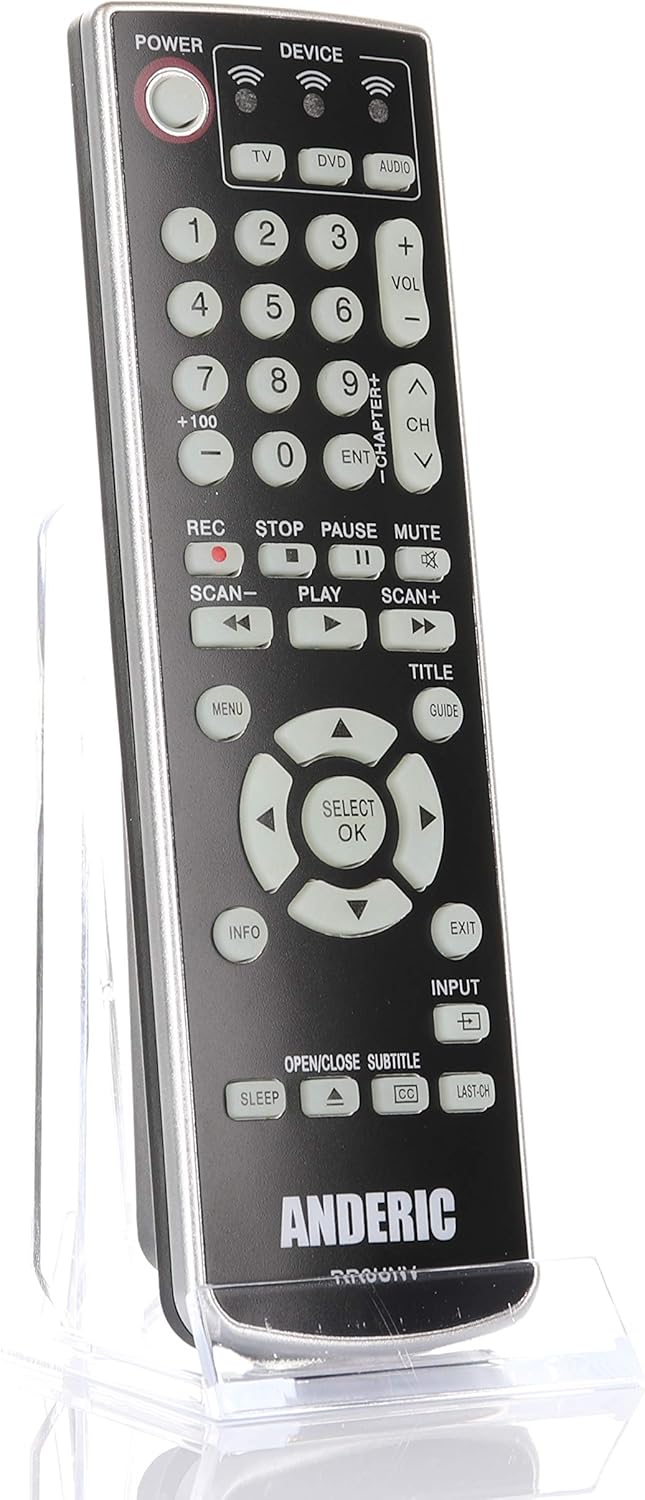
Imagen: Frente view of the Anderic RR3UNV remote control. It is black with silver trim, featuring glow-in-the-dark buttons for power, device selection, number pad, volume, channel, playback, menu, and navigation controls.
Operación del control remoto
Once programmed, the Anderic RR3UNV remote functions like your original remote. Select the desired device mode before sending commands.
- Selección de dispositivo: Presione el TV, DVD, o AUDIO button to select the device you want to control. The selected device button will light up briefly.
- Fuerza: Presione el FUERZA Botón para encender o apagar el dispositivo seleccionado.
- Control de volumen: Utilice el VOL+ y vol- Botones para ajustar el volumen.
- Control de canales: Utilice el CH+ y CH- Botones para cambiar de canal.
- Silenciar: Presione el MUTE Botón para silenciar el audio.
- Teclado numérico: Utilice los botones numéricos (0-9) para ingresar directamente números de canal u otras entradas numéricas.
- Controles de reproducción: Botones como JUGAR, PAUSA, DETENER, REC, ESCANEAR-, y ESCANEAR+ control media playback functions.
- Navegación: The directional arrow buttons and SELECT/OK button are used for menu navigation.
- Menu/Guide/Info/Exit: These buttons provide access to device-specific menus, program guides, information displays, and exit functions.
- Aporte: El APORTE button cycles through available input sources on your TV.
- Dormir: El DORMIR button may activate a sleep timer function on compatible devices.
- CC/Subtitles: El CC/SUBTITLE button toggles closed captions or subtitles.
Mantenimiento
- Reemplazo de batería: Replace batteries when the remote's performance degrades or if the device indicator light does not illuminate. Always replace both AA batteries at the same time with new ones.
- Limpieza: Clean the remote control with a soft, dry cloth. Do not use liquid cleaners or abrasive materials, as they may damage the remote's surface or internal components.
- Almacenamiento: Store the remote in a dry place away from direct sunlight and extreme temperatures. If storing for an extended period, remove the batteries to prevent leakage.
Solución de problemas
| Problema | Posible causa | Solución |
|---|---|---|
| El control remoto no funciona en absoluto. | Pilas muertas o insertadas incorrectamente. | Reemplace las baterías con baterías AA nuevas, asegurándose de la polaridad correcta. |
| El control remoto controla algunas funciones pero no otras. | Incorrect device code or incomplete learning. | Try a different code for your device brand or re-program specific buttons using the learning function. |
| Device does not respond to remote commands. | Remote not aimed correctly; obstruction; device not selected. | Ensure the remote is aimed directly at the device's IR sensor. Remove any obstructions. Press the correct device button (TV, DVD, AUDIO) before sending commands. |
| La función de aprendizaje falla. | Original remote batteries low; remotes too far apart; ambient light interference. | Ensure original remote has fresh batteries. Place remotes 1-2 inches apart. Try learning in a dimly lit room. |
Presupuesto
- Marca: Andérico
- Nombre del modelo: RR3UNV
- Número de modelo: RR3UNV
- Número máximo de dispositivos compatibles: 3
- Tecnología de conectividad: Infrarrojos (IR)
- Tipo de batería: 2 pilas AA (no incluidas)
- Alcance máximo: Aproximadamente 25 pies (7.6 metros)
- Button Quantity: 41
- Características especiales: Universal compatibility, Learning function, Glow-in-the-dark buttons
- Dispositivos compatibles: TV, DVD, VCR, Cable, Satellite, Audio, DVD/VCR Combos, TV/DVD/VCR Combos
Información de garantía
Anderic products typically come with a limited warranty covering manufacturing defects. For specific warranty details, including duration and terms, please refer to the documentation included with your purchase or visit the official Anderic webSitio. Conserve su comprobante de compra para reclamaciones de garantía.
Atención al cliente
For technical assistance, programming help, or general inquiries regarding your Anderic RR3UNV remote control, please contact Anderic customer support:
- Websitio: www.anderic.com
- Teléfono: 1-855-573-6683
Please have your model number (RR3UNV) and a description of your issue ready when contacting support.