1. Introducción
Thank you for choosing the Coolgear USB C Hub. This device is designed to expand your computer's connectivity by providing four additional USB 3.1 Gen1 SuperSpeed ports (one USB-C and three USB-A) from a single USB Type-B upstream connection. It is ideal for connecting multiple USB peripherals such as external hard drives, keyboards, mice, printers, and more, all while maintaining high-speed data transfer capabilities.
2. Características
- Compliant with USB 3.1 Gen 1 Specifications.
- Provides 4 (1 USB-C and 3 USB-A) downstream facing USB 3.1 ports.
- Supports 5Gbps (SuperSpeed), 480Mbps (High-Speed), 12Mbps (Full-Speed), and 1.5Mbps (Low-Speed) speeds.
- Supports 15KV ESD Surge Protection for enhanced durability.
- Supports USB battery charging: CDP (Charging Downstream Port) and DCP (Dedicated Charging Port) modes.
- Industrial-grade metal housing with mounting flanges for secure installation.
- Wide range 7-48V DC power input via terminal block.
3. Contenido del paquete
Por favor verifique que todos los artículos estén presentes en su paquete:
- Coolgear USB C Hub (Model CG-4PU31C1B1)
- Cable USB 3.1 tipo B a tipo A
- Mounting Hardware (screws and clip)

Image: All components included in the Coolgear USB C Hub package.
4. Configuración
Follow these steps to set up your Coolgear USB C Hub:
- Conectarse al ordenador host: Locate the USB 3.1 Type-B port on the hub (labeled '0' with a USB-B icon). Connect one end of the provided USB 3.1 Type-B to Type-A cable to this port. Connect the other end (Type-A) to an available USB 3.1 (or compatible) port on your host computer.
- Conectar periféricos: Connect your USB devices (e.g., flash drives, external hard drives, keyboards, mice) to the available downstream USB-A ports (labeled '2', '3', '4') or the USB-C port (labeled '1').
- Power Connection (Optional/Required for high-power devices): For stable operation, especially with multiple high-power devices, connect a 7-48V DC power supply to the terminal block on the hub. Ensure correct polarity (+ and -). The 'PWR' LED indicator will illuminate when power is supplied.
- Montaje (opcional): The hub features integrated mounting flanges. Use appropriate screws to secure the hub to a surface if permanent installation is desired.

Image: The USB 3.1 Type-B upstream cable connected to the hub.
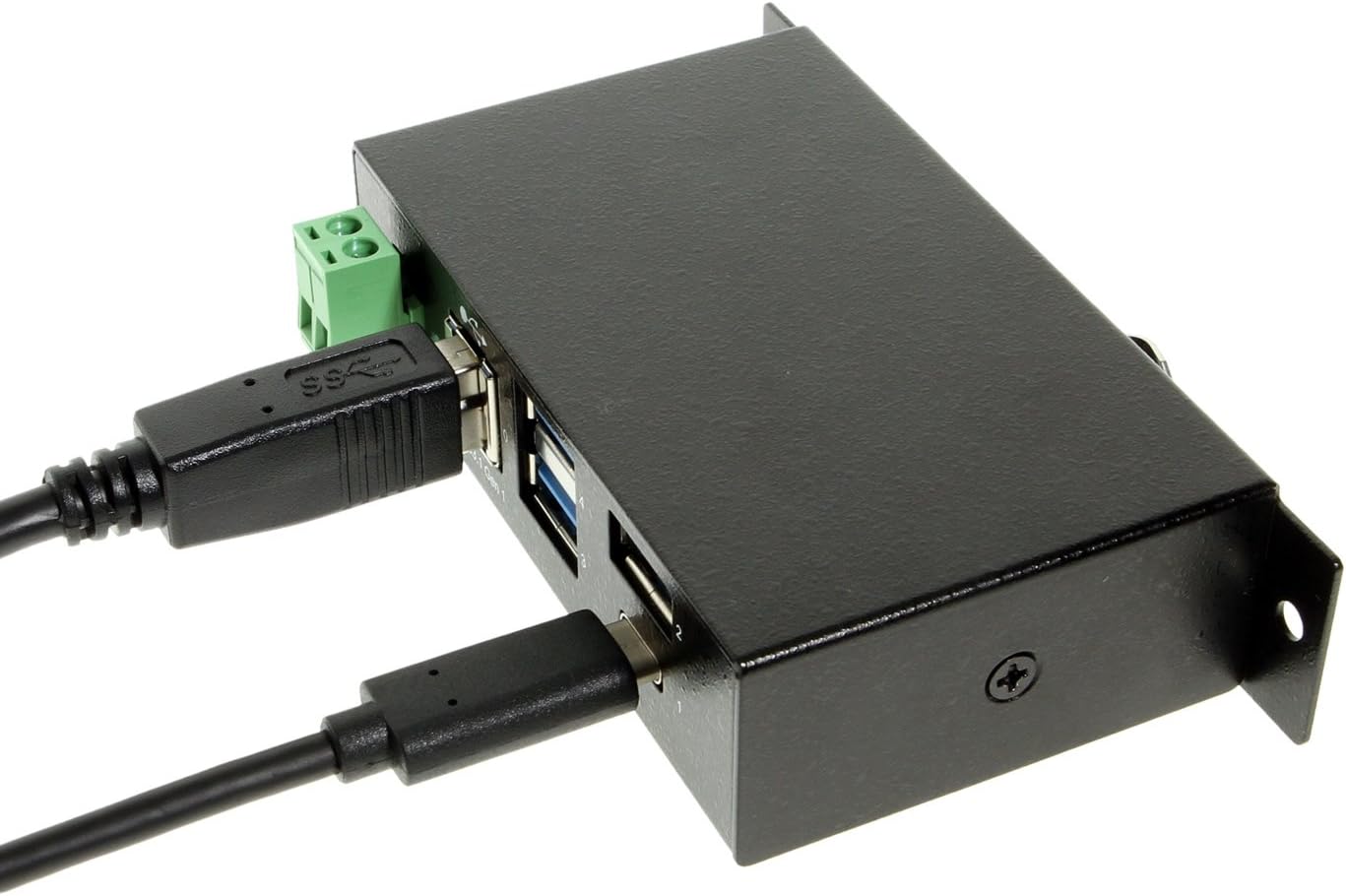
Image: The hub with both upstream (Type-B) and a downstream (Type-C) device connected.

Imagen: Frente view of the hub, highlighting the power input terminal block and various USB ports.

Imagen: Lateral view of the hub demonstrating the integrated mounting bracket.
5. Operación
The Coolgear USB C Hub is a plug-and-play device, requiring no special drivers for most operating systems. Once connected, your computer should automatically detect the hub and any connected devices.
- Transferencia de datos: Enjoy SuperSpeed data transfer rates of up to 5Gbps with compatible USB 3.1 Gen1 devices. The hub is also backward compatible with USB 2.0 and USB 1.1 devices, operating at their respective speeds.
- Cargando: The hub supports USB battery charging (CDP and DCP modes), allowing you to charge compatible devices connected to its downstream ports.
- Indicador LED: The 'PWR' LED indicates that the hub is receiving power.
6. Especificaciones
| Característica | Especificación |
|---|---|
| Número de modelo | CG-4PU31C1B1 |
| Dimensiones del producto | 3.74 x 2.23 x 1.03 pulgadas |
| Peso del artículo | 15 onzas |
| Marca | Equipos de refrigeración |
| Color | Negro |
| Interfaz de hardware | USB, USB tipo C |
| Velocidad de transferencia de datos | Up to 5Gbps (USB 3.1 Gen1 SuperSpeed) |
| Protección ESD | 15 kV |
| Entrada de potencia | +7~48V DC via Terminal Block |
| Dispositivos compatibles | Laptops, Desktops, Keyboards, Mouse, Printers, Tablets |
7. Solución de problemas
If you encounter issues with your Coolgear USB C Hub, please refer to the following common problems and solutions:
- Dispositivo no reconocido:
- Ensure all cables are securely connected to both the hub and the host computer.
- Intente conectar el concentrador a un puerto USB diferente en su computadora.
- If using an external power supply, ensure it is correctly connected and providing the specified voltage.
- Reinicie su computadora.
- Velocidades lentas de transferencia de datos:
- Verify that both your host computer's USB port and the connected device support USB 3.1 Gen1 (SuperSpeed).
- Ensure you are using a high-quality USB 3.1 cable.
- Evite conectar demasiados dispositivos con gran ancho de banda simultáneamente.
- Power Issues / Devices Not Charging:
- Ensure an external power supply is connected if you are using high-power devices or charging.
- Compruebe el voltaje de la fuente de alimentacióntage and current to ensure it meets the hub's requirements.
- Some devices may require more power than the hub can provide, even with an external power supply.
8. Mantenimiento
To ensure the longevity and optimal performance of your Coolgear USB C Hub, follow these maintenance guidelines:
- Limpieza: Utilice un paño suave y seco para limpiar el exterior del concentrador. No utilice limpiadores líquidos ni aerosoles.
- Almacenamiento: Guarde el concentrador en un lugar fresco y seco, alejado de la luz solar directa y de temperaturas extremas cuando no esté en uso.
- Manejo: Avoid dropping the hub or subjecting it to strong impacts. Do not attempt to disassemble the unit.
- Ambiente: Keep the hub away from water, moisture, and excessive dust.
9. Garantía y soporte
Coolgear products are designed for reliability and performance. For specific warranty information, please refer to the documentation included with your purchase or visit the official Coolgear website. If you require technical assistance or have questions about your product, please contact Coolgear customer support through their official channels.
Para obtener más información y asistencia, visite el Coolgear Store on Amazon.