
1. Introducción
The Duronic DMUSB5X1 is a desk-mounted monitor arm designed to optimize your workspace. It features a gas spring mechanism for smooth, effortless adjustments, allowing you to position your monitor for optimal viewing comfort. This model also integrates a USB hub and audio ports for convenient connectivity directly at your desk.
This manual provides detailed instructions for the safe and efficient installation, operation, and maintenance of your Duronic DMUSB5X1 monitor arm.
2. Instrucciones de seguridad
- Lea atentamente todas las instrucciones antes del montaje y uso.
- Ensure your desk surface is strong enough to support the monitor arm and attached monitor(s).
- No exceda la capacidad máxima de peso de 8 kg (17.6 lbs) por brazo.
- Ensure all screws and connections are securely tightened before use. Periodically check for tightness.
- Mantenga a los niños y las mascotas alejados del área de reunión.
- Use only the provided hardware. If any parts are missing or damaged, contact Duronic customer support.
- Adjust the gas spring tension carefully to match your monitor's weight. Improper tension can cause the monitor to drop or spring up unexpectedly.
3. Contenido del paquete
Verifique que todos los componentes estén presentes antes de comenzar el ensamblaje:
- Monitor Arm Assembly (Gas Spring Arm, Pole)
- Escritorio Clamp Base
- Placa de montaje VESA
- USB and Audio Extension Cables
- Herrajes de montaje (varios tornillos, arandelas, espaciadores)
- Llaves Allen para montaje y ajuste
4. Configuración e instalación
Follow these steps to install your Duronic DMUSB5X1 monitor arm:
- Adjuntar organizador de escritorioamp: Coloque el escritorio clamp base on your desk edge. Ensure the desk clamp is securely fastened to a stable surface. The clamp can accommodate desk thicknesses up to 68mm. Tighten the clamp atornillar firmemente.

Figura 4.1: Escritorio limpioamp instalación.
- Assemble Arm to Pole: Insert the monitor arm onto the pole of the desk clamp. Secure it with the provided screws and Allen key.
- Conecte la placa VESA al monitor: Carefully place your monitor face down on a soft, clean surface. Attach the VESA mounting plate to the back of your monitor using the appropriate screws and spacers (if needed). The arm supports VESA 75x75mm and 100x100mm patterns.
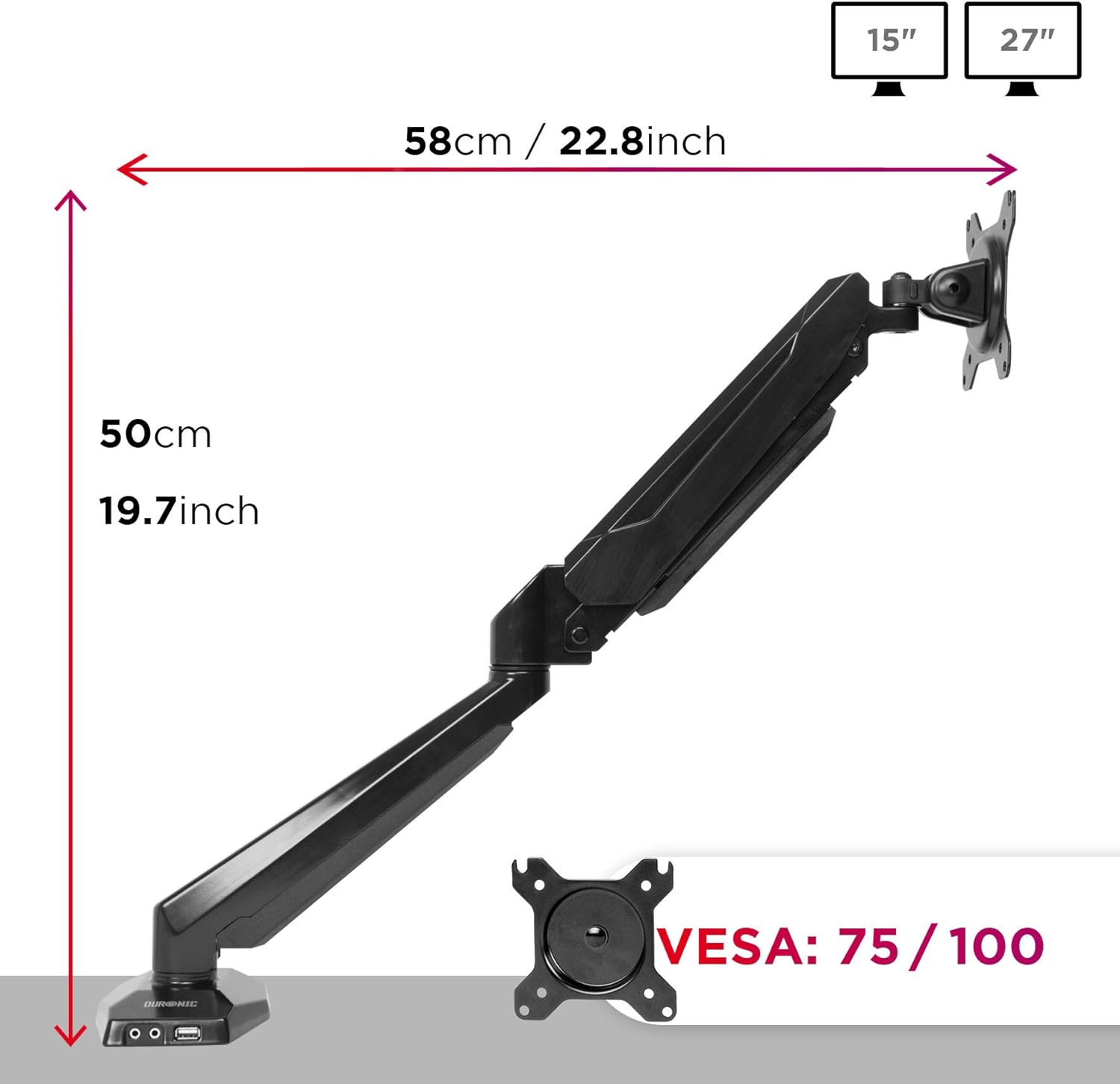
Figure 4.2: VESA plate and arm dimensions.
- Montar el monitor en el brazo: Slide the monitor (with VESA plate attached) onto the arm's VESA head. Secure it with the locking mechanism or screws as per the specific design.
- Connect USB and Audio Cables: Connect the integrated USB and audio extension cables from the monitor arm base to the corresponding ports on your computer. This enables the convenient USB and audio ports on the arm's base.

Figure 4.3: Integrated USB and audio ports.
- Ajuste la tensión del resorte de gas: The gas spring comes pre-tensioned. You may need to adjust it to match your monitor's weight. Use the provided Allen key to turn the adjustment screw on the arm. Turn clockwise to increase tension for heavier monitors, and counter-clockwise to decrease tension for lighter monitors. Adjust until the monitor stays in position when moved.
5. Operación y ajustes
The Duronic DMUSB5X1 offers a wide range of adjustments for optimal viewen:
- Ajuste de altura: The gas spring arm allows for smooth vertical movement. Gently push or pull the monitor to the desired height.
- Inclinación: The VESA head allows tilting the monitor -90° (downwards) to +85° (upwards) to reduce glare and improve viewángulos de ing.
- Girar: The arm can swivel 180° left or right at the pole and at the arm joints, allowing you to share your screen or adjust its position.
- Rotación: The VESA plate allows for 360° rotation, enabling you to switch between landscape and portrait orientations.
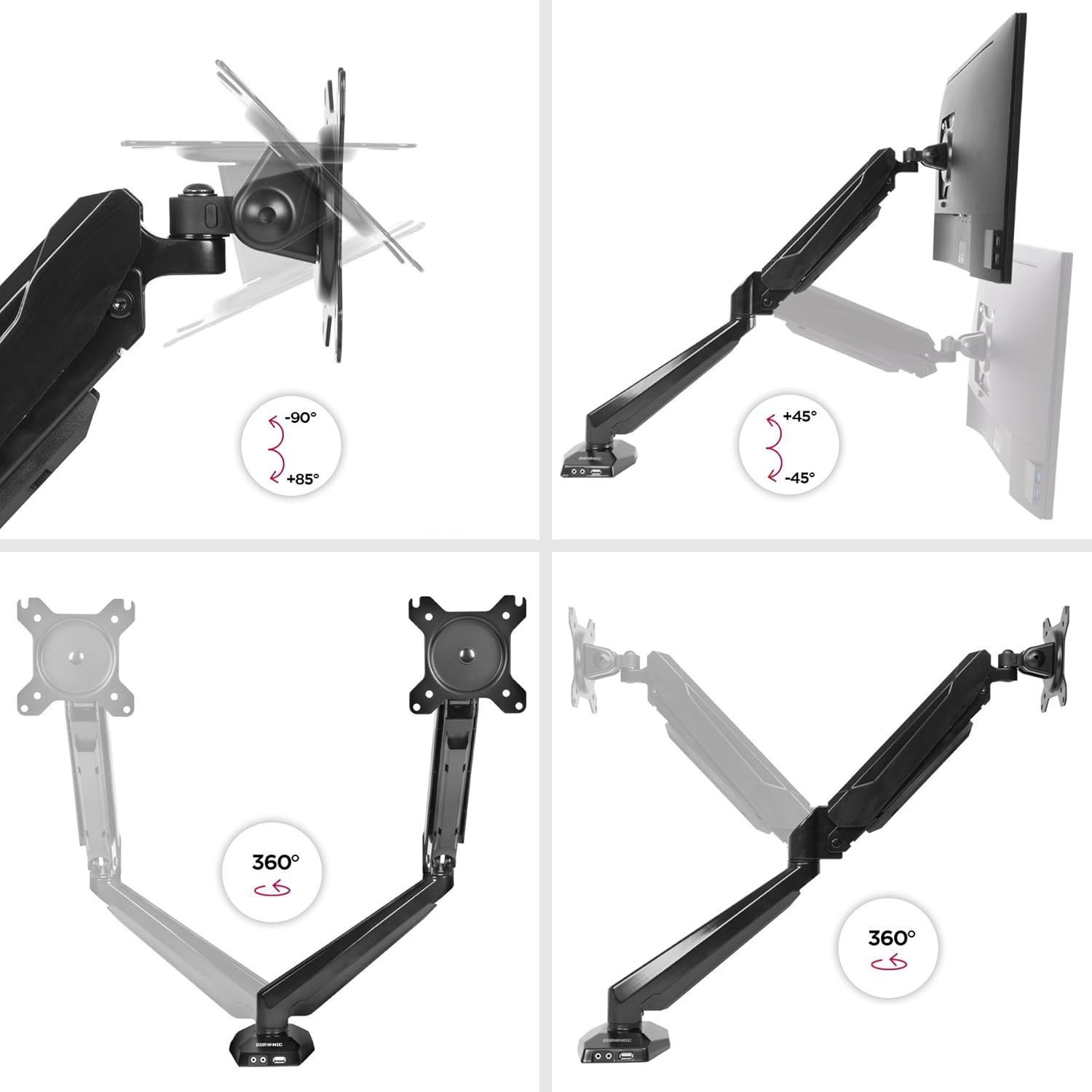
Figure 5.1: Monitor arm adjustment ranges.
- Integrated USB and Audio Ports: Use the two USB 2.0 ports for connecting peripherals like keyboards, mice, or USB drives. The headphone and microphone jacks provide convenient access for audio devices.
6. Mantenimiento
- Limpieza: Limpie el brazo del monitor con un paño suave.amp paño. Evite limpiadores abrasivos o disolventes que puedan dañar el acabado.
- Controles periódicos: Revise periódicamente todos los tornillos y conexiones para asegurarse de que estén bien apretados y seguros. Vuelva a apretarlos si es necesario.
- Ajuste del resorte de gas: If your monitor's weight changes, or if the arm no longer holds its position correctly, re-adjust the gas spring tension as described in the setup section.
7. Solución de problemas
| Problema | Posible causa | Solución |
|---|---|---|
| Monitor does not stay in desired position (sags or springs up). | Incorrect gas spring tension. | Adjust the gas spring tension using the provided Allen key. Turn clockwise for heavier monitors, counter-clockwise for lighter monitors. |
| Monitor cannot be attached to the VESA plate. | Monitor VESA pattern is not compatible (not 75x75mm or 100x100mm). | Verify your monitor's VESA compatibility. An adapter may be required for non-standard patterns. |
| USB or audio ports on the arm base are not working. | Extension cables are not properly connected to the computer. | Ensure the USB and audio extension cables from the monitor arm base are securely plugged into the corresponding ports on your computer. |
| Arm feels loose or unstable. | Escritorio clamp is not tightened sufficiently or desk surface is unstable. | Vuelva a apretar el cierre del escritorio.amp. Ensure the desk surface is stable and within the recommended thickness. |
8. Especificaciones
- Modelo: DMUSB5X1
- Marca: Durónico
- Material: Aluminio
- Compatibilidad del tamaño del monitor: 15-27 pulgadas (38-68 cm)
- Capacidad de peso: Hasta 8 kg (17.6 libras) por brazo
- Compatibilidad VESA: 75 x 75 mm, 100 x 100 mm
- Ajustes:
- Inclinación: -90 ° a + 85 °
- Giro: 180°
- Rotación: 360°
- Escritorio Clamp Espesor: Hasta 68 mm
- Puertos integrados: 2 x USB 2.0, 1 x Headphone Jack, 1 x Microphone Jack
9. Garantía y soporte
Información de garantía: Para conocer los términos y condiciones detallados de la garantía, consulte el sitio web oficial del fabricante. websitio o la tarjeta de garantía incluida con el embalaje de su producto.
Atención al cliente: If you encounter any issues or have questions regarding your Duronic DMUSB5X1 monitor arm, please visit the official Duronic website for support resources, FAQs, and contact information for their customer service team.