
Comix CS-3302
Manual del usuario de la calculadora de escritorio Comix CS-3302 de 12 dígitos
Model: CS-3302 (P/N: 11821063)
Brand: Comix
1. Introducción
This user manual provides comprehensive instructions for the Comix CS-3302 12-Digit Desktop Calculator. Please read this manual thoroughly before using the calculator to ensure proper operation and to maximize its lifespan. This calculator is designed for general office and school use, featuring a large LCD display, dual power source, and various calculation functions.
2. Información de seguridad
- Do not expose the calculator to extreme temperatures, direct sunlight, or high humidity.
- Evite dejar caer la calculadora o someterla a impactos fuertes.
- Do not attempt to disassemble or modify the calculator. This will void the warranty.
- Use a soft, dry cloth for cleaning. Do not use liquid cleaners or abrasive materials.
- Mantener fuera del alcance de los niños pequeños.
3. Producto terminadoview

Figura 3.1: Frente view of the Comix CS-3302 Desktop Calculator, showing the large LCD display and full keypad.
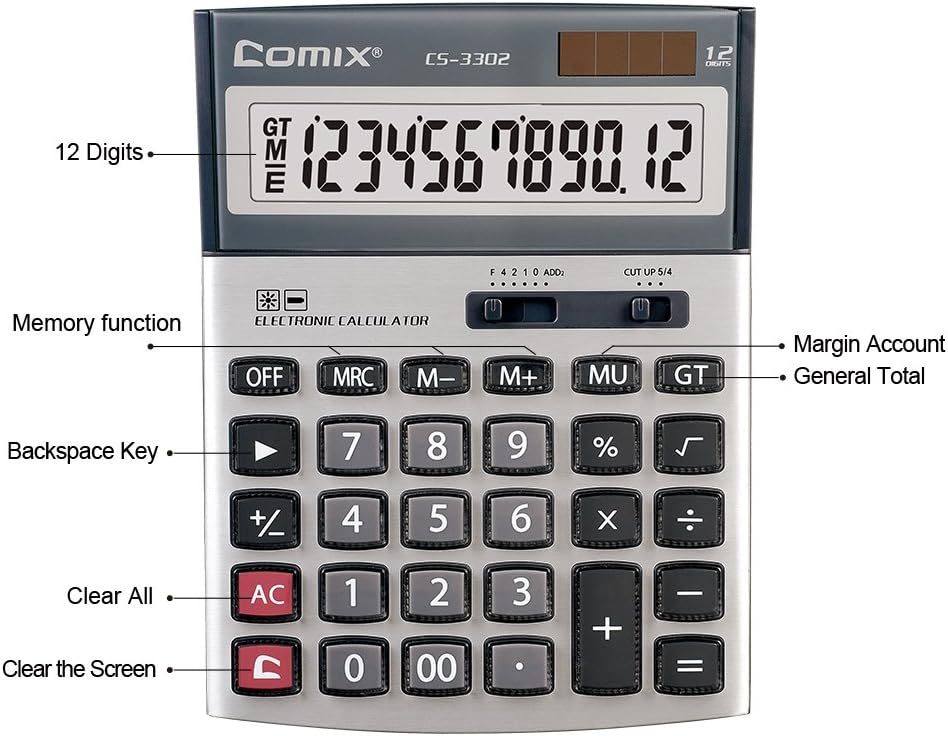
Figura 3.2: Key functions and display features of the Comix CS-3302 Calculator, including 12 digits display, memory functions, and clear keys.

Figura 3.3: Dimensions of the Comix CS-3302 Calculator, showing its compact and ergonomic design.

Figura 3.4: Angular view of the Comix CS-3302 Calculator, highlighting its sleek profile y disposición de teclas.

Figura 3.5: Lado profesionalfile of the Comix CS-3302 Calculator, showing its slim design.

Figura 3.6: Retail packaging of the Comix CS-3302 Calculator, highlighting key features like 12 digits, dual power, and acrylic keys.
4. Configuración
Fuente de alimentación 4.1
The Comix CS-3302 calculator operates on a dual power system: solar and battery. The solar panel provides power in well-lit environments, while a single AA battery (not included) serves as an auxiliary power source for low-light conditions or when solar power is insufficient.
- Instalación de la batería: Locate the battery compartment on the back of the calculator. Open the cover and insert one AA battery, ensuring correct polarity (+/-). Close the battery compartment cover securely.
- Encendido inicial: The calculator should power on automatically when sufficient light is available or with the battery installed. If not, press the ENCENDIDO/CA botón.
5. Instrucciones de funcionamiento
5.1 Operaciones básicas
- Suma (+): Ingrese el primer número, presione +, ingrese el segundo número y luego presione =.
- Resta (-): Ingrese el primer número, presione -, ingrese el segundo número y luego presione =.
- Multiplicación (×): Ingrese el primer número, presione ×, ingrese el segundo número y luego presione =.
- División (÷): Ingrese el primer número, presione ÷, ingrese el segundo número y luego presione =.
- Porcentajetagmi (%): Enter the number, press × (o ÷), enter the percentage value, then press %. Por ejemploampes decir, para calcular el 10% de 200, ingrese 200 × 10 %.
- Raíz cuadrada (√): Ingrese el número y luego presione √.
5.2 Funciones especiales
- OFF: Powers off the calculator.
- Aire acondicionado (todo despejado): Borra todas las entradas y la memoria, restableciendo la calculadora a su estado inicial.
- C (Entrada clara): Clears the last entered number or the current display value without affecting previous calculations or memory.
- Retroceso (►): Elimina el último dígito ingresado.
- M+ (Memoria Plus): Agrega el valor mostrado a la memoria.
- M- (Memoria menos): Resta el valor mostrado de la memoria.
- MRC (Recuperación/borrado de memoria): Presione una vez para recuperar el valor de la memoria. Presione dos veces para borrar la memoria.
- MU (Mark Up / Margin Account): Used for profit margin calculations. Enter cost, press MU, enter selling price, then press = to get the profit margin.
- GT (total general): Accumulates the results of all calculations. Pressing GT displays the grand total.
- +/- (Cambio de signo): Cambia el signo del número mostrado (de positivo a negativo o de negativo a positivo).
5.3 Decimal and Rounding Settings
The calculator features two slide switches at the top for controlling decimal places and rounding:
- Decimal Selector (F 4 2 1 0 ADD2):
- F (Floating Decimal): Displays all available decimal places.
- 4 2 1 0: Sets the number of decimal places to 4, 2, 1, or 0 respectively.
- ADD2 (Modo Agregar): Automatically adds two decimal places to all results, useful for currency calculations.
- Rounding Selector (CUT UP 5/4):
- CUT (Cut Off): Truncates the number, discarding all digits beyond the set decimal places.
- UP (Round Up): Rounds up the last digit if there are any non-zero digits beyond the set decimal places.
- 5/4 (Round Half Up): Rounds up if the first discarded digit is 5 or greater, otherwise rounds down.
6. Mantenimiento
- Limpieza: Wipe the calculator surface with a soft, dry cloth. For stubborn dirt, slightly dampen the cloth with water, but ensure no liquid enters the calculator. Do not use chemical cleaners.
- Almacenamiento: Cuando no utilice la calculadora durante períodos prolongados, guárdela en un lugar fresco y seco, lejos de la luz solar directa y de temperaturas extremas.
- Reemplazo de batería: If the display becomes dim or unresponsive in low light, replace the AA battery. Ensure the calculator is off before replacing the battery.
7. Solución de problemas
| Problema | Posible causa | Solución |
|---|---|---|
| La pantalla está en blanco o tenue. | Luz insuficiente para energía solar o batería baja. | Move to a brighter area or replace the AA battery. |
| Resultados de cálculo incorrectos. | Incorrect input, incorrect decimal/rounding settings, or memory interference. | Prensa AC to clear all and restart. Check decimal and rounding switch positions. Ensure correct key presses. |
| Las teclas no responden. | Calculadora congelada o daño fisico. | Intenta presionar APAGADO entonces ENCENDIDO/CA. If problem persists, remove and reinsert battery. If still unresponsive, contact support. |
8. Especificaciones
| Marca | Cómic |
| Número de modelo | CS-3302 (P/N: 11821063) |
| Mostrar | LCD de 12 dígitos |
| Fuente de poder | Dual Power (Solar & 1x AA Battery - not included) |
| Material | Acrílico, Metal |
| Dimensiones (L x An x Al) | Aproximadamente 23.6 x 15.7 x 4.3 cm (9.3 x 6.2 x 1.7 pulgadas) |
| Peso | Aproximadamente 322 g (0.71 libras) |
| Temperatura de funcionamiento | -25 ℃ to +60 ℃ (-13 ℉ to +140 ℉) |
| Código Postal | 842064102524 |
9. Garantía y soporte
Comix products are designed for quality and durability. This product comes with a 3 año de garantía a partir de la fecha de compra, cubriendo defectos de materiales y mano de obra en condiciones normales de uso.
For warranty claims, technical support, or any inquiries regarding your Comix CS-3302 calculator, please contact Comix customer service through their official website or the retailer where the product was purchased. Please have your proof of purchase and the product model number ready when contacting support.
For more information, visit the official Comix websitio: www.comix.com
Ask a question about this manual
Ask about setup, troubleshooting, compatibility, parts, safety, or missing instructions. Manuals+ will review the question and use this page’s manual context to help answer it.