1. Introducción
Thank you for choosing the PatrolEyes PE-DV5-2 Body Camera. This device is designed for professional use, offering high-definition video recording, advanced night vision capabilities, and integrated GPS for reliable evidence collection. This manual will guide you through the setup, operation, and maintenance of your new body camera to ensure optimal performance and longevity.
2. Contenido del paquete
Por favor verifique que todos los artículos estén presentes en su paquete:
- PatrolEyes PE-DV5-2 Body Camera
- Battery (Included Components)
- Cable de datos / carga USB
- de Carga Rápida
- Clip de montaje
- Manual de usuario (este documento)
3. Piezas y controles
Familiarize yourself with the various parts and controls of your PatrolEyes PE-DV5-2 body camera.

Figura 3.1: Frente view of the PatrolEyes PE-DV5-2 body camera, highlighting the central camera lens, surrounding infrared (IR) lights for night vision, and the PatrolEyes logo at the bottom. The device has a rugged, black casing.

Figura 3.2: Front-side perspective of the PatrolEyes PE-DV5-2 body camera, providing a clearer view of the camera lens and the array of control buttons located on the side panel, including the yellow button at the top.

Figura 3.3: Lado view of the PatrolEyes PE-DV5-2 body camera, prominently featuring the red record button and the covered USB port for charging and data transfer.
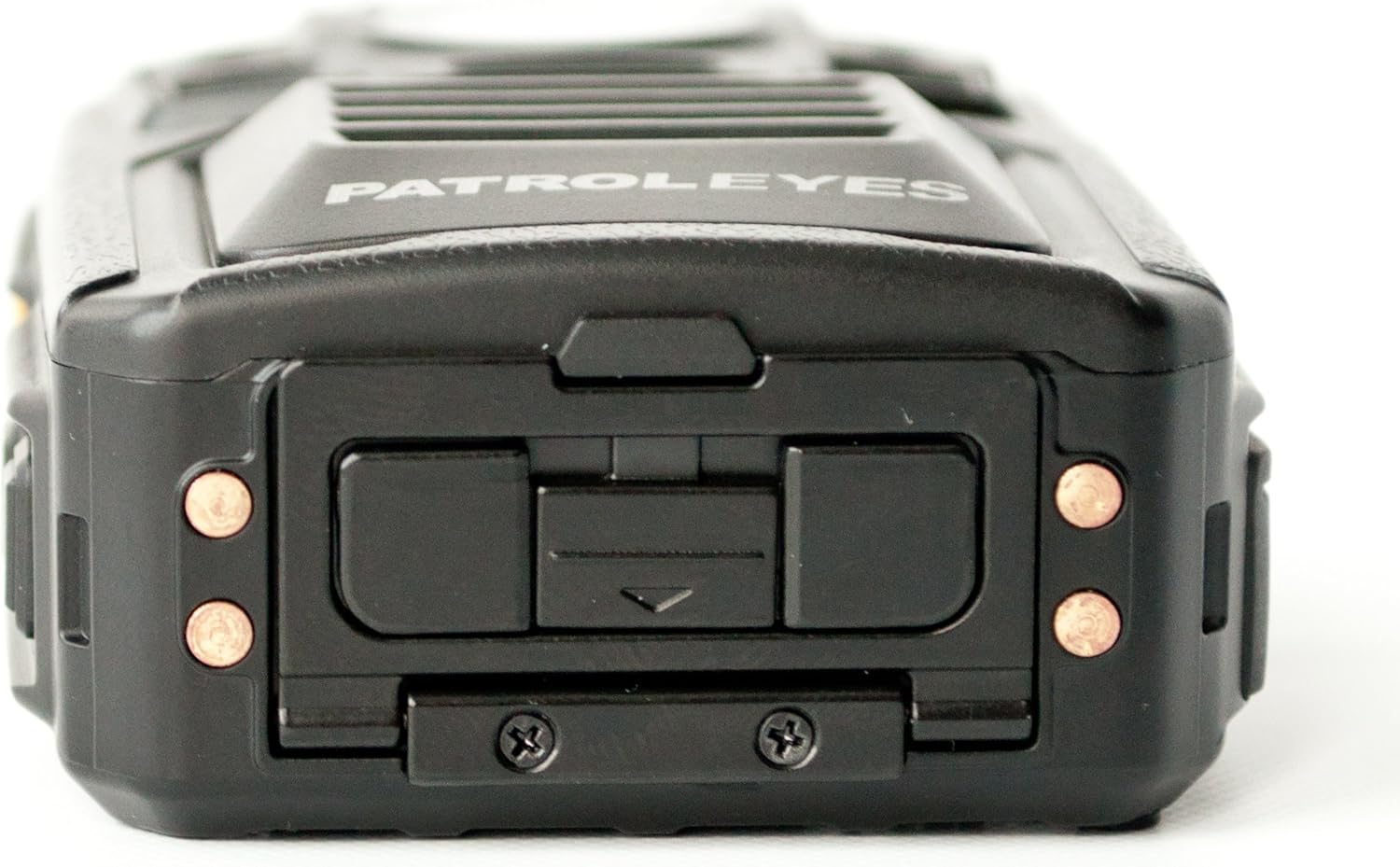
Figura 3.4: Arriba view of the PatrolEyes PE-DV5-2 body camera, displaying the GPS indicator light and other top-mounted features.

Figura 3.5: Abajo view of the PatrolEyes PE-DV5-2 body camera, revealing the charging contacts designed for use with a docking station.
4. Primeros pasos
4.1. Carga de la batería
Before first use, fully charge the camera's battery. The camera comes with a rechargeable battery.
- Connect the USB charging cable to the camera's USB port.
- Plug the other end of the USB cable into the wall charger and then into a power outlet.
- The charging indicator light will illuminate. It will change color or turn off once charging is complete.
Alternatively, use a compatible docking station (sold separately) for charging.
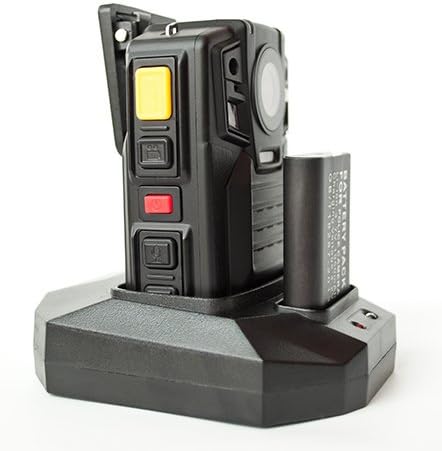
Figura 4.1: The PatrolEyes body camera securely placed in its docking station, which also features a dedicated slot for charging an additional battery pack.

Figura 4.2: Trasero view of the PatrolEyes docking station, clearly showing the power input port and the USB data port for connecting to a computer.
4.2. Encendido / apagado
- Para encender: Press and hold the Power button for a few seconds until the device vibrates and the indicator lights turn on.
- Para apagar: Press and hold the Power button until the device vibrates and the indicator lights turn off.
4.3. Attaching the Mounting Clip
Attach the provided mounting clip to the back of the camera. This allows you to securely fasten the camera to your uniform or gear.
5. Operación de la cámara
5.1. Grabación de vídeo
The camera supports video capture resolutions of 1080p, 480p, and 720p.
- Asegúrese de que la cámara esté encendida.
- Presione el botón dedicado Botón de grabación (often red) once to start video recording. The recording indicator light will flash.
- Presione el Botón de grabación de nuevo para detener la grabación. La luz indicadora dejará de parpadear.
5.2. Tomar fotografías
The camera has an effective still resolution of 33 MP.
- While in standby mode or during video recording, press the Botón de foto once to capture a still image.
5.3. Visión nocturna (IR)
The camera features auto IR night vision with a range of 30 feet, utilizing infrared light sources.
- The camera is equipped with automatic infrared (IR) activation. In low-light conditions, the IR lights will automatically turn on to provide clear night vision footage.
5.4. Funcionalidad GPS
The integrated GPS module automatically records location data with your video footage. Ensure the camera has a clear view del cielo para una adquisición óptima de la señal GPS.
5.5. Reproducción
Puedes volver aview Graba vídeos y fotos directamente en la pantalla de la cámara.
- Enter Playback mode via the menu or a dedicated button (refer to on-screen prompts).
- Navegar a través de files using the directional buttons.
- Press the OK/Select button to play a video or view una fotografía.
5.6. Conexión a una computadora
Para transferir files, conecte la cámara a una computadora usando el cable USB provisto.
- Encienda la cámara.
- Conecte la cámara a su computadora usando el cable USB.
- La cámara aparecerá como una unidad de disco extraíble en su computadora.
- You can now access and transfer video and photo files.
6. Mantenimiento y cuidado
6.1. Limpieza
- Limpie el cuerpo de la cámara con un paño suave.amp paño. No utilice productos químicos agresivos ni limpiadores abrasivos.
- Para la lente, utilice un paño y una solución de limpieza de lentes especializados para evitar rayones.
6.2. Almacenamiento
- Guarde la cámara en un lugar fresco y seco, alejado de la luz solar directa y de temperaturas extremas.
- Ensure the battery is partially charged (around 50%) if storing for extended periods to preserve battery life.
6.3. Cuidado de la batería
- Evite descargar completamente la batería con frecuencia.
- Utilice únicamente accesorios de carga originales o aprobados.
7. Solución de problemas
| Problema | Posible causa | Solución |
|---|---|---|
| La cámara no se enciende. | Carga de batería baja o nula. | Cargue la batería completamente. |
| No se pueden grabar vídeos ni tomar fotografías. | Almacenamiento lleno. | Transferir files to a computer and delete them from the camera. |
| Mala calidad de video/imagen. | Lente sucia; condiciones de poca luz. | Clean the lens; ensure IR is active in low light. |
| El GPS no adquiere señal. | Obstruido view de cielo; uso interior. | Muévete a un área abierta al aire libre. |
| Cámara no reconocida por la computadora. | Cable USB defectuoso; problema con el controlador. | Try a different USB port/cable; ensure camera is powered on. |
8. Especificaciones
| Característica | Detalle |
|---|---|
| Número de modelo | PE-DV5-2 |
| Resolución de captura de video | 1080p, 480p, 720p |
| Resolución de imágenes fijas efectiva | 33 MP |
| Velocidad de cuadros | 30 fps |
| Rango de visión nocturna | 30 pies |
| Tecnología de conectividad | Inalámbrico (Wi-Fi) |
| Fuente de poder | Funciona con pilas |
| Componentes incluidos | Batería |
| Calificación de protección internacional | IP54 |
| Características especiales | Sensor de movimiento, visión nocturna |
| Uso en interiores y exteriores | Interior, exterior |
| Fabricante | PatrullaOjos |
| Primera fecha disponible | 14 de mayo de 2017 |
9. Información de garantía
PatrolEyes products typically come with a limited manufacturer's warranty. Please refer to the warranty card included with your purchase or visit the official PatrolEyes webConsulte el sitio web para conocer los términos y condiciones detallados de la garantía. Conserve su comprobante de compra para reclamar la garantía.
10. Atención al cliente
For technical assistance, troubleshooting beyond this manual, or inquiries about your PatrolEyes PE-DV5-2 body camera, please contact PatrolEyes customer support. Contact information can typically be found on the manufacturer's websitio o en el embalaje del producto.
Recursos en línea: Visit the official PatrolEyes webSitio para preguntas frecuentes, actualizaciones de software y materiales de soporte adicionales.