
Alarm.com ADC-V723x
Manual del usuario de la cámara Wi-Fi para exteriores ADC-V723 de Alarm.com
Model: ADC-V723x
1. Producto terminadoview
The Alarm.com ADC-V723 is a high-definition 1080p outdoor Wi-Fi camera designed to provide reliable surveillance for your property. Featuring High Dynamic Range (HDR) and powerful Video Analytics, it can detect and alert you to people, vehicles, and animals. Its robust design ensures performance in various lighting conditions and environments. This manual provides comprehensive instructions for installation, operation, and maintenance.
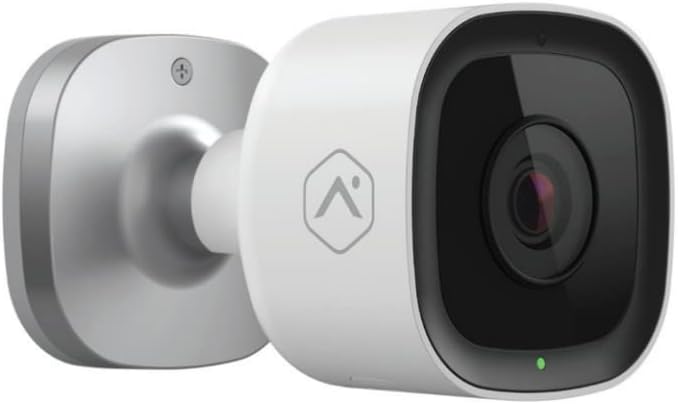
Imagen: Frente view of the Alarm.com ADC-V723 Outdoor Wi-Fi Camera, showing its compact, bullet-style design and lens.
2. Información de seguridad
- Ensure the camera is installed in a location that complies with local building codes and regulations.
- Utilice únicamente el adaptador de corriente suministrado con la cámara.
- No exponga la cámara a temperaturas extremas fuera de su rango operativo.
- Evite colocar la cámara cerca de fuentes de fuerte interferencia electromagnética.
- Desconecte la alimentación antes de limpiar o realizar cualquier mantenimiento.
3. Contenido del paquete
Verifique que todos los artículos estén presentes en su paquete:
- Alarm.com ADC-V723 Outdoor Wi-Fi Camera
- Placa de montaje
- Tornillos de montaje y anclajes de pared
- Adaptador de corriente
- Guía de instalación (este documento)
4. Configuración e instalación
4.1 Elegir una ubicación
Seleccione una ubicación al aire libre que proporcione el resultado deseado. viewing angle and is within range of your Wi-Fi network. The camera is designed for outdoor use and is IP67 rated for weather resistance. Consider areas with good lighting or where the camera's night vision capabilities can be maximized.
4.2 Montaje de la cámara
- Secure the mounting plate to the desired surface using the provided screws and wall anchors. Ensure the plate is level.
- Attach the camera to the mounting plate by aligning the camera with the plate and twisting until it locks securely.
- Adjust the camera's angle to achieve the optimal field of view.
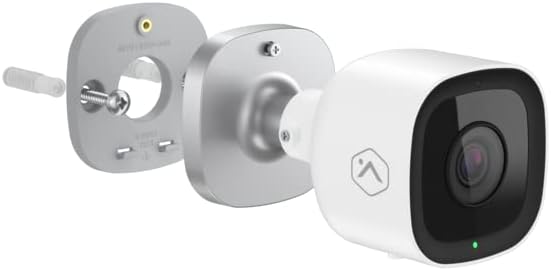
Imagen: Explotada view showing the Alarm.com ADC-V723 camera, its mounting plate, and a screw with wall anchor, illustrating the assembly process.
4.3 Powering On and Connecting to Wi-Fi
- Conecte el adaptador de corriente a la cámara y enchúfelo a una toma de corriente exterior adecuada.
- Wait for the camera's LED indicator to show a specific status (refer to the LED status guide in Section 5.2).
- Download the Alarm.com mobile application from your device's app store.
- Follow the in-app instructions to add the ADC-V723 camera to your Alarm.com system and connect it to your Wi-Fi network. This typically involves scanning a QR code on the camera or entering its MAC address.
5. Operación de la cámara
5.1 en vivo View y Grabación
Access live video feeds and recorded clips through the Alarm.com mobile app or web portal. You can view comida en tiempo realtage, iniciar grabaciones manuales y review event-triggered clips.
5.2 indicadores de estado LED
The camera features an LED indicator that communicates its current status:
- Verde sólido: Connected to Wi-Fi and operating normally.
- Verde intermitente: Attempting to connect to Wi-Fi.
- Rojo sólido: Not connected to Wi-Fi or an error has occurred.
- Rojo intermitente: Firmware update in progress or factory reset.
5.3 Video Analytics and Alerts
The ADC-V723 supports advanced Video Analytics. Configure detection zones and rules within the Alarm.com app to receive specific alerts for people, vehicles, or animals entering designated areas. Alerts can be customized to send notifications to your mobile device.
5.4 Visión nocturna y HDR
The camera is equipped with infrared night vision, allowing clear video capture up to 40 feet in low-light conditions. High Dynamic Range (HDR) technology enhances video quality by balancing bright and dark areas, providing clearer images in challenging lighting environments.
6. Mantenimiento
- Limpie periódicamente la lente de la cámara con un paño suave y húmedo.amp Paño para garantizar una imagen nítida. No utilice productos químicos agresivos.
- Periodically check the mounting hardware to ensure the camera remains securely fastened.
- Ensure the power cable is free from damage and properly secured.
- Keep the camera's firmware updated through the Alarm.com app to ensure optimal performance and access to new features.
7. Solución de problemas
| Problema | Posible causa | Solución |
|---|---|---|
| La cámara no enciende | Sin energía, adaptador defectuoso, conexión suelta. | Check power outlet, ensure connections are secure, try a different outlet. |
| No se puede conectar al wifi | Contraseña de Wi-Fi incorrecta, cámara demasiado lejos del enrutador, interferencia de red. | Verify Wi-Fi password, move camera closer to router, reduce interference, restart router. |
| Mala calidad de video | Lente sucia, ancho de banda bajo, mala iluminación. | Clean lens, check internet speed, ensure adequate lighting or rely on night vision. |
| Sin alertas de movimiento | Incorrect Video Analytics settings, notifications disabled. | Review and adjust Video Analytics rules in the app, enable notifications for the camera. |
8. Especificaciones
| Característica | Detalle |
|---|---|
| Número de modelo | ADC-V723x |
| Resolución de captura de video | 1080p (1920x1080) |
| Conectividad | Wifi |
| Fuente de poder | Eléctrico con cable |
| Uso en interiores y exteriores | Exterior |
| Viewángulo de ing | 167 grados |
| Rango de visión nocturna | 40 pies |
| Material | Metal |
| Dimensiones (L x An x Al) | 2.5 x 2.5 x 4.5 pulgadas |
| Peso del artículo | 1.32 libras |
| Calificación de protección internacional | IP67 |
| Característica especial | Motion Sensor, HDR |
9. Garantía y soporte
For warranty information and technical support, please contact your Alarm.com service provider or visit the official Alarm.com webNo intente reparar el dispositivo usted mismo, ya que podría anular la garantía.
For additional resources and FAQs, please refer to the Alarm.com support portal.
Ask a question about this manual
Ask about setup, troubleshooting, compatibility, parts, safety, or missing instructions. Manuals+ will review the question and use this page’s manual context to help answer it.