
Introducción
The Beurer HM55 Wireless Thermometer and Hygrometer is designed to monitor your indoor climate, providing real-time data on temperature and relative humidity. This device helps you maintain a comfortable and healthy environment within your home by displaying current conditions and allowing long-term monitoring via the Beurer FreshRoom app on your smartphone. This manual provides essential information for the safe and effective use of your HM55 device.
Características principales
- Monitors and displays current time, temperature, and relative humidity.
- Proporciona una rápida sobreview of indoor environment quality through a colored indicator.
- Bluetooth Smart connectivity for long-term monitoring with the free Beurer FreshRoom app.
- Allows monitoring of temperature and humidity trends over time with easy-to-read graphs in the app.
- Compact and elegant design for discreet placement.
- Multi-room display function enables management of multiple Beurer indoor humidity monitors via the app.
- App features include LED brightness control and time zone settings.
Información de seguridad
Lea atentamente estas instrucciones de seguridad antes de usar el dispositivo. Conserve este manual para futuras consultas.
Seguridad general
- No exponga el dispositivo a la luz solar directa, temperaturas extremas o mucha humedad.
- Mantenga el dispositivo alejado del agua y otros líquidos. No lo sumerja.
- No abra ni intente reparar el dispositivo usted mismo. Encargue cualquier servicio técnico a personal cualificado.
- Este dispositivo no es un juguete. Manténgalo fuera del alcance de los niños.
- Utilice el dispositivo únicamente para el fin previsto, tal y como se describe en este manual.
Seguridad de la batería
- Inserte siempre las pilas con la polaridad correcta (+/-).
- No mezcle baterías viejas y nuevas, o diferentes tipos de baterías.
- Retire las baterías agotadas rápidamente para evitar fugas y daños.
- Si el dispositivo no se utilizará durante un período prolongado, retire las baterías.
- Deseche las baterías según la normativa local. No las arroje al fuego.
Contenido del paquete
Carefully unpack your Beurer HM55 and check that all components are present and undamaged.
- 1 x Beurer HM55 Thermo-Hygrometer
- 2 pilas AAA de 1.5 V
- 1 x Manual de instrucciones (este documento)
Dispositivo terminadoview
Familiarize yourself with the components of your Beurer HM55 device.
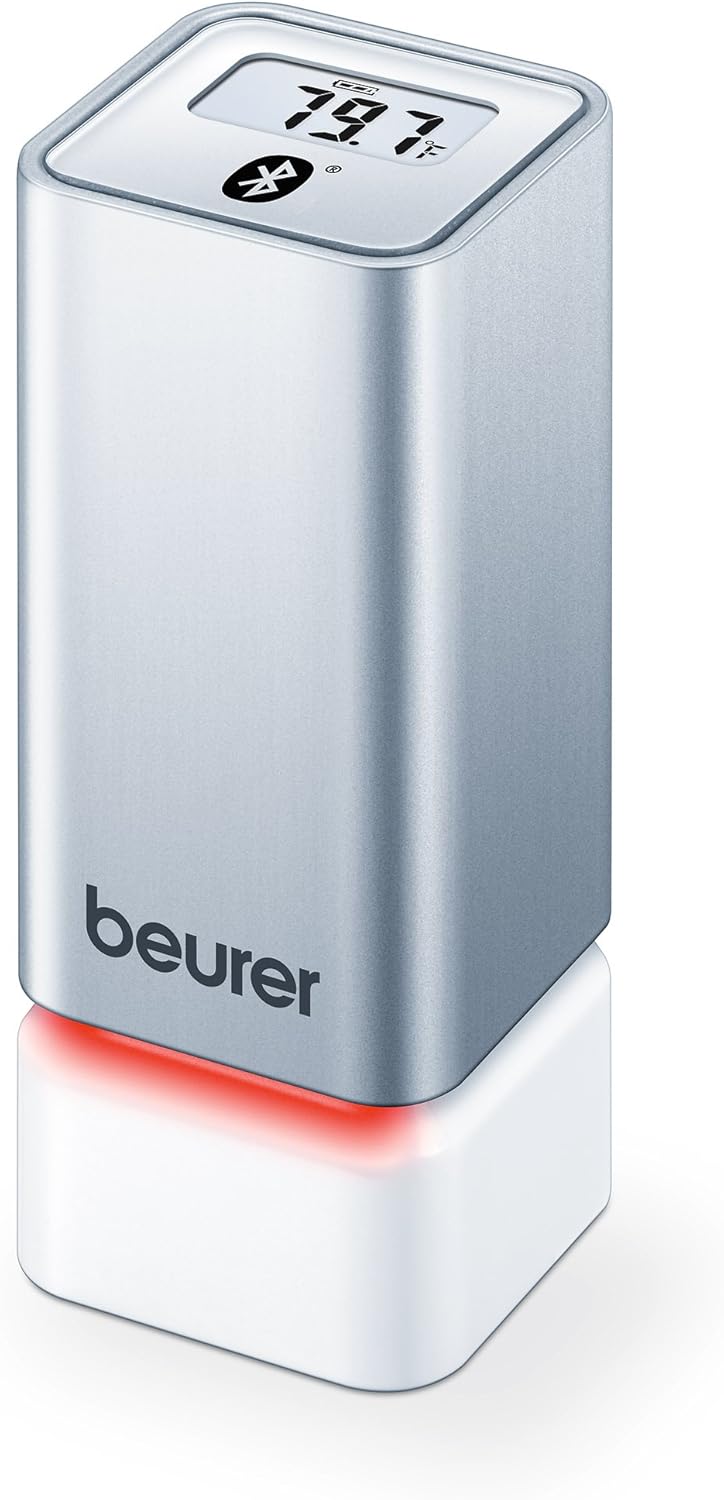
Figura 1: Frente view of the Beurer HM55 device, showing the display and Beurer logo.

Figura 2: Close-up of the HM55 display, indicating temperature, humidity, and Bluetooth icon.

Figura 3: The compact size of the HM55 device, shown in comparison to a hand.
- Mostrar: Shows current temperature, relative humidity, and time.
- Indicador LED: Located at the base, changes color to indicate indoor climate quality.
- Compartimento de la batería: Located on the underside of the device.
- Símbolo de Bluetooth: Indicates active Bluetooth connection.
Configuración
1. Insertar baterías
- Locate the battery compartment on the bottom of the HM55 device.
- Abra la tapa del compartimiento de la batería.
- Inserte las dos pilas AAA de 1.5 V, asegurándose de la polaridad correcta (+/-).
- Close the battery compartment cover securely. The device display should activate.
2. Downloading the Beurer FreshRoom App
The Beurer FreshRoom app is required to utilize the full functionality of your HM55 device, including long-term monitoring and multi-room management. The app is compatible with iOS (version 8.0 or higher) and Android (version 4.4 or higher with Bluetooth 4.0).
- For iOS devices, download the "Beurer FreshRoom" app from the Apple App Store.
- For Android devices, download the "Beurer FreshRoom" app from the Google Play Store.
- Alternatively, scan the QR code provided in the product packaging or visit the official Beurer webSitio para enlaces directos. Beurer Smartphone App Information

Figura 4: Example of the Beurer FreshRoom app interface on a smartphone.
3. Emparejamiento con su teléfono inteligente
- Asegúrese de que Bluetooth esté habilitado en su teléfono inteligente.
- Open the Beurer FreshRoom app.
- Follow the on-screen instructions within the app to search for and connect to your HM55 device. The app will guide you through the pairing process.
- Once successfully paired, the Bluetooth symbol on the HM55 display will illuminate, and data will begin to synchronize with the app.
4. Colocación inicial
Place the HM55 in the room you wish to monitor. For accurate readings, avoid placing it:
- Near heat sources (e.g., radiators, direct sunlight).
- Near air conditioning vents or open windows.
- In areas with high airflow or drafts.
- In direct contact with moisture.
Operación del dispositivo
Comprender la pantalla
The HM55 display provides immediate readings:
- Temperatura: Displays in Celsius (°C) or Fahrenheit (°F). The unit can be changed via the app.
- Humedad relativa: Se muestra como un porcentajetagmi (%).
- Tiempo: Displays the current time, synchronized via the app.
- Icono de Bluetooth: Indicates an active connection to your smartphone.
Interpreting the Colored Climate Indicator
The LED light at the base of the HM55 provides a quick visual indication of your indoor climate:
- Verde: Optimal indoor climate.
- Rojo: Poor indoor climate (e.g., too dry, too humid, or extreme temperature).
- The specific thresholds for these indicators can be customized within the Beurer FreshRoom app.

Figura 5: HM55 device showing a red LED indicator, signifying a poor indoor climate.

Figura 6: HM55 device showing a green LED indicator, signifying an optimal indoor climate.
Using the Beurer FreshRoom App
The app provides advanced features for monitoring and managing your indoor climate:
- Datos en tiempo real: View current temperature and humidity readings from your device.
- Información histórica: Access graphs and logs of temperature and humidity over various periods (e.g., hourly, diario, semanal, mensual).
- Alertas: Set custom minimum and maximum thresholds for temperature and humidity. Receive notifications if readings fall outside these ranges.
- Ajustes: Adjust device settings such as temperature unit (°C/°F), LED brightness, and time zone.
Multi-Room Function
If you have multiple Beurer HM55 devices, the FreshRoom app allows you to monitor all of them from a single interface. Each device can be assigned to a specific room for easy identification and tracking.
- Add each additional HM55 device to the app following the pairing instructions.
- Assign a unique name or room designation to each device within the app settings.
- View and compare climate data from all connected rooms on a single dashboard.
Mantenimiento
Limpieza
- Limpie el dispositivo con un paño suave, seco o ligeramente desodorante.amp paño.
- No utilice limpiadores abrasivos, solventes o productos químicos agresivos, ya que pueden dañar la superficie o los componentes internos.
- Asegúrese de que no entre líquido en el dispositivo.
Reemplazo de batería
When the battery low indicator appears on the display or in the app, replace both AAA batteries following the instructions in the "Inserting Batteries" section.
Almacenamiento
If the device will not be used for an extended period, remove the batteries and store the device in a cool, dry place, away from direct sunlight and extreme temperatures.
Solución de problemas
If you encounter issues with your Beurer HM55, refer to the following common problems and solutions:
| Problema | Posible causa | Solución |
|---|---|---|
| La pantalla del dispositivo está en blanco. | Las baterías están agotadas o insertadas incorrectamente. | Verifique la polaridad de la batería o reemplácela con baterías AAA nuevas. |
| La aplicación no puede conectarse al dispositivo. | Bluetooth is off on smartphone; device is out of range; app issue. | Ensure Bluetooth is enabled. Move smartphone closer to the device. Restart the app or smartphone. Re-pair the device if necessary. |
| Las lecturas parecen inexactas. | Device placement is suboptimal; environmental factors. | Relocate the device away from direct heat, cold, or drafts. Allow time for readings to stabilize after relocation. |
| LED indicator is always red. | Indoor climate is consistently outside optimal range; app settings. | Check temperature and humidity levels in the app. Adjust environmental conditions (e.g., use a humidifier/dehumidifier, adjust heating/cooling). Review and adjust alert thresholds in the app. |
Especificaciones técnicas
| Modelo | HM55 |
| Marca | Beurer |
| Fuente de alimentación | 2 pilas AAA de 1.5 V |
| Conectividad | Bluetooth Smart (Bluetooth 4.0) |
| Compatibilidad de aplicaciones | iOS 8.0 o superior, Android 4.4 o superior |
| Tipo de montaje | Montaje en pared |
| Color | Plata |
| Componentes incluidos | Beurer Thermo-Hygrometer |
Garantía y soporte
Beurer provides a limited warranty for this product. For detailed warranty terms and conditions, please refer to the warranty card included with your product or visit the official Beurer websitio.
For technical support, troubleshooting assistance, or to inquire about replacement parts, please contact Beurer customer service. Contact information can typically be found on the Beurer websitio o en el embalaje del producto.
Recursos en línea: For additional information and app support, visit Beurer Smartphone App Information.