
1. Introducción
Thank you for choosing the Xanlite TO250S LED Flashlight. This manual provides essential information for the safe and efficient use of your new flashlight. Please read it thoroughly before operation and retain it for future reference.
The Xanlite TO250S is a robust and powerful LED flashlight designed for various applications, offering 3 lighting modes and a long-range beam. Its durable aluminum construction ensures reliability in demanding conditions.
2. Producto terminadoview
The Xanlite TO250S is a compact and powerful LED flashlight. It features a durable aluminum body, a bright LED light source, and multiple lighting modes for versatility.
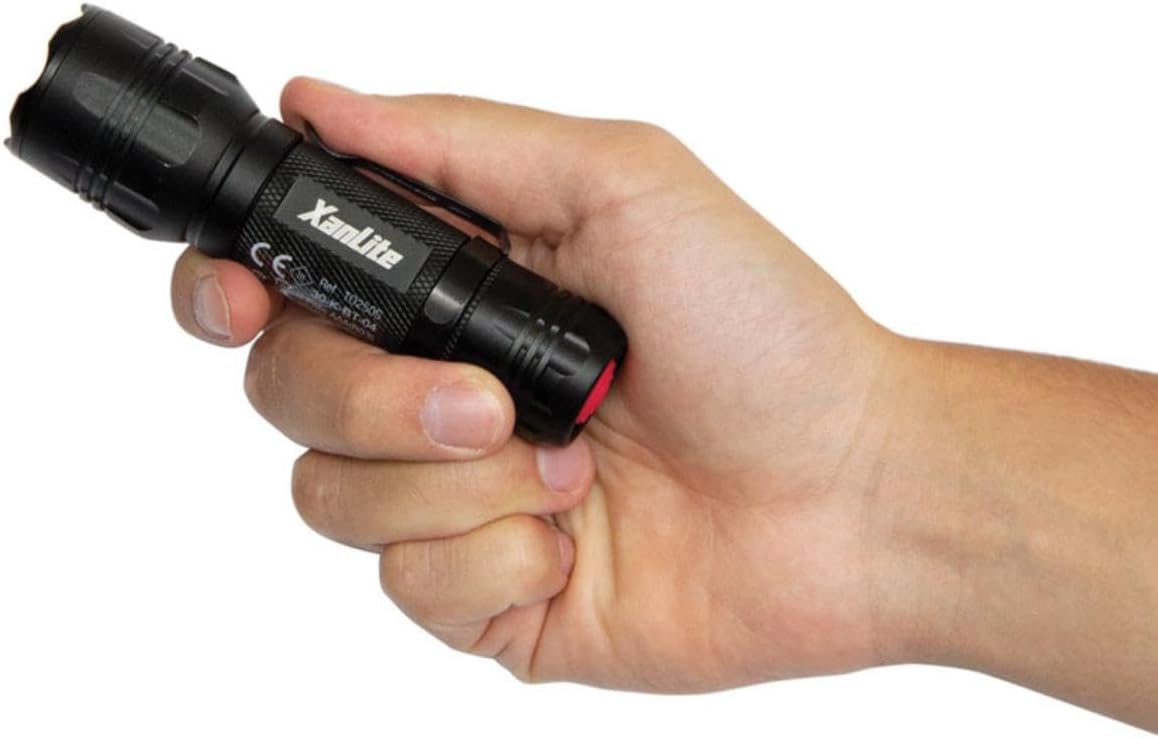
Image: A hand holding the Xanlite TO250S LED flashlight, showcasing su diseño compacto y agarre texturizado.

Image: A graphic highlighting key features of the Xanlite TO250S: 3 lighting modes (300 lumens, 150 lumens, flash), 10 hours of autonomy, shock-resistant aluminum body, and a long range of up to 200 meters.
3. Configuración e instalación de la batería
Your Xanlite TO250S flashlight requires batteries for operation. Please follow these steps to install them correctly:
- Desenrosque la tapa trasera de la linterna girándola en sentido contrario a las agujas del reloj.
- Insert the required alkaline batteries (typically AAA, as indicated by the product specifications) into the battery compartment, ensuring correct polarity (+/-) as marked inside the flashlight.
- Enrosque nuevamente la tapa de la cola girándola en el sentido de las agujas del reloj hasta que quede bien apretada.

Image: The Xanlite TO250S flashlight with its tail cap removed, revealing the battery compartment and an inserted AAA battery.
4. Operación
To operate your Xanlite TO250S flashlight, use the power button located on the tail cap.
- Encender/Apagar: Press the red power button on the tail cap once to turn the flashlight on. Press it again to turn it off.
- Cambio de modos: While the flashlight is on, lightly press the power button (without fully clicking it) to cycle through the available lighting modes: High, Low, and Flash.

Imagen: Un primer plano de la parte superior view of the Xanlite TO250S flashlight, highlighting the red power button on the tail cap.
5. Modos de iluminación
The Xanlite TO250S offers three distinct lighting modes to suit various needs:
- Alto brillo (300 lúmenes): Provides maximum illumination for long-distance viewing or when a powerful light is required. Ideal for outdoor activities, searching, or working in dark environments.
- Low Brightness (Approx. 150 Lumens): Offers a softer light for close-range tasks, reading, or to conserve battery life.
- Modo destello: A flashing light signal, useful for emergencies, signaling, or attracting attention.

Image: A man using the Xanlite TO250S flashlight to inspect the underside of a car, demonstrating its utility in detailed tasks.
6. Mantenimiento
To ensure the longevity and optimal performance of your Xanlite TO250S flashlight, follow these maintenance guidelines:
- Limpieza: Limpie el cuerpo de la linterna con un paño suave.amp Paño. No utilice limpiadores abrasivos ni disolventes.
- Reemplazo de batería: Replace batteries when the light output diminishes. Always use fresh alkaline batteries of the specified type (AAA). Do not mix old and new batteries or different battery types.
- Almacenamiento: If storing the flashlight for an extended period, remove the batteries to prevent leakage and damage. Store in a cool, dry place.
7. Especificaciones
| Número de modelo | TO250S |
| Marca | Xanlita |
| Color | Negro |
| Material | Aluminio |
| Tipo de fuente de luz | CONDUJO |
| Brillo blanco | 300 lúmenes |
| Light Beam Distance | 200 metros |
| Modos de iluminación | 3 (High, Low, Flash) |
| Tipo de batería | Alkaline (Piles Incluses) |
| Tiempo de ejecución | Hasta 10 horas |
| Nivel de resistencia al agua | Impermeable (Étanche) |
| Característica especial | Durable, Adjustable lighting mode, Flash mode |

Image: A diagram illustrating the dimensions of the Xanlite TO250S flashlight, showing a length of 137mm and a width of 39mm.
8. Solución de problemas
If you encounter any issues with your Xanlite TO250S flashlight, please refer to the following common solutions:
- La linterna no enciende:
- Compruebe si las pilas están insertadas correctamente con la polaridad correcta.
- Asegúrese de que las baterías estén nuevas y no agotadas. Reemplácelas si es necesario.
- Make sure the tail cap is fully tightened. A loose connection can prevent the flashlight from working.
- Luz tenue o parpadeante:
- Batteries may be low. Replace them with fresh ones.
- Clean the battery contacts and the flashlight's internal contacts with a clean cloth to remove any dirt or corrosion.
- No se pueden cambiar los modos de iluminación:
- Ensure you are lightly pressing the power button to cycle modes, not fully clicking it off and on.
If the problem persists after trying these steps, please contact Xanlite customer support.
9. Garantía y soporte
The Xanlite TO250S LED Flashlight comes with a limited warranty. For specific details regarding warranty coverage, duration, and terms, please refer to the warranty information provided at the time of purchase or contact Xanlite customer service directly.
For technical support, replacement parts, or any other inquiries, please visit the official Xanlite webSitio web o contacte con el equipo de atención al cliente. Conserve el recibo de compra como comprobante para reclamaciones de garantía.