
1. Introducción
This manual provides comprehensive instructions for the safe and efficient installation, operation, and maintenance of your ONKRON Full Motion TV Wall Mount, model M4-WHT. Please read all instructions carefully before installation to ensure proper setup and to prevent damage or injury.
2. Información importante de seguridad
- Capacidad de peso: No exceda el peso máximo de 35 kg (77 lb). Superar este límite podría causar lesiones graves o daños materiales.
- Tamaño de pantalla: Este soporte está diseñado para televisores de entre 32 y 65 pulgadas.
- Compatibilidad VESA: Ensure your TV's VESA pattern (100x100mm to 400x400mm) is compatible with this mount.
- Tipo de pared: This mount is suitable for installation on solid concrete walls, brick walls, and wood stud walls. Do not install on drywall alone.
- Instalación profesional: If you have any doubts about the installation process or the suitability of your wall, consult a qualified professional.
- Herramientas: Use appropriate tools and follow all safety precautions when drilling and tightening fasteners.
- Niños: Mantenga a los niños alejados del área de instalación durante la configuración.
3. Contenido del paquete
Verify that all components are present and undamaged before beginning installation. If any parts are missing or defective, contact ONKRON customer support.
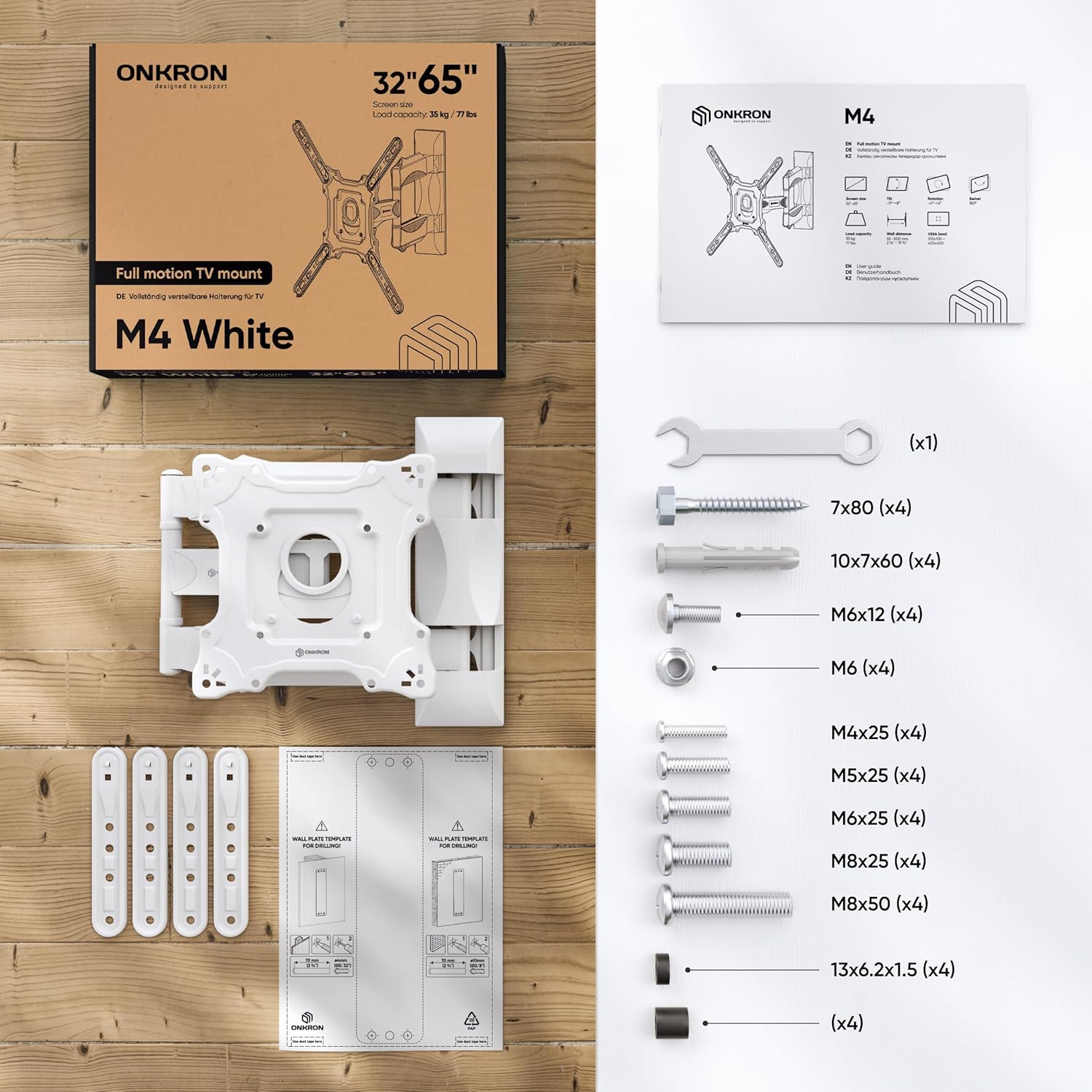
Figure 1: All necessary fasteners and a clear manual are included in the TV mounting kit.
- Wall Plate Assembly (pre-assembled)
- Panel VESA
- VESA Extenders (4 pieces)
- Plastic Covers for cable management
- Hardware Kit (various screws, washers, anchors, wrench)
- Plantilla de perforación
4. Herramientas necesarias (no incluidas)
- Lápiz
- Martillo
- Destornillador Phillips
- Taladro eléctrico
- Drill Bits (specific sizes depending on wall type)
- Nivel
- Detector de vigas (para instalación de vigas de madera)
5. Guía de instalación
Watch the official ONKRON M4 Assembly and Configuration Instructions video for a visual guide:
Video 1: ONKRON M4 Assembly and Configuration Instructions. This video demonstrates the step-by-step process of installing the M4 TV wall mount.
5.1. Prepare the Mount
- Use the provided wrench to unscrew the nuts and detach the VESA panel from the main mount assembly.
- Carefully detach the plastic covers from the mount arms. These will be reattached later for cable management.
5.2. Mark Drill Holes on the Wall
Determine your desired TV height and position on the wall.
- Para paredes con montantes de madera:
- Use a stud finder to locate the center of a wood stud.
- Place the drilling template against the wall at the desired height, ensuring it is level.
- Mark the drill hole locations with a pencil.
- Drill pilot holes with a 5/32" (4mm) drill bit to a minimum depth of 3.1" (80mm). No dowels are needed for wood studs.
- Para paredes de hormigón/ladrillo:
- Place the drilling template against the wall at the desired height, ensuring it is level.
- Mark the drill hole locations with a pencil.
- Drill holes with a 3/8" (10mm) drill bit to a minimum depth of 3.1" (80mm).
- Insert the provided concrete anchors (dowels) into the drilled holes. Tap gently with a hammer until flush with the wall.
5.3. Instale la placa de pared
- Align the main wall plate assembly with the drilled holes.
- Secure the wall plate to the wall using the appropriate screws and washers from the hardware kit. Tighten firmly with the wrench.
5.4. Attach VESA Panel to TV
The ONKRON M4-WHT supports VESA patterns from 100x100mm to 400x400mm.

Figure 2: The VESA panel can be extended to fit larger VESA patterns.
- Coloque el televisor boca abajo sobre una superficie suave y limpia para evitar rayones.
- Identify your TV's VESA mounting holes.
- If your TV's VESA pattern is 100x100, 100x200, or 200x200, you may not need the VESA extenders. Attach the VESA panel directly to the TV using the correct screws and plastic spacers (if needed to compensate for bolt length or curved screens).
- If your TV's VESA pattern is larger (e.g., 200x300, 200x400, 300x200, 300x300, 300x400, 400x200, 400x300, 400x400), attach the VESA extenders to the VESA panel first, then secure the entire assembly to the TV using the appropriate screws and spacers.
- Apriete todos los tornillos firmemente, pero no los apriete demasiado.
5.5. Hang Your TV onto the Mount
- With assistance, carefully lift your TV and align the VESA panel (attached to the TV) with the mounting plate on the wall arm.
- Hook the VESA panel onto the mount.
- Secure the TV to the mount by tightening the safety screws located on the VESA panel.
5.6. Gestión de cables
- Route your TV cables through the designated channels on the mount arms.
- Reattach the plastic covers to conceal the cables and provide a clean appearance.
6. Funcionamiento del soporte para TV
The ONKRON M4-WHT offers versatile adjustments for optimal viewEn.
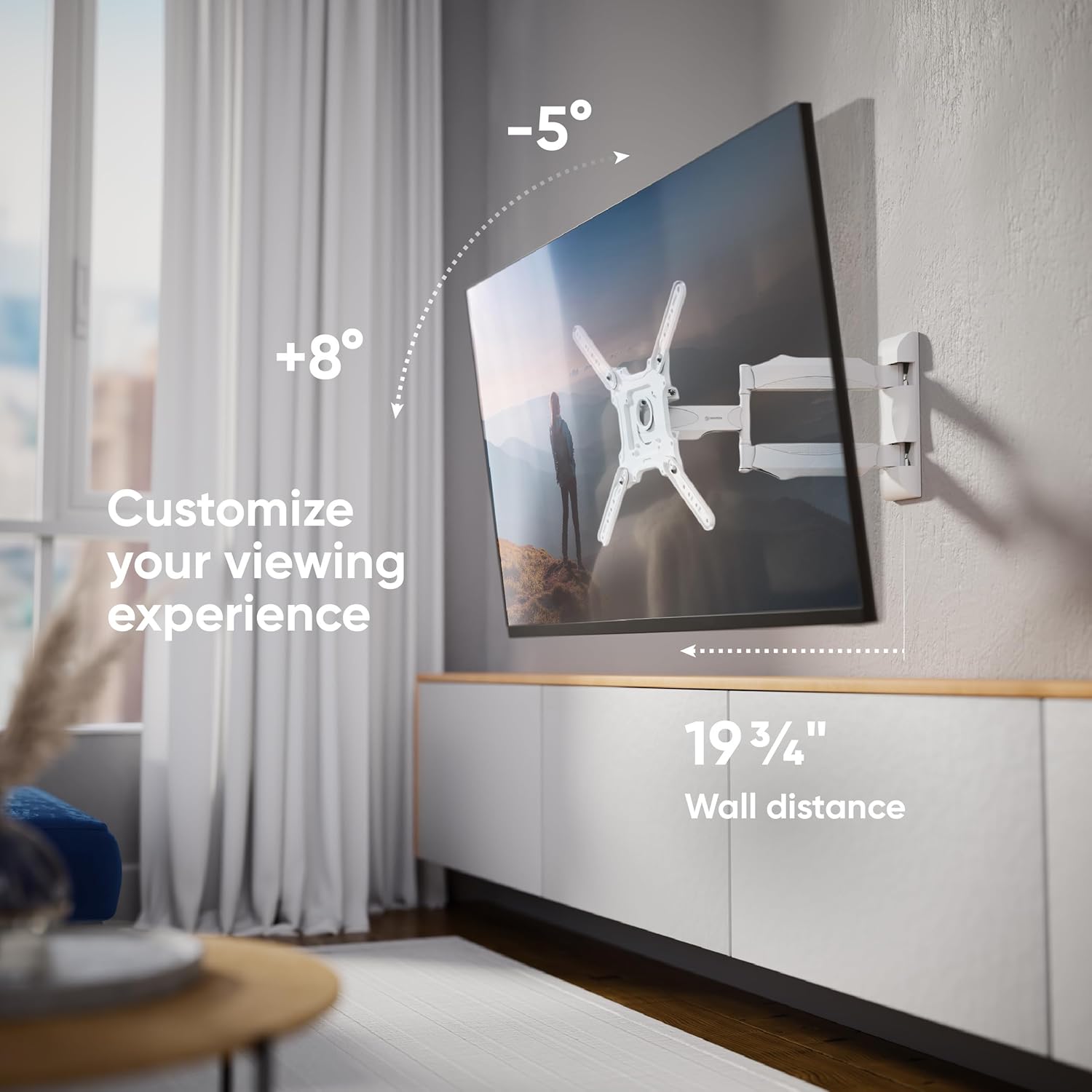
Figure 3: Customize your viewing experience with tilt and extension.
- Ajuste de inclinación: The mount allows for a tilt range of -5° to +8°. Loosen the tilt adjustment screws on the VESA panel, adjust the screen to your desired angle, and then re-tighten the screws to secure the position.
- Ajuste giratorio: The articulating arm allows the TV to swivel up to 180° (depending on TV size and wall distance). Gently push or pull the TV to achieve the desired viewángulo de ing.
- Extensión: The mount can extend from a minimum distance of 2.1 inches (55mm) from the wall to a maximum of 19.7 inches (500mm).
- Screen Leveling: After installation, the screen can be aligned horizontally by slightly rotating the VESA panel before tightening the final screws.

Figure 4: Achieve a perfect view from anywhere with the 180-degree swivel.
7. Mantenimiento
- Limpieza: Limpie el soporte con un paño suave y seco. Evite el uso de limpiadores abrasivos o disolventes.
- Inspección periódica: Revise periódicamente todos los tornillos y conexiones para asegurarse de que estén bien apretados y seguros. Vuelva a apretarlos si es necesario.
- Partes móviles: Los brazos articulados están diseñados para un movimiento suave. Normalmente no requieren lubricación.
8. Solución de problemas
- TV no nivelada: If the TV appears unlevel after installation, slightly loosen the screws connecting the VESA panel to the mount, adjust the TV to be level, and then re-tighten the screws.
- El monte se siente suelto: Check all wall mounting screws and TV attachment screws. Ensure they are securely tightened. If the issue persists, re-evaluate your wall type and installation method.
- Difficulty Adjusting Tilt/Swivel: Ensure no cables are obstructing movement. For tilt, loosen the adjustment screws before attempting to change the angle, then re-tighten.
9. Especificaciones
| Característica | Especificación |
|---|---|
| Número de modelo | M4-WHT |
| Compatibilidad de tamaño de pantalla | 32 - 65 pulgadas |
| Capacidad de carga máxima | 77 libras (35 kg) |
| Compatibilidad VESA | 100x100mm hasta 400x400mm |
| Ángulo de inclinación | -5° a +8° |
| Ángulo de giro | Up to 180° (screen size dependent) |
| Extensión desde la pared | 2.1" (55 mm) a 19.7" (500 mm) |
| Material | Acero aleado |
| Color | Blanco |
| Dimensiones del producto | 16 x 13 x 3 pulgadas (plegado) |
| Peso del artículo | 8.1 libras |
10. Garantía y soporte
ONKRON products undergo multi-stage quality control. For any questions, technical assistance, or warranty claims, please contact ONKRON customer support. Refer to your product packaging or the official ONKRON webSitio para obtener la información de contacto más actualizada.
All necessary fasteners and a clear manual are included in the TV mounting kit. ONKRON full motion TV wall mounts undergo multi-stage quality control and feature sturdy packaging, with expert support ready to assist when needed.