
BenQ EX3501R
BenQ EX3501R Ultrawide Curved Gaming Monitor User Manual
Model: EX3501R
1. Configuración
1.1 Desembalaje del monitor
Retire con cuidado todos los componentes del embalaje. Asegúrese de que estén presentes todos los elementos enumerados a continuación:
- BenQ EX3501R Monitor
- Soporte para monitor (base y mástil)
- Adaptador de corriente
- Cable de alimentación
- Cable HDMI
- Cable DisplayPort
- Cable USB-C
- Manual de usuario (este documento)
1.2 Montaje del soporte
Siga estos pasos para fijar el soporte a su monitor:
- Coloque el monitor boca abajo sobre un paño suave y limpio para evitar rayones.
- Coloque el soporte en la parte posterior del monitor. Asegúrese de que encaje firmemente en su lugar.
- Connect the stand base to the neck, tightening any screws as indicated in the quick start guide.

Figura 1: Frente view of the BenQ EX3501R monitor with its stand.
1.3 Cables de conexión
Connect the necessary cables to the monitor and your computer. The monitor supports various input options:
- Fuerza: Conecte el adaptador de corriente al monitor y luego a una toma de corriente.
- Entrada de video: Use either the HDMI, DisplayPort, or USB-C cable to connect your computer to the monitor.
- USB-C: The USB-C port supports video, data transfer, and power delivery, allowing for a single-cable connection with compatible devices.
- Puertos USB: 3.0 Utilize the integrated USB 3.0 ports for connecting peripherals.
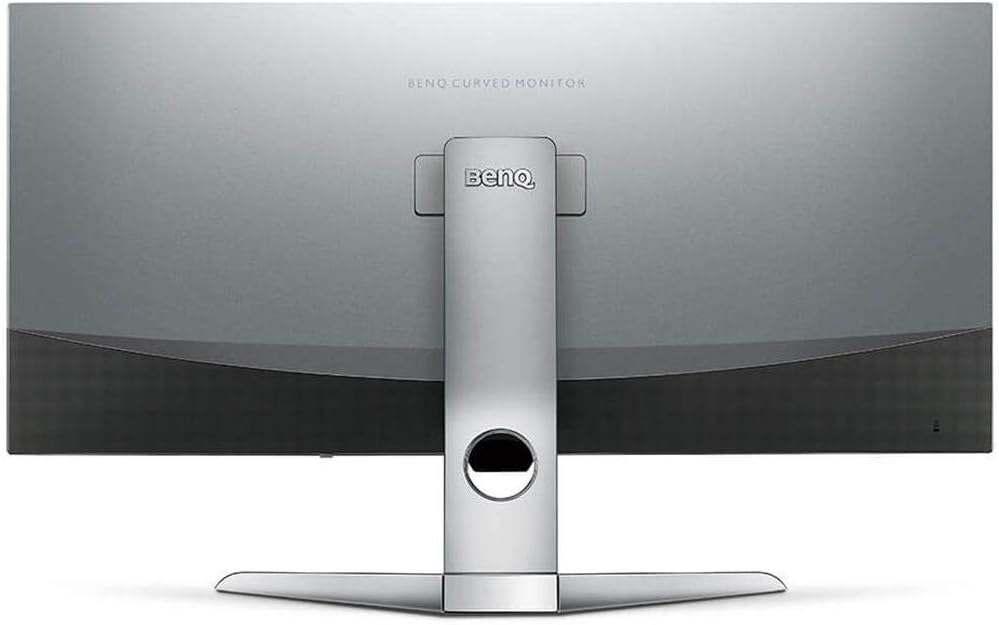
Figura 2: Posterior view of the monitor displaying the connectivity ports.
2. Funcionamiento del monitor
2.1 Encendido y apagado
Press the power button, usually located on the bottom right side of the monitor, to turn it on or off. The power indicator light will illuminate when the monitor is active.
2.2 Navegación en pantalla (OSD)
Use the joystick or buttons located on the monitor's underside to navigate the On-Screen Display (OSD) menu. This menu allows you to adjust various settings such as brightness, contrast, color modes, and input sources.
2.3 Display Features and Eye-Care Technology
The BenQ EX3501R incorporates several technologies designed to enhance viewExperimente y reduzca la fatiga visual:
- Brightness Intelligence Plus (B.I.+): This patented technology automatically senses ambient lighting conditions and adjusts the screen's brightness and color temperature to provide optimal viewing comfort and protect your eyes during extended use.
- Luz azul baja: Filters out harmful blue light emissions to reduce eye fatigue. Multiple levels of blue light reduction are available.
- ZeroFlicker™: Eliminates screen flickering at all brightness levels, further reducing eye strain and discomfort.
- HDR (alto rango dinámico): Offers enhanced brightness and contrast, bringing greater detail and vibrancy to HDR video content.
Vídeo 1: Un finalview of BenQ's Eye-Care technology, including Low Blue Light, ZeroFlicker, and Brightness Intelligence Plus, demonstrating how these features work to reduce eye strain and adjust screen settings automatically based on ambient light.
2.4 Resolución y frecuencia de actualización
The monitor features a QHD (3440x1440) resolution and a 100Hz refresh rate, providing a smooth and detailed visual experience. The 21:9 ultrawide aspect ratio offers ample screen space for multitasking, such as viewing multiple documents side-by-side without needing a second monitor.
2.5 AMD FreeSync
For a fluid gaming experience, the monitor supports AMD FreeSync technology, which synchronizes the monitor's refresh rate with your graphics card's frame rate to eliminate screen tearing and stuttering.
3. Mantenimiento
3.1 Limpieza del monitor
To maintain optimal performance and appearance, regularly clean your monitor:
- Pantalla: Gently wipe the screen with a soft, lint-free cloth. For stubborn smudges, use a monitor-specific cleaning solution applied to the cloth, not directly to the screen.
- Exterior: Utilice un paño suave y seco para limpiar el polvo y los residuos del monitor.asing y soporte.
Evite utilizar limpiadores abrasivos, ceras o disolventes, ya que pueden dañar la superficie del monitor.
3.2 Consejos generales de cuidado
- No bloquee las aberturas de ventilación del monitor.
- Evite colocar el monitor bajo la luz solar directa o cerca de fuentes de calor.
- Manipule el monitor con cuidado para evitar daños físicos.
4. Solución de problemas
If you encounter issues with your BenQ EX3501R monitor, refer to the following common troubleshooting steps:
4.1 No Display or Black Screen
- Asegúrese de que el cable de alimentación esté conectado de forma segura tanto al monitor como a la toma de corriente.
- Verifique que el cable de video (HDMI, DisplayPort o USB-C) esté firmemente conectado tanto al monitor como a la computadora.
- Compruebe si la fuente de entrada correcta está seleccionada en el menú OSD del monitor.
- Reinicie su computadora.
4.2 Imagen parpadeante o inestable
- Ensure the ZeroFlicker™ feature is enabled in the OSD menu.
- Compruebe si hay conexiones de cable de vídeo sueltas.
- Actualice los controladores de su tarjeta gráfica a la última versión.
- If using AMD FreeSync, ensure it is properly configured in your graphics card settings.
4.3 Color or Brightness Issues
- Ajuste la configuración de brillo, contraste y color a través del menú OSD.
- Enable or disable Brightness Intelligence Plus (B.I.+) to see if it resolves the issue.
- Realice un restablecimiento de fábrica a través del menú OSD.
5. Especificaciones
Key technical specifications for the BenQ EX3501R monitor:
| Característica | Especificación |
|---|---|
| Tamaño de pantalla | 35 pulgadas |
| Resolución máxima de pantalla | 3440 x 1440 Pixels (QHD Ultrawide) |
| Relación de aspecto | 21:9 |
| Frecuencia de actualización | 100 Hz |
| Curvatura | 1800R |
| Tipo de panel | VA (Alineación vertical) |
| Conectividad | USB-C, HDMI, DisplayPort |
| Características especiales | AMD FreeSync, Brightness Intelligence Plus, Low Blue Light, ZeroFlicker |
| Peso del artículo | 21.3 libras |
| Dimensiones del producto | 6.88 x 3.47 x 12.93 pulgadas |
6. Garantía y soporte
6.1 Garantía del producto
The BenQ EX3501R monitor typically comes with a 3-year manufacturer's warranty. Please refer to the warranty card included in your product packaging for specific terms and conditions, or visit the official BenQ websitio para obtener información detallada sobre la garantía.
6.2 Atención al cliente
For further assistance, technical support, or warranty claims, please contact BenQ customer service. You can find contact information and support resources on the official BenQ websitio: www.benq.com/es-es/support.html
Ask a question about this manual
Ask about setup, troubleshooting, compatibility, parts, safety, or missing instructions. Manuals+ will review the question and use this page’s manual context to help answer it.