
Introducción
Thank you for choosing the MeeTion K9310 Gaming Keyboard. This manual provides detailed instructions for setting up, operating, and maintaining your new keyboard. The K9310 is designed for an enhanced gaming experience with features such as multicolor backlighting, anti-ghosting, and dedicated shortcut keys.
Contenido del paquete
- MeeTion K9310 Gaming Keyboard
- Manual de usuario (este documento)
Configuración
Follow these steps to connect your MeeTion K9310 Gaming Keyboard to your computer:
- Desempaque el teclado de su embalaje.
- Ubique un puerto USB disponible en su computadora.
- Conecte el conector USB del teclado al puerto USB.
- Your operating system (Windows XP/Vista/7/8/10) will automatically detect and install the necessary drivers. No additional software installation is typically required.
- The keyboard is ready for use once the drivers are installed.

Imagen: Arriba view of the MeeTion K9310 Gaming Keyboard with its USB cable, ready for connection.
Instrucciones de funcionamiento
Características principales
- Multicolor Key Backlit: The keyboard features vibrant multicolor backlighting for enhanced visibility and aesthetic appeal, especially in low-light conditions.
- Comfortable and Soft Keys: Designed with membrane keys offering tactile feedback, providing a comfortable typing and gaming experience.
- 19 teclas anti-efecto fantasma: This feature ensures that up to 19 keys can be pressed simultaneously without any input loss, crucial for complex gaming commands.
- Win Lock Function with LED Indication: Prevents accidental presses of the Windows key during gameplay, which can interrupt your game. An LED indicator shows when this function is active.
- 12 FN Shortcut Buttons: Access various multimedia and system functions quickly using the Function (FN) key in combination with the F1-F12 keys.
Control de luz de fondo
The K9310 keyboard features a multicolor backlight. Specific key combinations may be used to adjust brightness or switch lighting modes. Refer to the keyboard's markings for dedicated backlight control keys, often indicated by a sun or light bulb icon, or through FN key combinations.
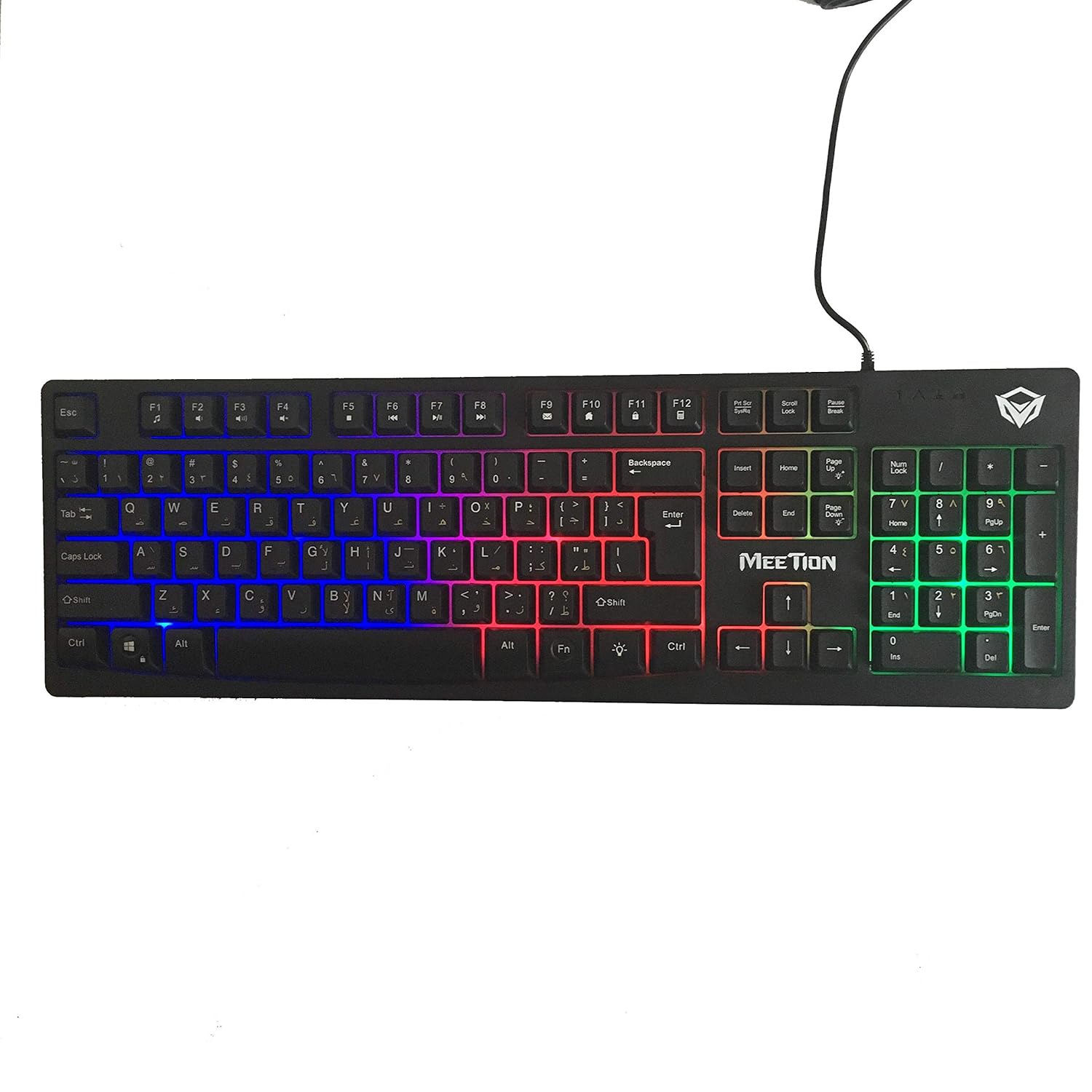
Imagen: Arriba view of the MeeTion K9310 Gaming Keyboard with its multicolor backlighting illuminated.
FN Shortcut Functions
The keyboard includes 12 FN (Function) shortcut buttons. To activate these functions, press and hold the FN key, then press the desired F-key (F1-F12).
| Combinación de teclas | Función |
|---|---|
| FN + F1 | Reproductor multimedia |
| FN + F2 | Bajar volumen |
| FN + F3 | Subir volumen |
| FN + F4 | Silenciar |
| FN + F5 | Detener |
| FN + F6 | Pista anterior |
| FN + F7 | Reproducir/Pausa |
| FN + F8 | Pista siguiente |
| FN + F9 | Correo electrónico |
| FN + F10 | Web Navegador |
| FN + F11 | Mi computadora |
| FN + F12 | Calculadora |
Función de bloqueo de Windows
To activate or deactivate the Windows key lock function, press FN + tecla de ganancia. When active, the Windows key will be disabled, preventing accidental presses during gaming. An LED indicator on the keyboard will typically illuminate to show the Win Lock status.
Mantenimiento
Un mantenimiento adecuado garantiza la longevidad y el rendimiento óptimo de su teclado.
- Limpieza: Utilice un paño suave y seco para limpiar la superficie del teclado. Para una limpieza más profunda, utilice un paño ligeramente seco.amp Se puede utilizar un paño con jabón suave, asegurándose de que no entre líquido en los interruptores de llave ni en los componentes internos.
- Eliminación de polvo: Utilice aire comprimido para eliminar el polvo y los residuos entre las teclas.
- Evite los líquidos: Do not spill liquids on the keyboard. If a spill occurs, immediately disconnect the keyboard from the computer and allow it to dry completely before reconnecting.
- Almacenamiento: Guarde el teclado en un lugar fresco y seco, alejado de la luz solar directa y de temperaturas extremas cuando no lo utilice durante períodos prolongados.

Imagen: Abajo view of the MeeTion K9310 Gaming Keyboard, showing the product label and rubber feet.
Solución de problemas
If you encounter issues with your MeeTion K9310 Gaming Keyboard, refer to the following troubleshooting steps:
- El teclado no responde:
- Asegúrese de que el cable USB esté conectado de forma segura a un puerto USB que funcione en su computadora.
- Intente conectar el teclado a un puerto USB diferente.
- Reinicie su computadora.
- Pruebe el teclado en otra computadora para determinar si el problema está en el teclado o en la computadora.
- Keys Not Working (e.g., 'W' key):
- Check for any debris or foreign objects lodged under the affected key. Use compressed air to clear it.
- If only specific keys are not responding, and the keyboard is otherwise functional, it might indicate a hardware issue.
- La luz de fondo no funciona o parpadea:
- Asegúrese de que el teclado esté conectado correctamente.
- Check if the backlight brightness is set to minimum or turned off via FN key combinations.
- Si el problema persiste, puede indicar un mal funcionamiento del hardware.
- Win Lock Function Not Working:
- Ensure you are using the correct key combination (FN + Win Key) to toggle the function.
- Check the LED indicator for Win Lock status.
Presupuesto
| Característica | Detalle |
|---|---|
| Marca | REUNIÓN |
| Modelo | K9310 |
| Tipo de teclado | Teclado para juegos |
| Contacto clave | Membrane with tactile feedback |
| Disposición | Cyrillic alphabet layout (Windows Keys) |
| Anti-efecto fantasma | 19 teclas |
| Iluminar desde el fondo | Tecla multicolor retroiluminada |
| Función de bloqueo de Windows | Sí, con indicación LED |
| FN Shortcut Buttons | 12 |
| Error-Free Running Time | More than 10 million strokes |
| Compatibilidad del sistema operativo | Windows XP/Vista/7/8/10 |
| Dimensiones | 17.5 × 5.5 x 1.5 inches (approximate) |
| Peso | 1.2 libras (aproximadamente) |
| Dispositivos compatibles | Laptop (and Desktop PCs) |
Garantía y soporte
For warranty information or technical support, please refer to the documentation provided at the time of purchase or visit the official MEETION webSitio. Conserve su comprobante de compra para cualquier reclamación de garantía.