
Notifier DAA2-5025
Notificador DAA2-5025 Digital AmpLifier Manual de usuario
Model: DAA2-5025 | Brand: Notifier
Introducción
This manual provides essential information for the safe and efficient operation, installation, and maintenance of the Notifier DAA2-5025 Digital Amplifier. The DAA2-5025 is a 50W, 25V digital amplifier designed for integration into fire alarm and emergency communication systems, operating on 120 VAC. Please read this manual thoroughly before installation or operation.
Información de seguridad
ADVERTENCIA: Este dispositivo funciona con alto volumen.tage (120 VAC). Installation and servicing must be performed by qualified personnel only. Disconnect all power sources before servicing to prevent electric shock.
PRECAUCIÓN: To reduce the risk of fire or electric shock, do not expose this appliance to rain or moisture. Do not open the enclosure; there are no user-serviceable parts inside. Refer all servicing to qualified service personnel.
- Siga siempre los códigos eléctricos locales y nacionales.
- Asegure una conexión a tierra adecuada de la unidad.
- No bloquee las aberturas de ventilación.
- Utilice únicamente las piezas de repuesto especificadas.
Configuración e instalación
The DAA2-5025 is designed for surface mount installation within a compatible enclosure. Ensure the mounting location is dry, well-ventilated, and free from excessive dust or vibration.
Montaje del Ampmás vivaz
- Identify a suitable mounting surface that can support the unit's weight (approximately 2 pounds).
- Asegurar el amplifier's mounting plate to the surface using appropriate fasteners.
- Ensure adequate clearance around the unit for ventilation and access to wiring terminals.
Conexiones eléctricas
Before making any electrical connections, ensure all power is disconnected at the circuit breaker.
- Entrada de energía: Connect the 120 VAC power supply to the designated terminals. Observe correct polarity (Line, Neutral, Ground).
- Salida de audio: Connect the 25V audio output to the speaker lines or distribution system. Ensure correct impedance matching.
- Entradas/Salidas de control: Connect any necessary control signals (e.g., activation, supervision) as per system design. Refer to the system's specific wiring diagrams.

Figure 1: The Notifier DAA2-5025 Digital Amplifier, showing the main circuit board, power supply unit, and various connection points. This view highlights the internal components and robust construction.
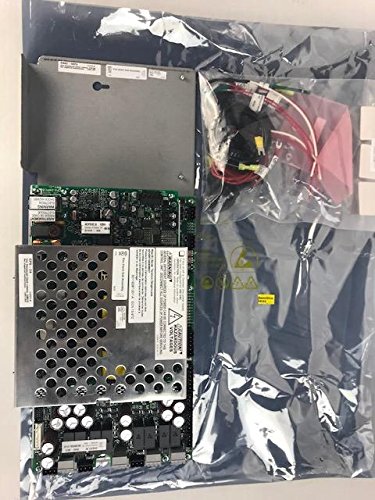
Figure 2: The Notifier DAA2-5025 Digital Amplifier along with its accessory components, as typically received in its packaging. This image provides a view of the complete product and included parts before installation.
Instrucciones de funcionamiento
The DAA2-5025 operates as part of a larger fire alarm or emergency communication system. Its operation is typically controlled by the main system panel.
- Encendido: Once all connections are secure and verified, apply 120 VAC power to the unit. The amplifier will perform a self-test.
- Indicadores de estado: Observe the status LEDs on the unit (if present) for normal operation, fault conditions, or active signals. Refer to the system's specific documentation for LED indicator meanings.
- Salida de audio: El amplifier will output audio signals (e.g., voice messages, tones) when activated by the control panel. Ensure speaker lines are properly connected and terminated.
- Supervisión: The DAA2-5025 typically includes supervision circuits to monitor speaker lines and amplifier status, reporting any faults back to the main control panel.
Mantenimiento
The Notifier DAA2-5025 is designed for reliable, long-term operation with minimal maintenance. However, periodic inspection is recommended.
- Inspección anual: Visually inspect the unit for any signs of damage, loose connections, or excessive dust accumulation.
- Limpieza: If necessary, gently clean the exterior of the unit with a soft, dry cloth. Do not use liquid cleaners or solvents. Ensure power is off before cleaning.
- Actualizaciones de firmware: Any firmware updates should only be performed by qualified Notifier service technicians.
- Batería de respaldo (si corresponde): If the system utilizes a battery backup for the amplifier, ensure batteries are inspected and replaced according to manufacturer recommendations.
Solución de problemas
Before attempting any troubleshooting, ensure all power is disconnected. If the issue persists after basic checks, contact qualified service personnel.
| Problema | Posible causa | Solución |
|---|---|---|
| No Power/Unit Off | No 120 VAC input; Blown fuse; Internal fault. | Check power supply and circuit breaker. Verify fuse (if accessible and user-replaceable). Contact service if power is present but unit remains off. |
| Sin salida de audio | Incorrect wiring; Speaker line fault; Amplifier fault; No audio signal from control panel. | Verify speaker wiring and connections. Check speaker line impedance. Confirm audio signal from control panel. Check amplifier status indicators. |
| Fault Indicator Active | Speaker line open/short; Amplifier internal fault; Power supply issue. | Inspect speaker lines for damage. Consult system documentation for specific fault codes. Contact service for internal faults. |
Presupuesto
| Atributo | Detalle |
|---|---|
| Modelo | DAA2-5025 |
| Marca | Notificador |
| Descripción | Digital Amplifier, 50W, 25V, 120 VAC |
| Potencia de salida | 50 vatios |
| Vol de salidatage | 25 voltios |
| Vol de entradatage | 120 V CA |
| Tipo de montaje | Montaje en superficie |
| Peso del artículo | 2 libras (0.91 kg) |
| ASIN | B07B66SSRY |
| Código Postal | 670875920132 |
| Fecha de primera disponibilidad | 24 de mayo de 2016 |
| Fabricante | NOTIFIER |
Información de garantía
Notifier products typically come with a manufacturer's limited warranty covering defects in materials and workmanship. For specific warranty terms and conditions, please refer to the documentation provided with your purchase or contact Notifier customer support. Keep your proof of purchase for warranty claims.
Atención al cliente
For technical assistance, troubleshooting beyond this manual, or information on replacement parts, please contact Notifier customer support or your authorized Notifier distributor. You can find contact information on the official Notifier website or through your system installer.
Recursos en línea: Visita el Notificador oficial webSitio para documentación de productos, preguntas frecuentes y contactos de soporte.
Ask a question about this manual
Ask about setup, troubleshooting, compatibility, parts, safety, or missing instructions. Manuals+ will review the question and use this page’s manual context to help answer it.