Introducción
The LASER X Two Player Laser Gaming Set provides a real-life laser gaming experience. This set includes two compact laser units with two arm receivers, allowing for exciting laser tag battles with a range of up to 100 feet. The blasters feature full-color lighting effects to track shots and hits, and an interactive voice coach provides tips and feedback during gameplay. For an immersive experience, you can plug in headphones to hear the Laser X Soundtrack and Sound Effects. This set is compatible with all other Laser X equipment, expanding your play possibilities.

Image: The product packaging for the LASER X Two Player Laser Gaming Set, featuring two individuals holding the micro blasters.
Qué incluye
Your LASER X Two Player Laser Gaming Set includes the following components:
- Two (2) LASER X Micro Blasters
- Two (2) Arm Receivers (one for each player)

Imagen: Un primer plano view of the two white LASER X Micro Blasters and their corresponding arm receivers.
Configuración
Instalación de la batería
Each LASER X Micro Blaster requires three (3) AAA batteries. A total of six (6) AAA batteries are needed for the complete two-player set. Batteries are not included.
- Locate the battery compartment on the underside of each Micro Blaster.
- Con un destornillador Phillips, abra la tapa del compartimiento de la batería.
- Insert three (3) AAA batteries into each blaster, ensuring correct polarity (+/-).
- Vuelva a colocar la tapa del compartimiento de la batería y asegúrela con el tornillo.
- Repeat for the second Micro Blaster.
Wearing the Arm Receiver
The arm receiver is designed to be worn on your upper arm. It features an elastic band for a secure and comfortable fit. Ensure the receiver is positioned so that the target area is clearly visible to other players.
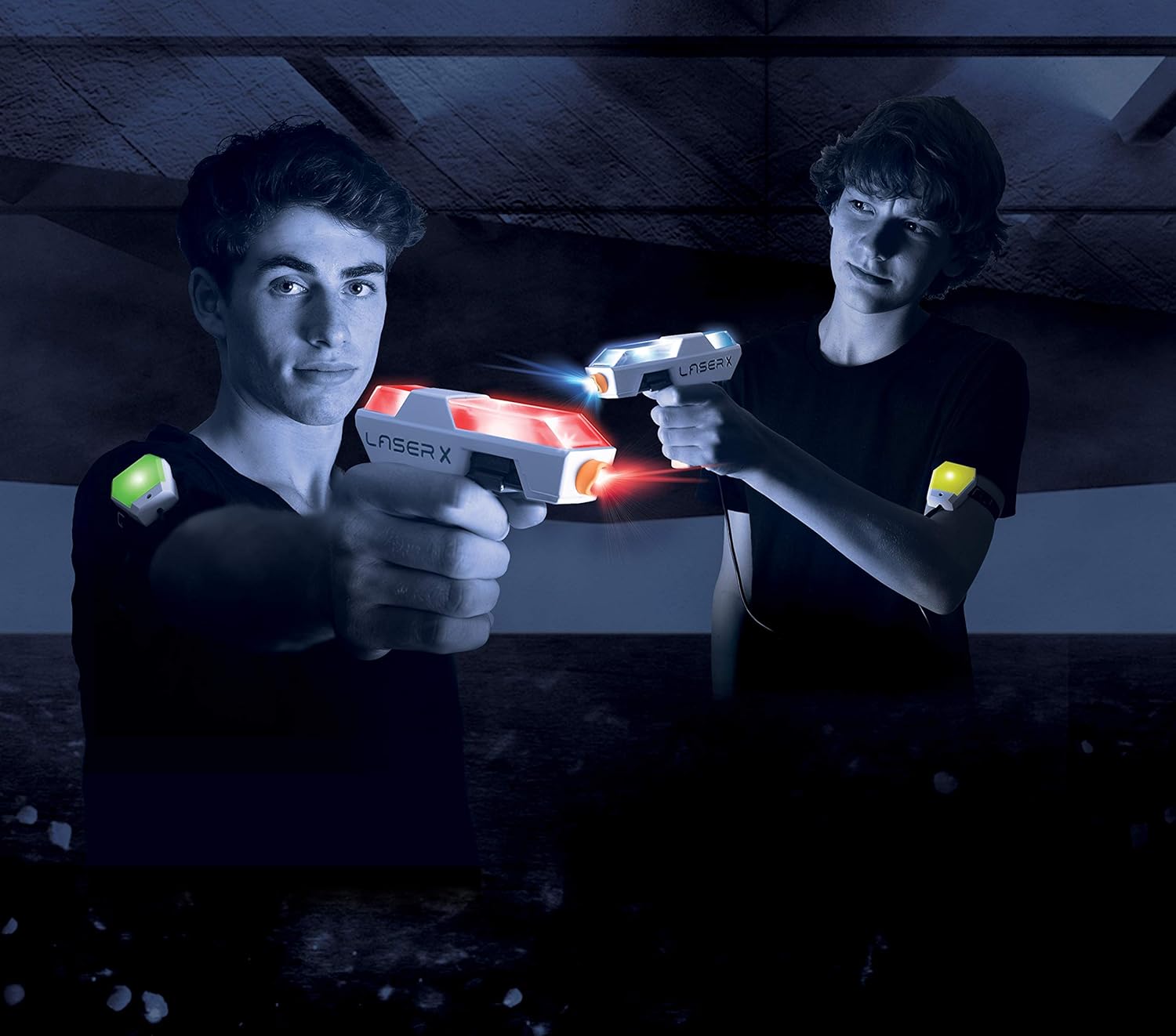
Image: Two players engaged in a laser tag game, demonstrating how the arm receivers are worn.
Instrucciones de funcionamiento
Powering On and Team Selection
Each arm receiver has a power switch and a team selection switch. To begin playing:
- Turn on the power switch on each arm receiver. The receiver will light up green, indicating it's ready.
- Select your team using the team selection switch:
- Red Team: Your blaster and receiver will glow red.
- Blue Team: Your blaster and receiver will glow blue.
- Free-for-All: Your blaster and receiver will blink between red and blue, indicating no teams.
Conceptos básicos del juego
The LASER X Micro Blasters allow you to blast opponents' receiver vests from up to 100 feet away. The blasters and receivers provide real-time feedback through lights and sounds.
- Tiroteo: Aim your blaster at an opponent's arm receiver and press the trigger to fire.
- Comentarios de éxito: When hit, your arm receiver will change color from green to yellow, then to red, indicating your remaining "lives."
- Recarga To reload your blaster, simply press and hold the trigger. You will hear a sound indicating a successful reload.
- Out of Game: When your receiver turns solid red, you are out of the game. To rejoin, turn the receiver off and then back on.

Image: A close-up of the LASER X Micro Blasters showing their illuminated sections, indicating active play.
Mantenimiento
Limpieza
To clean your LASER X Micro Blasters and arm receivers, wipe them with a soft, dry cloth. Do not submerge the units in water or use harsh chemicals, as this may damage the electronics.
Cuidado de la batería
To prolong battery life and prevent leakage, always remove batteries from the blasters and receivers when not in use for extended periods.
Solución de problemas
- Blaster not firing or receiver not responding:
- Compruebe que las pilas estén correctamente instaladas y no estén agotadas. Reemplácelas si es necesario.
- Ensure the power switch on both the blaster and receiver is in the "ON" position.
- Verify that there is a clear line of sight between the blaster and the receiver. Obstacles can block the infrared signal.
- Rango limitado:
- Ensure you are within the advertised 100-foot range.
- Bright sunlight can sometimes interfere with infrared signals. Try playing in shaded areas or indoors for optimal performance.
- Voice coach or sound effects not working:
- Verifique los niveles de la batería.
- If using headphones, ensure they are properly plugged in and functioning.
Presupuesto
| Característica | Detalle |
|---|---|
| Dimensiones del producto | 5.72 x 30.48 x 25.4 pulgadas |
| Peso del artículo | 12.8 onzas |
| Número de modelo del artículo | 88053 |
| Edad recomendada por el fabricante | 12 años y más |
| Pilas necesarias | 6 AAA batteries (3 per unit, not included) |
| Rango máximo | 100 pies |

Image: A visual representation of the compact size of the LASER X Micro Blaster compared to a human hand.
Información importante de seguridad
ADVERTENCIA: PELIGRO DE ASFIXIA - Piezas pequeñas.
No apto para niños menores de 3 años debido a que contiene piezas pequeñas que pueden representar peligro de asfixia.
- No apunte a los ojos ni a la cara.
- Úselo únicamente como se indica en este manual.
- Se recomienda la supervisión de un adulto durante el juego.
Garantía y soporte
For warranty information, technical support, or any questions regarding your LASER X product, please refer to the manufacturer's official websitio o contacte con su departamento de atención al cliente. Los datos de contacto suelen encontrarse en el embalaje del producto o en la información del fabricante. websitio.
Manufacturer: Laser X