
1. Introducción
This manual provides essential information for the safe and effective use of your Amcrest IP8M-2493EB Outdoor PoE Bullet Camera. Please read these instructions thoroughly before installation and operation to ensure optimal performance and to prevent damage to the device.
2. Producto terminadoview
2.1 Características principales
- 2MP IP PoE Bullet Camera
- 1920x1080p @30fps Video Resolution
- Nightvision up to 98 feet (30 meters)
- IP67 Weatherproof Rating for outdoor use
- Cloud Storage Capability
- Diseño de montaje en pared
- 4K Video Capture Resolution (for recording)
- Motion Sensor Special Feature
2.2 Contenido del paquete
Verifique que todos los componentes estén presentes en su paquete:
- Amcrest IP8M-2493EB Outdoor PoE Bullet Camera
- Herrajes de montaje (tornillos, anclajes)
- Guía de inicio rápido (este manual)
2.3 Componentes de la cámara
Familiarícese con los componentes físicos de la cámara:

Figura 1: Frente view of the Amcrest IP8M-2493EB Bullet Camera, showing the lens, IR LEDs, and housing.
3. Configuración
3.1 Antes de comenzar
Ensure you have the following items and conditions:
- A Power over Ethernet (PoE) switch or PoE injector (802.3af/at compliant)
- Cat5e or Cat6 Ethernet cable
- A stable internet connection (recommended for remote viewing and cloud features)
- A drill and screwdriver for mounting
3.2 Instalación física
- Elija una ubicación de montaje: Select a suitable wall location that provides the desired viewángulo de visión y está al alcance de su cable Ethernet.
- Marcar los agujeros de perforación: Use the provided mounting template (if included) or the camera base to mark the positions for drilling.
- Perforar agujeros: Perfore agujeros piloto e inserte anclajes de pared si lo va a montar sobre paneles de yeso o mampostería.
- Asegure la cámara: Attach the camera base to the wall using the provided screws.
- Ajustar ángulo: Loosen the adjustment screws on the camera body to position the camera for optimal coverage, then tighten them securely.
3.3 Conexión de red
Connect one end of the Ethernet cable to the camera's Ethernet port and the other end to a PoE port on your PoE switch or injector. The camera will power on automatically.
3.4 Configuración inicial
For initial setup and configuration, download the Amcrest View Pro app on your mobile device or use the Amcrest web interface via a computer connected to the same network. Follow the on-screen instructions to discover and add your camera to your system.
4. Operación de la cámara
4.1 Acceso en vivo View
Access the live video feed through the Amcrest View Pro app or the web interface. This allows real-time monitoring of your surveillance area.
4.2 Grabación y almacenamiento
La cámara admite varias opciones de grabación:
- Almacenamiento local: If equipped with a microSD card slot (card sold separately), recordings can be stored directly on the camera.
- Grabadora de vídeo en red (NVR): Connect the camera to a compatible Amcrest NVR for continuous recording and extended storage.
- Almacenamiento en la nube: Utilize Amcrest Cloud services for off-site storage of event-triggered recordings. Refer to the Amcrest webSitio para obtener detalles de suscripción.
4.3 Detección de movimiento
Configure motion detection settings via the camera's interface. You can define detection zones, sensitivity levels, and set up alerts (e.g., email notifications, push notifications to your phone) when motion is detected.
4.4 Visión nocturna
The camera features infrared (IR) LEDs for night vision, providing clear surveillance footage in low-light or no-light conditions up to 98 feet. The camera automatically switches between day and night modes.
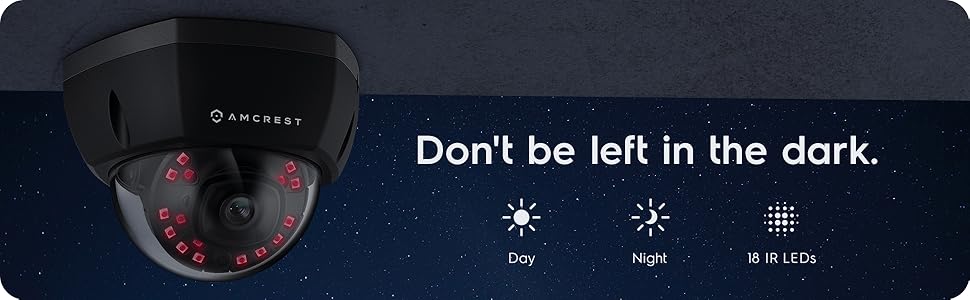
Figura 2: Example of night vision capability, illustrating clear image capture in dark conditions.
5. Mantenimiento
5.1 Limpieza
Limpie periódicamente la lente y la carcasa de la cámara con un paño suave.amp paño. Evite utilizar productos químicos agresivos o materiales abrasivos que puedan rayar la lente o dañar el acabado.
5.2 actualizaciones de firmware
Regularly check for and install firmware updates from the Amcrest webSitio. Las actualizaciones de firmware suelen incluir mejoras de rendimiento, nuevas funciones y mejoras de seguridad.
5.3 Protección contra la intemperie
The IP8M-2493EB camera has an IP67 weatherproof rating, meaning it is protected against dust ingress and can withstand immersion in water up to 1 meter for 30 minutes. While designed for outdoor use, ensure all cable connections are properly sealed to maintain water resistance.
6. Solución de problemas
6.1 Problemas comunes y soluciones
- Sin energía/sin video: Ensure the Ethernet cable is securely connected to both the camera and a functioning PoE port. Check the PoE switch/injector for power.
- Mala calidad de imagen: Clean the camera lens. Check network bandwidth. Adjust resolution and compression settings in the camera interface. Ensure sufficient lighting for optimal image clarity.
- Night Vision Halo Effect: This can occur if the IR light reflects off nearby surfaces or the camera housing. Ensure there are no obstructions close to the lens.
6.2 Video Support
For visual guidance on resolving common issues, including potential IR reflection, please refer to the following video:
Video 1: This video from Amcrest Direct provides instructions on resolving IR reflection issues that can affect night vision clarity in Amcrest cameras.
7. Especificaciones
| Característica | Especificación |
|---|---|
| Nombre del modelo | IP8M-2493EB |
| Uso en interiores y exteriores | Exterior |
| Fuente de poder | AC/DC (via PoE) |
| Protocolo de conectividad | Ethernet |
| Tipo de montaje | Montaje en pared |
| Resolución de captura de video | 4K |
| Color | Negro |
| Número de artículos | 1 |
| Número de canales | 1 |
| Tecnología de comunicación inalámbrica | POE (Alimentación a través de Ethernet) |
| Factor de forma | Bala |
| Rango de visión nocturna | 98 pies (30 metros) |
| Velocidad de cuadros | 30 fps |
| Dimensiones del artículo (largo x ancho x alto) | 6.1 x 6.1 x 5.4 pulgadas |
| Peso del artículo | 1.3 libras |
| ¿Se requieren pilas? | No |
| Tecnología con poca luz | Color de la noche |
| Calificación de protección internacional | IP67 |
| Máximo WebResolución de imagen de cámara | 2 MP |
| Método de control | Aplicación |
| Usos recomendados del producto | Seguridad al aire libre |
| Tecnología de conectividad | Cableado |
| Característica especial | Sensor de movimiento |
8. Garantía y soporte
Amcrest products typically come with a limited warranty. For specific warranty terms, registration, and technical support, please visit the official Amcrest website or contact Amcrest customer service directly. Keep your purchase receipt for warranty claims.
Amcrest Support: https://amcrest.com/support