
Bytech BCAUBS134BK
Manual del usuario del altavoz Bluetooth de barra larga Bytech Massive-BK
Model: BCAUBS134BK
1. Introducción
Gracias por la compraasing the Bytech Massive Bluetooth Long Bar Speaker-BK. This manual provides essential information for the proper setup, operation, and maintenance of your new speaker. Please read this manual thoroughly before using the product to ensure optimal performance and longevity.
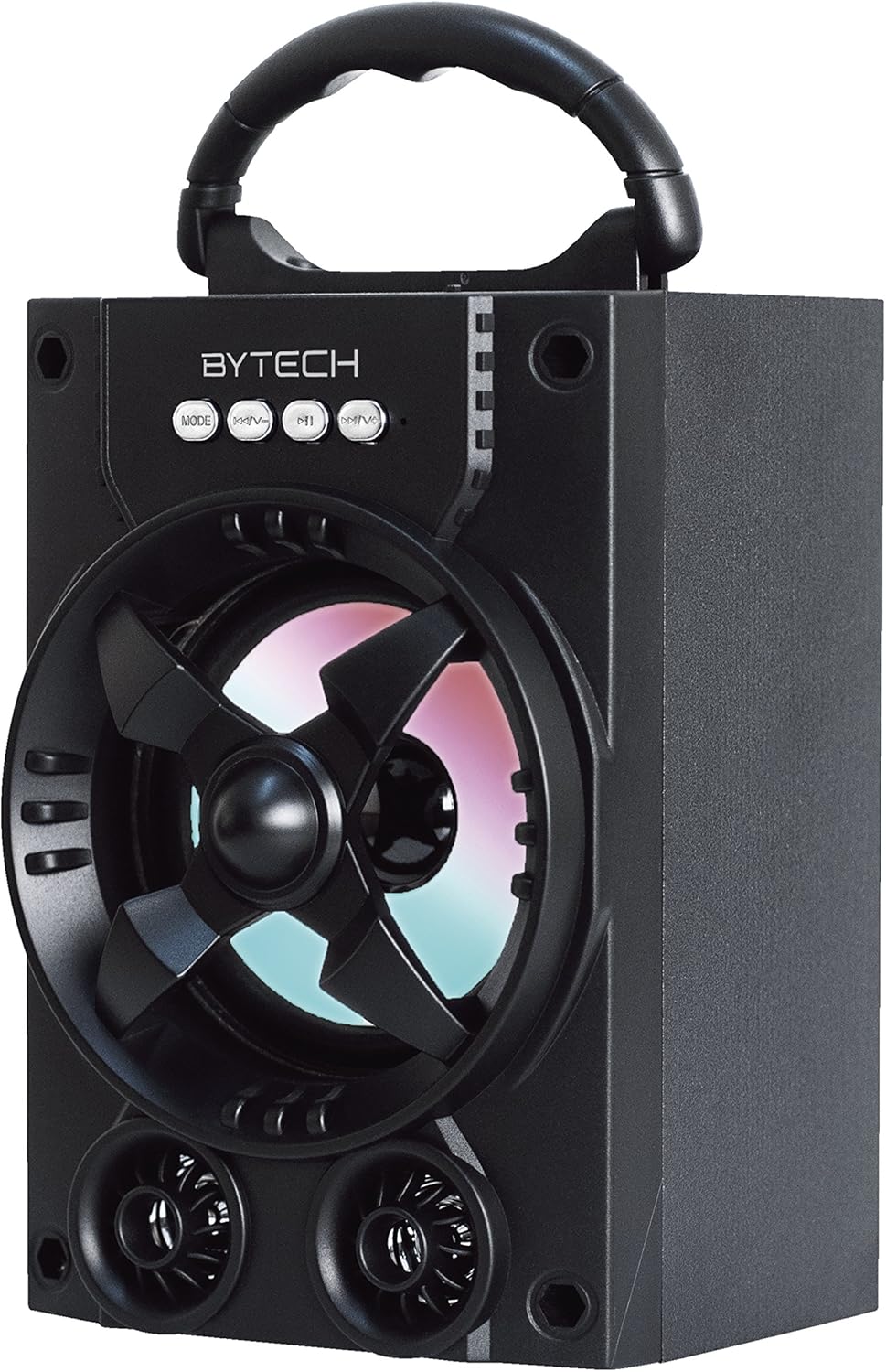
Figura 1.1: Frente view of the Bytech Massive Bluetooth Long Bar Speaker-BK, showcasing its design, handle, and speaker grille with LED lights.
2. Contenido del paquete
Por favor revise el paquete para ver los siguientes artículos:
- Bytech Massive Bluetooth Long Bar Speaker-BK
- Cable de carga USB
- Manual de usuario (este documento)
Si falta algún artículo o está dañado, comuníquese con atención al cliente.
3. Características del producto
- LED Performance Lights: Dynamic LED lights that synchronize with your music for an enhanced audio-visual experience.
- Convenient Carrying Handle: Integrated handle for easy portability, allowing you to take your music anywhere.
- Conectividad Bluetooth universal: Seamlessly connect wirelessly to your smartphone, tablet, or other Bluetooth-enabled devices.
- Sonido envolvente: Designed to deliver a high-quality surround sound experience.
- Diseño portátil: Ideal for various settings, including parties, outdoor gatherings, and personal use.

Figure 1.2: The speaker shown with its retail packaging, illustrating its key features such as multi-color LED lights, Bluetooth connectivity, and surround sound capability.
4. Controles e indicadores
The speaker features intuitive controls and indicators for easy operation:
- Botón MODE: Press to switch between available input modes (e.g., Bluetooth).
- Botón V: Press to decrease volume. Long press to skip to the previous track.
- Botón V+: Presione para aumentar el volumen. Mantenga presionado para pasar a la siguiente pista.
- Botón M: (Function not explicitly detailed, typically for mode or mute)
- Luces LED: Indicate power status, charging status, and provide dynamic light effects during audio playback.
5. Guía de configuración
5.1 Carga del altavoz
- Conecte el extremo pequeño del cable de carga USB al puerto de carga del altavoz.
- Conecte el extremo grande del cable de carga USB a un adaptador de corriente USB (no incluido) o al puerto USB de una computadora.
- El indicador LED mostrará el estado de carga (por ejemplo, rojo para cargarse, apagado cuando esté completamente cargado).
- Deje pasar aproximadamente de 3 a 4 horas para una carga completa antes del primer uso.
5.2 Encendido / Apagado
- To power on, press and hold the Power button (location not specified, typically near charging port or on control panel) for a few seconds until you hear an audible prompt or see the LED lights activate.
- Para apagar, mantenga presionado el botón de encendido nuevamente hasta que el altavoz se apague.
5.3 Emparejamiento Bluetooth
- Asegúrese de que el altavoz esté encendido y en modo de emparejamiento Bluetooth (indicado por una luz LED intermitente o un aviso audible).
- En su teléfono inteligente o tableta, navegue hasta la configuración de Bluetooth.
- Buscar available devices. The speaker will appear as "BYTECH" or a similar name.
- Seleccione el altavoz de la lista para iniciar el emparejamiento.
- Once successfully paired, the LED indicator will typically become solid, and you may hear a confirmation tone.
6. Instrucciones de funcionamiento
6.1 Reproducción de audio a través de Bluetooth
- After successful Bluetooth pairing, open your preferred music application on your connected device.
- Select and play your desired audio. The sound will be streamed wirelessly to the speaker.
- Use the V+ and V- buttons on the speaker or your connected device to adjust the volume.
- Long press V+ or V- to skip tracks.
6.2 LED Performance Lights
The speaker features integrated LED lights that enhance your listening experience. These lights typically activate automatically when the speaker is powered on and playing audio. Specific controls for light modes are not detailed, but they are designed to provide dynamic visual effects.
6.3 Cambio de modo
Presione el MODO button to cycle through available input modes. While Bluetooth is the primary connectivity, other modes (if available, such as FM radio or AUX input) can be accessed via this button.
7. Mantenimiento y cuidado
- Limpieza: Utilice un paño suave y seco para limpiar el exterior del altavoz. No utilice limpiadores abrasivos, ceras ni disolventes.
- Almacenamiento: Cuando no utilice el altavoz durante períodos prolongados, guarde el altavoz en un lugar fresco y seco, alejado de la luz solar directa y de temperaturas extremas.
- Cuidado de la batería: Para prolongar la vida útil de la batería, evite descargarla por completo con frecuencia. Recargue el altavoz regularmente, incluso si no lo usa, para mantener la batería en buen estado.
- Resistencia al agua: Este producto es NO waterproof. Avoid exposure to water, rain, or excessive moisture to prevent damage.
8. Solución de problemas
Si tiene problemas con su altavoz, consulte los siguientes problemas y soluciones comunes:
| Problema | Posible causa | Solución |
|---|---|---|
| El altavoz no se enciende. | Batería baja. | Cargue el altavoz completamente. |
| No hay sonido desde el altavoz. | Volumen demasiado bajo; No emparejado; Modo incorrecto. | Increase volume on speaker and device; Ensure successful Bluetooth pairing; Press MODE button to select correct input. |
| La conexión Bluetooth es inestable o falla. | Device too far; Interference; Pairing issue. | Move device closer to speaker (within 33 ft/10m); Avoid obstacles; Forget device on your phone and re-pair. |
| Las luces LED no funcionan. | Speaker not powered on or playing audio. | Ensure speaker is on and audio is playing. |
9. Especificaciones
| Característica | Detalle |
|---|---|
| Marca | Tecnología de bytes |
| Nombre del modelo | BYTECH |
| Número de modelo del artículo | BCAUBS134BK |
| Tipo de altavoz | Sonido envolvente |
| Tecnología de conectividad | Bluetooth |
| Tecnología de comunicación inalámbrica | Bluetooth |
| Dispositivos compatibles | Teléfono inteligente |
| Potencia máxima de salida del altavoz | 20 vatios |
| Respuesta de frecuencia | 20 kHz |
| Impedancia | 1 ohmios |
| Tamaño del altavoz | 5 pulgadas |
| Fuente de poder | Eléctrico con cable (para cargar) |
| Tipo de batería | Se requiere 1 batería de iones de litio |
| Color | Negro |
| Dimensiones del producto | 4.75 x 5.5 x 8.5 pulgadas |
| Peso del artículo | 1.3 libras |
| es resistente al agua | No |
| País natal | Porcelana |
| Código Postal | 805112038121 |
10. Información de garantía
Bytech products are manufactured to the highest quality standards. For specific warranty terms and conditions, please refer to the warranty card included with your purchase or visit the official Bytech webSitio. Conserve su comprobante de compra para reclamaciones de garantía.
11. Atención al cliente
For technical assistance, troubleshooting, or general inquiries, please contact Bytech customer support. Contact information can typically be found on the product packaging, the official Bytech websitio, o su recibo de compra.
Nota: No había videos oficiales del producto del vendedor disponibles para incrustar según los datos proporcionados.
Ask a question about this manual
Ask about setup, troubleshooting, compatibility, parts, safety, or missing instructions. Manuals+ will review the question and use this page’s manual context to help answer it.