
1. Introducción
This manual provides essential instructions for the proper use and care of your Yamaha RAV536 (Part # ZP601100) OEM remote control. This remote is designed to operate specific Yamaha A/V receiver models, ensuring seamless control over your audio and video system. Please read this manual thoroughly before use to ensure optimal performance and longevity of your remote control.
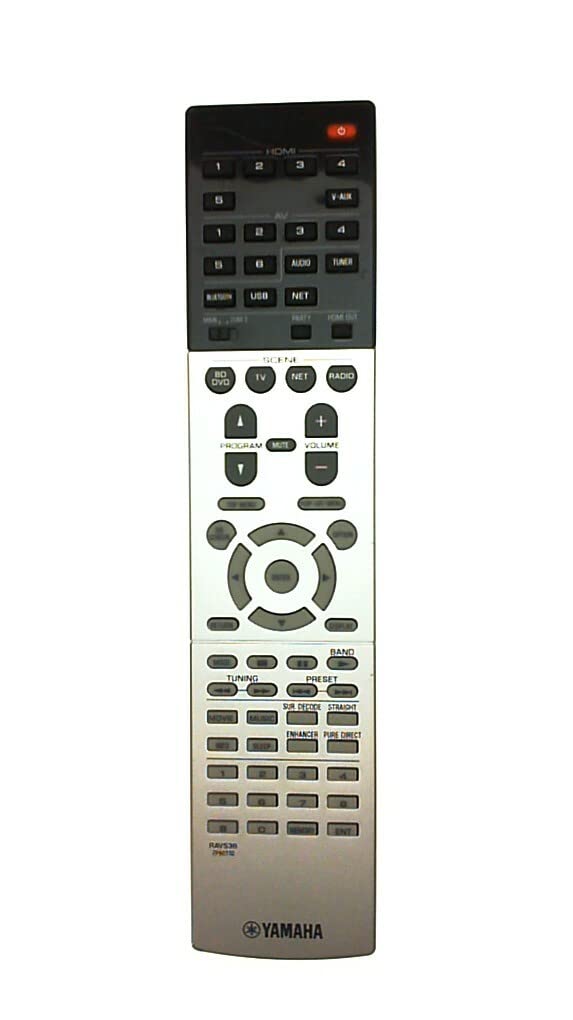
Figure 1: Yamaha RAV536 Remote Control. This image displays the front view of the remote, highlighting its button layout and ergonomic design.
2. Modelos compatibles
The Yamaha RAV536 (ZP601100) remote control is specifically designed for use with the following Yamaha A/V receiver models:
- TSR-7790
- RX-V679BL
- HTR-6068
- TSR-7790BL
- RX-A750
- RX-V679
- RX-V779
Importante: This is an OEM remote control and is not universal. It is intended to replace the original remote supplied with the listed models only. Compatibility with other models is not guaranteed.
3. Configuración: Instalación de la batería
To begin using your Yamaha RAV536 remote control, you must install batteries. The remote requires two (2) AAA batteries (not included).
- Abra el compartimiento de la batería: Localice la tapa del compartimento de las pilas en la parte posterior del control remoto. Deslícela hacia abajo o presione el pestillo y levántela para abrirla.
- Inserte las baterías: Insert two new AAA batteries into the compartment. Ensure that the positive (+) and negative (-) terminals of the batteries align correctly with the polarity indicators inside the compartment. Incorrect installation can prevent the remote from functioning.
- Cierre el compartimento de la batería: Vuelva a colocar la tapa del compartimiento de la batería deslizándola en su lugar hasta que encaje firmemente.
Nota: Always use new batteries for optimal performance. Do not mix old and new batteries, or different types of batteries, as this can lead to leakage or malfunction.
4. Operación
Once batteries are installed, the Yamaha RAV536 remote control is ready for use with your compatible Yamaha A/V receiver. No additional programming is typically required for OEM remotes.
- Pointing the Remote: Point the remote control directly towards the infrared (IR) sensor on your Yamaha A/V receiver. Obstructions between the remote and the receiver can block the signal.
- Funciones de los botones: Each button on the remote corresponds to a specific function on your A/V receiver (e.g., Power, Volume, Input Selection, Menu Navigation). Refer to the owner's manual of your specific Yamaha A/V receiver model for a detailed explanation of each button's function and how to operate your system.
- Rango: The remote operates effectively within a range of approximately 10 meters (33 feet) from the receiver, provided there are no significant obstructions.
For advanced features and specific operational procedures, consult the comprehensive owner's manual that came with your Yamaha A/V receiver.
5. Mantenimiento
Un mantenimiento adecuado garantiza la longevidad y el rendimiento confiable de su control remoto.
- Reemplazo de batería: Replace batteries when the remote's response becomes sluggish or stops working. Always replace both batteries simultaneously with new ones of the same type (AAA).
- Limpieza: To clean the remote, gently wipe it with a soft, dry cloth. For stubborn dirt, slightly dampLimpie el paño con agua o un limpiador suave no abrasivo. Evite usar productos químicos agresivos, disolventes o materiales abrasivos, ya que pueden dañar la superficie o los componentes internos del control remoto.
- Almacenamiento: If the remote will not be used for an extended period, remove the batteries to prevent potential leakage and damage. Store the remote in a cool, dry place away from direct sunlight and extreme temperatures.
- Evite caídas e impactos: Protect the remote from physical shocks, drops, and impacts, which can damage internal circuitry.
6. Solución de problemas
If you experience issues with your Yamaha RAV536 remote control, refer to the following common troubleshooting steps:
- El control remoto no responde:
- Check if the batteries are inserted correctly, observing polarity (+/-).
- Reemplace las baterías viejas con baterías AAA nuevas.
- Ensure there are no obstructions between the remote's IR emitter and the receiver's IR sensor.
- Verify that you are pointing the remote directly at the receiver.
- Limited Range or Intermittent Operation:
- Reemplace las baterías por otras nuevas.
- Ensure the remote's IR emitter and the receiver's IR sensor are clean and free from dust or smudges.
- Reduce the distance between the remote and the receiver.
- Compruebe si hay fuentes de luz intensas (por ejemplo, luz solar directa, luces fluorescentes) que puedan interferir con la señal IR.
- Funciones específicas que no funcionan:
- Confirm that your A/V receiver is powered on and functioning correctly.
- Refer to your A/V receiver's owner's manual to ensure you are using the correct buttons for the desired functions.
If the problem persists after trying these steps, contact Yamaha customer support or refer to your receiver's manual for further assistance.
7. Especificaciones
| Marca | Yamaha |
| Nombre del modelo | RAV536 |
| Número de pieza | ZP601100 |
| Color | Negro |
| Tecnología de conectividad | Infrarrojos (IR) |
| Alcance máximo | 10 metros (aprox. 33 pies) |
| Tipo de batería | 2 x AAA (no incluido) |
| Tipo de controlador | Control de botones |
| Característica especial | Diseño ergonómico |
| Compatibilidad con hogares inteligentes | Not Smart Home Compatible |
8. Soporte y garantía
For detailed support regarding the functions of your Yamaha A/V receiver, please refer to the owner's manual provided with your original receiver unit. This remote control is an OEM replacement part.
Warranty information for this replacement remote control is typically covered under the terms of purchase from your retailer. Please retain your proof of purchase for any warranty claims. For direct support, you may visit the official Yamaha websitio o comuníquese con su departamento de servicio al cliente.
Puede encontrar más información y recursos de apoyo en Tienda Yamaha en Amazon.