
1. Producto terminadoview
The Zerone Multi-Language Translator Bluetooth Earphone is a portable wireless device designed for real-time language translation and audio playback. It features Bluetooth 4.1 connectivity, high-fidelity audio output, and a compact in-ear design for comfortable use during various activities.

Imagen 1.1: Principal view of the Zerone Multi-Language Translator Bluetooth Earphone.
2. Contenido del paquete
Verifique que todos los artículos enumerados a continuación estén incluidos en su paquete:
- Zerone Multi-Language Translator Bluetooth Earphone
- Cable de carga USB
- Puntas de oído adicionales (varios tamaños)
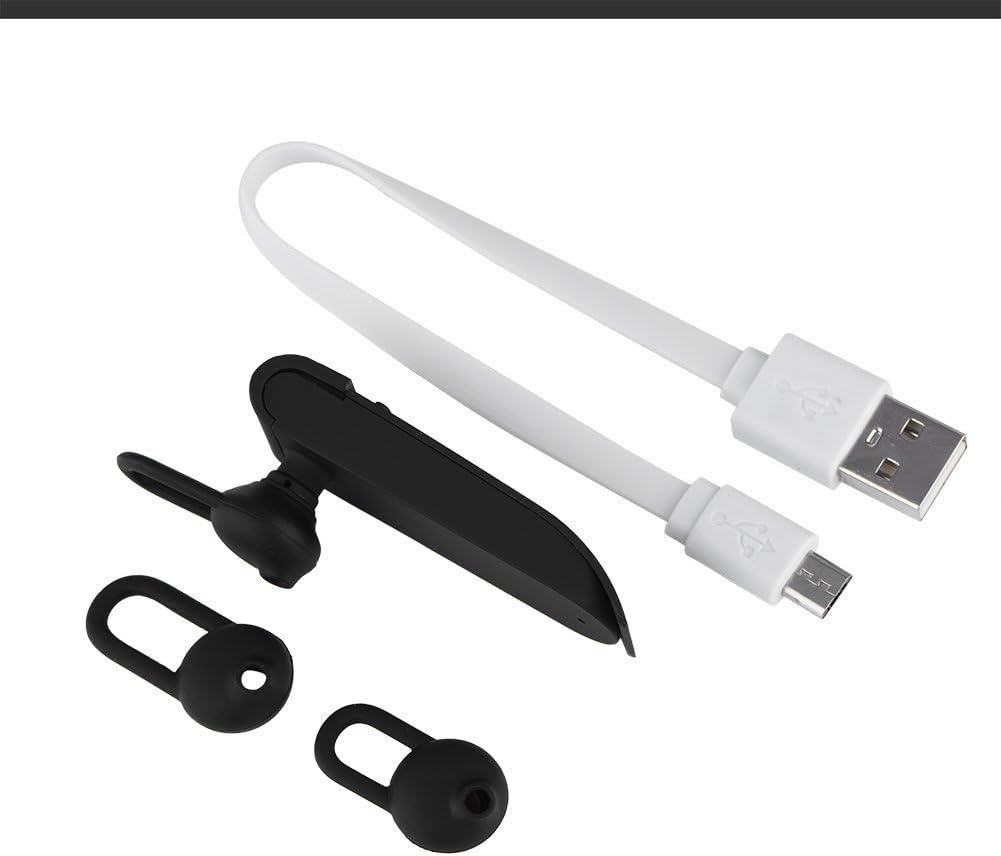
Image 2.1: The earphone with its charging cable and two additional ear tips.
3. Características del producto
- Traducción a varios idiomas: Supports up to 16 languages for real-time translation. Speak into the earphone, and it will translate into the desired language.
- High Fidelity Audio Output: Equipped with an 8mm moving coil speaker for clear, smooth audio and enhanced bass.
- True Wireless In-Ear Design: Mini and compact, offering a stable and comfortable fit without tangled wires, suitable for various activities.
- Conectividad Bluetooth 4.1: Optimized Bluetooth 4.1 version ensures a stable and fast wireless connection with a range of up to 10 meters.
- Mayor duración de la batería: Built-in 90mAh rechargeable lithium battery provides approximately 5-8 hours of playback time and up to 13 hours of talk time.

Image 3.1: Visual representation of the 16 languages translation feature.

Image 3.2: Illustration of the high fidelity audio output with an 8mm moving coil speaker.

Image 3.3: Visual representation of the Bluetooth true wireless connection with a 10-meter transmission range.

Image 3.4: Details on the earphone's 90mAh rechargeable lithium battery and extended usage times.
4. Configuración
4.1 Carga de los auriculares
Before initial use, fully charge the earphone. Connect the provided USB charging cable to the earphone's charging port and the other end to a USB power source (e.g., computer, wall adapter). The charging time is approximately 2 hours.
4.2 Emparejamiento Bluetooth
- Ensure the earphone is fully charged and powered off.
- Mantenga presionado el botón multifunción del auricular hasta que la luz indicadora parpadee en rojo y azul alternativamente, lo que indica el modo de emparejamiento.
- En su teléfono inteligente o dispositivo con Bluetooth, navegue hasta la configuración de Bluetooth.
- Buscar available devices and select "Zerone Translator Earphone" (or similar name) from the list.
- Una vez conectado, la luz indicadora generalmente se volverá azul fija o parpadeará en azul lentamente.
4.3 Companion Application (for Translation)
To utilize the multi-language translation feature, you will need to download and install a compatible companion application on your smartphone. Refer to the packaging or product documentation for the specific app name and download instructions. Ensure your phone is connected to the internet for translation services.
5. Instrucciones de funcionamiento
5.1 Encendido y apagado
- Encendido: Press and hold the multi-function button for approximately 3 seconds until the indicator light turns blue.
- Apagado: Press and hold the multi-function button for approximately 5 seconds until the indicator light turns red.
5.2 Reproducción de música
- Reproducir/Pausa: Pulse brevemente el botón multifunción.
- Pista siguiente: Presione dos veces el botón multifunción.
- Pista anterior: Presione tres veces el botón multifunción.
5.3 Gestión de llamadas
- Responder/Finalizar llamada: Pulse brevemente el botón multifunción.
- Rechazar llamada: Mantenga pulsado el botón multifunción durante 2 segundos.
5.4 Uso de la función de traducción
After successfully pairing the earphone with your device and setting up the companion application:
- Open the translation application on your smartphone.
- Seleccione los idiomas de origen y destino dentro de la aplicación.
- Activate the translation mode as instructed by the application (this may involve pressing a button on the earphone or within the app).
- Speak clearly into the earphone's microphone. Your speech will be translated and played back through the earphone or your phone's speaker, depending on the app's settings.

Image 5.1: A conceptual image demonstrating the earphone's translation capability between two languages.
6. Mantenimiento
- Limpieza: Use a soft, dry cloth to clean the earphone. Do not use abrasive cleaners or immerse the device in water.
- Almacenamiento: Guarde el auricular en un lugar fresco y seco, alejado de la luz solar directa y de temperaturas extremas.
- Cuidado de la batería: To prolong battery life, avoid fully discharging the earphone frequently. Charge it regularly, even if not in use for extended periods.
7. Solución de problemas
| Problema | Posible causa | Solución |
|---|---|---|
| El auricular no se enciende | Batería baja | Cargue el auricular durante al menos 30 minutos. |
| No se puede emparejar con el dispositivo | Earphone not in pairing mode; Bluetooth off on device; device too far | Ensure earphone is in pairing mode (flashing red/blue). Turn on Bluetooth on your device. Move device closer to earphone (within 10m). |
| No sound during playback/calls | Volume too low; earphone not connected; media output not selected | Increase volume on both earphone and connected device. Re-pair the earphone. Check device's audio output settings. |
| La función de traducción no funciona | Companion app not open/configured; no internet connection; microphone blocked | Ensure the companion app is open and correctly configured. Verify internet connectivity. Check if the earphone's microphone is clear. |
8. Especificaciones
| Característica | Detalle |
|---|---|
| Número de modelo | 4351510494 |
| Tecnología de conectividad | Inalámbrico (Bluetooth) |
| Versión de Bluetooth | 4.1 |
| Alcance de Bluetooth | Hasta 10 metros |
| Capacidad de la batería | Batería de litio de 90 mAh |
| Tiempo de juego | 5-8 horas |
| Tiempo de hablar | Hasta 13 horas |
| Tiempo de carga | Aproximadamente 2 horas |
| Toma de auriculares | USB (para cargar) |
| Material | Plástico |
| Colocación de orejas | En el oído |
| Factor de forma | En el oído |
| Tipo de control | Control de medios, táctil |
| Control de ruido | Cancelación activa de ruido |
| Peso del artículo | 2.39 onzas |
9. Garantía y soporte
For warranty information and technical support, please refer to the documentation included with your purchase or visit the official Zerone webSitio. Conserve su comprobante de compra para reclamaciones de garantía.