
1. Introducción
This manual provides instructions for the setup, operation, and maintenance of the Avaya 1616 IP Telephone (Model 700450190). The Avaya 1616 is designed for users who require a robust and feature-rich communication device, supporting 16 line appearances and a high-quality speakerphone. This guide will help you maximize the functionality of your IP telephone.
2. Configuración
Follow these steps to properly set up your Avaya 1616 IP Telephone.
2.1 Desembalaje e identificación de componentes
Carefully remove all components from the packaging. Ensure all parts are present before proceeding with the setup.
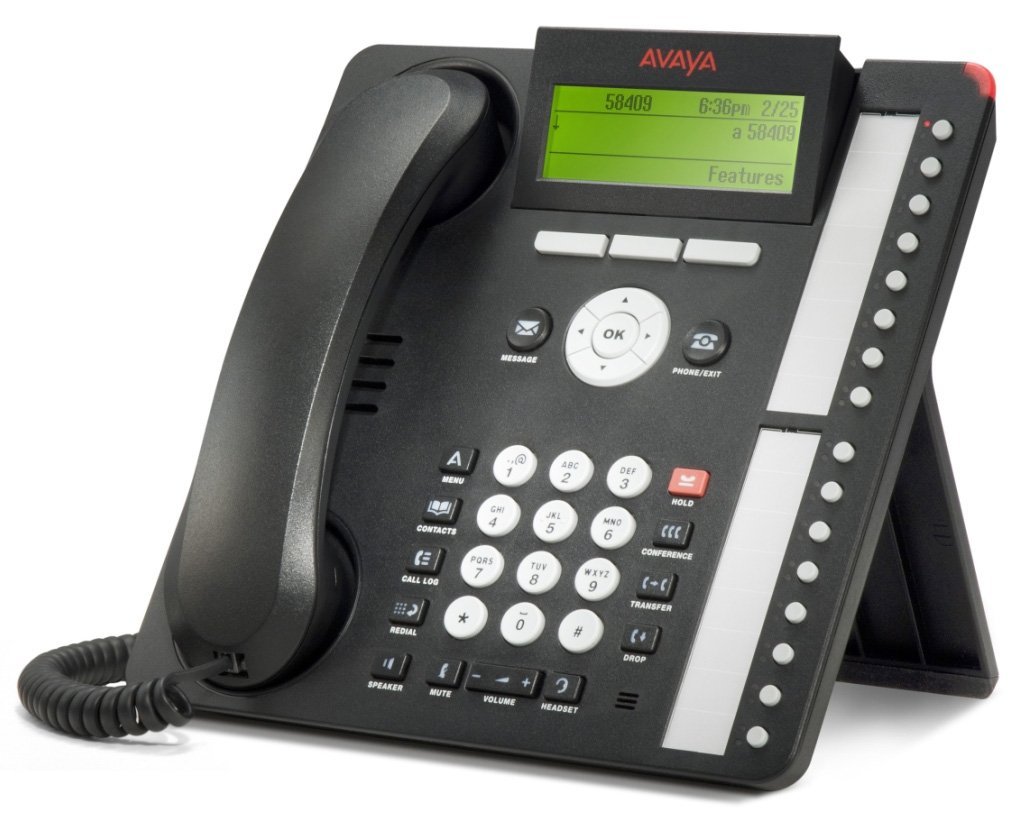
Figura 1: Avaya 1616 IP Telephone components. This image displays the main telephone unit, the handset, the coiled handset cord, an Ethernet cable, and the desk stand. The main unit features a display screen, a numeric keypad, and various function buttons. The desk stand is designed to elevate the phone for easier viewing y operación.
- Telephone Base Unit: The main body of the phone with keypad, display, and function buttons.
- Auricular: The receiver for voice communication.
- Cable del auricular: Coiled cord connecting the handset to the base unit.
- Cable de ethernet: Para conexión a la red.
- Soporte de escritorio: For positioning the phone on a desk.
- Power Adapter (Sold Separately): A 5V local power supply may be required if Power over Ethernet (PoE) is not available.
2.2 Conexiones físicas
- Coloque el soporte de escritorio: Securely attach the desk stand to the bottom of the telephone base unit.
- Conectar el teléfono: Plug one end of the coiled handset cord into the handset and the other end into the designated handset port on the side or back of the telephone base unit.
- Conectarse a la red: Insert one end of the Ethernet cable into the "LAN" port on the back of the telephone and the other end into a network switch or router. The phone supports dual Ethernet ports for connection of the phone and a collocated PC with VLAN separation.
- Conecte la electricidad:
- Alimentación a través de Ethernet (PoE): If your network switch supports 802.3af PoE, the phone will receive power through the Ethernet cable. No separate power adapter is needed.
- Local Power Supply: If PoE is not available, connect a 5V local power supply (sold separately) to the power port on the back of the telephone and then to an electrical outlet.
Once connected, the phone will power on and begin its boot sequence. This may take a few moments.
3. Instrucciones de funcionamiento
This section covers the basic operation of your Avaya 1616 IP Telephone.
3.1 Características principales
- 16 Line Appearances/Feature Keys: Programmable buttons with dual LEDs for line status and feature access.
- High-Quality 2-Way Speakerphone: Para comunicación manos libres.
- Identificador de llamadas: Muestra información de la llamada entrante.
- Operación multilínea: Supports multiple active lines.
- Capacidad de llamada de conferencia: Basic conferencing features.
3.2 Funciones básicas de llamada
- Haciendo una llamada:
- Levante el auricular o presione el botón Altavoz.
- Marque el número deseado usando el teclado.
- Press the "Call" or "Dial" softkey, or wait for automatic dialing.
- Responder una llamada:
- Lift the handset, or press the Speaker button, or press the flashing line appearance button.
- Terminar una llamada:
- Replace the handset, or press the Speaker button again if using speakerphone, or press the "End Call" softkey.
- Poner una llamada en espera:
- During an active call, press the "Hold" button. The line appearance LED will flash.
- To retrieve the call, press the flashing line appearance button.
- Transferir una llamada:
- During an active call, press the "Transfer" button. The current call is put on hold.
- Dial the number of the party to whom you wish to transfer the call.
- Wait for the party to answer (consulted transfer) or press "Transfer" again to complete the transfer (blind transfer).
- Iniciar una llamada en conferencia:
- During an active call, press the "Conference" button. The current call is put on hold.
- Marque el número del tercero.
- Once the third party answers, press the "Conference" button again to join all parties.
4. Mantenimiento
Proper maintenance ensures the longevity and optimal performance of your Avaya 1616 IP Telephone.
4.1 Limpieza
- Utilice un paño suave y ligeramente húmedo.amp Paño para limpiar las superficies exteriores del teléfono.
- Avoid using abrasive cleaners, solvents, or strong chemicals, as these can damage the finish and electronic components.
- Do not spray cleaning liquids directly onto the phone. Apply to the cloth first.
- Ensure the phone is disconnected from power before cleaning.
4.2 Cuidados generales
- Mantenga el teléfono alejado del calor excesivo, la luz solar directa y la humedad.
- Evite dejar caer el teléfono o someterlo a impactos fuertes.
- Ensure cables are not pinched or strained.
5. Solución de problemas
This section provides solutions to common issues you might encounter with your Avaya 1616 IP Telephone.
| Problema | Posible causa | Solución |
|---|---|---|
| El teléfono no se enciende. | No hay suministro de energía o conexión defectuosa. |
|
| No hay tono de marcado. | Network connectivity issue or service problem. |
|
| No puedo realizar ni recibir llamadas. | Network configuration, service issue, or phone registration problem. |
|
| Mala calidad de audio. | Congestión de la red, cable defectuoso o problema con el teléfono. |
|
If the problem persists after attempting these solutions, please contact your IT department or Avaya support for further assistance.
6. Especificaciones
Key technical specifications for the Avaya 1616 IP Telephone (700450190).
| Característica | Detalle |
|---|---|
| Número de modelo | 700450190 |
| Line Appearances | 16 with dual LEDs |
| Altavoz | High-quality 2-way |
| Opciones de montaje | Desk or wall mountable (with optional adapter) |
| Puertos Ethernet | Dual (for phone and collocated PC w/VLAN separation) |
| Fuente de poder | 802.3af Power over Ethernet (PoE) or optional 5V local power supply |
| Tipo de marcador | Teclado único |
| Tipo de sistema de contestación | Digital |
| Dispositivos compatibles | Computers, Telephone Networks, VoIP Services |
| Capacidad de realizar llamadas en conferencia | Básico |
| Operación multilínea | Operación multi-línea |
| Identificador de llamadas | Sí |
| Color | Negro |
| Dimensiones del producto | 9.8 x 7.9 x 2.8 pulgadas (aproximadamente) |
| Dimensiones del paquete | 16.8 x 10 x 3.3 pulgadas |
| Peso | 2.9 libras (peso del paquete) |
7. Información de garantía
This Avaya 1616 IP Telephone (700450190) is typically offered with a Garantía limitada de 90 días. This warranty covers defects in materials and workmanship under normal use. For specific terms and conditions, please refer to the warranty documentation provided at the time of purchase or contact your vendor.
Note: As a renewed product, warranty terms may vary from new products. Always confirm warranty details with your supplier.
8. Soporte
For technical assistance, further troubleshooting, or inquiries regarding your Avaya 1616 IP Telephone, please contact your system administrator or the vendor from whom you purchased the device. Avaya's official support channels can also provide resources and documentation for their products.
For general information about Avaya products, you may visit the official Avaya websitio.


