
Aigital N300
Manual del usuario del extensor de alcance WiFi Aigital N300
Wireless Repeater, Internet Signal Booster, Access Point
Modelo: N300
1. Introducción
This manual provides detailed instructions for the setup, operation, and maintenance of your Aigital N300 WiFi Range Extender. Please read this manual carefully before use to ensure proper functionality and optimal performance. This device is designed to expand your wireless network coverage and provide internet access in areas with weak or no signal.
2. Producto terminadoview
The Aigital N300 WiFi Range Extender is a compact and versatile device. It supports 2.4 GHz frequency band with a data transfer rate of up to 300 Megabits Per Second. It can function as a WiFi Repeater to extend your existing network or as an Access Point to create a new wireless network from a wired connection.
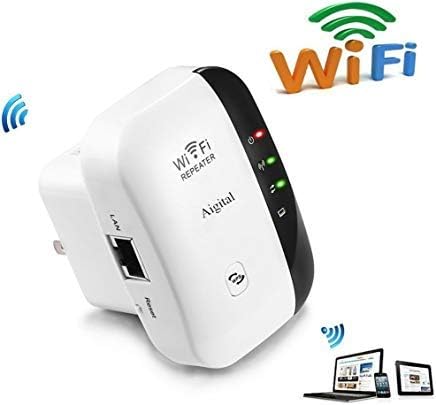
The Aigital N300 WiFi Range Extender is a compact device designed to expand your wireless network coverage. It features indicator lights for power, WLAN, and WPS status, along with an Ethernet (LAN) port and a reset button. The device is white with a black accent on one side.
Componentes clave:
- Indicador de encendido: Muestra el estado de energía del dispositivo.
- Indicador WLAN: Indica actividad de red inalámbrica.
- Botón WPS: For quick and secure connection to compatible routers.
- Puerto LAN: For wired connection to devices or for AP mode setup.
- Botón de reinicio: Se utiliza para restaurar el dispositivo a la configuración predeterminada de fábrica.
3. Instrucciones de configuración
Before beginning the setup, ensure your Aigital N300 is plugged into a power outlet near your main router or modem.
Conexión inicial:
- Conecte el repetidor WiFi a una toma eléctrica.
- Wait for the power indicator light to become stable.
- On your phone, computer, or laptop, connect to the Wi-Fi network named "wifi repeater". This is the default network broadcast by the extender.
Configuración a través de Web Navegador:
- Abrir una web navegador (por ejemplo, Chrome, Firefox, Edge).
- En la barra de direcciones, escriba 192.168.10.1 y presione Enter.
- You will be prompted to log in. The default username and password are typically administración (or as specified in the included mini-manual).
- Follow the on-screen wizard to select your desired operating mode (Repeater or AP).
Restablecimiento del dispositivo:
If you need to reconfigure the device or encounter issues, you can perform a factory reset:
- Con el dispositivo encendido, localice el botón de reinicio (generalmente un pequeño orificio).
- Use a paperclip or a similar pointed object to press and hold the reset button for over 10 seconds.
- Release the button when the power light and WPS light turn on, and the WLAN light blinks. The device will restart with factory default settings.
4. Modos de funcionamiento
4.1. Modo repetidor (extensor de alcance)
This mode is used to extend the coverage of your existing Wi-Fi network. It is ideal when your primary Wi-Fi signal is weak or non-existent in certain areas of your home or office, such as a yard, other rooms, a second floor, a basement, or a garage.
Setup Steps for Repeater Mode:
- Después de iniciar sesión en el web interface (192.168.10.1), select "Repeater Mode".
- El extensor buscará redes Wi-Fi disponibles. Seleccione su red Wi-Fi doméstica en la lista.
- Enter the exact password for your home Wi-Fi network. Importante: The password must be identical to your main Wi-Fi password for internet access.
- Puede optar por mantener el mismo SSID (nombre de red) o crear uno nuevo para la red extendida.
- Save the settings and wait for the extender to restart. Once restarted, the WLAN indicator should be stable, indicating a successful connection.
4.2. Modo AP (Punto de acceso)
This mode transforms a wired internet connection into a wireless Wi-Fi hotspot. It is useful if you have a modem but no router, or if you want to add Wi-Fi capability to a wired-only network, allowing wireless devices like phones and tablets to connect.
Setup Steps for AP Mode:
- Connect the RJ-45 Ethernet Cable from your modem or wired network to the LAN port of the Aigital N300 extender.
- Después de iniciar sesión en el web interface (192.168.10.1), select "AP Mode".
- Configure el nuevo nombre de la red Wi-Fi (SSID) y la contraseña.
- Save the settings and wait for the extender to restart. Once restarted, your new Wi-Fi network will be available for connection.
5. Solución de problemas
- No Internet Access in Repeater Mode: Ensure the password entered for your home Wi-Fi network during setup is exactly the same. Any mismatch will prevent internet access. Try resetting the device and reconfiguring.
- Cannot Access Configuration Page (192.168.10.1): Ensure your device is connected to the "wifi repeater" network. If still unable, try resetting the extender to factory defaults and attempt connection again.
- Señal débil después de la configuración: Relocate the extender to a position that is halfway between your main router and the area where you need improved Wi-Fi coverage. Avoid placing it near large metal objects or other electronic devices that may cause interference.
- El dispositivo no se enciende: Check the power outlet and ensure the extender is securely plugged in.
- Configuración de vídeo: For visual guidance, a setup video is available at https://youtu.be/3uoGpCGlTWk.
6. Especificaciones
| Característica | Detalle |
|---|---|
| Modelo | N300 |
| Banda de frecuencia | 2.4 GHz |
| Velocidad de transferencia de datos | 300 megabits por segundo |
| Vol soportadotage | 110 V-240 V |
| Seguridad WLAN | WPA2, WPA, WEP(128/64) |
| Antenas | Integrado |
| Dimensiones (L x An x Al) | 5.51 x 5.79 x 8 cm |
| Peso | 136 gramos |
| Componentes incluidos | 1x WiFi Repeater, 1x RJ-45 Ethernet Cable, 1x User Manual |
7. Mantenimiento
- Limpieza: Utilice un paño suave y seco para limpiar el exterior del dispositivo. No utilice limpiadores líquidos ni aerosoles.
- Colocación: For optimal performance, place the extender in an open area, away from obstructions like walls, large furniture, or metal objects. Avoid placing it near other electronic devices that may cause signal interference.
- Actualizaciones de firmware: Revise periódicamente las instrucciones del fabricante. webSitio para obtener actualizaciones de firmware disponibles para garantizar el mejor rendimiento y seguridad.
8. Garantía y soporte
For any inquiries regarding setup, troubleshooting, or product information, please contact Aigital customer support. While specific warranty details are not provided in this manual, please refer to your purchase documentation or contact the seller for warranty terms and conditions.
Puede comunicarse con nuestro equipo de soporte por correo electrónico a: aigital@hotmail.com
Ask a question about this manual
Ask about setup, troubleshooting, compatibility, parts, safety, or missing instructions. Manuals+ will review the question and use this page’s manual context to help answer it.