
1. Introducción
The SUNMI L2 SmartOrder is a rugged industrial terminal designed for various business applications requiring mobility and data capture. It features an Android 7.1 operating system, a 5-inch display, and an integrated 1D/2D Zebra scanner. This manual provides essential information for the proper setup, operation, and maintenance of your device.
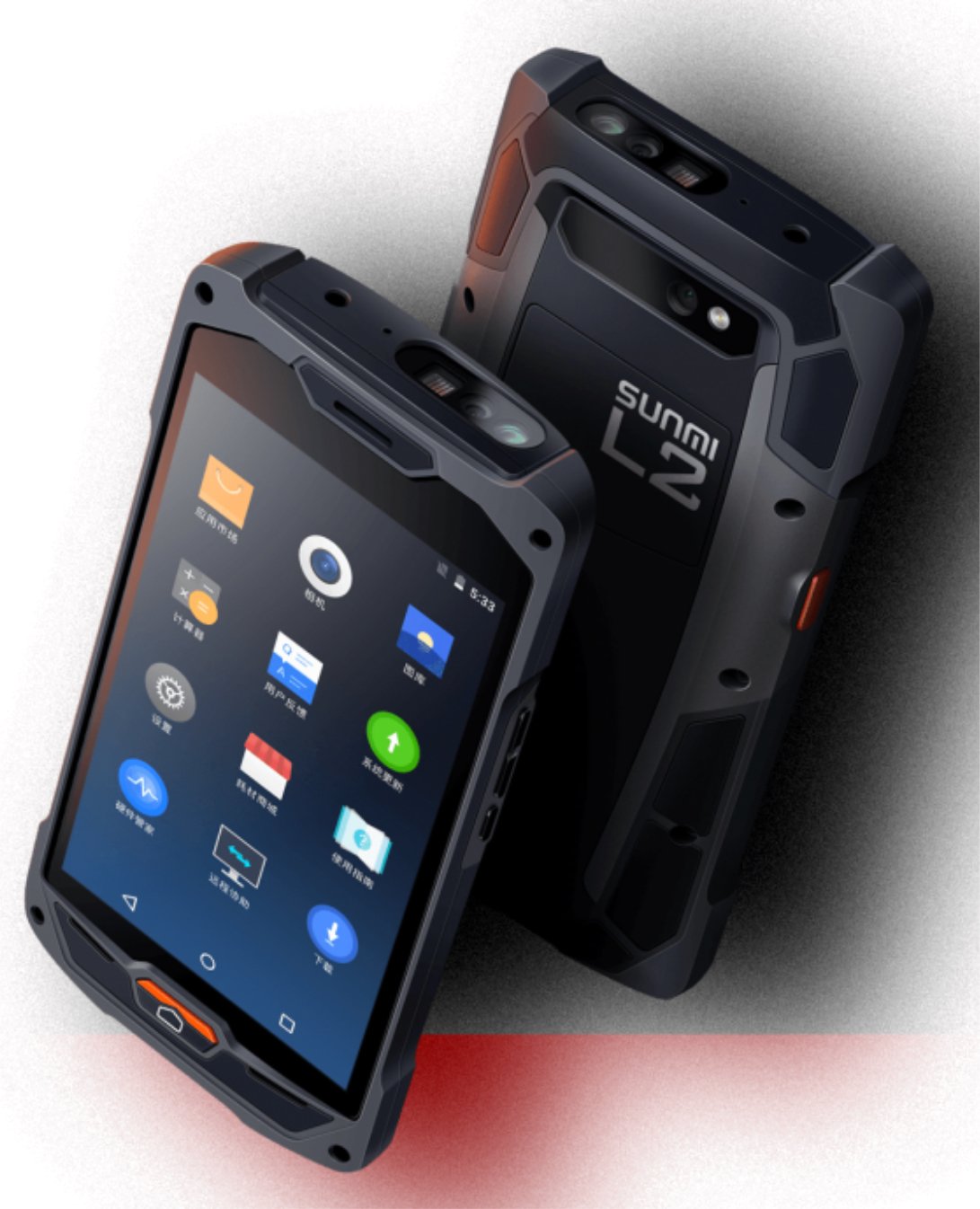
Figura 1: Parte delantera y trasera view of the Sunmi L2 SmartOrder industrial terminal.
2. Información de seguridad
Lea todas las instrucciones de seguridad antes de usar el dispositivo para evitar lesiones o daños. Conserve este manual para futuras consultas.
- No exponga el dispositivo a temperaturas extremas, luz solar directa o humedad alta.
- Use only SUNMI-approved accessories and power adapters.
- Evite dejar caer o someter el dispositivo a impactos fuertes, a pesar de su diseño resistente.
- No intente desmontar ni reparar el dispositivo usted mismo. Consulte a personal de servicio técnico cualificado.
- Mantenga el dispositivo alejado de dispositivos médicos, ya que puede interferir con su funcionamiento.
3. Dispositivo terminadoview
The SUNMI L2 SmartOrder is designed for durability and functionality. Key features include:
- Pantalla de 5 pulgadas: High-resolution touchscreen for clear visibility.
- 1D/2D Zebra Scanner: Integrated for efficient barcode and QR code scanning.
- Puerto USB-C: Para carga y transferencia de datos.
- Ranura para tarjeta SIM: Para conectividad de red celular.
- Ranura para tarjetas TF: Para almacenamiento expandible.
- PSAM Card Slot (Optional): For enhanced security in professional applications.
- Área de inducción NFC: For near-field communication.

Figura 2: Posterior view showing SIM card slot, TF card slot, PSAM card slot, and NFC induction area.

Figure 3: Three different scanner options for the Sunmi L2: Zebra Code Scanner, Standard Code Scanner, and without scanner.
4. Configuración
4.1. Instalación y carga de la batería
The device is equipped with a 5000mAh high-volume battery. Ensure the battery is fully charged before initial use.
- Connect the provided USB-C cable to the USB-C port on the device.
- Connect the other end of the USB-C cable to a compatible power adapter and plug it into a power outlet.
- The charging indicator will illuminate. Allow the device to charge completely before disconnecting.

Figure 4: Illustration of the 5000mAh high-volume battery with Quick Charge technology.
4.2. Instalación de la tarjeta SIM y TF
To install SIM or TF cards:
- Locate the card slot cover on the rear of the device (refer to Figure 2).
- Abra la tapa con cuidado.
- Insert the SIM card into the designated SIM card slot with the gold contacts facing down.
- Insert the TF card (microSD) into the TF card slot if additional storage is required.
- Cierre la tapa de la ranura de la tarjeta de forma segura para mantener la clasificación IP67 del dispositivo.
4.3. Encendido inicial
After charging, press and hold the power button located on the side of the device until the screen illuminates and the SUNMI logo appears. The device will boot into the Android 7.1 operating system.
5. Instrucciones de funcionamiento
5.1. Navegación básica
The SUNMI L2 operates on Android 7.1. Navigate the interface using the touchscreen. Swipe to unlock, tap icons to open applications, and use the navigation buttons (Home, Back, Recent Apps) as standard for Android devices.
5.2. Using the 1D/2D Zebra Scanner
The integrated Zebra scanner is located at the top of the device.
- Abra la aplicación de escaneo en su dispositivo.
- Point the scanner window at the barcode or QR code you wish to scan.
- Press the dedicated scan button (if available on your model) or trigger the scan via the software interface.
- Ensure the barcode is well-lit and within the scanner's optimal range for accurate reading.

Figura 5: Abajo view of the Sunmi L2, highlighting its rugged design and integrated scanner.
5.3. Conectividad
El dispositivo admite varias opciones de conectividad:
- WLAN (Wi-Fi): Supports 2.4 GHz and 5 GHz bands. Access Wi-Fi settings from the Android system menu to connect to available networks.
- Bluetooth (BT): Pair with other Bluetooth-enabled devices such as printers or headsets via the Bluetooth settings.
- GPRS/LTE: Utilize cellular data by inserting a SIM card and configuring network settings.
- NFC: For short-range wireless communication, typically used for contactless payments or data exchange.
6. Mantenimiento
6.1. Limpieza del dispositivo
Para mantener el rendimiento y la apariencia del dispositivo:
- Utilice un paño suave y sin pelusa ligeramente seco.ampLimpiar con agua o un limpiador de pantalla suave.
- Avoid using harsh chemicals, abrasive cleaners, or solvents, as these can damage the device's surface and seals.
- Asegúrese de que todas las cubiertas de los puertos estén bien cerradas antes de limpiar para mantener la resistencia al agua y al polvo.
6.2. Cuidado de la batería
El cuidado adecuado de la batería prolonga su vida útil:
- Evite descargar completamente la batería con frecuencia.
- No exponga el dispositivo a calor o frío extremos, ya que esto puede degradar el rendimiento de la batería.
- If storing the device for an extended period, charge the battery to approximately 50% and store it in a cool, dry place.
6.3. Almacenamiento
When not in use, store the SUNMI L2 in a cool, dry environment, away from direct sunlight and corrosive materials.
7. Solución de problemas
This section addresses common issues you might encounter with your SUNMI L2 device.
- El dispositivo no enciende: Ensure the battery is sufficiently charged. Connect the device to a power source and attempt to power it on again.
- El escáner no funciona: Verify that the scanning application is active and the scanner is enabled in the device settings. Ensure the barcode is clean, undamaged, and properly illuminated.
- Problemas de conectividad (Wi-Fi/Celular): Check your Wi-Fi network connection or cellular data settings. Ensure the SIM card is correctly inserted. Try restarting the device.
- La pantalla táctil no responde: Reinicia el dispositivo. Si el problema persiste, contacta con el servicio de asistencia.
8. Especificaciones
Key technical specifications for the SUNMI L2 SmartOrder:
| Número de modelo | Sunmi L2 Zebra T8900 |
| Sistema operativo | Androide 7.1 |
| Mostrar | 5 pulgadas |
| UPC | Cuatro núcleos |
| RAM | 2 GB |
| memoria de sólo lectura | 16 GB |
| Escáner | 1D/2D Zebra Scanner |
| Conectividad | USB-C, WLAN 2.4/5 GHz, Bluetooth, GPRS, LTE, NFC |
| Batería | 5000mAh (up to 2 days use, 30 days standby) |
| Durabilidad | IP67 rated (dust-proof, water-resistant, drop-resistant) |
| Temperatura de funcionamiento | -20°C a +55°C |
| Peso | 349.27 gramos |
| Dispositivos compatibles | Desktop computer, Laptop, POS, Smartphone, Tablet |

Figure 6: Sunmi L2 device partially submerged in water, demonstrating its IP67 dust-proof and water-resistant capabilities.
9. Garantía y soporte
For detailed warranty information, technical support, or service inquiries, please refer to the official SUNMI website or contact your authorized SUNMI distributor. Please retain your purchase receipt as proof of purchase for any warranty claims.