
Canyon CND-GPW5
Manual del usuario del mando inalámbrico con panel táctil Canyon Gaming CND-GPW5
Model: CND-GPW5
Introducción
This manual provides comprehensive instructions for the Canyon Gaming Gamepad CND-GPW5, a wireless controller designed for PlayStation 4 with an integrated touchpad. Please read this manual carefully before using the product to ensure proper operation and to maximize your gaming experience.

Imagen: Frente view of the Canyon Gaming Gamepad CND-GPW5, showcasing su diseño ergonómico, dos joysticks analógicos, pad direccional, botones de acción y panel táctil central.
Contenido del paquete
- Canyon Gaming Gamepad CND-GPW5
- Cable de carga USB
- Manual de usuario (este documento)

Image: The Canyon Gaming Gamepad CND-GPW5 displayed within its retail packaging, highlighting key features like wireless connectivity, touchpad, and vibration feedback.
Configuración
1. Carga del gamepad
- Conecte el extremo pequeño del cable de carga USB al puerto de carga del gamepad.
- Connect the larger end of the USB charging cable to a USB port on your PlayStation 4 console or a compatible USB wall adapter.
- The indicator light on the gamepad will illuminate to show it is charging. It will turn off or change color when fully charged.
2. Emparejamiento con PlayStation 4
- Asegúrese de que su consola PlayStation 4 esté encendida.
- For initial pairing, connect the gamepad to the PS4 console using the USB charging cable.
- Presione el Botón PS (located in the center of the gamepad). The gamepad will power on and automatically pair with the console.
- Una vez emparejado, puedes desconectar el cable USB para reproducir de forma inalámbrica.
- To pair wirelessly after initial setup, simply press the Botón PS on the gamepad. It will attempt to connect to the last paired console.
Instrucciones de funcionamiento
Disposición y funciones del gamepad

Imagen: Trasera view of the Canyon Gaming Gamepad CND-GPW5, showing the M1, M2, M3, and M4 programmable buttons, along with regulatory information.
- Joysticks analógicos: Used for precise movement and camera control.
- Pad direccional (D-Pad): Para navegar por el menú y realizar acciones específicas dentro del juego.
- Botones de acción (triángulo, círculo, cruz, cuadrado): Perform various in-game actions.
- Botones de hombro (L1, R1) y gatillos (L2, R2): For aiming, firing, and other contextual actions.
- Botón PS: Powers on the gamepad, accesses the PS4 home menu, and switches users.
- Botón COMPARTIR: Shares screenshots and video clips.
- Botón OPCIONES: Accede a los menús y opciones del juego.
- Panel táctil: Functions as a clickable surface for navigation and specific game interactions.
- Botones M1, M2, M3, M4: These are additional programmable buttons located on the rear of the gamepad. Refer to your game's settings or the PS4 system settings for customization options.
Vibración Feedback
The gamepad features vibration feedback to enhance immersion during gameplay. This function is automatically enabled when supported by the game.
Mantenimiento
Limpieza
- Limpie el gamepad con un paño suave y seco.
- Do not use liquid cleaners, solvents, or abrasive materials, as these can damage the surface and internal components.
Almacenamiento
- Guarde el gamepad en un lugar fresco y seco, alejado de la luz solar directa y de temperaturas extremas.
- Evite colocar objetos pesados sobre el gamepad.
Cuidado de la batería
- Para prolongar la vida útil de la batería, evite descargar completamente el gamepad con frecuencia.
- If storing for an extended period, charge the gamepad to approximately 50% before storage.
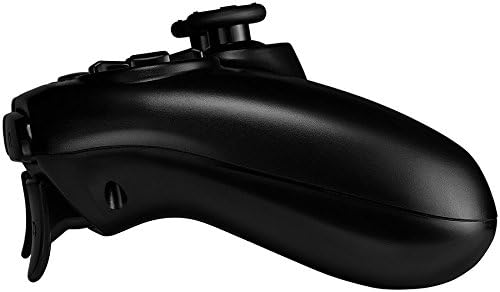
Imagen: Side profile of the Canyon Gaming Gamepad CND-GPW5, illustrating its contoured grip and trigger button placement.
Solución de problemas
- El gamepad no se conecta:
- Asegúrese de que el gamepad esté cargado.
- Connect the gamepad to the PS4 console with the USB cable and press the PS button to re-establish connection.
- Compruebe si hay interferencias de otros dispositivos inalámbricos.
- Buttons or analog sticks unresponsive:
- Restart the gamepad by holding the PS button for 10 seconds, then press it again to power on.
- Ensure the gamepad's firmware is up to date (check Canyon's official website for updates if available).
- Problemas de carga:
- Try a different USB cable or USB port on the console/adapter.
- Ensure the charging port on the gamepad is clean and free of debris.
If problems persist, please refer to the support section or contact Canyon customer service.
Presupuesto
| Característica | Detalle |
|---|---|
| Número de modelo | CND-GPW5 (Item Model Number: 9598241) |
| Conectividad | Inalámbrico |
| Compatibilidad | PlayStation 4 |
| Características | Touchpad, Vibration Feedback |
| Batería | 1 Lithium-ion battery (required) |
| Dimensiones del producto (L x An x Al) | 50 x 50 x 28 cm |
| Peso | 224 gramos |
| ASIN | B07G37JCMC |
| Fecha de lanzamiento | 1 de julio de 2020 |
Garantía y soporte
For information regarding warranty coverage, please refer to the warranty card included with your product or visit the official Canyon website. For technical support or further assistance, please contact Canyon customer service through their official support channels.
Official Canyon Websitio: https://canyon.eu/