
Introducción
This manual provides instructions for the installation, operation, and maintenance of your Audiovox ELEAUDAX80EXT Wireless Extension. This device is designed to expand the functionality of compatible Audiovox phone models, specifically the AX8001, AX8001E, and AX8101AM, by providing an additional wireless handset.
Contenido del paquete
Verifique que todos los elementos estén presentes en el paquete antes de continuar con la configuración.
- Audiovox ELEAUDAX80EXT Wireless Extension Unit
- Adaptador de corriente (si corresponde)
- Batería recargable (preinstalada o separada)
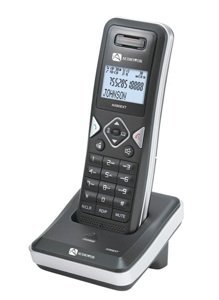
Image: The Audiovox ELEAUDAX80EXT Wireless Extension Unit. This image displays the compact design of the extension handset.
Configuración
- Cargar la batería: If the battery is not pre-installed, insert it into the extension unit according to the markings. Place the extension unit on its charging cradle (if included) or connect the power adapter directly to the unit and a power outlet. Allow the unit to charge for at least 12-16 hours before initial use.
- Register the Extension:
- Ensure your main Audiovox phone base (AX8001, AX8001E, or AX8101AM) is powered on.
- On the main phone base, locate and press the "Register" or "Page" button. Hold it until the indicator light on the base begins to flash (refer to your main phone's manual for exact instructions).
- While the base is in registration mode, on the ELEAUDAX80EXT extension unit, navigate to the "Menu" and select "Register Handset" or a similar option. Follow the on-screen prompts.
- Once registration is successful, the extension unit will display a confirmation message, and the indicator light on the base will stop flashing.
- Conexión de prueba: Make a test call from the extension unit to ensure proper functionality.
Instrucciones de funcionamiento
Realizar una llamada
- Levante el auricular o presione el HABLAR botón.
- Marque el número de teléfono deseado.
- Presione el HABLAR button again or place the handset back on the cradle to end the call.
Respondiendo una llamada
- Cuando suene el teléfono, levante el auricular o presione el botón HABLAR botón.
- Para finalizar la llamada, presione la tecla FIN button or place the handset back on the cradle.
Intercom Function (if supported by base unit)
- Presione el INTERCOMUNICADOR botón.
- Dial the number of the extension you wish to call (e.g., "2" for the second handset).
- Prensa HABLAR to initiate the intercom call.
Mantenimiento
- Limpieza: Limpie la unidad con un paño suave yamp paño. No utilice productos químicos agresivos ni limpiadores abrasivos.
- Cuidado de la batería: For optimal battery life, avoid fully discharging the battery frequently. Keep the unit on its charger when not in use.
- Almacenamiento: Si va a almacenar la unidad durante un período prolongado, retire la batería y guárdela en un lugar fresco y seco.
Solución de problemas
| Problema | Solución |
|---|---|
| No hay tono de marcado / No se pueden realizar llamadas |
|
| El teléfono no se carga |
|
| Mala calidad de llamada / Estática |
|
Presupuesto
- Número de modelo: ELEAUDAX80EXT
- Compatible Base Units: Audiovox AX8001, AX8001E, AX8101AM
- Dimensiones (L x An x Al): 20 x 40 x 30 milímetros
- Peso: 20 gramos
- Código postal: 044476082719
Garantía y soporte
For specific warranty information and technical support, please refer to the documentation included with your original Audiovox phone system or visit the official Audiovox webSitio. Conserve su recibo de compra como comprobante para reclamaciones de garantía.
For further assistance, please contact Audiovox customer service.