
Introducción
The AIMILAR Digital Countdown Timer AY4034 is designed to help you track important events up to 9999 days. This manual provides detailed instructions for setting up and operating your countdown timer, ensuring you can effectively monitor your significant dates.
Información de seguridad
Please read and understand all instructions before using this device. Keep the device away from water and extreme temperatures. Do not attempt to disassemble or repair the unit yourself. Use only the specified battery type.
Contenido del paquete
- AIMILAR Digital Countdown Timer AY4034
- Interchangeable background cards (e.g., Retirement, Wedding, Blank)
- Manual de usuario
Producto terminadoview
The AIMILAR Digital Countdown Timer features a large display for easy readability and several control buttons on the back for setting and adjusting the countdown. The front display shows days, hours, minutes, and seconds.

Figura 1: Frente view of the AIMILAR Digital Countdown Timer.
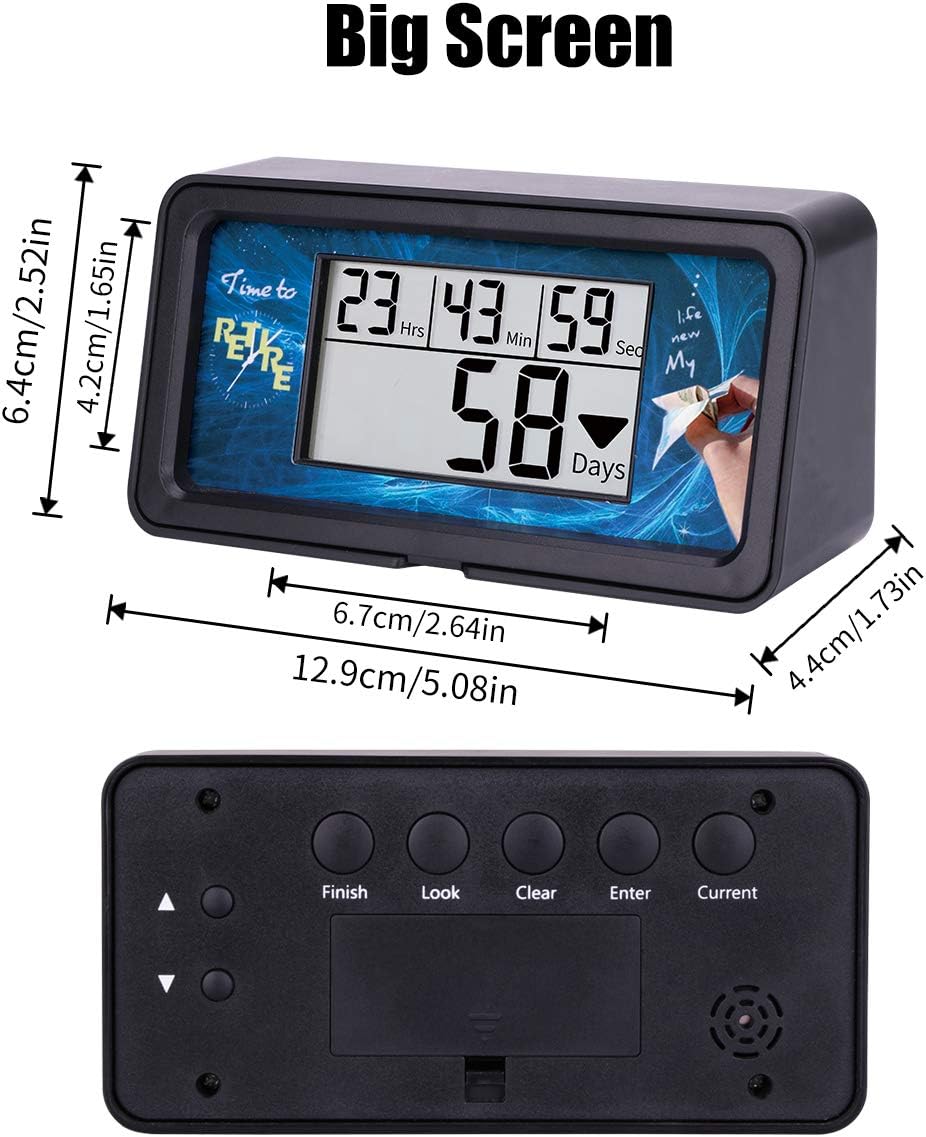
Figura 2: Atrás view showing control buttons (Finish, Look, Clear, Enter, Current) and dimensions.
Configuración
1. Instalación de la batería
The timer requires two AAA batteries (not included). Open the battery compartment on the back of the device and insert the batteries, ensuring correct polarity.
2. Setting the Target Time (Finish Time)
- Presione el Finalizar botón.
- Use the arrow buttons (up/down) to adjust the year, month, day, hour, minute, and second for your target event.
- Prensa Ingresar para confirmar cada configuración y pasar a la siguiente.
3. Configuración de la hora actual
- Presione el Actual botón.
- Use the arrow buttons (up/down) to adjust the current year, month, day, hour, minute, and second.
- Prensa Ingresar para confirmar cada configuración y pasar a la siguiente.
Once both target and current times are set, the timer will automatically calculate and display the remaining countdown time.
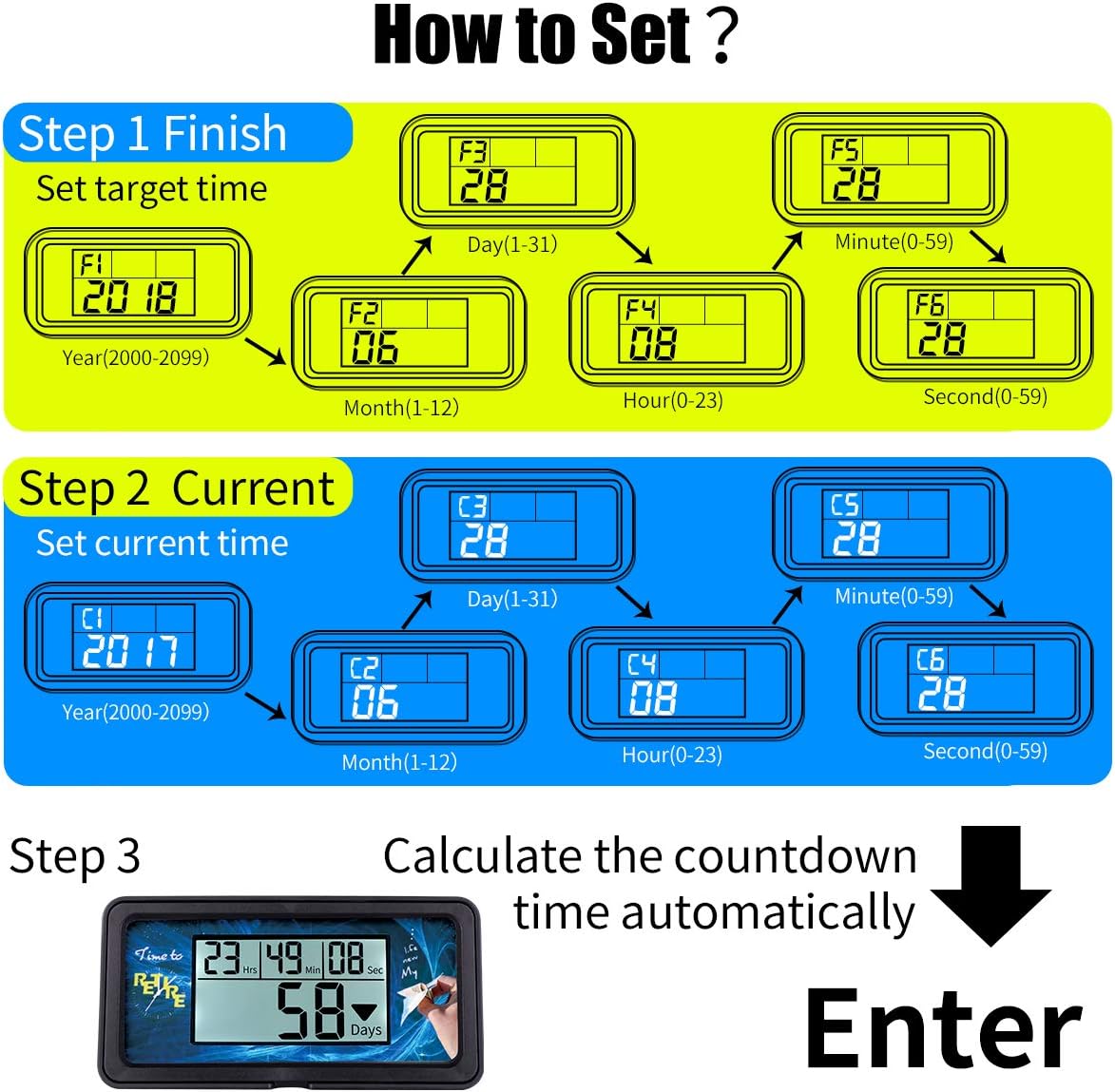
Figure 3: Visual guide for setting target and current times.
4. Video Guide: Setting the Countdown Timer
Video 1: Official AIMILAR guide on setting up the 9999 Days Countdown Timer (Model AY4034).
Instrucciones de funcionamiento
1. Función de retroiluminación
Press any button to activate the backlight. The backlight will automatically turn off after 10 seconds of inactivity to conserve battery life.

Figure 4: Comparison of the timer display with and without backlight activated.
2. Función de memoria
The timer retains your last countdown setting. To recall it:
- Sostener el Claro button until all numbers display "0".
- Presione el Ingresar button. The timer will resume counting down from your previously set target.

Figure 5: Steps to use the memory function to recall a previous countdown.
3. Checking Settings (Look Function)
While the timer is counting down, press the Mirar button to cycle through the different settings you have entered (e.g., target date, current date). This allows you to quickly review your programmed information.
4. Personalización de la pantalla
The timer allows for interchangeable background cards. You can use the provided cards (e.g., Retirement, Wedding) or design your own custom card to personalize the timer for your specific event.

Figure 6: The timer with its removable frame and various background card options.
Mantenimiento
To clean the timer, gently wipe it with a soft, dry cloth. Do not use abrasive cleaners or immerse the device in water. Replace batteries when the display becomes dim or unresponsive.
Solución de problemas
| Problema | Solución |
|---|---|
| La pantalla está tenue o en blanco. | Replace the AAA batteries. Ensure batteries are inserted with correct polarity. |
| Timer not counting down correctly. | Verify that both the target time (Finish) and current time (Current) are set accurately. |
| Cannot clear previous settings. | Sostener el Claro button for approximately 6 seconds until the display shows "0". |
| La pantalla es difícil de leer. | Activate the backlight by pressing any button. Ensure the timer is placed at an optimal viewángulo de ing. |
Presupuesto
- Marca: AIMILAR
- Número de modelo: AY4034
- Material: Acrilonitrilo butadieno estireno
- Dimensiones del producto: 2.5" de profundidad x 5" de ancho x 1.73" de alto (6.4 cm de profundidad x 12.9 cm de ancho x 4.4 cm de alto)
- Peso del artículo: 5.1 onzas (144.6 gramos)
- Tamaño de pantalla: 2.5 pulgadas
- Countdown Capacity: Hasta 9999 días
- Pilas necesarias: Sí (AAA)
- Código postal: 190835417583
Garantía y soporte
This AIMILAR product comes with a 30-day money-back guarantee and a 2-year warranty. For technical support or warranty claims, please contact AIMILAR customer service through the retailer where the product was purchased or visit the official AIMILAR websitio.