
1. Introducción
This manual provides detailed instructions for the KECAG KC-608EW Portable DVD/CD Player. This device integrates multiple functions including a DVD player, CD player, Bluetooth speaker, FM radio, and USB player, offering versatile audio and video entertainment. Please read this manual thoroughly before use to ensure proper operation and to maximize your product experience.
2. Información de seguridad
- No exponga el dispositivo a la lluvia ni a la humedad para evitar incendios o descargas eléctricas.
- No abra la casing. Deje todo servicio a personal cualificado.
- Asegúrese de que la fuente de alimentación coincida con el volumen.tagy los requisitos especificados en el dispositivo.
- Mantenga el dispositivo alejado de fuentes de calor como radiadores, rejillas de calefacción, estufas u otros aparatos que produzcan calor.
- Limpiar únicamente con un paño seco.
- Evite colocar el dispositivo sobre superficies inestables.
- No bloquee ninguna abertura de ventilación.
3. Contenido del paquete
Verifique que todos los artículos enumerados a continuación estén incluidos en su paquete. Si falta algún artículo o está dañado, comuníquese con atención al cliente.

Image: Contents of the KECAG KC-608EW player package, showing the DVD player, wall mount plate, wall mount kit, desk stand, 5V2A USB adapter, disc cover, remote control, HDMI cord, and AV cord.
- KECAG KC-608EW DVD/CD Player (with 2.5m power cord)
- Placa de montaje en pared
- Kit de montaje en pared (tornillos y anclajes)
- Soporte de escritorio
- 5V2A USB Adapter
- Tapa del disco
- Control remoto (con 1 batería CR2 incluida)
- Cable HDMI
- AV Cable
4. Producto terminadoview
4.1 Características principales

Imagen: Frente view of the KECAG KC-608EW player on a desk stand, highlighting its functions: DVD player, CD player, Bluetooth speaker, FM radio, USB player, and Line in/out.
- Reproductor de DVD: Full-HD 1080p output via HDMI, 480p+720p output via AV port.
- Reproductor de CD: Supports various CD/DVD formats including CD, DVD, CD-R/RW, DVD-R/+R, DVD+RW/-RW, VCD, SVCD.
- Bocina Bluetooth: Built-in Bluetooth 4.2 receiver for wireless audio streaming.
- Radio FM: Full band 87.5KHz-108.0MHz with auto search and manual set, 99 presets.
- Reproductor USB: Reads and plays video, audio, and photo files desde unidades USB.
- Entrada/Salida de línea: 3.5mm auxiliary input for connecting external devices (laptops, iPods) and output for headphones/external speakers/ampsalvavidas.
- Altavoces integrados: Built-in HiFi stereo speakers.
- Tiempo de dormir: Adjustable sleep timer from 30 to 180 minutes.
4.2 Controles y puertos

Imagen: de arriba hacia abajo view of the KECAG KC-608EW player, showing the disc protection dust cover, various control buttons (MODE, VOL-, VOL+, PREV/REWIND, NEXT/FORWARD), and connection ports (AV, HDMI, USB charging, USB reading). The pull switch for power on/off is also illustrated.
- Tire del interruptor: Located at the bottom, pull the power cord to turn the unit ON or OFF.
- Botón MODE: Cycles through DVD, USB, Bluetooth (BT), FM Radio, and AUX input modes.
- Botones VOL - / VOL +: Ajustar los niveles de volumen.
- PREV/REWIND Button: Skips to the previous track/chapter or rewinds during playback.
- NEXT/FORWARD Button: Skips to the next track/chapter or fast-forwards during playback.
- Cubierta del disco: A removable transparent cover protects the disc slot.
- Salida HDMI: For connecting to a TV or projector for Full HD 1080p video output.
- Salida AV: For connecting to a TV or display using composite video and stereo audio cables (480p + 720p output).
- Puerto USB: Para reproducir medios files desde una unidad USB.
- AUX Input/Output (3.5mm jack): For connecting external audio sources or outputting audio to headphones/speakers.
5. Configuración
5.1 Conexión de alimentación
- Connect the power cord to the DC IN port on the player.
- Plug the 5V2A USB adapter into a standard wall outlet.
- To power on the device, gently pull the power cord downwards (the pull switch). Pull again to power off.
5.2 opciones de montaje
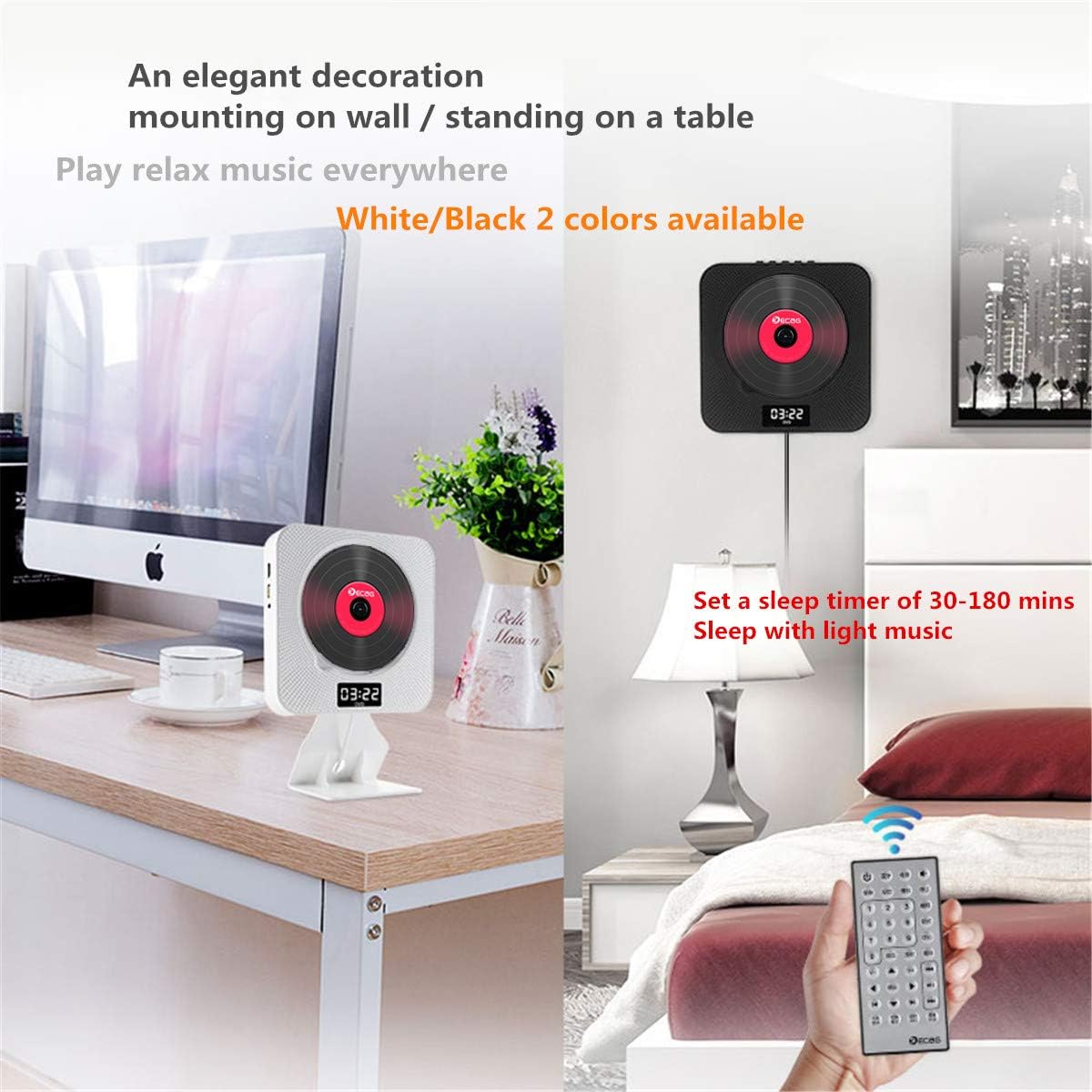
Image: Two KECAG KC-608EW players, one mounted on a wall and another standing on a desk with its stand, demonstrating flexible placement options.
5.2.1 Montaje en pared
- Elija una ubicación adecuada en la pared.
- Use the provided wall mount plate as a template to mark the drilling points.
- Perfore agujeros e inserte los anclajes de pared.
- Secure the wall mount plate to the wall using the screws.
- Carefully slide the DVD player onto the mounted plate until it clicks into place.
5.2.2 Desk Stand Installation
- Insert the bottom edge of the DVD player into the slot on the desk stand.
- Ensure the player is securely seated in the stand.
- Coloque la unidad ensamblada sobre una superficie plana y estable.
5.3 Conexión a un televisor/pantalla
5.3.1 HDMI Connection (Recommended for Full HD)

Image: The KECAG KC-608EW player connected to a television via an HDMI cable, illustrating its use as a home entertainment device.
- Asegúrese de que tanto el reproductor de DVD como el televisor estén apagados.
- Connect one end of the HDMI cable to the HDMI OUT port on the DVD player.
- Conecte el otro extremo del cable HDMI a un puerto HDMI IN de su televisor.
- Power on both devices and select the correct HDMI input source on your TV.
5.3.2 Conexión AV
- Asegúrese de que tanto el reproductor de DVD como el televisor estén apagados.
- Connect the AV cable to the AV OUT ports on the DVD player (Yellow for Video, White for Left Audio, Red for Right Audio).
- Conecte el otro extremo del cable AV a los puertos AV IN correspondientes de su televisor.
- Power on both devices and select the correct AV input source on your TV.
6. Instrucciones de funcionamiento
Use the MODE button on the player or the remote control to switch between functions.
6.1 Reproducción de DVD/CD
- Asegúrese de que el reproductor esté encendido.
- Gently remove the disc protection dust cover.
- Insert a DVD or CD into the disc slot with the label side facing outwards.
- Replace the disc protection dust cover.
- Press the MODE button until "DVD" or "CD" mode is selected.
- The disc should begin playing automatically. If not, press the PLAY button on the remote control.
- Use the PREV/REWIND, NEXT/FORWARD, PLAY, PAUSE, and STOP buttons on the player or remote for control.
Formatos de disco compatibles: DVD, CD, CD-ROM, CD-RM, CD-G, HD-CD, DVD-RM, DVD-R, VCD, WMA, AVI, XVID, MP3, JPEG.
6.2 Modo Bluetooth

Image: The KECAG KC-608EW player wirelessly connected via Bluetooth to a smartphone, indicating its use for streaming music.
- Press the MODE button until "BT" (Bluetooth) mode is selected. The display will show "BT" and a blinking Bluetooth icon, indicating it's ready for pairing.
- En su dispositivo móvil (teléfono inteligente, tableta, etc.), habilite Bluetooth y busque los dispositivos disponibles.
- Select "KECAG KC-608EW" from the list of devices.
- Once paired, the Bluetooth icon on the player's display will stop blinking.
- You can now play audio from your mobile device through the player's speakers. Use your mobile device or the player's controls for playback.
Modo de radio 6.3 FM
- Press the MODE button until "FM" mode is selected.
- Búsqueda automática: Press the PLAY/PAUSE button on the remote control or player to initiate an auto-scan for FM stations. The player will automatically save found stations (up to 99 presets).
- Sintonización manual: Use the PREV/REWIND or NEXT/FORWARD buttons to manually tune to specific frequencies or navigate through saved presets.
Reproducción USB 6.4
- Insert a USB flash drive into the USB port on the player.
- Press the MODE button until "USB" mode is selected.
- The player will automatically detect and begin playing compatible media files de la unidad USB.
- Use the PREV/REWIND, NEXT/FORWARD, PLAY, PAUSE, and STOP buttons for control.
USB compatible File Formatos: WMA, AVI, XVID, MP3, JPEG.
6.5 Entrada/salida AUX
- Entrada auxiliar: Connect an external audio device (e.g., smartphone, MP3 player) to the 3.5mm AUX jack using an audio cable. Press the MODE button until "AUX" mode is selected. Audio from the external device will play through the player's speakers.
- Salida auxiliar: Connect headphones or external speakers/amplifiers to the 3.5mm AUX jack. The player's audio will be routed to the connected device.
6.6 Temporizador de sueño
The sleep timer allows you to set a duration after which the player will automatically turn off. This feature is useful for falling asleep to music or radio.
- While the player is on, press the SLEEP button on the remote control.
- Repeatedly press the SLEEP button to cycle through available timer settings (e.g., 30, 60, 90, 120, 180 minutes, or OFF).
- The selected time will be displayed briefly. The player will automatically power off after the set duration.
7. Mantenimiento
7.1 Limpieza de la unidad
- Desenchufe siempre el cable de alimentación antes de limpiar.
- Use a soft, dry cloth to wipe the exterior surfaces of the player.
- No utilice limpiadores abrasivos, ceras o disolventes ya que pueden dañar el acabado.
7.2 Manejo del disco
- Manipule los discos por los bordes para evitar dejar huellas dactilares en la superficie de reproducción.
- Keep discs clean and free from scratches. Wipe discs gently from the center outwards with a soft, lint-free cloth if cleaning is necessary.
- Store discs in their cases when not in use to prevent dust and damage.
8. Solución de problemas
| Problema | Posible causa | Solución |
|---|---|---|
| Sin poder | Power cord not properly connected or unit not turned on via pull switch. | Ensure the power adapter is securely plugged into the wall outlet and the player. Pull the power cord downwards to activate the pull switch and turn on the unit. |
| Sin sonido | Volume too low; incorrect mode selected; external speakers/headphones not connected properly. | Increase the volume. Ensure the correct mode (DVD, BT, FM, USB, AUX) is selected. Check connections if using external audio devices. |
| No hay salida de video al televisor | Incorrect TV input selected; HDMI/AV cable loose or faulty. | Seleccione la entrada HDMI o AV correcta en su televisor. Compruebe que los cables HDMI o AV estén bien conectados tanto al reproductor como al televisor. |
| Disc error or disc not playing | El disco está sucio, rayado o su formato es incompatible. | Clean the disc with a soft cloth. Try a different disc. Ensure the disc format is supported by the player. |
| El emparejamiento de Bluetooth falló | Player not in BT mode; device too far; Bluetooth on mobile device is off. | Ensure the player is in "BT" mode. Keep your mobile device within range. Turn Bluetooth on your mobile device off and on again. |
| Mala recepción de radio FM | Señal débil; interferencia. | Adjust the position of the player. Try auto-scanning again. Avoid placing near other electronic devices that may cause interference. |
9. Especificaciones
- Número de modelo: KC-608EW
- Marca: KECAG
- Tecnología de conectividad: HDMI, AV, AUX 3.5 mm
- Color: Blanco
- Tipo de altavoz: Altavoces duales
- Dimensiones del artículo (largo x ancho x alto): 19.7 x 19.7 x 3.7 cm (7.76 x 7.76 x 1.46 pulgadas)
- Fuente de energía: Electric Cable (5V2A USB adapter)
- Supported Standards (Disc): CD, MP3, WMA, WAV, DVD, CD-ROM, CD-RM, CD-G, HD-CD, DVD-RM, DVD-R, VCD, AVI, XVID, JPEG
- Compatible con Bluetooth: Sí (Bluetooth 4.2)
- Formato de audio compatible: MP3, WMA, CD-DA
- Número de oradores: 2
- Frecuencia de radio FM: 87.5 KHz-108.0 MHz
- Batería (Remota): 1 CR2 (incluido)
10. Garantía y soporte
Specific warranty information for the KECAG KC-608EW is not available in the provided product details. For warranty claims or technical support, please refer to the documentation included with your purchase or contact the retailer/manufacturer directly.