
1. Introducción
This manual provides essential information for the safe and efficient operation of your lightmaXX Nano Beam FX show effect light. Please read it thoroughly before use and retain it for future reference.
2. Instrucciones de seguridad
- Lea todas las instrucciones cuidadosamente.
- Conserve este manual para futuras consultas.
- No exponga el dispositivo a la lluvia ni a la humedad.
- Asegúrese de que haya una ventilación adecuada.
- Desconecte de la alimentación antes de limpiar o realizar mantenimiento.
- Use only specified power supply.
- Evite la exposición directa de los ojos a la fuente de luz.
- Este dispositivo es solo para uso en interiores.
- Ensure the mounting bracket is securely fastened.
3. Contenido del paquete
Verificar que todos los artículos estén presentes y en buen estado.
- lightmaXX Nano Beam FX Unit
- Cable de alimentación
- Mando a distancia
- Manual de instrucciones (este documento)

Image 1: lightmaXX Nano Beam FX unit, power cable, and remote control.
4. Producto terminadoview
4.1 Panel frontal
The front panel features multiple lenses for projecting various light effects.
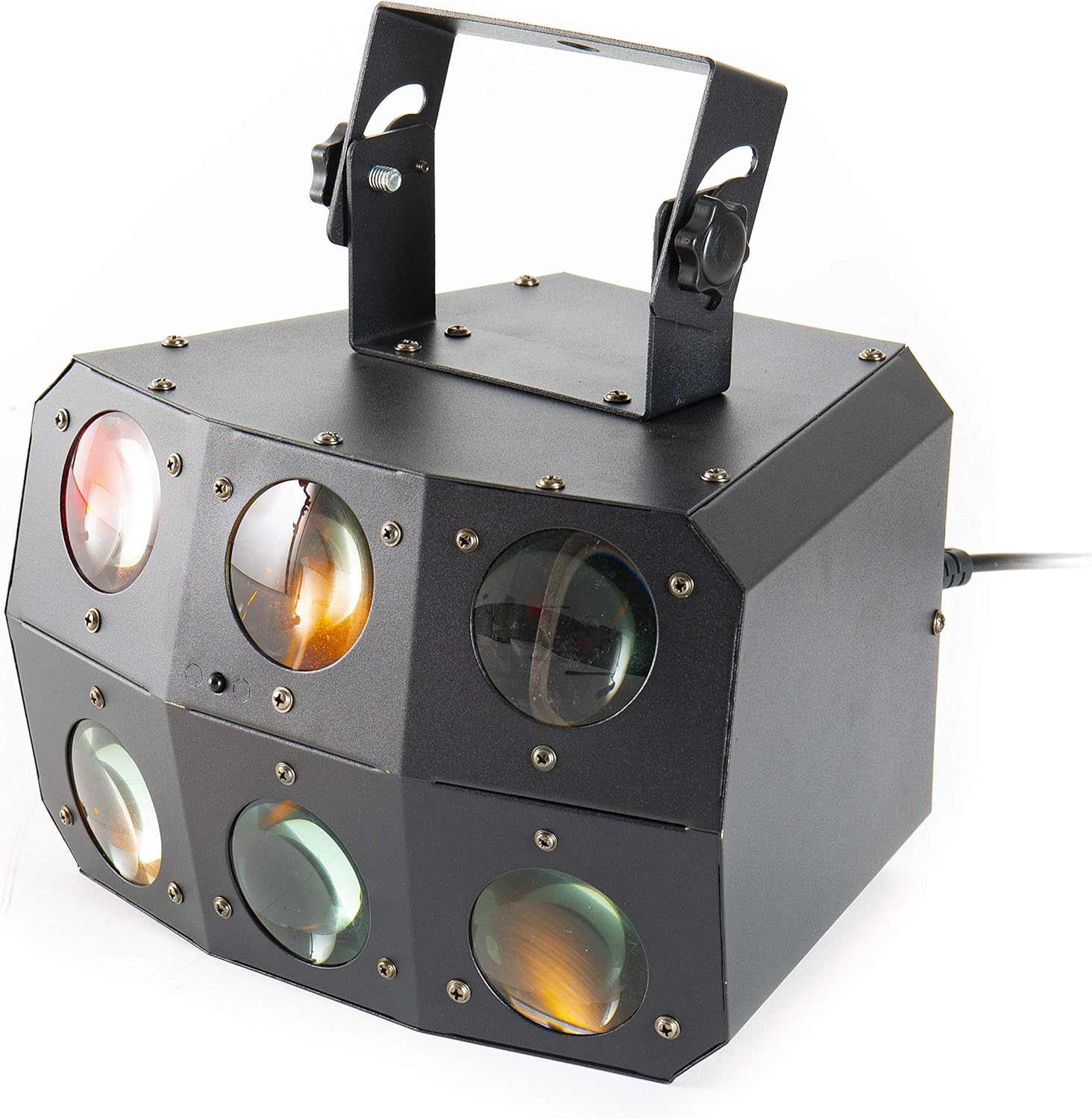
Imagen 2: Primer plano view of the front lenses.
4.2 Panel trasero y conexiones
The rear panel provides power input/output, DMX connections, and control interface.

Image 3: Rear panel with connections and control interface.
- ENTRADA DE ALIMENTACIÓN: Conecte aquí el cable de alimentación suministrado.
- SIN ELECTRICIDAD: For daisy-chaining power to other units.
- ENTRADA DMX: Connect DMX controller or previous DMX device.
- SALIDA DMX: Connect to the next DMX device in the chain.
- micrófono: Built-in microphone for sound-activated modes.
- Pantalla y botones: For menu navigation and settings (MENU, UP, DOWN, ENTER).
- SAFETY ROPE: Punto de fijación para un cable de seguridad.
4.3 control remoto
The included remote control allows for convenient operation of the unit's functions.
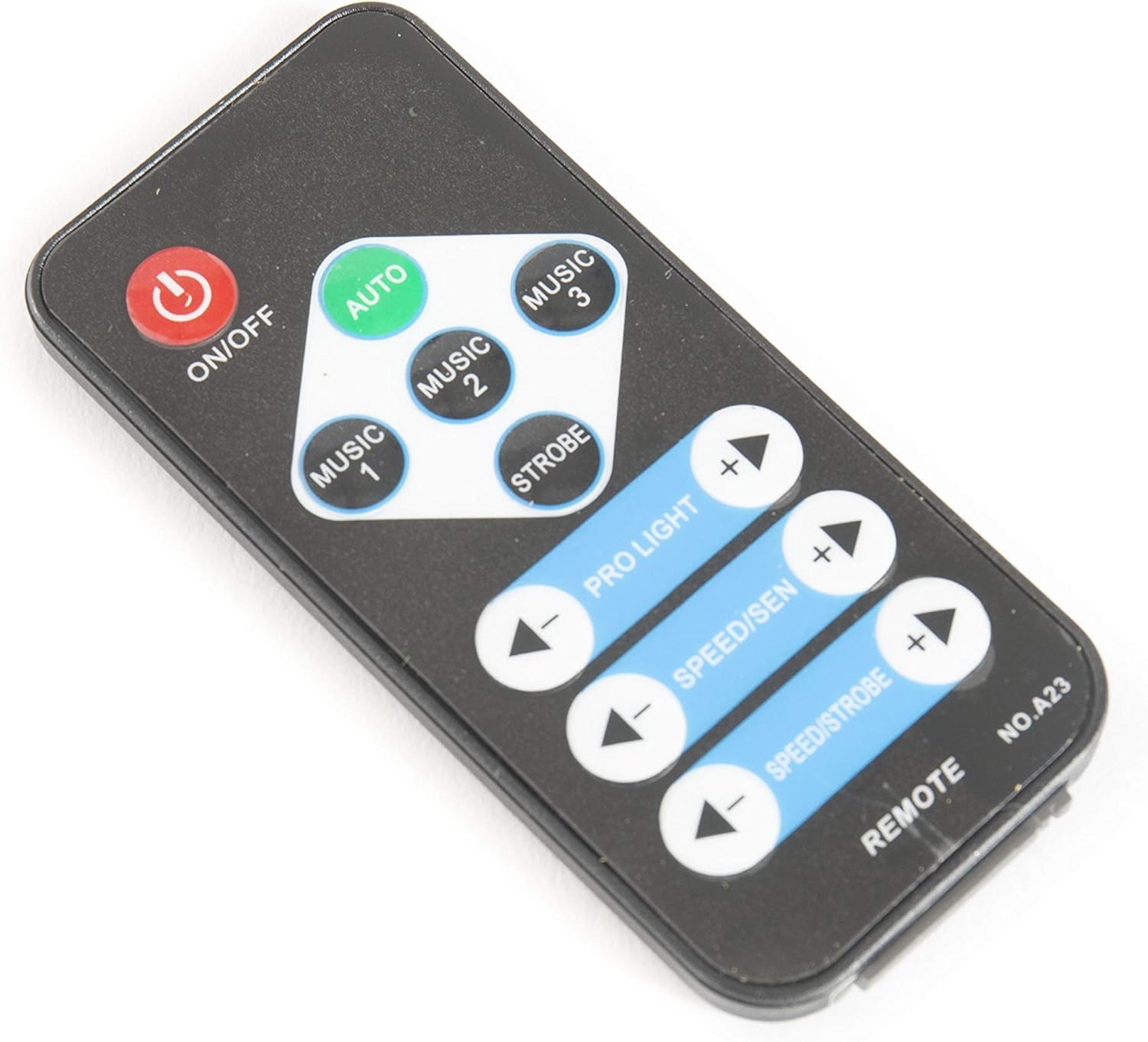
Image 4: Remote control for the Nano Beam FX.
- ENCENDIDO/APAGADO: Encender o apagar la unidad.
- COCHE: Activa el modo de programación automática.
- MÚSICA 1/2/3: Activates sound-activated modes with different sensitivities or patterns.
- ESTROBO: Activa el efecto estroboscópico.
- PRO LIGHT: Adjusts light intensity or program selection.
- SPEED/SEN: Adjusts program speed or sound sensitivity.
5. Configuración
5.1 Desembalaje
Carefully remove the unit from its packaging. Inspect for any damage during transit. Retain packaging for future transport or storage.
5.2 Montaje
The Nano Beam FX unit is equipped with a mounting bracket for secure installation.

Image 5: Adjustable mounting bracket.
- Attach the unit securely to a truss, ceiling, or wall using appropriate clamps and hardware (not included).
- Always use a safety cable (not included) attached to the SAFETY ROPE point on the rear panel, ensuring it can hold the weight of the unit.
- Adjust the angle of the unit using the knobs on the mounting bracket.
5.3 Conexión de alimentación
Connect the supplied power cable to the POWER IN socket on the rear panel and then to a suitable power outlet.
5.4 Conexión DMX (opcional)
For advanced control, connect the unit to a DMX controller.
- Connect a DMX cable from your DMX controller's output to the DMX IN socket of the Nano Beam FX.
- If connecting multiple DMX devices, connect from the DMX OUT of the first unit to the DMX IN of the next.
- Refer to the DMX channel chart (not provided in product data) for specific DMX control parameters.
6. Operando
6.1 Encendido y apagado
Presione el ENCENDIDO/APAGADO button on the remote control or ensure the unit is connected to power. The unit will power on automatically when connected to power.
Modos de funcionamiento de 6.2
The Nano Beam FX offers several operating modes, selectable via the remote control or the rear panel display.
- Modo automático: Presione el AUTO button on the remote. The unit will cycle through its pre-programmed light shows automatically.
- Modo MÚSICA: Prensa MÚSICA 1, MÚSICA 2, o MÚSICA 3 on the remote. The unit will react to sound picked up by its internal microphone. Different music modes may offer varying sensitivities or patterns.
- Modo estroboscópico: Presione el ESTROBO button on the remote to activate a flashing light effect.
- Modo DMX: If connected to a DMX controller, the unit will respond to DMX signals. Use the rear panel display to set the DMX address.

Imagen 6: Example of light effects (blue and red).

Imagen 7: Example of light effects (green and yellow).

Imagen 8: Example of light effects (orange and red).
6.3 Adjustments via Remote Control
- PRO LIGHT: Utilice el + y - buttons to cycle through different light programs or adjust intensity in certain modes.
- SPEED/SEN: Utilice el + y - buttons to adjust the speed of automatic programs or the sensitivity of sound-activated modes.
7. Mantenimiento
7.1 Limpieza
Disconnect the unit from power before cleaning. Use a soft, lint-free cloth to wipe the exterior. For lenses, use a specialized lens cleaner and cloth to avoid scratches. Do not use abrasive cleaners.
7.2 Almacenamiento
When not in use, store the unit in its original packaging or a suitable case in a dry, dust-free environment.
8. Solución de problemas
| Problema | Posible causa | Solución |
|---|---|---|
| La unidad no se enciende. | No hay fuente de alimentación; cable defectuoso. | Verifique la conexión del cable de alimentación; pruebe con una toma de corriente diferente. |
| El control remoto no funciona. | Dead battery; obstruction; out of range. | Replace remote battery; ensure clear line of sight; move closer to unit. |
| No light effects. | Unit in DMX mode without DMX signal; program not selected. | Select AUTO or MUSIC mode; check DMX connection and settings. |
| El modo activado por sonido no responde. | Microphone sensitivity too low; no sound input. | Increase sensitivity using remote; ensure sound source is close to the unit. |
9. Especificaciones
| Característica | Detalle |
|---|---|
| Modelo | Nano Beam FX |
| Marca | luzmaXX |
| Dimensiones del producto | 32 x 30 x 29 cm |
| Peso del artículo | 3.5 kilogramos |
| Fuente de poder | Eléctrico con cable |
| Fuente de luz Wattage | 3 Watts (per light source) |
| Número de fuentes de luz | 24 |
| Referencia del fabricante | LIG0015648-000 |
| ASIN | B07JM9XVT4 |
10. Garantía y soporte
Para obtener información sobre la garantía y soporte técnico, consulte el sitio web oficial del fabricante. webSitio web o contacte a su vendedor. Conserve su comprobante de compra para cualquier reclamación de garantía.