
1. Producto terminadoview
The Comfee MDDE-10DEN3 Dehumidifier is designed to efficiently remove excess moisture from indoor air, creating a more comfortable and healthier environment. It is suitable for rooms up to approximately 40 cubic meters. This unit features a clearly designed control panel for easy operation, a 2-liter water tank, and includes essential protections such as frost and overflow protection. It utilizes R290 refrigerant for effective dehumidification.
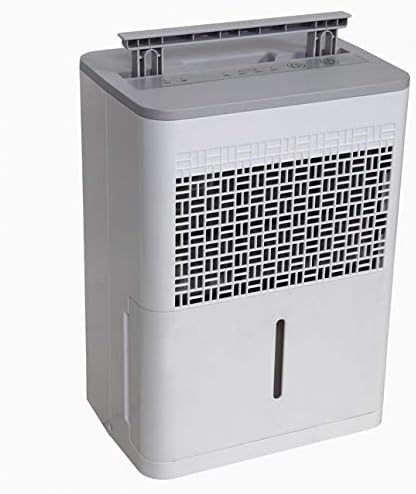
Figura 1: Frente view of the Comfee MDDE-10DEN3 Dehumidifier. This image shows the compact design of the unit, with the air intake grille visible on the front and the water level indicator on the side.
2. Instrucciones de seguridad
Please read all safety instructions carefully before operating the dehumidifier to prevent injury or damage. Keep this manual for future reference.
- Asegúrese de que la fuente de alimentación coincida con el volumen.tage se especifica en la etiqueta de clasificación de la unidad.
- No opere el deshumidificador con un cable o enchufe dañado.
- No bloquee la entrada ni la salida de aire. Mantenga un espacio libre de al menos 20 cm (8 pulgadas) alrededor de la unidad.
- No utilice el aparato en mojado o damp environments, such as bathrooms or laundry rooms, where it may come into contact with water.
- Desenchufe siempre la unidad antes de limpiarla o realizar cualquier mantenimiento.
- Mantenga la unidad en posición vertical durante el transporte y el funcionamiento.
- Este aparato utiliza refrigerante R290, que es inflamable. No perfore el circuito de refrigerante.
- No intente reparar ni modificar la unidad usted mismo. Para reparaciones, contacte con personal de servicio técnico cualificado.
- Mantener fuera del alcance de los niños y las mascotas.
3. Componentes del producto
Familiarize yourself with the main parts of your Comfee MDDE-10DEN3 Dehumidifier:
- Panel de control: Located on the top of the unit, used for setting operation modes and humidity levels.
- Rejilla de entrada de aire: Where air is drawn into the unit for dehumidification.
- Salida de aire: Donde se expulsa el aire seco.
- Tanque de agua: Collects condensed water. Features a water level indicator.
- Manejar: Para una fácil portabilidad.
- Cable de alimentación: Conecta la unidad a una toma eléctrica.

Figura 2: De cerca view of the Comfee MDDE-10DEN3 Dehumidifier control panel. This image displays the various buttons and indicator lights, including power, humidity settings (40%, 50%, 60%), and defrost indicators.
4. Configuración
- Desembalaje: Retire con cuidado el deshumidificador de su embalaje. Conserve el embalaje para su posterior almacenamiento o transporte.
- Colocación: Place the unit on a firm, level surface in the desired room. Ensure there is at least 20 cm (8 inches) of free space around all sides of the unit for proper air circulation. Do not place it near heat sources or in direct sunlight.
- Conexión de energía: Conecte el cable de alimentación a una toma de corriente con conexión a tierra. Asegúrese de que la toma cumpla con los requisitos de potencia de la unidad.
- Tanque de agua: Asegúrese de que el tanque de agua esté insertado correctamente en la unidad.
5. Instrucciones de funcionamiento
El panel de control le permite gestionar las funciones del deshumidificador.
Figura 3: Detallado view of the control panel for operation reference.
- Botón de encendido (①): Pulse para encender o apagar la unidad.
- Botón de ajuste de humedad (②): Press to cycle through desired humidity levels: 40%, 50%, 60%. The corresponding indicator light will illuminate. The unit will operate until the set humidity level is reached.
- Operación continua: If no specific humidity level is set, the unit may operate continuously.
- Indicador de descongelación (③): Illuminates when the unit is in defrost mode, which occurs automatically when coil temperatures are too low. The dehumidification process will pause during defrosting.
- Full Water Tank Indicator (④): Illuminates when the water tank is full or incorrectly inserted. The unit will stop operating until the tank is emptied and reinserted correctly.
- Función de reinicio automático: En caso de un corte de energíatage, the unit will automatically restart with the previously set humidity level once power is restored.
Drenaje continuo (opcional)
For continuous operation without needing to empty the water tank, a drainage hose (not included) can be connected to the continuous drainage port on the back of the unit. Ensure the hose is sloped downwards to allow gravity drainage into a suitable receptacle.
6. Mantenimiento
El mantenimiento regular garantiza un rendimiento óptimo y prolonga la vida útil de su deshumidificador.
- Vaciado del depósito de agua: When the "Full Water Tank" indicator illuminates, carefully pull out the water tank, empty the collected water, and reinsert it firmly until it clicks into place.
- Limpieza del filtro de aire: El filtro de aire debe limpiarse cada dos semanas o con mayor frecuencia según el uso.
- Apague la unidad y desconéctela de la toma de corriente.
- Remove the air filter from the back or side of the unit (refer to diagram in full manual if available).
- Lave el filtro con agua tibia y jabón. Enjuáguelo bien y déjelo secar al aire antes de volver a colocarlo.
- No opere el deshumidificador sin el filtro.
- Limpieza del exterior de la unidad: Limpie el exterior con un paño suave y seco.amp paño. No utilice productos químicos agresivos ni limpiadores abrasivos.
- Almacenamiento: Si va a guardar la unidad durante un período prolongado, asegúrese de que el depósito de agua esté vacío y limpio, y que el filtro esté limpio y seco. Guarde la unidad en posición vertical en un lugar fresco y seco.
7. Solución de problemas
Consulte la siguiente tabla para conocer los problemas comunes y sus soluciones.
| Problema | Posible causa | Solución |
|---|---|---|
| La unidad no se enciende. | No power; power cord loose; water tank full or not properly inserted. | Check power outlet and cord connection. Empty and reinsert water tank correctly. |
| No se recoge agua. | Humidity level set too high; room temperature too low; air filter clogged; continuous drainage hose connected and draining. | Lower desired humidity setting. Ensure room temperature is above 5°C (41°F). Clean air filter. Check continuous drainage setup. |
| La unidad funciona constantemente. | Humidity level not reached; unit set to continuous operation. | Allow more time for dehumidification. Set a specific humidity level if continuous operation is not desired. |
| El indicador de descongelación está encendido. | Coils are frosting up due to low ambient temperature. | This is normal operation. The unit will automatically defrost and resume dehumidification. |
Si el problema persiste después de probar estas soluciones, comuníquese con el servicio de atención al cliente de Comfee.
8. Especificaciones
| Característica | Especificación |
|---|---|
| Nombre del modelo | MDDE-10DEN3 |
| Marca | Café |
| Capacidad de deshumidificación | 10 litros/24 horas |
| Capacidad del tanque de agua | 2 litros |
| Tamaño de habitación recomendado | Up to approximately 40 m³ |
| Refrigerante | R290 |
| Dimensiones (paquete) | 44.8 x 36.3 x 34 cm |
| Peso del artículo | 11 kilogramos |
| Color | Blanco/gris |
| Modo de funcionamiento | Automático |
9. Garantía y soporte
Specific warranty information for your Comfee MDDE-10DEN3 Dehumidifier is typically provided with your purchase documentation or on the manufacturer's official webSitio. Consulte estos recursos para obtener detalles sobre la cobertura de la garantía, sus términos y condiciones.
For technical support, service, or inquiries about replacement parts, please contact Comfee customer service. Contact information can usually be found on the Comfee websitio o en el embalaje de su producto.
Puedes visitar la tienda oficial de Comfee para obtener más información: Tienda Comfee