
Introducción
The Datexx TimeCube Plus is a simple and effective tool designed to enhance time management and productivity. This manual provides essential information for setting up, operating, maintaining, and troubleshooting your TimeCube Plus timer.
Características principales
- Ultimate Pomodoro Timer: Optimized for the Pomodoro Time Management technique to boost productivity.
- Herramienta de aprendizaje: Improves time management skills and encourages productive learning for all ages.
- Fácil de usar: Features no buttons, no dials, and no distractions. Simply turn the cube to activate a preset timer.
- Aplicaciones versátiles: Available in various color and time setting combinations, suitable for cooking, studying, fitness, meditation, and more. Ideal for home, classroom, and office environments.
- Auto-Rotate Display: The digital display automatically rotates to always show the remaining time upright, regardless of the cube's orientation.
- Alarma silenciosa: Equipped with a convenient 4-LED light mode for alarms without disturbing others, perfect for quiet settings like offices or libraries.
- Funciones avanzadas: A digital gravity sensor detects motion to command start, pause, and stop functions based on the TimeCube's position.
- Designed in USA: Invented and designed in New Jersey, USA.
Configuración
Instalación de la batería
The TimeCube Plus requires two AAA batteries (not included). To install:
- Locate the battery compartment on the underside of the TimeCube.
- Abra la tapa del compartimiento de la batería.
- Inserte dos pilas AAA, asegurándose de la polaridad correcta (+/-).
- Cierre bien la tapa del compartimento de la batería.

Instrucciones de funcionamiento
Iniciar un temporizador
The TimeCube Plus features preset times of 5, 10, 20, and 25 minutes. To start a timer:
- Identify the desired time duration (e.g., '25' for 25 minutes) on one of the cube's faces.
- Place the TimeCube with the desired time face pointing upwards. The timer will automatically start counting down.

Pantalla giratoria automáticamente
The TimeCube Plus is designed with an auto-rotating LCD display. This ensures that the remaining time is always shown in an upright, readable orientation, regardless of how the cube is positioned.
Configuración de alarma
The TimeCube Plus offers flexible alarm options:
- Alarma de sonido: A audible beep will sound when the timer reaches zero.
- Silent LED Alarm: Four blue LED lights will flash when the timer reaches zero, providing a discreet notification. This is ideal for quiet environments.
- Ambos: You can choose to have both the sound and LED light alarms activate.
Use the switches on the underside of the cube (next to the battery compartment) to select your preferred alarm mode: sound only, LED only, or both.
Pausing and Stopping the Timer
- Pausa: To pause an active timer, turn the TimeCube so that the LCD display faces upwards. The timer will pause, and the display will show the remaining time.
- Reanudando: To resume, simply turn the cube back to one of the numbered faces.
- Parada: To stop the alarm once it has activated, simply turn the TimeCube so that the LCD display faces downwards. This will reset the timer.
Aplicaciones
The TimeCube Plus is a versatile tool for various daily activities:
- Trabajo y oficina: Optimize workflow, implement time blocking, and maintain focus during tasks.
- Study & Learning: Ideal for Pomodoro technique, homework sessions, and homeschooling to manage study intervals and breaks.
- Cocinando: Perfect for timing recipes and ensuring precise cooking durations.
- Fitness & Meditation: Use for workout intervals, yoga sessions, or timed meditation practices.
- Tiempo en familia: Helps structure activities with children, such as reading or screen time limits.


Presupuesto
| Característica | Detalle |
|---|---|
| Número de modelo | DF-48 |
| Color | Rojo |
| Horarios preestablecidos | 5, 10, 20, 25 Minutes |
| Material | Plástico |
| Dimensiones del producto | 2.4" de profundidad x 2.4" de ancho x 2.4" de alto |
| Peso del artículo | 0.8 onzas |
| Fuente de poder | Pilas 2 x AAA (no incluidas) |
| Tipo de alarma | Audible (High/Low) and/or 4-LED Visual |
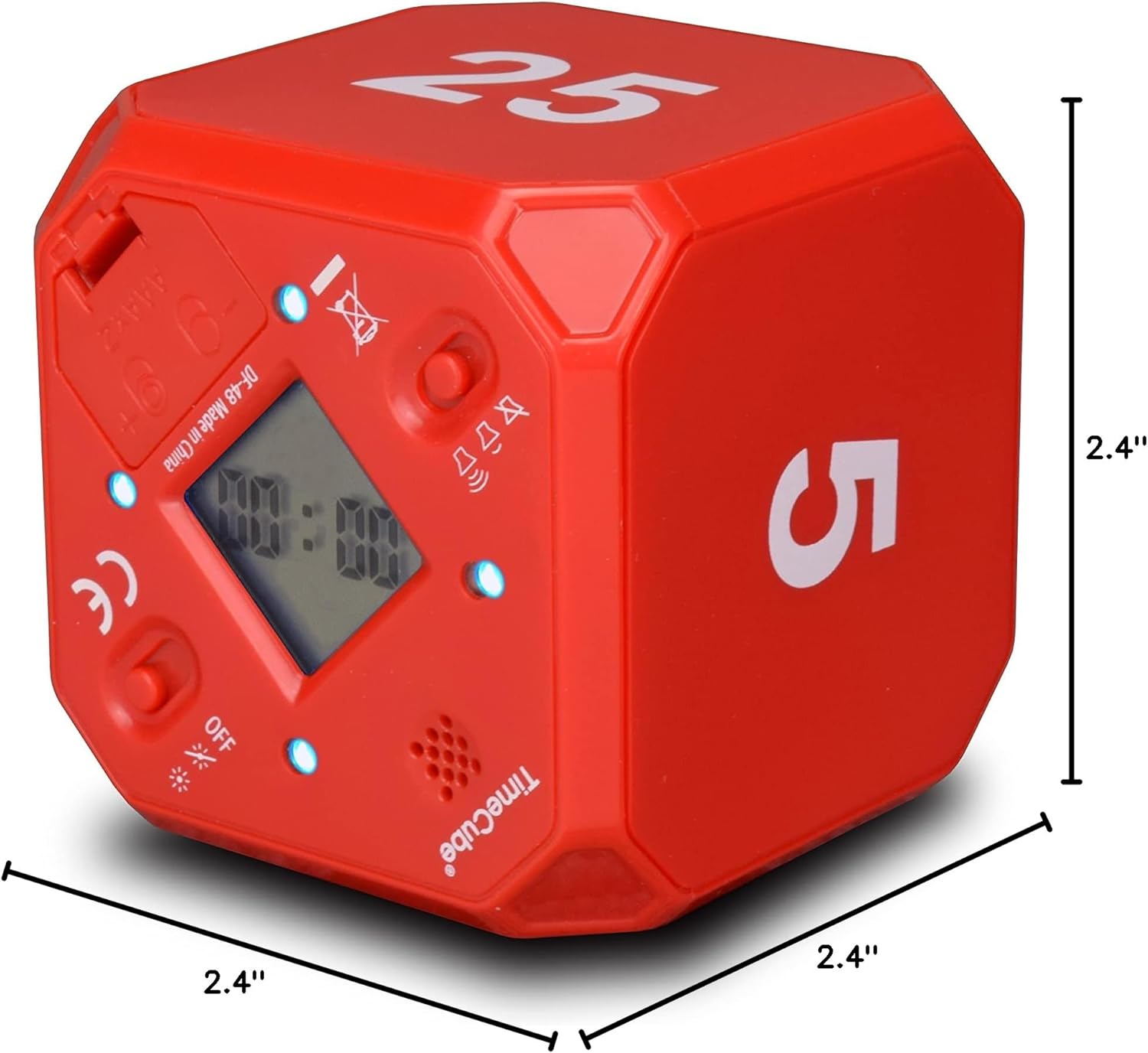
Mantenimiento
- Limpieza: Wipe the TimeCube with a soft, dry cloth. Avoid using abrasive cleaners or solvents.
- Reemplazo de batería: Replace batteries when the display becomes dim or the timer functions inconsistently. Ensure correct polarity during replacement.
- Almacenamiento: Store the TimeCube in a cool, dry place when not in use for extended periods.
Solución de problemas
- El temporizador no se inicia: Ensure batteries are correctly installed and have sufficient charge. Verify that the desired time face is placed upright.
- La alarma no suena/parpadea: Check the alarm mode switches on the underside of the cube to ensure the desired alarm type (sound, LED, or both) is selected.
- Inconsistent Operation/Battery Drain: If the device exhibits unusual behavior or rapid battery drain, ensure batteries are fresh and correctly inserted. If issues persist, contact customer support.
Garantía y soporte
Datexx offers a 1-year warranty for the TimeCube Plus. For support or warranty claims, please refer to the contact information provided with your product packaging or visit the official Datexx website. Ensure to retain your proof of purchase for warranty validation.
Información de seguridad
- Mantener fuera del alcance de los niños pequeños para evitar peligro de asfixia por piezas pequeñas o pilas.
- No exponga el dispositivo a temperaturas extremas ni a la luz solar directa.
- Evite dejar caer o someter el dispositivo a impactos fuertes.
- Deseche las baterías usadas de manera responsable de acuerdo con las regulaciones locales.