
Introducción
Thank you for choosing the Lamax X9.1 Action Camera. This manual provides essential information for setting up, operating, and maintaining your camera. Please read it thoroughly before use to ensure optimal performance and longevity of your device. The Lamax X9.1 is designed to capture your adventures in stunning 4K Ultra HD video and 12-megapixel photos, featuring Wi-Fi connectivity and a robust design.
Contenido del paquete
Please check the package contents upon unboxing. Typical accessories include:
- Lamax X9.1 Action Camera
- Mando a distancia
- Estuche impermeable
- Accesorios de montaje
- Cable USB
- Manual de usuario
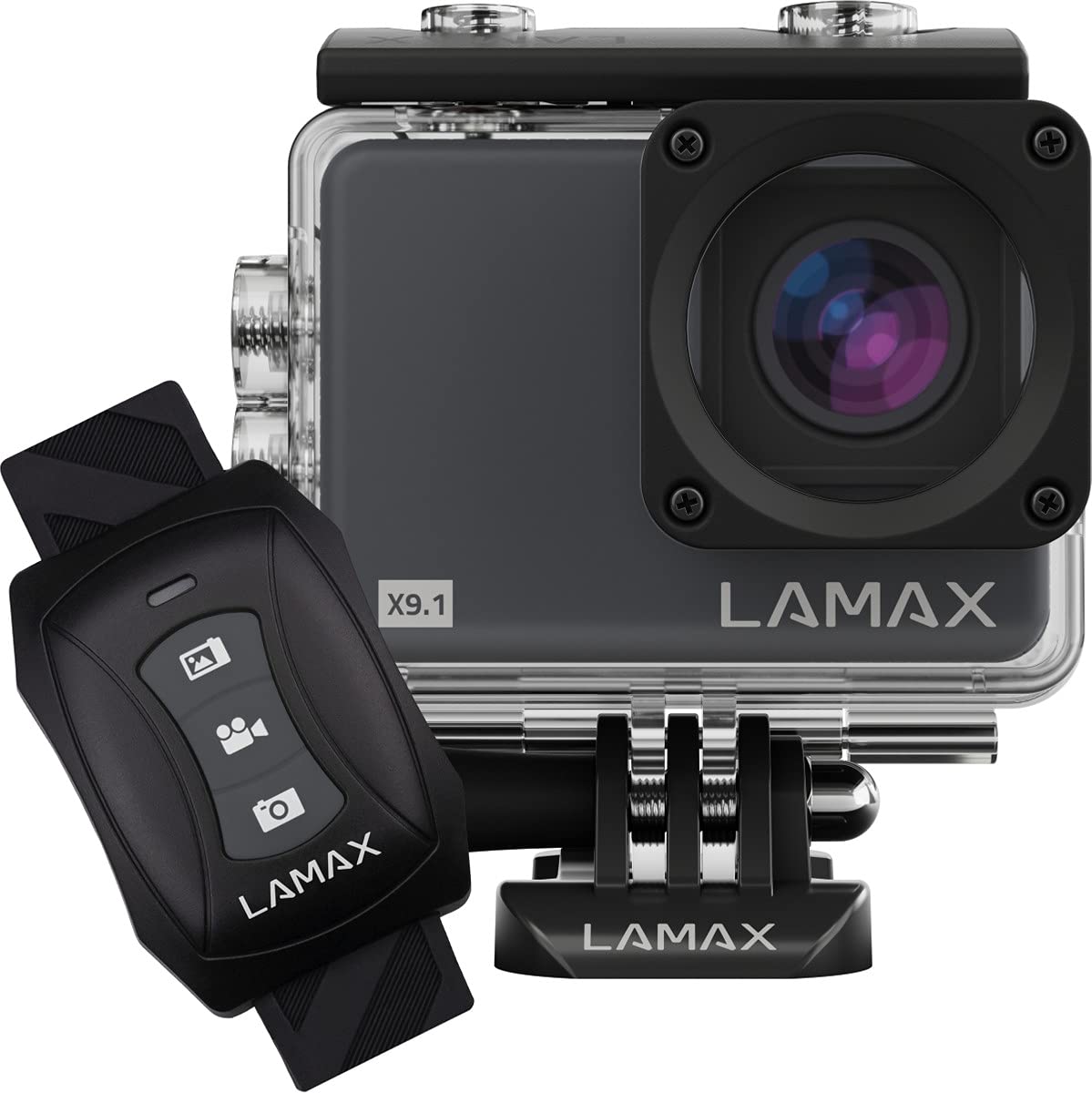
Image: The Lamax X9.1 Action Camera shown alongside its remote control, illustrating the main components.
Cámara sobreview
Familiarícese con los componentes físicos de la cámara:
- Lente: Front-facing optical component for capturing images and videos.
- Pantalla LCD: 2-inch display on the rear for live view, navegación del menú y reproducción.
- Botón de encendido / modo: Typically located on the front or top, used to power on/off and switch modes.
- Botón del obturador / grabación: Located on the top, used to start/stop recording or take photos.
- Botones de navegacion: Used for menu navigation (Up/Down).
- Puerto Micro-USB: Para carga y transferencia de datos.
- Puerto HDMI: Para conectar a una pantalla externa.
- Ranura para tarjeta microSD: Para inserción de tarjeta de memoria.

Imagen: Frente view of the Lamax X9.1 Action Camera, clearly showing the lens and model number.

Imagen: Lateral view of the Lamax X9.1 Action Camera, highlighting the Micro-USB and HDMI ports.

Imagen: Trasera view of the Lamax X9.1 Action Camera, displaying the LCD screen and control buttons.
Configuración
1. Instalación y carga de la batería
- Open the battery compartment cover, usually located on the bottom or side of the camera.
- Insert the Lithium-Ion (Li-Ion) battery (1050 mAh) with the contacts facing the correct direction.
- Cierre bien el compartimento de la batería.
- Connect the camera to a power source using the provided Micro-USB cable. The charging indicator will illuminate. A full charge takes approximately 1.84 hours.
2. Instalación de la tarjeta MicroSD
- Locate the MicroSD card slot, typically on the side of the camera.
- Insert a compatible MicroSDHC or MicroSDXC card (up to 64 GB, Class 10 or higher recommended) with the contacts facing down. Push until it clicks into place.
- Para quitarla, empuje la tarjeta nuevamente hasta que salga.
3. Encendido / apagado
- Para encender: Mantenga presionado el botón de Encendido/Modo durante unos segundos hasta que la pantalla se ilumine.
- Para apagar: Mantenga presionado el botón de Encendido/Modo nuevamente hasta que la pantalla se apague.
4. Uso de la funda impermeable
The Lamax X9.1 is waterproof up to 40 meters when enclosed in its waterproof case. Ensure the case is properly sealed before submerging the camera.
- Open the waterproof case latch.
- Coloque con cuidado la cámara dentro del estuche, asegurándose de que encaje perfectamente.
- Close the latch firmly, making sure the rubber seal is clean and free of debris.
- Always test the waterproof case without the camera first to ensure no leaks.

Image: The Lamax X9.1 Action Camera securely placed inside its waterproof housing, shown with the remote control.
Operación de la cámara
1. Controles básicos
- Botón de encendido / modo: Short press to cycle through video, photo, playback, and settings modes.
- Botón del obturador / grabación: Press to start/stop video recording or take a photo in the respective modes.
- Botones arriba / abajo: Used to navigate menu options or zoom (if applicable).
2. Grabación de video
In video mode, press the Shutter/Record button to begin recording. Press again to stop.
- Resoluciones: Supports 4K Ultra HD (3840 x 2160 pixels), 1080p, 720p.
- Tasas de cuadro: Up to 120 frames per second (fps) for smooth slow-motion capture.
- Formatos: H.264, H.265, MP4.
3. Captura de fotos
In photo mode, press the Shutter/Record button to take a picture.
- Resolución: 12 Megapixels (3840 x 2160 pixels).
- Formato: JPG.
4. Modos especiales
- Time-lapse: Captura una serie de fotografías a intervalos establecidos para crear un vídeo con lapso de tiempo.
- Cámara superlenta: Record high frame rate video for dramatic slow-motion effects.
5. Conectividad WiFi
The Lamax X9.1 features Wi-Fi for remote control and file transfer via a smartphone application.
- Habilite el Wi-Fi en su cámara a través del menú de configuración.
- Download the official Lamax app (check your camera's packaging or the Lamax website for the correct app name) on your smartphone.
- Connect your smartphone to the camera's Wi-Fi network (SSID and password will be displayed on the camera screen).
- Use the app to control the camera, view vivir footage, y descargar files.
6. Control remoto
El control remoto incluido permite una operación conveniente sin tocar directamente la cámara.
- Ensure the remote is paired with the camera (refer to the camera's settings menu for pairing instructions).
- Use the dedicated buttons on the remote to start/stop recording or take photos.
Menú de configuración
Access the settings menu by cycling through modes using the Power/Mode button until you reach the settings icon, or by pressing a dedicated menu button if available. Use the navigation buttons to scroll and the Shutter/Record button to select options.
Las configuraciones comunes incluyen:
- Video Resolution and Frame Rate
- Resolución de la fotografía
- Exposure Compensation (EV)
- Balance de blancos (WB)
- Fecha y hora
- Grabación en bucle
- Screen Saver/Auto Power Off
- Configuración de Wi-Fi
- Formatear tarjeta SD
Mantenimiento
1. Limpieza
- Lente: Utilice un paño suave y sin pelusa, especialmente diseñado para lentes ópticas. Evite productos químicos agresivos.
- Pantalla: Limpie suavemente con un paño de microfibra.
- Cuerpo de cámara: Utilice un paño suave y seco.amp cloth to clean the exterior. Ensure all ports are closed before cleaning with moisture.
- Estuche impermeable: After use in saltwater, rinse the case with fresh water and let it air dry. Check the rubber seal for any debris or damage.
2. Cuidado de la batería
- Evite descargar completamente la batería con frecuencia.
- Guarde la cámara con la batería parcialmente cargada (alrededor del 50%) si no la utilizará durante períodos prolongados.
- No exponga las baterías a temperaturas extremas.
3. Almacenamiento
Store the camera in a cool, dry place away from direct sunlight and excessive humidity. Remove the battery if storing for a long time.
Solución de problemas
If you encounter issues with your Lamax X9.1, refer to the following common problems and solutions:
| Problema | Posible causa / solución |
|---|---|
| La cámara no se enciende. | Battery is depleted. Charge the battery fully. Ensure the battery is inserted correctly. |
| Mensaje de error de la tarjeta SD. | SD card is not inserted correctly, is full, or is corrupted. Reinsert the card, try a different card, or format the card (this will erase all data). Ensure the card is MicroSDHC/XC, up to 64GB, Class 10 or higher. |
| Mala duración de la batería. | High-resolution video recording (4K) and Wi-Fi use consume more power. Ensure the battery is fully charged. Consider carrying spare batteries for extended use. |
| Fuga de agua en la carcasa. | Waterproof case was not sealed properly, or the rubber seal is damaged/dirty. Always check the seal and latch before submerging. |
| Cámara no reconocida por la computadora. | Ensure the USB cable is connected securely. Try a different USB port or cable. The camera might need to be in a specific mode (e.g., Mass Storage) to be recognized. |
| Problemas de conexión Wi-Fi. | Ensure Wi-Fi is enabled on the camera and your smartphone. Check the Wi-Fi password. Move closer to the camera to improve signal strength. |
If the problem persists, perform a factory reset (if available in settings) or contact Lamax customer support.
Presupuesto
| Característica | Especificación |
|---|---|
| Número de modelo | X9.1 |
| Resolución de vídeo | Hasta 4K Ultra HD (3840 x 2160 píxeles) |
| Velocidad máxima de cuadros | 120 fps |
| Resolución de la fotografía | 12 megapíxeles (3840 x 2160 píxeles) |
| Mostrar | 2-inch (5.08 cm) LCD |
| Medios de almacenamiento | MicroSDHC, MicroSDXC (up to 64 GB) |
| Tipo de batería | Lithium-Ion (Li-Ion), 1050 mAh |
| Tiempo de carga | Aproximadamente 1.84 horas |
| Conectividad | Wi-Fi, Micro-USB, HDMI |
| Peso | 72 gramos |
| Dimensiones (L x An x Al) | 60 x 44 x 33 mm |
| Clasificación de impermeabilidad | Hasta 40 metros (con carcasa impermeable) |
| Características especiales | Time-lapse, Super Slow Motion, Image Stabilization |
Garantía y soporte
For warranty information and technical support, please refer to the documentation included with your product or visit the official Lamax webSitio. Conserve su comprobante de compra para cualquier reclamación de garantía.