
lightmaXX LIG0015652-000
Manual del usuario del lightmaXX Nano PAR FX 3x 4 W LED RGBW
Model: LIG0015652-000
1. Introducción
Gracias por la compraasing the lightmaXX Nano PAR FX 3x 4 W LED RGBW. This compact and powerful LED PAR spot is designed for various lighting applications, offering vibrant RGBW color mixing and dynamic strobe effects. This manual provides essential information for safe operation, setup, and maintenance of your device. Please read it thoroughly before use.
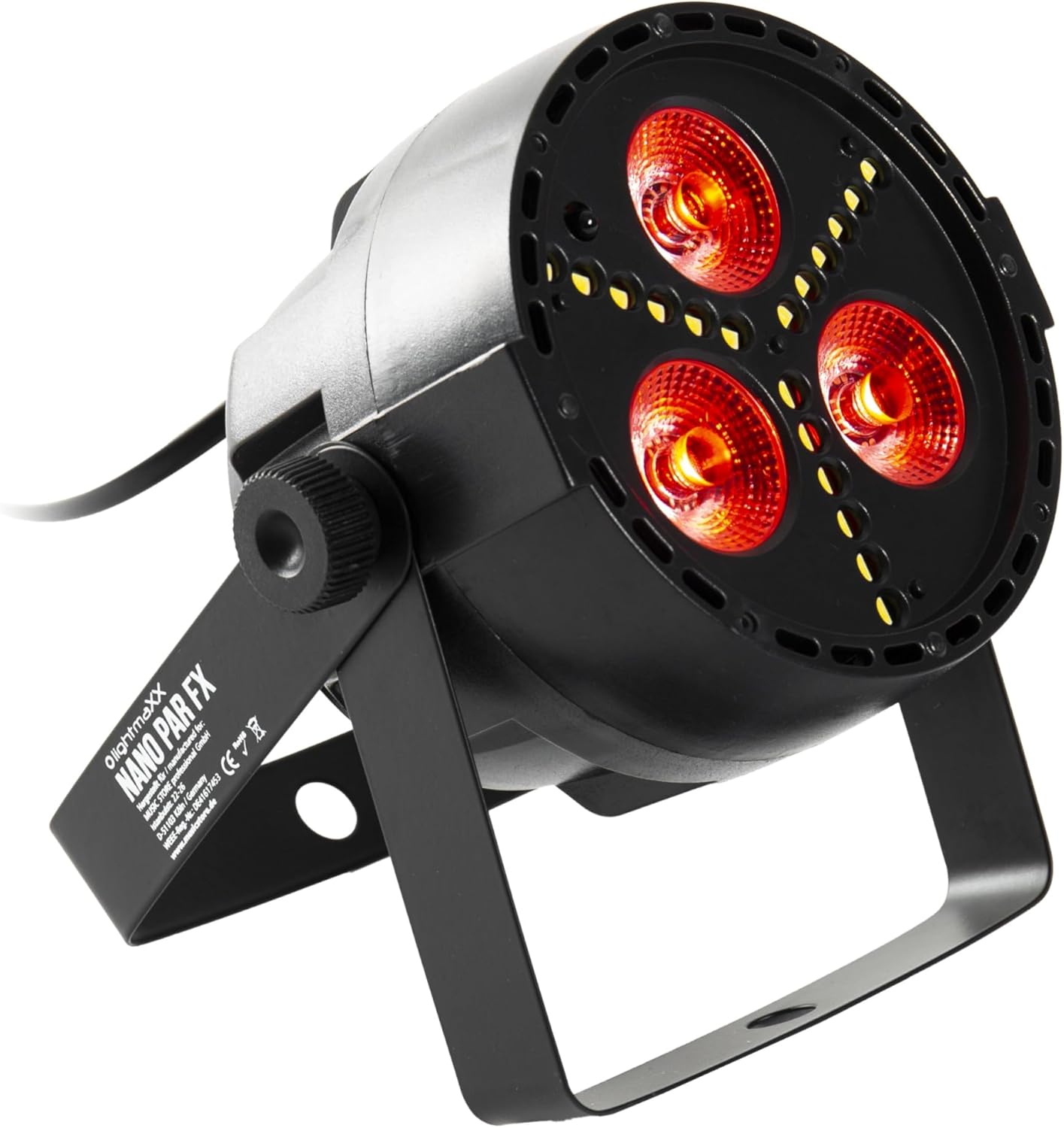
Figure 1: lightmaXX Nano PAR FX LED PAR Spot
2. Instrucciones de seguridad
To ensure safe operation, please observe the following safety instructions:
- Fuente de alimentación: Connect the device only to a grounded power outlet with the correct voltage (230 VCA).
- Ventilación: Asegúrese de que haya una ventilación adecuada alrededor de la unidad. No bloquee las aberturas de ventilación.
- Humedad: Do not expose the device to rain or moisture. Do not use it in damp entornos.
- Temperatura: Operate the device within the specified temperature range. Avoid extreme heat or cold.
- Manejo: Manipule el dispositivo con cuidado. Evite dejarlo caer o someterlo a impactos fuertes.
- Mantenimiento: Encargue cualquier reparación a personal técnico cualificado. No intente reparar la unidad usted mismo.
- Salida de luz: Evite mirar directamente a la fuente de luz, ya que puede causar daños en los ojos.
3. Configuración
3.1 Ubicación física
The lightmaXX Nano PAR FX is designed as a floor spot but can also be mounted using its adjustable bracket. Ensure the mounting surface or location is stable and can support the weight of the fixture. Allow sufficient space around the unit for proper ventilation.
3.2 Conexiones
Connect the power cable to a suitable power outlet. For DMX control, connect a DMX cable from your DMX controller to the DMX IN port of the fixture. If linking multiple units, connect a DMX cable from the DMX OUT port of the first fixture to the DMX IN port of the next, and so on.

Figure 2: Rear panel with DMX ports and control display
4. Instrucciones de funcionamiento
4.1 Panel de control
The rear panel features a digital display and four control buttons: MENU, UP, DOWN, and ENTER. These buttons allow you to navigate through the settings and select various operating modes.
- MENÚ: Presione para recorrer las opciones del menú principal.
- UP: Aumenta valores o sube en las opciones del menú.
- ABAJO: Disminuye valores o se mueve hacia abajo en las opciones del menú.
- ENTRAR: Confirma una selección o ingresa a un submenú.
4.2 control remoto
The lightmaXX Nano PAR FX comes with an infrared (IR) remote control for convenient operation. Ensure there is a clear line of sight between the remote and the fixture's IR receiver.

Figure 3: Product with Remote Control
Modos de funcionamiento de 4.3
The fixture offers several built-in operating modes, accessible via the control panel or remote:
- Modo automático: Cycles through pre-programmed light shows automatically.
- Modo de sonido: Reacts to music or sound via a built-in microphone.
- Modo de salto: Cambia de color abruptamente.
- Modo de desvanecimiento: Transiciones suaves entre colores.
- Modo estroboscópico: Produces a flashing light effect.
4.4 Color Mixing
The Nano PAR FX features RGBW LEDs, allowing for a wide spectrum of colors. You can select individual colors or mix them to create custom hues using the remote control or DMX.

Figura 4: Examples of color outputs

Salida de luz roja

Green Light Output
4.5 Operación DMX
For professional control, the Nano PAR FX can be operated via DMX512. Set the DMX address using the control panel. Consult the DMX channel chart (typically found in a separate DMX manual or product sheet) for specific channel assignments for color, dimming, strobe, and mode control.
5. Mantenimiento
5.1 Limpieza
Regular cleaning helps maintain optimal performance and extends the lifespan of your fixture.
- Desconecte la alimentación antes de limpiar.
- Utilice un paño suave que no suelte pelusa para limpiar el exterior.
- Para las lentes, utilice un limpiador de lentes especializado y un paño suave para evitar rayones.
- No utilice limpiadores abrasivos ni disolventes.
5.2 Almacenamiento
Cuando no esté en uso, guarde el dispositivo en un entorno seco y sin polvo, preferiblemente en su embalaje original o en un estuche protector.
6. Solución de problemas
| Problema | Posible causa | Solución |
|---|---|---|
| Sin poder | Cable de alimentación desconectado; no hay corriente en el tomacorriente; fusible defectuoso. | Check power cable connection; test outlet; replace fuse if necessary. |
| Sin salida de luz | Dispositivo en espera; modo incorrecto seleccionado; problema con la señal DMX. | Check power and mode settings; verify DMX connection and address. |
| El control remoto no funciona | Battery low/dead; IR receiver blocked; too far from fixture. | Replace battery; ensure clear line of sight; move closer to fixture. |
| Problemas de control DMX | Dirección DMX incorrecta; cable DMX defectuoso; problema con el controlador DMX. | Verify DMX address; test DMX cable; check DMX controller. |
7. Especificaciones
| Característica | Especificación |
|---|---|
| Marca | luzmaXX |
| Fabricante | luzmaXX |
| Número de modelo | LIG0015652-000 |
| Dimensiones del producto (L x An x Al) | 12.9 x 12.9 x 12.8 cm |
| Peso del artículo | 620 gramos |
| Estilo | Moderno |
| Color | Black (fixture), RGBW (light output) |
| Vatios máximos | 20 vatios |
| Volumentage | 230 voltios (CA) |
| Tipo de bombilla | Diodo emisor de luz (LED) |
| Tipo de fuente de luz | Diode électroluminescente (LED) |
8. Garantía y soporte
This product is subject to the standard return policy of 30 days from the date of purchase. For technical support, service, or warranty inquiries, please contact your retailer or the lightmaXX customer service department. Please have your model number (LIG0015652-000) and proof of purchase ready when contacting support.
Documentos relacionados - LIG0015652-000
 |
Manual de usuario y especificaciones de la serie LightmaXX VEGA Silent PAR Manual de usuario completo y especificaciones técnicas de los efectos de iluminación LED LightmaXX VEGA Silent PAR Series, que abarcan la configuración, el funcionamiento, la seguridad y la resolución de problemas. Incluye detalles del modelo, modos DMX e instrucciones de instalación. |
 |
Manual de usuario de LightmaXX Pro Spot ARC RGBW Manual de usuario del efecto de iluminación LED LightmaXX Pro Spot ARC RGBW, que detalla instrucciones de seguridad, instalación, funcionamiento, control DMX, especificaciones y solución de problemas. |
 |
lightmaXX VEGA Silent PAR III Complete Bedienungsanleitung Entdecken Sie den lightmaXX VEGA Silent PAR III Complete LED-Beleuchtungseffekt mit dieser umfassenden Bedienungsanleitung. Erfahren Sie mehr über Installation, sichere Bedienung, DMX-Steuerung y technische Details für professional Lichtanwendungen. |
 |
Manual de usuario de LightmaXX LED NANO PAR Manual de usuario del LightmaXX LED NANO PAR, que cubre instrucciones de seguridad, instalación, modos de funcionamiento (DMX, estático, automático, sonido), conexiones, estructura del menú, especificaciones, resolución de problemas, limpieza y protección del medio ambiente. |
 |
Manual de usuario de la cabeza móvil Lightmaxx VEGA 3WAY PRO 6x40W RGBW Manual de usuario completo para la cabeza móvil Lightmaxx VEGA 3WAY PRO BEAM|WASH|FX 6*40W RGBWtage light. Detalles: instrucciones de seguridad, instalación, funcionamiento, control DMX (10/17 canales) y especificaciones técnicas. |
 |
Manual del usuario de lightmaXX Cannon Shot FX FOUR Manual de usuario completo para la máquina de confeti lightmaXX Cannon Shot FX FOUR, que cubre instrucciones de seguridad, instalación, funcionamiento, modos DMX y control remoto, resolución de problemas y consideraciones ambientales. |
Ask a question about this manual
Ask about setup, troubleshooting, compatibility, parts, safety, or missing instructions. Manuals+ will review the question and use this page’s manual context to help answer it.