
Introducción
This manual provides essential information for the safe and effective use of your Canon PowerShot SX740 HS Digital Camera. Please read it thoroughly before operating the camera to ensure proper handling and to maximize its features. The Canon PowerShot SX740 HS is a compact digital camera featuring a 20.3-megapixel CMOS sensor, 40x optical zoom, 4K video recording capabilities, and built-in Wi-Fi and Bluetooth connectivity.

Figura 1: Frente view of the Canon PowerShot SX740 HS Digital Camera with the lens retracted.
¿Qué hay en la caja?
Verifique que todos los siguientes elementos estén incluidos en su paquete:
- Cámara digital Canon PowerShot SX740 HS
- NB-13L Lithium-Ion Battery Pack
- CB-2LH Battery Charger
- Correa de muñeca
- Cable HDMI
- Trípode
- SanDisk 64GB SDHC Memory Card
- Premium Camera Case
- Lector de tarjetas USB de alta velocidad
Configuración
1. Carga e instalación de la batería
- Insert the NB-13L battery into the CB-2LH charger.
- Plug the charger into a power outlet. The charging indicator light will show the charging status.
- Una vez completamente cargada, retire la batería del cargador.
- Abra la tapa del compartimiento de la batería en la parte inferior de la cámara.
- Inserte la batería cargada en el compartimento, asegurándose de que esté correctamente orientada. Cierre bien la tapa.
2. Insertar la tarjeta de memoria
- Abra la tapa de la ranura de la tarjeta de memoria, generalmente ubicada cerca del compartimiento de la batería.
- Insert the SDHC memory card with the label facing the front of the camera until it clicks into place.
- Cierre la tapa de la ranura para tarjetas de memoria.
3. Encendido inicial y configuración básica
- Pulse el botón de encendido para encender la cámara.
- Siga las instrucciones en pantalla para configurar la fecha, la hora y el idioma.
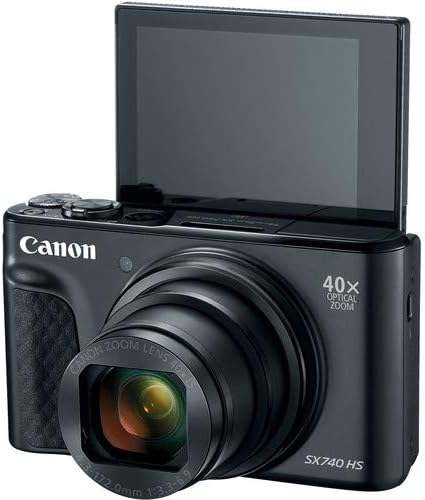
Figura 2: Frente view of the camera with the LCD screen tilted upwards, ready for use.
Operación de la cámara
1. Encendido y apagado
Presione el FUERZA Botón ubicado en la parte superior de la cámara para encenderla o apagarla.
2. Modos de disparo
The camera offers various shooting modes. Use the mode dial or menu options to select:
- Modo automático: For simple point-and-shoot operation, where the camera automatically adjusts settings.
- Modo Programa (P): Permite un mayor control sobre la configuración mientras la cámara establece la exposición.
- Modos de escena: Optimized settings for specific scenarios like portraits, landscapes, or night scenes.
- Feature Assistant: Provides on-screen explanations to help you understand and use various camera features.
3. Operación de zoom
The camera features a 40x optical zoom lens. Use the zoom lever around the shutter button to zoom in (telephoto) or out (wide-angle). Digital zoom can extend the range further, but may reduce image quality.

Figura 3: Frente view of the camera with the lens extended for zooming.
4. Enfoque
The camera primarily uses autofocus. Point the camera at your subject and half-press the shutter button to focus. The focus frame will appear on the LCD screen. For specific situations, manual focus options may be available in the menu.
5. Grabación de video
To record videos, switch to video mode (if available via a dedicated button or mode dial) or press the dedicated movie recording button. The camera supports 4K video capture. Press the button again to stop recording.
6. Uso de la pantalla LCD inclinable
The 3.0-inch LCD screen can tilt 180 degrees, allowing for easy framing of selfies or shots from various angles. Adjust the screen to your desired position.

Figura 4: Atrás view de la cámara, mostrando la pantalla LCD y el diseño de los controles.
7. Conectividad Wi-Fi y Bluetooth
The camera features built-in Wi-Fi and Bluetooth for connecting to compatible mobile devices. Download the Canon Camera Connect app to your smartphone or tablet to transfer images, remotely control the camera, and share photos.
- Enable Wi-Fi or Bluetooth in the camera's menu.
- Open the Canon Camera Connect app on your mobile device and follow the pairing instructions.
Mantenimiento
1. Limpieza de la cámara
- Lente: Use a soft, lint-free cloth or a lens brush to gently remove dust. For smudges, use a specialized lens cleaning solution and cloth. Avoid touching the lens directly with your fingers.
- Pantalla LCD: Wipe gently with a soft, dry cloth. Do not use harsh chemicals.
- Cuerpo de cámara: Utilice un paño suave y seco para limpiar el polvo y la suciedad.
2. Cuidado de la batería
- Guarde las baterías en un lugar fresco y seco cuando no las utilice.
- Evite descargar completamente la batería con frecuencia para prolongar su vida útil.
- Retire la batería de la cámara si no la va a utilizar durante un período prolongado.
3. Almacenamiento
Si guarda la cámara durante un período prolongado, asegúrese de que esté limpia, seca y guardada en un estuche protector para evitar el polvo y los daños. Retire la batería y la tarjeta de memoria.
Solución de problemas
Si tiene problemas con su cámara, consulte las siguientes soluciones comunes:
- La cámara no se enciende: Asegúrese de que la batería esté completamente cargada e insertada correctamente. Pruebe con otra batería cargada si está disponible.
- Error de tarjeta de memoria: Check if the memory card is inserted correctly. Format the card (this will erase all data) if the error persists, or try a different compatible SDHC card.
- Las imágenes están borrosas: Ensure the lens is clean. Check your focus settings and make sure the camera has successfully focused on your subject before taking the shot. Use optical image stabilization for handheld shots.
- Problemas de conexión Wi-Fi/Bluetooth: Ensure Wi-Fi/Bluetooth is enabled on both the camera and your mobile device. Restart both devices and try pairing again. Confirm the Canon Camera Connect app is up to date.
- El flash no se dispara: Check the flash mode settings. Ensure the flash is popped up if it's a manual pop-up type.
For more complex issues or persistent problems, please consult the official Canon support websitio o póngase en contacto con el servicio de atención al cliente.
Presupuesto
| Característica | Especificación |
|---|---|
| Nombre del modelo | PowerShot SX740 HS |
| Resolución del sensor fotográfico | 20.3 megapíxeles |
| Zoom óptico | 40x |
| Formato de captura de video | 4K |
| Procesador de imágenes | Canon DIGIC 8 |
| Conectividad | Bluetooth, HDMI, USB, Wi-Fi |
| Tipo de pantalla | Tilting LCD |
| Estabilización de imagen | Óptico |
| Tipo de batería | Lithium Ion (NB-13L) |
| Memoria compatible | SDHC (up to 64 GB) |
| Disparo continuo | 10 cuadros por segundo |
| Apoyado File Formato | JPEG, SIN PROCESAR |
Garantía y soporte
Your Canon PowerShot SX740 HS Digital Camera is covered by a manufacturer's warranty. Please refer to the warranty card included with your product for specific terms and conditions. For technical support, service, or additional information, please visit the official Canon website or contact Canon customer service directly. Keep your purchase receipt as proof of purchase for warranty claims.
Recursos en línea: Canon USA Official Websitio