
Introducción
The Fender The Pinwheel Rotary Speaker Emulator Pedal is designed to replicate the classic swirling sounds of a rotary speaker, a sound traditionally associated with organs but widely adopted in modern music. This pedal offers three distinct rotary speaker voices, including Fender's unique Vibratone effect, allowing musicians to integrate this rich, modulated tone into their setup. It features switchable slow and fast speeds, an onboard overdrive for added tonal texture, and a sensitivity control that adjusts modulation rate based on playing dynamics. The pedal is built with a durable anodized aluminum chassis and includes LED-backlit knobs for visibility in various lighting conditions.
Características principales
- Three distinct rotary speaker voicings, including 122, 145, and Fender Vibratone.
- Switchable slow and fast speeds for dynamic modulation control.
- Integrated onboard overdrive circuit to add texture and warmth.
- Sensitivity control for dynamic modulation rate changes based on playing intensity.
- True stereo inputs and outputs for versatile connectivity.
- Expression pedal/external footswitch input for enhanced control.
- LED-backlit knobs for clear visibility on dark stages.
- Durable, lightweight anodized aluminum chassis.
Configuración
Before connecting your Fender The Pinwheel pedal, ensure all equipment is powered off to prevent damage.
- Conexión de energía: Connect a 9V DC power adapter (center-negative, 310mA minimum) to the 'DC IN' jack on the rear of the pedal. The pedal does not operate on internal batteries.
- Conexiones de audio:
- Configuración mono: Connect your instrument to the 'IN' jack. Connect the 'L/MONO OUT' jack to your amplificador o siguiente pedal en la cadena de señal.
- Configuración estéreo: Connect your instrument to the 'IN' jack. If your instrument has stereo output, connect it to both 'IN' and 'EXP/FS' jacks (ensure 'FS SELECT' switch is set to 'EXP'). Connect the 'L/MONO OUT' and 'R OUT' jacks to two separate amplifiers or stereo input devices.
- Control externo (opcional): For an expression pedal or external footswitch, connect it to the 'EXP/FS' jack. Use the 'FS SELECT' switch on the rear panel to choose between 'EXP' (Expression Pedal) or 'FS' (Footswitch).
- Voicing Switch: On the rear panel, select 'GUITAR' or 'KEYBOARD' to optimize the pedal's frequency response for your instrument.
- Dynamics Switch: On the rear panel, set 'DYNAMICS' to 'ON' to enable dynamic modulation rate changes based on your playing intensity, or 'OFF' for a consistent rate.
- LEDs Switch: On the rear panel, set 'LEDs' to 'ON' to illuminate the control knobs, or 'OFF' to disable them.
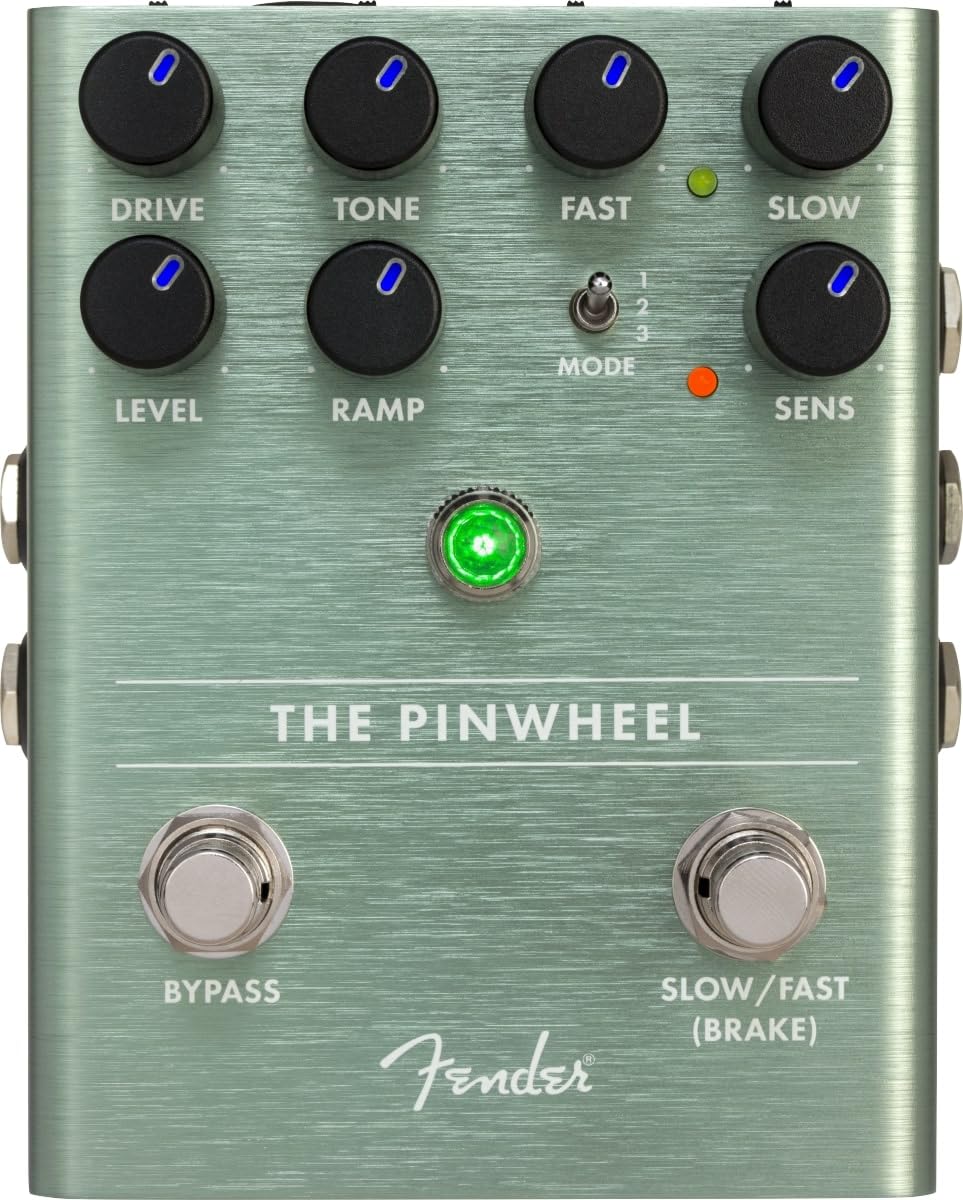
Figura 1: Arriba view of the Fender The Pinwheel pedal, highlighting control knobs and footswitches.

Figura 2: Lado view of the pedal, illustrating the input and output jacks for mono and stereo connections.
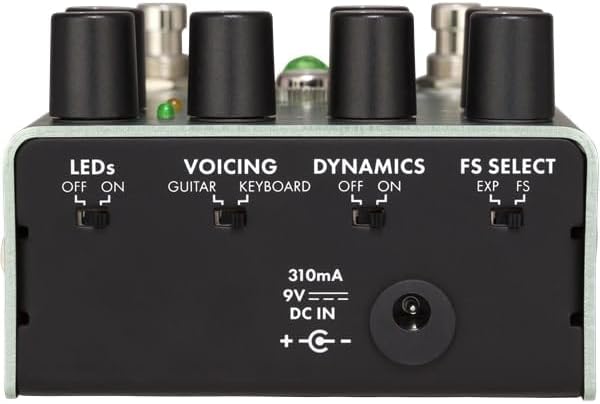
Figura 3: Posterior view of the pedal, detailing the utility switches and power input.
Operar el pedal
The Pinwheel pedal features two main sections: the overdrive/preamp emulation and the rotary speaker emulation.
Controles:
- MANEJAR: Adjusts the amount of overdrive/distortion from the emulated tube power amplifier. Turn clockwise for more saturation.
- TONO: Shapes the overall tonal character of the overdrive.
- NIVEL: Controls the output volume of the overdrive section.
- RÁPIDO: Sets the speed of the fast rotary speaker effect.
- LENTO: Sets the speed of the slow rotary speaker effect.
- RAMP: Adjusts the transition time between slow and fast speeds. A higher setting results in a slower, more gradual ramp.
- Cambio de modo: Selects one of the three rotary speaker voicings:
- Primera posición: Emulates a classic 122-type rotary speaker.
- Posición media: Emulates a classic 145-type rotary speaker.
- Posición inferior: Emulates the Fender Vibratone speaker.
- SENS (Sensibilidad): When the 'DYNAMICS' switch is 'ON', this knob determines how responsive the modulation speed is to your playing dynamics. Higher settings make the effect more intense with harder playing.
Interruptores de pie:
- DERIVACIÓN: Toggles the effect on/off. When the effect is active, the main LED will be green.
- SLOW/FAST (BRAKE): Switches between the slow and fast rotary speeds. Holding this footswitch will engage the 'BRAKE' function, gradually stopping the rotation.
Control externo:
If an expression pedal is connected and 'FS SELECT' is set to 'EXP', the expression pedal can continuously vary the rotary speed between the 'SLOW' and 'FAST' settings. If an external footswitch is connected and 'FS SELECT' is set to 'FS', it will toggle between slow and fast speeds, mirroring the 'SLOW/FAST' footswitch on the pedal.
Video 1: Official product demonstration of the Fender The Pinwheel Rotary Speaker Emulator Pedal, showcasing its features and various sounds.
Mantenimiento
To ensure the longevity and optimal performance of your Fender The Pinwheel pedal, follow these maintenance guidelines:
- Limpieza: Use a soft, dry cloth to clean the pedal's exterior. Avoid abrasive cleaners, solvents, or excessive moisture.
- Almacenamiento: Guarde el pedal en un lugar fresco y seco, alejado de la luz solar directa, temperaturas extremas y alta humedad.
- Fuente de alimentación: Always use a compatible 9V DC center-negative power supply with a minimum of 310mA. Using an incorrect power supply can damage the unit and void the warranty.
- Conexiones: Revise periódicamente todas las conexiones de cables para detectar desgaste. Asegúrese de que los conectores estén libres de residuos.
- Pedales y perillas: Handle footswitches and control knobs gently. Avoid excessive force that could lead to mechanical damage.
Solución de problemas
If you encounter issues with your Fender The Pinwheel pedal, consult the following common troubleshooting steps:
- Sin sonido:
- Ensure the pedal is powered on and the power supply is correctly connected and functioning.
- Check all audio cables for proper connection and integrity. Try swapping cables.
- Verify the 'BYPASS' footswitch is engaged (LED is green).
- Check the 'LEVEL' knob; ensure it is not set to minimum.
- Sonido/ruido inesperado:
- Asegúrese de utilizar una fuente de alimentación regulada. Las fuentes de alimentación no reguladas pueden generar ruido.
- Compruebe si hay bucles de tierra en su cadena de señal.
- Adjust the 'DRIVE' and 'TONE' knobs to find a desirable sound.
- If using the 'DYNAMICS' feature, adjust the 'SENS' knob or turn 'DYNAMICS' off to see if the issue persists.
- Rotary Speed Not Changing:
- Ensure the 'SLOW/FAST' footswitch is functioning.
- If using an external expression pedal or footswitch, verify the 'FS SELECT' switch on the rear is set correctly ('EXP' for expression, 'FS' for footswitch).
- Check the 'RAMP' knob setting; a high 'RAMP' setting will result in a slow transition.
If these steps do not resolve the issue, please contact Fender customer support or an authorized service center.
Presupuesto
| Especificación | Valor |
|---|---|
| Número de modelo | 234543000 |
| Peso del artículo | 1.1 libras (0.5 kilogramos) |
| Dimensiones del producto | 0.01 x 0.01 x 0.01 inches (approximate, actual dimensions may vary) |
| Material del cuerpo | Aluminio anodizado |
| Color | Plata |
| Fuente de poder | 9V DC (center-negative) |
| Consumo de corriente | 310 mA |
| Tipo de conector | Conector de audio de 1/4 de pulgada (6.35 mm) |
| Interfaz de hardware | Audio de 1/4 de pulgada |
| Formato de señal | Cosa análoga |
Garantía y soporte
Fender products are designed for reliability and performance. For detailed warranty information, product registration, and technical support, please visit the official Fender website or contact your local authorized Fender dealer. Keep your purchase receipt as proof of purchase for warranty claims.
Recursos en línea: guardabarros.com


