
Introducción
This manual provides detailed instructions for the installation, operation, and maintenance of your Anpviz 5MP IP PoE Turret Security Camera. This camera is designed for both indoor and outdoor surveillance, offering 5MP HD resolution, a 2.8mm wide-angle lens, and advanced features like human detection and night vision.

Figure 1: Anpviz 5MP IP PoE Turret Security Camera
Contenido del paquete
Verifique que todos los artículos enumerados a continuación estén incluidos en su paquete:
- 1x Anpviz 5MP POE IP Camera
- 1x tapa impermeable
- 1x Manual de usuario
- Paquetes de tornillos
- 1x Tarjeta de posventa
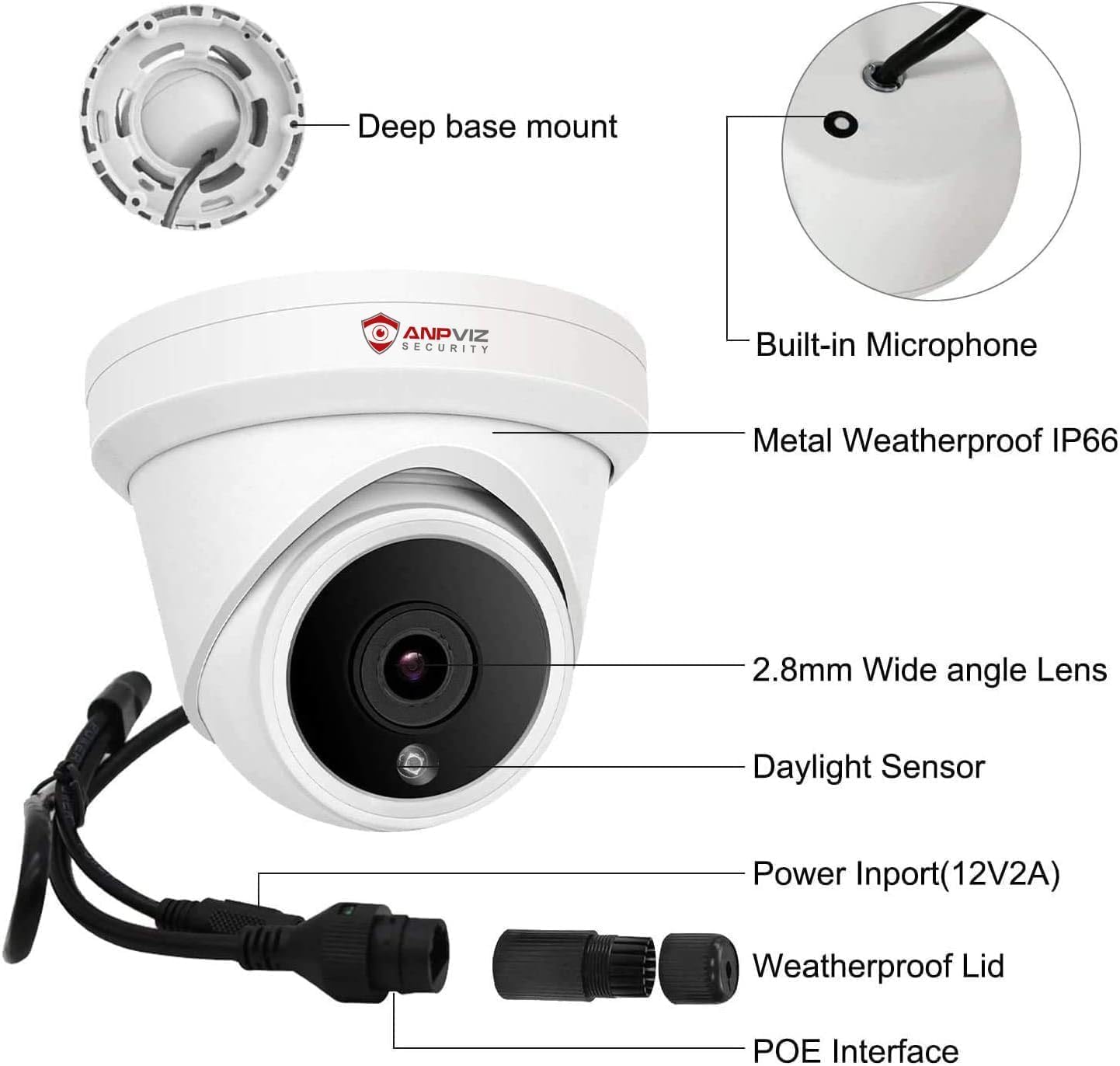
Figure 2: All components included in the Anpviz 5MP IP PoE Turret Security Camera package.
Para obtener una guía visual sobre cómo desempaquetar, consulte el video a continuación:
Video 1: Anpviz 5MP IP PoE Camera Unboxing. This video demonstrates the contents of the camera package.
Configuración
1. Instalación Física
The camera can be mounted on a ceiling or wall. Use the provided mounting template (if included) or the camera base to mark drill holes. Secure the camera using the supplied screws and wall plugs. Ensure the waterproof lid is correctly installed over the power connector if using Power over Ethernet (PoE) and not a separate power adapter.

Figure 3: The camera features an IP66 weatherproof rating, suitable for outdoor installation.
Para obtener una guía visual sobre la instalación, consulte el video a continuación:
Video 2: Turret Camera Easy Installation. This video demonstrates the physical mounting process of the camera.
2. Network Connection (PoE)
Connect the camera to your network using a single Ethernet cable. This cable will transmit both video signals and power simultaneously, eliminating the need for a separate power adapter. Connect the other end of the Ethernet cable to a PoE NVR or a PoE switch.

Figure 4: Simplified connection diagram for the Anpviz 5MP IP PoE Turret Security Camera.
For a visual guide on connecting the camera to an NVR, please refer to the video below:
Video 3: How to connect camera and NVR. This video illustrates the steps to connect the camera to a Network Video Recorder.
3. Configuración inicial
After connecting the camera to your network, you will need to configure its IP address. Use the provided SearchTool software (available for Windows and Mac) to discover the camera on your network and modify its IP settings. The default username is 'admin' and the default password is '123456'. It is highly recommended to change the default password for security reasons.
For a visual guide on using the SearchTool for initial configuration, please refer to the video below:
Video 4: How to download and use SearchTools. This video guides you through finding and configuring the camera's IP address.
For a visual guide on camera website settings, please refer to the video below:
Video 5: Anpviz Camera Website Setting. This video demonstrates how to access and adjust camera settings via a web navegador.
Operante
1. Acceso a la cámara
You can access your camera's live feed and settings through a web browser (Internet Explorer, Firefox, Google Chrome), a PC client (LMS), or the mobile app (VideoLink) available on the App Store and Google Play. This allows for remote access anytime, anywhere.

Figure 5: Remote access options via mobile app or PC client.
2. Video & Audio Settings
The camera supports 5MP HD video resolution (2592x1944) at 25 frames per second. It utilizes H.265/H.264 compression for efficient storage and bandwidth usage. The built-in microphone provides one-way audio recording, capturing clear voice and filtering environmental noise.

Figure 6: H.265 video compression offers improved efficiency.

Figure 7: The camera's one-way audio feature captures sound from the surveillance area.
3. Smart Human Detection
The camera is equipped with on-device human detection technology, allowing it to distinguish human figures from other moving objects. This feature triggers recording and sends motion alerts to your mobile phone via email, push notifications, or FTP, enhancing security by reducing false alarms.

Figure 8: Smart Human Detection provides accurate alerts for human presence.
Mantenimiento
1. Actualizaciones de firmware
Revise periódicamente el Anpviz website for firmware updates to ensure optimal performance and access to the latest features. Firmware updates can typically be performed using the SearchTool software or through the camera's web interfaz.
2. Limpieza de la lente
To maintain clear image quality, regularly clean the camera lens using a soft, lint-free cloth. Avoid abrasive materials or harsh chemicals that could scratch the lens.
3. Comprobación de las conexiones
Ensure all cable connections, especially the Ethernet cable, are secure and free from damage. For outdoor installations, verify that the waterproof lid is properly sealed to prevent moisture ingress.
Solución de problemas
- Sin vídeo: Check the power supply and Ethernet cable connection. Ensure the camera's LED indicator is lit. Verify the IP address configuration using the SearchTool.
- Problemas de conectividad de red: Confirm your network settings (IP address, subnet mask, gateway). Ensure the camera is within the same network segment as your viewdispositivo de ing.
- La detección de movimiento no se activa: Review the motion detection area settings and sensitivity in the camera's web interface or app. Ensure alerts are configured correctly.
- Restablecer contraseña: If you forget your password, refer to the user manual or contact Anpviz support for instructions on how to perform a factory reset.
Presupuesto
| Característica | Especificación |
|---|---|
| Nombre del modelo | Cámara de torreta |
| Resolución de captura de video | 5 MP |
| Viewángulo de ing | 110.0 grados |
| Rango de visión nocturna | 100 pies |
| Tecnología de conectividad | Ethernet (PoE) |
| Uso en interiores y exteriores | Interior, exterior |
| Nivel de resistencia al agua | Impermeable (IP66) |
| Material | Metal |
| Dimensiones del artículo L x W x H | 4 x 5 x 4 pulgadas |
| Peso del artículo | 1.28 libras |
Garantía y soporte
Anpviz provides a 1-year warranty and lifetime technical support for this product. For any questions or issues, please contact our professional tech staff. You can reach out to the Amazon Seller directly or email support@anpvizsecurity.com. Support is available Monday-Friday, 9:00 AM - 6:00 PM.