
Introducción
The Fanvil X4S is an enterprise-grade VoIP IP phone designed for professional communication environments. It features a 2.8-inch main color screen and a secondary 2.4-inch DSS color screen, enhancing user experience and productivity. This manual provides detailed instructions for the proper setup, operation, and maintenance of your Fanvil X4S IP Phone.
Contenido del paquete
Antes de continuar con la instalación, verifique que todos los elementos estén presentes en el paquete:
- Fanvil X4S IP Phone Unit
- Auricular y cable del auricular
- Cable Ethernet
- Power Adapter (X4S-AC model)
- Soporte de escritorio
- Guía de instalación rápida
Descripción física
The Fanvil X4S features a modern design with dual color screens. The primary display is a 2.8-inch color screen for call information and menu navigation. A secondary 2.4-inch DSS color screen provides dynamic DSS/BLF functions, offering up to 30 virtualized DSS keys across five pages. The phone supports both desktop and wall-mount installation.
Configuración
1. Conexión de alimentación
The Fanvil X4S IP Phone can be powered using either the included AC power adapter or Power over Ethernet (PoE).
- Using AC Power Adapter: Connect the small end of the power adapter cable to the DC 12V port on the back of the phone. Plug the other end of the power adapter into a standard electrical outlet.
- Uso de alimentación a través de Ethernet (PoE): If your network switch supports PoE, connect an Ethernet cable from the network switch to the LAN port on the back of the phone. The phone will receive power directly through the Ethernet cable, eliminating the need for the AC power adapter.
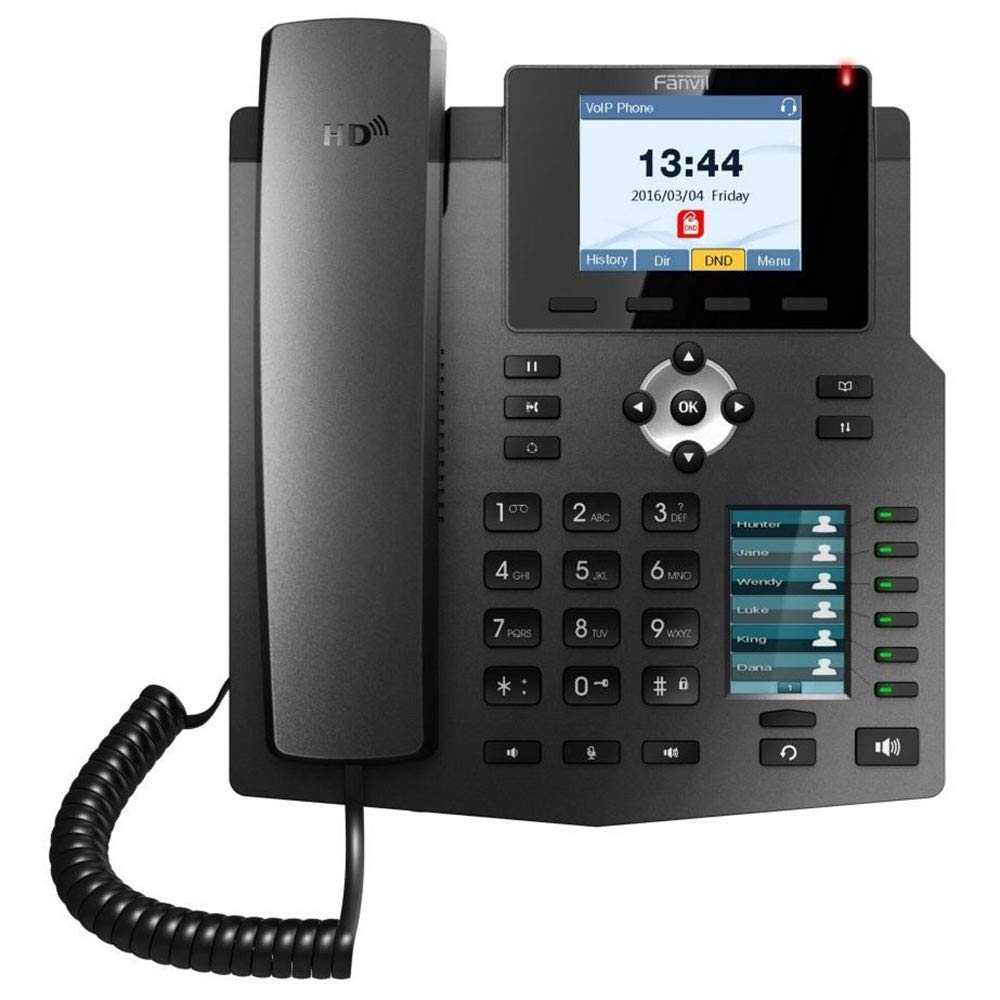
Image: The included AC power adapter for the Fanvil X4S IP Phone. This adapter is used to supply power to the device when PoE is not available.
2. Conexión de red
Connect one end of the Ethernet cable to the LAN port on the back of the phone and the other end to an available port on your network switch or router. If you are connecting a computer through the phone, connect a second Ethernet cable from the PC port on the phone to your computer's Ethernet port.
3. Handset and Headset Connection
- Auricular: Connect the coiled handset cord to the handset port on the side of the phone and to the handset itself.
- Auriculares: For hands-free communication, connect a compatible headset to the headset port. The Fanvil X4S supports Electronic Hook Switch (EHS) for Plantronics headsets.
4. Desktop / Wall-Mount Installation
- Desktop: Attach the desk stand to the back of the phone unit. Adjust the stand to your preferred viewángulo de ing.
- Montaje en pared: The phone can also be mounted on a wall. Refer to the separate wall-mount bracket instructions (if included) for proper installation.
Instrucciones de funcionamiento
1. Funciones básicas de llamada
- Haciendo una llamada: Lift the handset, press the speakerphone button, or press a line key. Dial the number and press the Dial soft key or wait a few seconds.
- Responder una llamada: Lift the handset, press the speakerphone button, or press the Answer soft key.
- Terminar una llamada: Replace the handset, press the speakerphone button, or press the End Call soft key.
- Rellamada Presione el botón Remarcar para llamar al último número marcado.
- Sostener: Durante una llamada activa, pulse la tecla programable Espera. Pulse la tecla programable Reanudar para recuperar la llamada.
2. Teclas DSS
The secondary 2.4-inch DSS color screen displays programmable DSS (Direct Station Select) keys. These keys can be configured for various functions such as Speed Dial, Busy Lamp Field (BLF), Intercom, Call Park, and more. The phone supports up to 30 virtualized DSS keys across five pages, which can be navigated using the page navigation buttons.
3. Agenda telefónica
The Fanvil X4S supports a phonebook with the capacity to store up to 500 entries. Access the phonebook via the menu to add, edit, or search for contacts. You can also access call logs to view llamadas entrantes, salientes y perdidas recientes.
Mantenimiento
1. Limpieza
Para limpiar el teléfono, utilice un paño suave y seco. Para manchas difíciles, utilice un paño ligeramente seco.amp cloth with mild, non-abrasive cleaner can be used. Avoid using harsh chemicals, solvents, or abrasive materials, as these can damage the phone's surface and screens.
2. Almacenamiento
When not in use for extended periods, store the phone in a cool, dry place away from direct sunlight and extreme temperatures. Disconnect the power adapter and network cable before storage.
Solución de problemas
This section addresses common issues you might encounter with your Fanvil X4S IP Phone.
- Sin energía:
- Ensure the power adapter is securely connected to both the phone and a working electrical outlet.
- If using PoE, verify that the Ethernet cable is connected to a PoE-enabled port on your network switch and that the switch is powered on.
- No hay tono de marcado:
- Check the network cable connection to the LAN port.
- Verify that the phone has successfully registered with your VoIP server. Check the phone's display for registration status.
- Asegúrese de que el cable del teléfono esté conectado correctamente.
- No se pueden realizar ni recibir llamadas:
- Confirm network connectivity.
- Check SIP account registration status on the phone's display.
- Contact your VoIP service provider or system administrator for assistance with account configuration.
- Mala calidad de audio:
- Verifique la estabilidad de la conexión de red.
- Asegúrese de que el teléfono o auricular esté conectado correctamente.
- Ajuste la configuración del volumen en el teléfono.
For more complex issues, consult your system administrator or Fanvil technical support.
Presupuesto
| Marca | Villa de abanico |
| Modelo | X4S |
| Líneas SIP | 4 |
| Pantalla principal | Pantalla a color de 2.8" |
| DSS Display | 2.4" Color Screen (30 virtual DSS keys across 5 pages) |
| Puertos Ethernet | 2 x 10/100 Mbps (LAN, PC) |
| Voz HD | Sí |
| Compatibilidad con PoE | Sí |
| Fuente de poder | Power Adapter (included) or PoE |
| Capacidad de la agenda telefónica | 500 entradas |
| Soporte EHS | For Plantronics headsets |
| Instalación | Desktop / Wall-mount |
| Dimensiones (L x An x Al) | 12 x 12 x 5 pulgadas |
| Identificación de llamadas | Sí |
| Operación multilínea | Sí |
| Plataformas compatibles | 3CX, Asterisk, Broadsoft, Elastix, Zycoo, etc. |
Información de garantía
Fanvil products typically come with a standard manufacturer's warranty. For specific warranty terms and conditions, including duration and coverage, please refer to the warranty card included with your product or visit the official Fanvil webSitio. Conserve su recibo de compra como comprobante para reclamaciones de garantía.
Apoyo
For technical assistance, product inquiries, or further support, please contact your vendor or visit the official Fanvil support website. Online resources, FAQs, and firmware updates may also be available.
Oficial de Fanvil Websitio: www.fanvil.com