
1. Introducción
Thank you for choosing the Gembird MUS-6B-01 Optical USB Mouse. This manual provides essential information for setting up, operating, maintaining, and troubleshooting your new mouse. Please read these instructions carefully to ensure optimal performance and longevity of your device.

Image: The official Gembird brand logo, featuring the company name in a stylized font with a geometric design.
2. Producto terminadoview
The Gembird MUS-6B-01 is a reliable 6-button optical USB mouse designed for comfortable and precise navigation. Its ambidextrous design makes it suitable for both left and right-handed users.
Características principales:
- Seguimiento óptico: Proporciona un control del cursor suave y preciso.
- 6 botones: Includes standard left/right click, scroll wheel, DPI adjustment, and two side buttons for enhanced functionality.
- Conectividad USB: Simple plug-and-play connection to your computer.
- Diseño ambidiestro: Cómodo tanto para usuarios zurdos como diestros.
Componentes:
- Botón de clic izquierdo
- Botón derecho
- Scroll Wheel (also functions as a middle click button)
- Botón de ajuste de DPI
- Botón de avance (lateral)
- Botón de retroceso (lateral)
- Optical Sensor (underside)
- USB Connector (at the end of the cable)
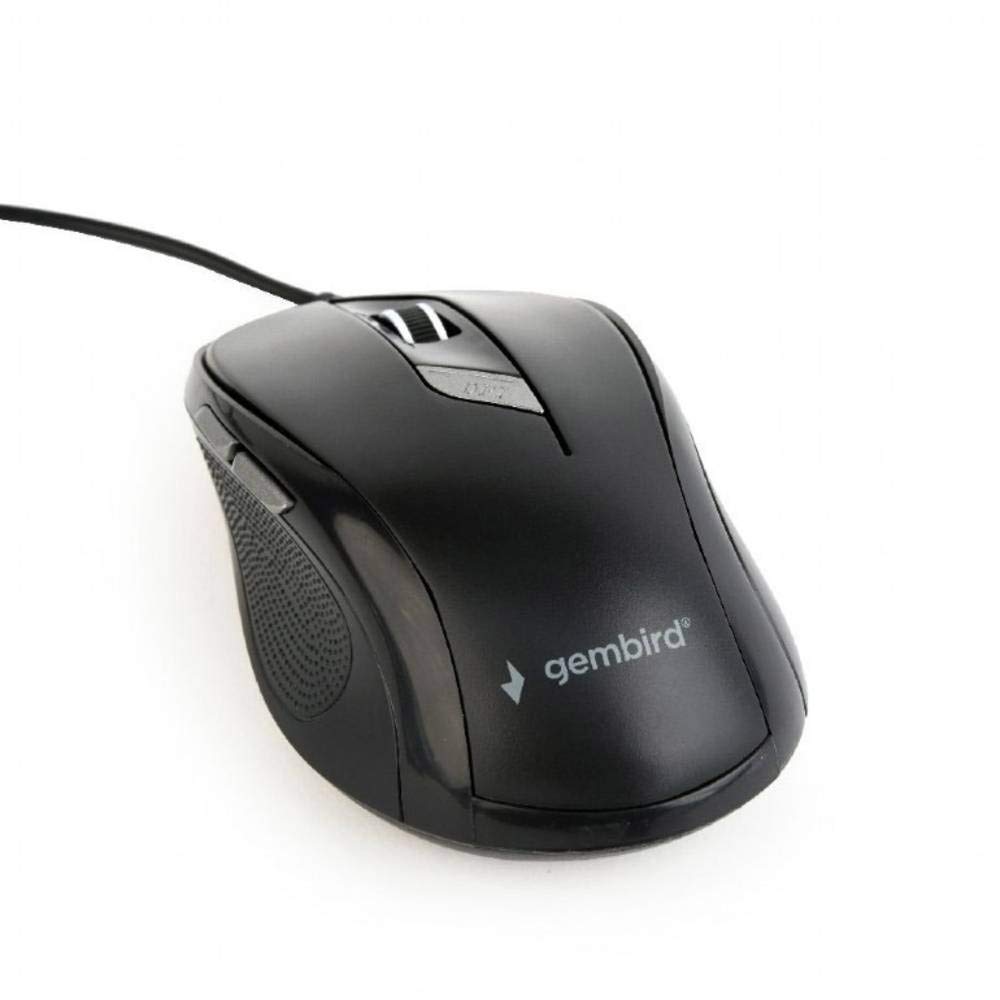
Imagen: Una vista de arriba hacia abajo view of the Gembird MUS-6B-01 optical USB mouse. The mouse is black with a matte finish, featuring a scroll wheel, left and right click buttons, a DPI button, and two side buttons. A black USB cable extends from the front of the mouse.
3. Configuración
Setting up your Gembird MUS-6B-01 mouse is a simple plug-and-play process.
Pasos de instalación:
- Ubique un puerto USB disponible en su computadora.
- Plug the USB connector of the Gembird MUS-6B-01 mouse firmly into the USB port.
- Your operating system (Windows, Linux) will automatically detect and install the necessary drivers. This process may take a few moments.
- Una vez instalados los controladores, el mouse está listo para usarse.
Generalmente no se requiere la instalación de software adicional para la funcionalidad básica.
4. Instrucciones de funcionamiento
Familiarize yourself with the functions of each button on your Gembird MUS-6B-01 mouse.
Funciones básicas:
- Click izquierdo: Primary action, selecting items, opening files.
- Botón derecho del ratón: Opens context menus, provides additional options.
- Rueda de desplazamiento: Desplácese hacia arriba o hacia abajo a través de los documentos y web páginas.
- Clic central (pulsación de la rueda de desplazamiento): Often used to open links in new tabs or for specific application functions.
Funciones avanzadas:
- Botón de ajuste de DPI: Located behind the scroll wheel, this button allows you to cycle through different sensitivity (DPI) settings. Press it to change the cursor speed to suit your preference.
- Botón de avance (lateral): Generalmente navega hacia adelante en web navegadores o file exploradores.
- Botón de retroceso (lateral): Generalmente navega hacia atrás en web navegadores o file exploradores.
The functionality of the side buttons may vary depending on the application or operating system settings. Some operating systems allow customization of these buttons.
5. Mantenimiento
Proper care will help extend the life of your Gembird MUS-6B-01 mouse.
Limpieza:
- Desconecte el mouse de su computadora antes de limpiarlo.
- Utilice un paño suave y ligeramente húmedo.ampPaño sin pelusa para limpiar la superficie del ratón.
- For stubborn dirt, a small amount of mild soap solution can be applied to the cloth (not directly to the mouse).
- Use a cotton swab or compressed air to clean around the scroll wheel and between buttons.
- Ensure the optical sensor on the underside is clean and free of dust or debris.
- No utilice productos químicos agresivos, limpiadores abrasivos ni sumerja el ratón en agua.
Almacenamiento:
Cuando no utilice el mouse durante períodos prolongados, guárdelo en un entorno limpio y seco, alejado de temperaturas extremas y de la luz solar directa.
6. Solución de problemas
If you encounter issues with your Gembird MUS-6B-01 mouse, try the following troubleshooting steps:
| Problema | Posible solución |
|---|---|
| El ratón no responde |
|
| Erratic or jumpy cursor movement |
|
| Los botones no funcionan |
|
7. Especificaciones
Detailed technical specifications for the Gembird MUS-6B-01 Optical USB Mouse:
| Característica | Especificación |
|---|---|
| Marca | Pájaro gema |
| Nombre del modelo | MUS-6B-01 |
| Tecnología de conectividad | Cableado (USB) |
| Tecnología de detección de movimiento | Óptico |
| Cantidad de botones | 6 |
| Orientación de la mano | Ambidextro |
| Sistemas operativos compatibles | Linux, Windows 7, Windows XP (y versiones más nuevas) |
| Plataforma de hardware | Ordenador personal |
| Longitud del cable | 5.0 metros |
| Peso del artículo | 74 gramos |
| Material | Plástico |
| Color | Negro |
| Pilas necesarias | No |
8. Información de seguridad
Tenga en cuenta las siguientes pautas de seguridad:
- No exponga el ratón al agua ni a la humedad excesiva.
- Evite dejar caer o someter el mouse a impactos fuertes.
- No intente desmontar ni reparar el ratón usted mismo. Consulte a personal de servicio técnico cualificado.
- Mantenga el dispositivo alejado de temperaturas extremas y de la luz solar directa.
- Deseche los residuos electrónicos de forma responsable de acuerdo con las regulaciones locales.
9. Garantía y soporte
Gembird products are designed for reliability and performance. For specific warranty terms and conditions, please refer to the warranty card included with your product or visit the official Gembird website. For technical support or further assistance, please contact your retailer or the Gembird customer service department.