
1. Introducción
This manual provides instructions for the Macally BTDYNAMOUSE Wireless Bluetooth Mouse. This device is designed for comfortable and quiet operation across various platforms.
The Macally BTDYNAMOUSE is a slim, ambidextrous Bluetooth mouse featuring silent click buttons and adjustable DPI settings. It connects wirelessly to compatible devices, offering a clutter-free workspace.
2. ¿Qué hay en la caja?
- Macally BTDYNAMOUSE Wireless Bluetooth Mouse
- 2 pilas AAA
3. Características del producto
- DPI ajustable: Cambie entre 800, 1200 y 1600 DPI para un control preciso del cursor.
- Botones de clic silencioso: Designed for quiet operation, reducing click noise by 90% compared to traditional mice.
- Slim and Ambidextrous Design: Comfortable for both left and right-handed users, with a low-profile factor de forma
- Conectividad inalámbrica Bluetooth: Se conecta de forma inalámbrica hasta 10 metros (30 pies).
- Batería de larga duración: Two AAA batteries provide up to 3 months of use (based on 8 hours daily use). Battery life may vary.
- Compatibilidad: Works with Windows and macOS operating systems.
4. Instrucciones de configuración
4.1. Instale las baterías
1. Locate the battery compartment on the underside of the mouse.
2. Abra la tapa del compartimento de la batería.
3. Insert two AAA batteries, ensuring correct polarity (+/-).
4. Cierre la tapa del compartimento de la batería.

Figura 1: Instalación de la batería
4.2. Emparejamiento Bluetooth
1. Turn on the mouse using the ON/OFF switch located on the underside.
2. Press and hold the Bluetooth pairing button (usually a small button near the ON/OFF switch or sensor) for 2-3 seconds until the LED indicator starts blinking, indicating it's in pairing mode.
3. On your computer or device (Mac, Windows, iPad, Tablet):
- Vaya a la configuración de Bluetooth.
- Buscar nuevos dispositivos.
- Select "Macally BTDYNAMOUSE" from the list of available devices.
- Siga las instrucciones en pantalla para completar el proceso de emparejamiento.
Once successfully paired, the LED indicator on the mouse will stop blinking and remain solid or turn off, depending on the mouse model.

Figure 2: Mouse with Laptop, indicating multi-device compatibility
5. Instrucciones de funcionamiento
The Macally BTDYNAMOUSE features a standard 3-button layout with a scroll wheel for intuitive navigation.
- Click izquierdo: Primary action, typically used for selecting items or opening links.
- Botón derecho del ratón: Secondary action, typically used to open context menus.
- Rueda de desplazamiento: Se utiliza para el desplazamiento vertical a través de documentos y web pages. The scroll wheel can also be pressed for a middle-click action, depending on software configuration.

Figura 3: Diseño ergonómico para un uso cómodo

Figure 4: Quiet Click Buttons in Action
6. Ajuste de DPI
The mouse features a DPI switch button to adjust cursor sensitivity. This allows you to fine-tune the mouse's responsiveness to your preference.
To change the DPI setting, press the small button located behind the scroll wheel. Each press cycles through the available DPI levels: 800, 1200, and 1600.
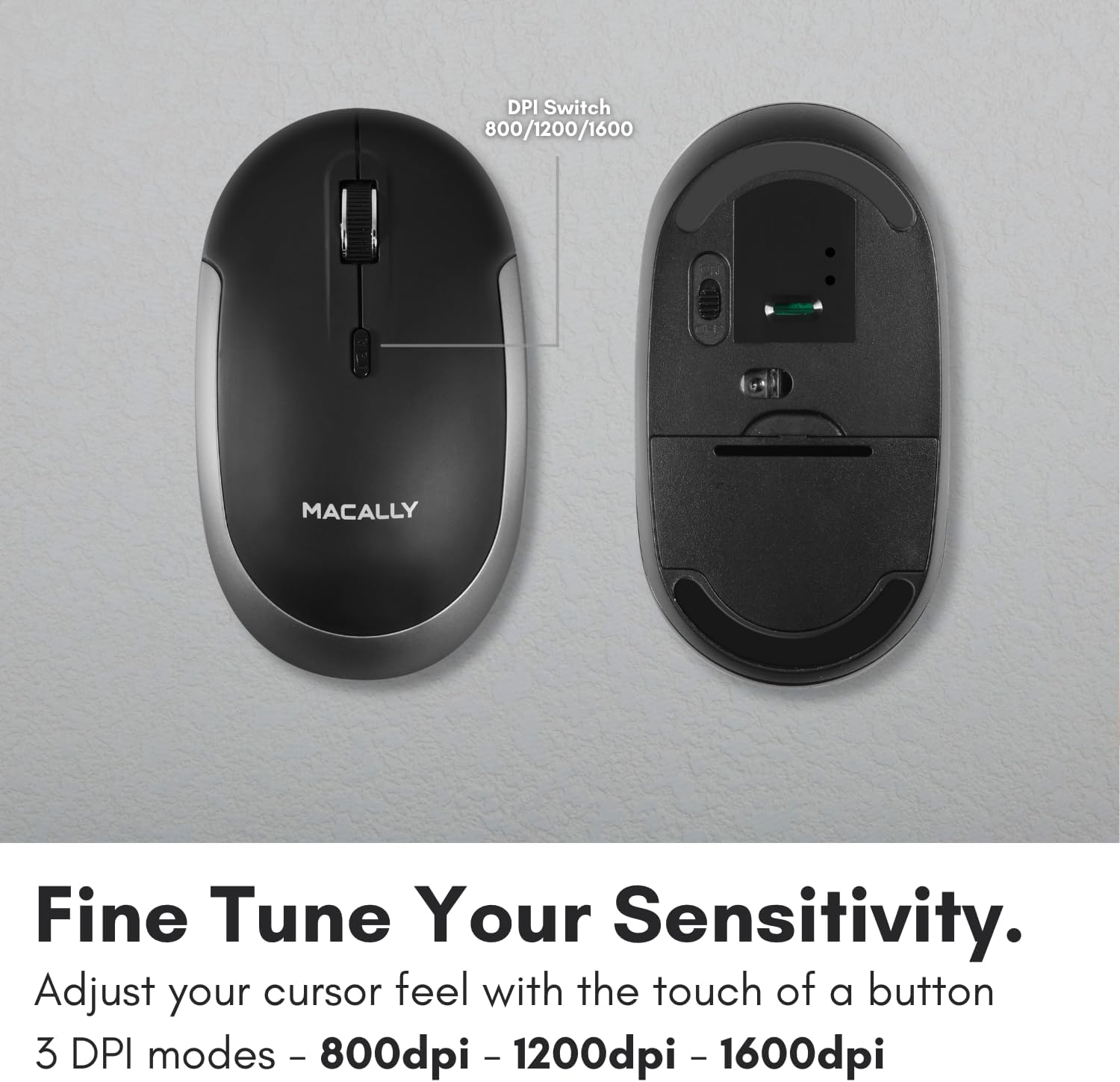
Figure 5: DPI Switch Location
7. Información de la batería
The Macally BTDYNAMOUSE uses two AAA batteries. For optimal performance and battery life, it is recommended to use high-quality alkaline batteries.
- Tipo de batería: 2 pilas AAA
- Duración estimada de la batería: Up to 3 months (based on 8 hours of daily use). Actual battery life may vary based on usage patterns and computing conditions.
When the battery level is low, the mouse's LED indicator may flash or change color to alert you. Replace batteries promptly to ensure uninterrupted use.
8. Mantenimiento
To ensure the longevity and optimal performance of your Macally BTDYNAMOUSE, follow these maintenance guidelines:
- Limpieza: Utilice un paño suave y seco para limpiar el ratón. Para la suciedad difícil, utilice un paño ligeramente seco.amp Se puede utilizar un paño, pero asegúrese de que no entre humedad en el dispositivo.
- Evite los líquidos: No exponga el ratón a líquidos ni a humedad excesiva.
- Almacenamiento: Guarde el ratón en un lugar fresco y seco cuando no lo utilice durante períodos prolongados.
- Reemplazo de batería: Replace batteries as needed. Dispose of old batteries according to local regulations.
9. Solución de problemas
| Problema | Posible causa | Solución |
|---|---|---|
| El mouse no se conecta a través de Bluetooth | Mouse is off or batteries are low. Not in pairing mode. Device's Bluetooth is off. | Ensure mouse is on and batteries are fresh. Put mouse in pairing mode. Check device's Bluetooth settings. Try re-pairing. |
| Cursor is erratic or unresponsive | Dirty optical sensor. Mouse used on unsuitable surface. Low battery. | Clean the optical sensor. Use a mouse pad or a smooth, non-reflective surface. Replace batteries. |
| Mouse clicks are not silent | This mouse is designed for 90% noise reduction, not complete silence. | The mouse provides a significantly quieter click than standard mice, but a faint sound may still be audible. |
| Duración corta de la batería | Frequent usage. Low-quality batteries. | Use high-quality alkaline batteries. Turn off the mouse when not in use for extended periods. |
10. Especificaciones
| Característica | Detalle |
|---|---|
| Marca | macally |
| Nombre del modelo | BTDYNAMOUSE |
| Tecnología de conectividad | Bluetooth, inalámbrico |
| Tecnología de detección de movimiento | Óptico |
| Configuración de DPI | 800 / 1200 / 1600 |
| Botones | 4 (izquierda, derecha, clic de desplazamiento, cambio de DPI) |
| Orientación de la mano | Ambidextro |
| Dispositivos compatibles | Laptop, Personal Computer (Windows, macOS) |
| alcance inalámbrico | Hasta 10 m (30 pies) |
| Tipo de batería | 2 x AAA (incluida) |
| Duración de la batería | Hasta 3 meses (estimado) |
| Peso del artículo | 73 gramos |
| Material | Silicone (Enclosure) |
| Color | Negro |
11. Vídeos oficiales del producto
11.1. Bluetooth Optical Silent Click Mouse - White
Este video proporciona un resumenview of the Macally BTDYNAMOUSE, highlighting its slim design, ambidextrous body, simple 3-button layout, 90% noise reduction, and easy DPI adjustability (800/1200/1600).
11.2. Macally Wireless Bluetooth Mouse for Windows PC and Mac
This video demonstrates the Macally BTDYNAMOUSE's features, including its Bluetooth wireless technology, comfortable ambidextrous design, simple 3-button/scroll wheel layout, silent click buttons, and easy DPI adjustability.
12. Garantía y soporte
For warranty information and technical support, please refer to the official Macally webSitio web o contacte con el servicio de atención al cliente. Conserve el recibo de compra para reclamaciones de garantía.