
1. Introducción
This manual provides essential information for the safe and effective use of your Scangrip MultiMatch R Essential Kit. This kit includes the I-Match 2, MiniMatch, and MultiMatch R lights, designed for professional detailing and color matching in the paint industry. The durable nylon bag with a practical carrying strap ensures easy transport and protection for your products, featuring spacious compartments and convenient side pockets.
Scangrip lights offer high CRI values and various color temperatures, making them ideal for inspecting painted surfaces, color matching, and general paint work.
2. Producto terminadoview
2.1 Componentes del kit
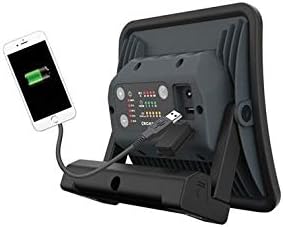
- MultiMatch R: A versatile light with all-day light function, 5 different color temperatures, an ergonomically designed handle, flexible mounting options with an integrated magnet, and USB charging capabilities.
- MiniMatch: Features the latest COB LED technology, rechargeable, 200 lumens light output, and two color temperatures (warm/cold).
- I-Match 2: An excellent hands-free headlamp suitable for all detailing and color matching tasks, incorporating the latest COB LED technology. It is dustproof/waterproof, lightweight, and includes an on/off hand motion sensor.
2.2 Identificación visual




3. Configuración
3.1 Carga inicial
Before first use, fully charge all lights in the kit. Connect the appropriate charging cable to the light and a power source. The charging indicator will show the charging status.
3.2 Montaje y posicionamiento
- MultiMatch R: Utilize the integrated magnet for flexible mounting on metallic surfaces. The ergonomically designed handle allows for comfortable handheld use or stable placement on flat surfaces.
- I-Match 2: Adjust the head strap for a secure and comfortable fit. Ensure the light is positioned to illuminate your work area effectively without obstructing your vision.
4. Instrucciones de funcionamiento
4.1 Encendido y apagado
Press the power button located on each light to turn it on or off. For the I-Match 2, the hand motion sensor can also be used to toggle the light.
4.2 Ajuste del brillo y la temperatura del color
- MultiMatch R: Cycle through the 5 different color temperatures and brightness levels using the dedicated control buttons.
- MiniMatch: Switch between the two available color temperatures (warm/cold) and adjust brightness as needed.
- I-Match 2: Adjust brightness and color temperature settings according to your detailing or color matching requirements.
4.3 USB Charging Function (MultiMatch R)
The MultiMatch R features a USB port that allows it to function as a power bank, enabling you to charge other USB-powered devices.
5. Mantenimiento
5.1 Limpieza
Limpie las luces con un paño suave.amp Paño. No utilice limpiadores abrasivos ni disolventes, ya que pueden dañar la superficie o los componentes internos.
5.2 Almacenamiento
Store the lights in their protective nylon bag in a cool, dry place away from direct sunlight and extreme temperatures. Ensure the lights are fully charged before long-term storage.
5.3 Cuidado de la batería
To prolong battery life, avoid fully discharging the lights frequently. Recharge them regularly, even if not in constant use.
6. Solución de problemas
| Problema | Posible causa | Solución |
|---|---|---|
| La luz no se enciende. | Batería baja. | Cargue la luz completamente. |
| La salida de luz es tenue. | Batería baja. | Recarga la luz. |
| I-Match 2 motion sensor not responding. | Sensor obstruido o sucio. | Ensure the sensor is clean and unobstructed. Try manually pressing the power button. |
| USB charging function not working. | Light's battery is too low or cable is faulty. | Ensure the MultiMatch R has sufficient charge. Try a different USB cable. |
7. Especificaciones
| Característica | Detalle |
|---|---|
| Marca | Scangrip |
| Modelo | MultiMatch R Essential Kit (MiniMatch 2, MultiMatch R, I-Match 2) |
| Tipo de fuente de luz | CONDUJO |
| Número de fuentes de luz | 3 (para el kit) |
| Fuente de poder | Funciona con pilas (recargables) |
| Material base | Metal |
| Tipo de acabado | Pintado |
| Tipo de interruptor | Magnetic, Motion Sensor |
| Características especiales | Motion Sensor, Rechargeable |
| Estilo | Moderno |
| Código UPC/GTIN | 761276879546 |
| ASIN | B07NHB98W6 |
| Calificación promedio del cliente | 4.0 out of 5 stars (based on 18 ratings) |
8. Garantía y soporte
Specific warranty details and support contact information are not provided in the product data. Please refer to the manufacturer's official website or the documentation included with your purchase for comprehensive warranty terms and customer support contacts.