
1. Producto terminadoview
The APC SMT2200 Smart-UPS is an Uninterruptible Power Supply (UPS) designed to provide reliable battery backup and surge protection for electronic equipment. This unit delivers 2200VA / 1980W of power, ensuring continuous operation during power outages and protecting against damaging power fluctuations. It features a pure sine wave output for compatibility with sensitive electronics and active PFC power supplies, an LCD display for status monitoring, and network manageability options.

Figura 1: Frente view of the APC SMT2200 Smart-UPS unit. This image shows the front panel with the APC logo and the Smart-UPS 2200 branding.
Características principales:
- 2200VA / 1980W Battery Backup Uninterruptible Power Supply (UPS)
- Pure Sine Wave UPS for compatibility with active PFC power supplies and electronics
- 8 battery backup and surge protector outlets
- Integrated LCD Display for real-time status and configuration
- Network-grade power conditioning protects from surges and disruptive noise
- Solid state Automatic Voltage Regulation (AVR) boosts low input voltage and trims high voltage without battery operation
- Network manageable via serial, USB, or optional Ethernet
- Typical recharge time: 3 hours
2. Configuración e instalación
2.1 Desembalaje e inspección
Carefully unpack the UPS and inspect it for any shipping damage. If any damage is found, notify the carrier and reseller. The package should contain the UPS unit, documentation, and necessary cables.
2.2 Colocación
Place the UPS in a protected area free from excessive dust, corrosive fumes, and conductive contaminants. Ensure the ambient temperature is within the operating range of 32°F to 104°F (0°C to 40°C). Maintain adequate clearance around the unit for proper ventilation, especially around the rear fan.
2.3 Conexión de la batería
The UPS battery may be disconnected for shipping. Refer to the specific instructions provided with your unit for connecting the internal battery. Typically, this involves rotating or pushing a battery connector into place.
2.4 Conexión de equipos
Connect your equipment to the appropriate outlets on the rear panel of the UPS. The SMT2200 features 8 outlets, providing both battery backup and surge protection. Ensure that the total load does not exceed the UPS's capacity of 1980W.

Figura 2: Rear panel of the APC SMT2200 Smart-UPS. This image displays the input power cord, output receptacles (NEMA 5-15R and NEMA 5-20R), USB port, serial port, and optional SmartSlot for network management cards.
- Tomas de corriente con respaldo de batería y protección contra sobretensiones: Connect critical equipment such as computers, monitors, and network devices to these outlets. These devices will receive power from the battery during an outage.
- Potencia de entrada: Connect the UPS power cord to a properly grounded 120V AC outlet.
2.5 Carga inicial de la batería
Allow the UPS battery to charge for at least 3 hours before connecting any equipment or performing a self-test. This ensures maximum runtime capability.
3. Operación
3.1 Encendido del SAI
Press the power button on the front panel. The LCD display will illuminate, and the UPS will perform a self-test. Once the self-test is complete, the UPS will be in Online mode, providing conditioned power to connected equipment.
3.2 Apagado del SAI
To turn off the UPS and remove power from connected equipment, press and hold the power button until the unit powers down. For a controlled shutdown, ensure all connected devices are properly shut down first.
Pantalla LCD 3.3
The LCD display provides real-time information about the UPS status, including input/output voltage, porcentaje de cargatage, battery charge level, and estimated runtime. Use the navigation buttons on the front panel to scroll through the display menus and configure settings.
3.4 Autocomprobación
It is recommended to perform a self-test periodically to ensure the battery and internal components are functioning correctly. Refer to the LCD menu for initiating a self-test.
4. Mantenimiento
4.1 Reemplazo de batería
The SMT2200 uses maintenance-free sealed Lead-Acid batteries. The typical battery life is 3-5 years, but this can vary based on environmental conditions and usage. The UPS will indicate when the battery needs replacement. Always replace batteries with APC-approved replacement battery cartridges (RBC55) to ensure optimal performance and safety. Refer to the APC website or your reseller for replacement instructions.
4.2 Limpieza
Keep the UPS free of dust and debris. Use a dry cloth to clean the exterior. Do not use liquid cleaners or solvents. Ensure ventilation openings are clear of obstructions.
5. Solución de problemas
Esta sección ofrece soluciones a problemas comunes. Para problemas más complejos, contacte con el soporte técnico de APC.
| Problema | Posible causa | Solución |
|---|---|---|
| El UPS no se enciende | Battery not connected; No input power; Faulty unit | Ensure battery is fully connected. Verify input power cable is securely plugged into a live outlet. Contact support if issue persists. |
| El UPS emite un pitido continuo | Con batería; Sobrecarga; Batería baja | Check if utility power is present. Reduce connected load. Allow battery to recharge. |
| "Replace Battery" indicator on LCD | La batería se acerca al final de su vida útil | Order and install a new APC replacement battery cartridge (RBC55). |
| El equipo conectado pierde energía | UPS overload; Battery depleted; UPS fault | Reduce load. Allow battery to recharge. Check LCD for error messages. |
6. Especificaciones técnicas
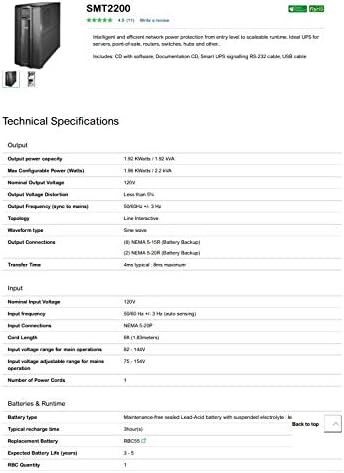
Figura 3: Part 1 of the APC SMT2200 Technical Specifications sheet, detailing output, input, and battery information.

Figura 4: Part 2 of the APC SMT2200 Technical Specifications sheet, detailing communications, surge protection, physical dimensions, environmental, and conformance information.
| Característica | Detalle |
|---|---|
| Marca | Vehículo blindado |
| Número de modelo | SMT2200 |
| Capacidad de potencia de salida | 1980 vatios / 2200 VA |
| Vol. De salida nominaltage | 120 V |
| Tipo de forma de onda | Onda sinusoidal |
| Conexiones de salida | 8 (NEMA 5-15R, NEMA 5-20R) |
| Vol. De entrada nominaltage | 120 V |
| Frecuencia de entrada | 50/60 Hz +/- 3 Hz (detección automática) |
| Tipo de batería | Batería de plomo-ácido sellada sin mantenimiento |
| Tiempo de recarga típico | 3 horas |
| Duración esperada de la batería | 3-5 años |
| Puertos de interfaz | SmartSlot, USB |
| Factor de forma | Torre |
| Dimensiones del artículo (alto x ancho x profundidad) | 7.72 x 21.42 x 17.01 pulgadas (196 x 544 x 432 mm) |
| Peso del artículo | 130 libras (59.09 kg) |
| Temperatura de funcionamiento | 32 - 104 °F (0 - 40 °C) |
| Material del recinto | Metal |
7. Garantía y soporte
7.1 Información de garantía
This APC SMT2200 Smart-UPS unit comes with a 90-day limited warranty. Please retain your proof of purchase for warranty claims. The warranty covers defects in materials and workmanship under normal use.
7.2 Soporte técnico
For technical assistance, troubleshooting, or warranty inquiries, please contact APC customer support. Visit the official APC webSitio para obtener información de contacto y recursos adicionales.